A lot of local businesses are in the same spot right now. Someone searches your brand, or searches for a service with local intent, and Google shows a panel with your hours, phone number, address, photos, reviews, and category before the searcher ever reaches your website. If that panel is accurate, complete, and trusted, you get the call. If it’s wrong, thin, or unstable, Google answers the search on your behalf and the customer moves on.
That’s why local knowledge panel optimization isn’t a side task, and it goes beyond a Google Business Profile cleanup. The job is entity management: making sure Google sees one business, one identity, and one set of corroborated facts everywhere it looks.
Why Your Local Knowledge Panel Decides the Click
A common failure looks small at first. A customer searches your business name on a phone to check whether you’re open. The panel shows outdated hours, an old phone number, or the wrong category. They don’t visit your site to investigate. They pick the next result.
Google’s shift toward entity-based search is the reason this matters so much. Google introduced the Knowledge Graph in 2012, and local knowledge panels grew out of that system as a way to present information about an entity directly in search, including details like addresses, hours, phone numbers, and location-specific information via Search Engine Land. For local businesses, that changed branded search from a list of blue links into a decision box that often sits at the top of results on mobile.
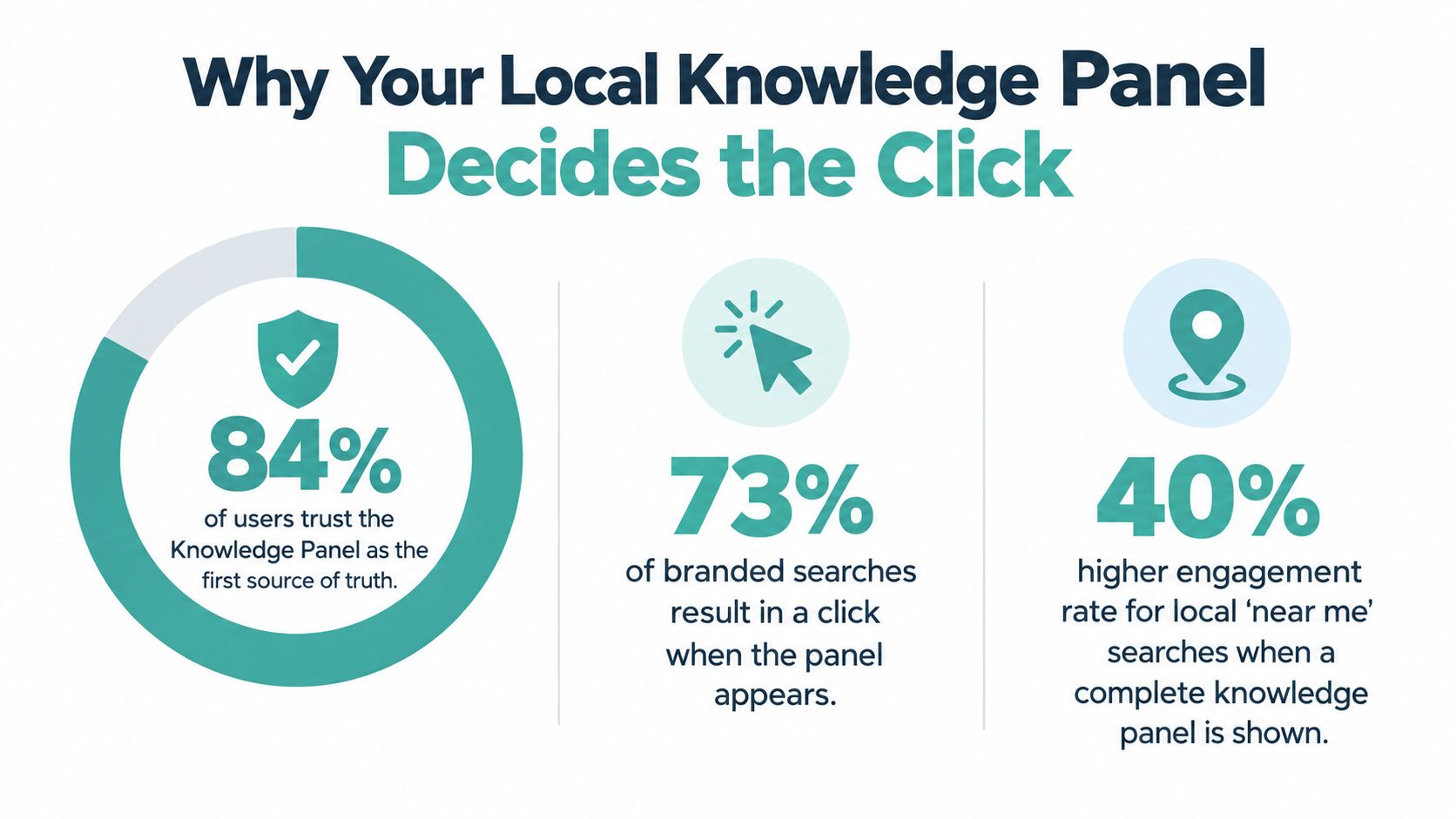
The panel often answers the question before the click
Many businesses still use the wrong scoreboard. They focus on whether the website got the click, when the panel may have already done the job or lost it.
Independent summaries cited by RenderSEO’s knowledge panel overview report that searches where a local Knowledge Panel appears can shift click behavior materially. That summary cites a 1.4% CTR share for searches where a local Knowledge Panel appears, notes that the first organic result can lose 20% to 30% CTR when a knowledge panel is present, and says 43% of users who see a knowledge panel click nowhere because the panel answers the question. It also cites a 72% zero-click rate for local searches in a 2026 compilation, specifically for searches like near me, address, and hours.
Practical rule: If your customers can decide from the search results page alone, your panel is part of your conversion path whether you manage it or not.
That’s why I treat local knowledge panel optimization as “own the answer box” work. The goal isn’t only to rank. The goal is to make Google comfortable showing your business facts without second-guessing them.
What local businesses usually get wrong
Many owners assume their Business Profile and their knowledge panel are the same thing. They’re connected, but not identical. Google’s guidance distinguishes local panels from Business Profiles tied to businesses that serve customers at a specific location or service area. In practice, the panel is what searchers see, while your Business Profile is one of the main control points that helps feed it.
That distinction matters for service businesses in particular. If you work in a category where location, service area, and urgent intent drive conversions, this issue shows up fast. The same local entity basics that matter for plumbers and electricians also matter for contractors, which is why this guide to local SEO for HVAC contractors is a useful companion read if your business depends on high-intent local searches.
For businesses that rely on Maps visibility and nearby intent, Adwave’s guide to Google Maps marketing for nearby customers is also worth reviewing because local discovery and panel visibility tend to reinforce each other.
Claim and Verify Your Panel the Right Way
Before you tweak schema, chase citations, or rewrite descriptions, claim the asset you’re trying to influence. Too many businesses skip straight to “optimization” while the ownership layer is still messy.
Google documents a direct knowledge panel ownership flow. A user can click “Claim this knowledge panel” at the bottom of the panel and go through verification steps, and Google Search Central states that verified owners can provide or edit business details such as address, contact information, business type, and photos, which can then appear in Google Maps and the knowledge panel in Google’s help documentation.
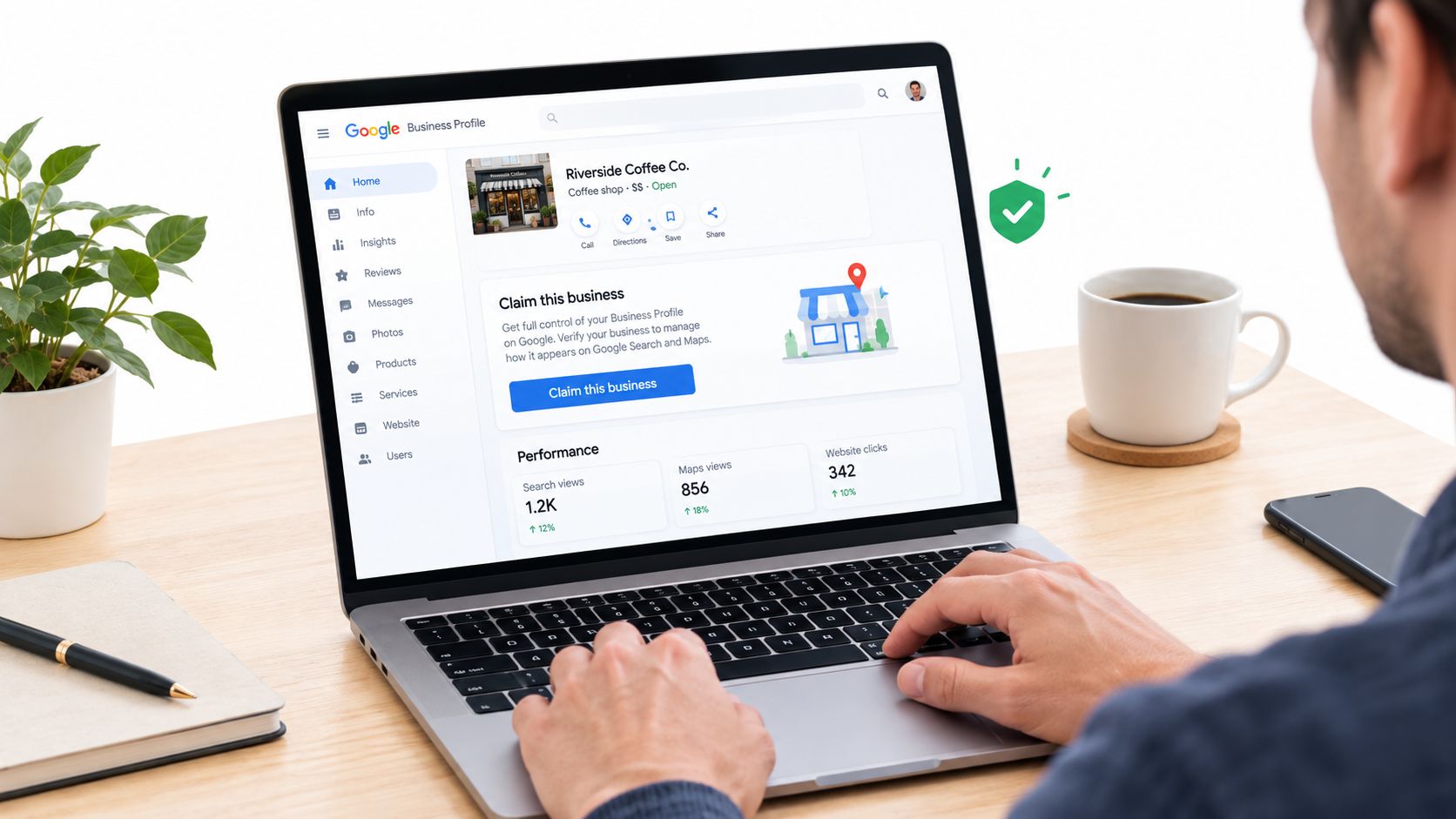
Start with ownership, not cosmetics
When I audit a messy local panel, I check four things first:
- Claim status: If nobody has claimed the panel or the connected profile, edits tend to be slower, less complete, and less durable.
- Verification path: The Google account tied to the business should be the one with legitimate operational control, not a former agency login or an employee who left.
- Duplicate listings: Two versions of the same business can split trust signals and create panel instability.
- Core business facts: Name, address, phone, website, and primary category need to be confirmed before anything else.
A clean foundation matters because later corrections inherit whatever trust problems already exist. If Google sees conflicting ownership, duplicate profiles, or category confusion, you can spend weeks adjusting details that never fully stick.
Category choice is more strategic than most guides admit
The primary category tells Google what the business is, not everything the business does. A lot of local companies choose categories as if they’re stuffing keywords into title tags. That usually backfires.
Pick the category that best matches the main service customers expect from the world business. Then use secondary categories only where they clearly fit. Category drift is one of the easiest ways to send mixed signals into a panel, especially after staff changes or quick edits made during a rebrand.
Claiming helps, but it doesn’t override Google’s need for corroboration. If your profile says one thing and the rest of the web says another, Google usually hesitates.
Service-area businesses need extra care here because they don’t present location signals the same way storefronts do. If that’s your model, Adwave’s walkthrough on service area business Google Profile setup is a practical reference for making sure the business is represented correctly from the start.
Confirm your NAP before you touch anything else
I’d rather delay optimization work than build on bad NAP data. If the visible website footer says one phone number, the contact page shows another, and a citation network still carries an old suite number, you’ve created the kind of conflict that makes local panels wobble.
Do a plain-language confirmation round before making changes:
- Business name on signage and profile should match
- Address format should be consistent everywhere it appears
- Primary phone should be the same on the site, profile, and major listings
- Website destination should lead to the correct canonical business page
That sounds basic because it is. It’s also where a lot of panel problems start.
Build One Consistent Entity on Google and the Web
This is the part that separates a claimed panel from a stable one. Local knowledge panel optimization works best when Google can resolve your business as one clear local entity across your site, your Business Profile, your citations, and your structured data.
Google’s help guidance distinguishes local business profiles from other kinds of knowledge panels and points toward a practical workflow: standardize the business name, address, and phone across the website and major citations, confirm the core entity data in the Business Profile, and keep supporting pages, directory listings, and structured data aligned so Google sees one consistent identity in Google’s knowledge panel guidance. That same source summary also notes benchmark data indicating that fully completed Google Business Profiles were reported to appear 2.7x more often in knowledge panels, and that knowledge panels were present in 89% of branded searches for well-known entities.
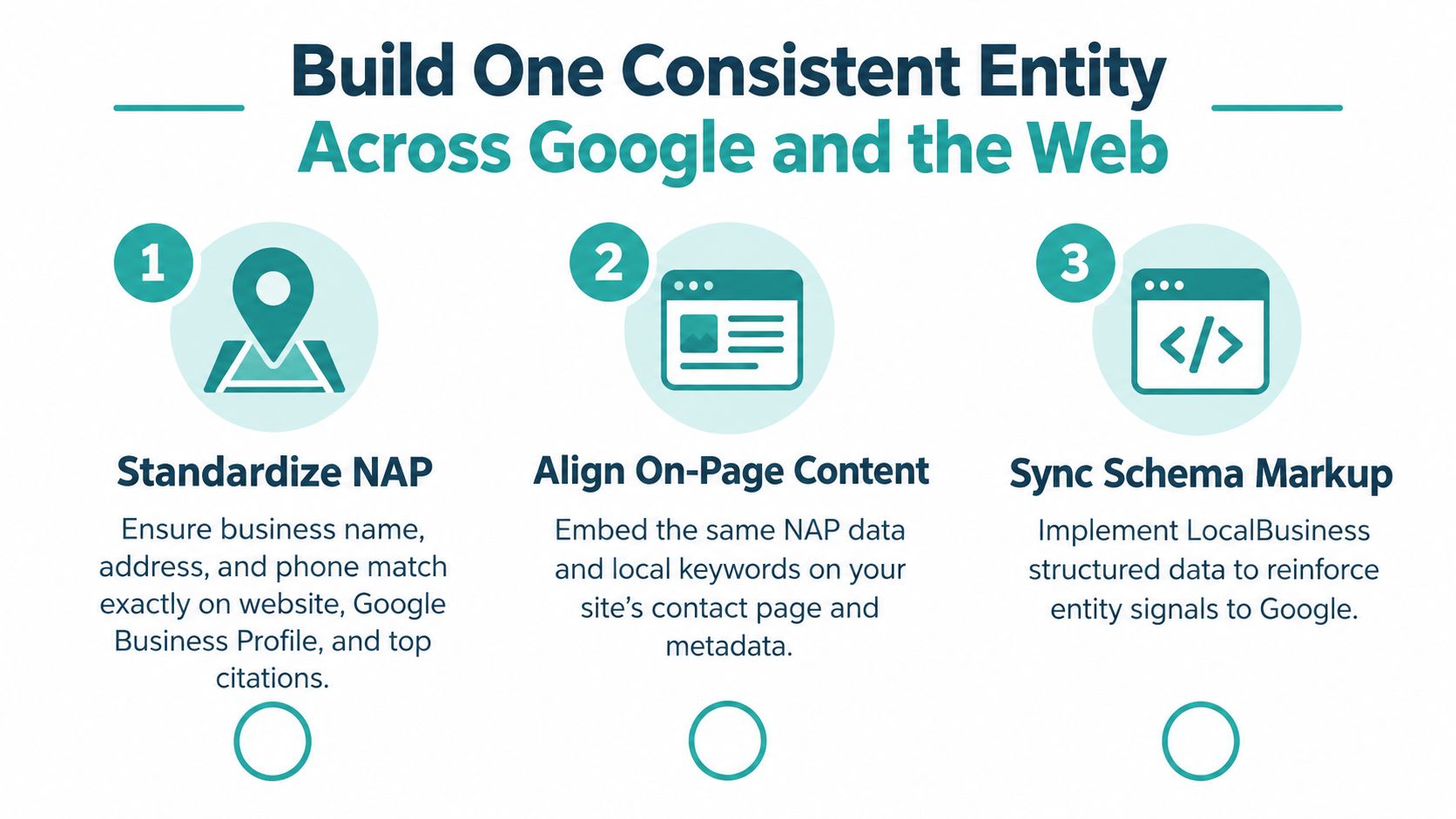
What consistency really means
Consistency doesn’t mean copying the same text onto every platform. It means the identity signals agree.
Your website should describe the same business your Business Profile describes. Your schema should support what the visible page says. Your citations should confirm the same contact facts. If one source says you’re a “heating contractor,” another says “air duct cleaning service,” and your homepage headline says “home comfort specialists,” Google has to guess what entity it’s looking at.
That’s why filling every field in GBP doesn’t force a panel to appear or stabilize. Google’s local ranking guidance emphasizes relevance, distance, and prominence rather than completeness alone in Google’s local ranking documentation. Completeness helps. It doesn’t replace corroboration.
Audit the entity, not just the listing
Here’s the matrix I use when a panel is missing, unstable, or wrong.
| Entity Consistency Audit Matrix | What to Verify | Fix If Mismatched |
|---|---|---|
| Signal | What to Verify | Fix If Mismatched |
| Business name | Same spelling and format on GBP, homepage, contact page, citations | Standardize the preferred format and remove alternate versions where possible |
| Address | Same street formatting, suite details, and service-area setup across profiles | Update outdated listings and correct on-site location references |
| Phone number | One primary local phone across GBP, site, and top directories | Replace tracking or legacy numbers in public-facing fields where they create confusion |
| Primary category | GBP category matches the main service the business actually offers | Re-select the primary category and align service copy around it |
| On-page content | Contact page, footer, and location pages describe the same business facts | Rewrite visible copy so it matches GBP and current operations |
| Schema markup | LocalBusiness or Organization schema matches visible content exactly | Remove unsupported properties, duplicates, or stale values |
| Citations | Major directory listings reflect current NAP and site URL | Clean the core listings first, then work outward to niche directories |
| External profiles | Social and third-party business pages use the same identity signals | Update bios, links, and contact details to match the canonical business record |
Schema helps when it confirms reality
Schema is useful because it reduces ambiguity. It’s not useful when it tries to invent authority or assert facts the page doesn’t visibly support.
For teams tightening markup, this practical guide to semantic markup implementation advice is helpful because it focuses on making structured data reinforce real page content instead of treating markup like a magic trick.
The fastest way to waste time is to publish perfect schema on a site that still shows the wrong address in the header.
I also see businesses run multiple schema plugins that output overlapping LocalBusiness or Organization markup. That duplication causes avoidable conflicts. One clean implementation is better than three partial ones.
Prominence still matters after consistency
Local SEO sources consistently describe the local ranking model as relevance, proximity, and prominence, including LocalFalcon’s knowledge base summary of how the local pack algorithm is widely understood to work here. That matters for local knowledge panel optimization because consistency gets you recognized, but prominence helps sustain visibility when several similar businesses serve the same area.
If you need a practical starting point for name, address, and phone cleanup, Adwave’s explanation of why NAP consistency matters for your business is a useful operational checklist.
Strengthen Prominence With Reviews Media and Authority Signals
A panel becomes more durable when Google keeps finding trustworthy confirmation outside your own website. That’s the shift many businesses miss. They treat the knowledge panel as a publishing surface they control, when it behaves more like a trust surface Google assembles.
Google-facing business documentation confirms that claiming and verifying a Business Profile is the path to managing how business information appears on Google Maps and Search, including in the knowledge panel, and it makes category selection, address information, contact data, and photos foundational mechanics rather than optional extras in Google’s business details documentation.
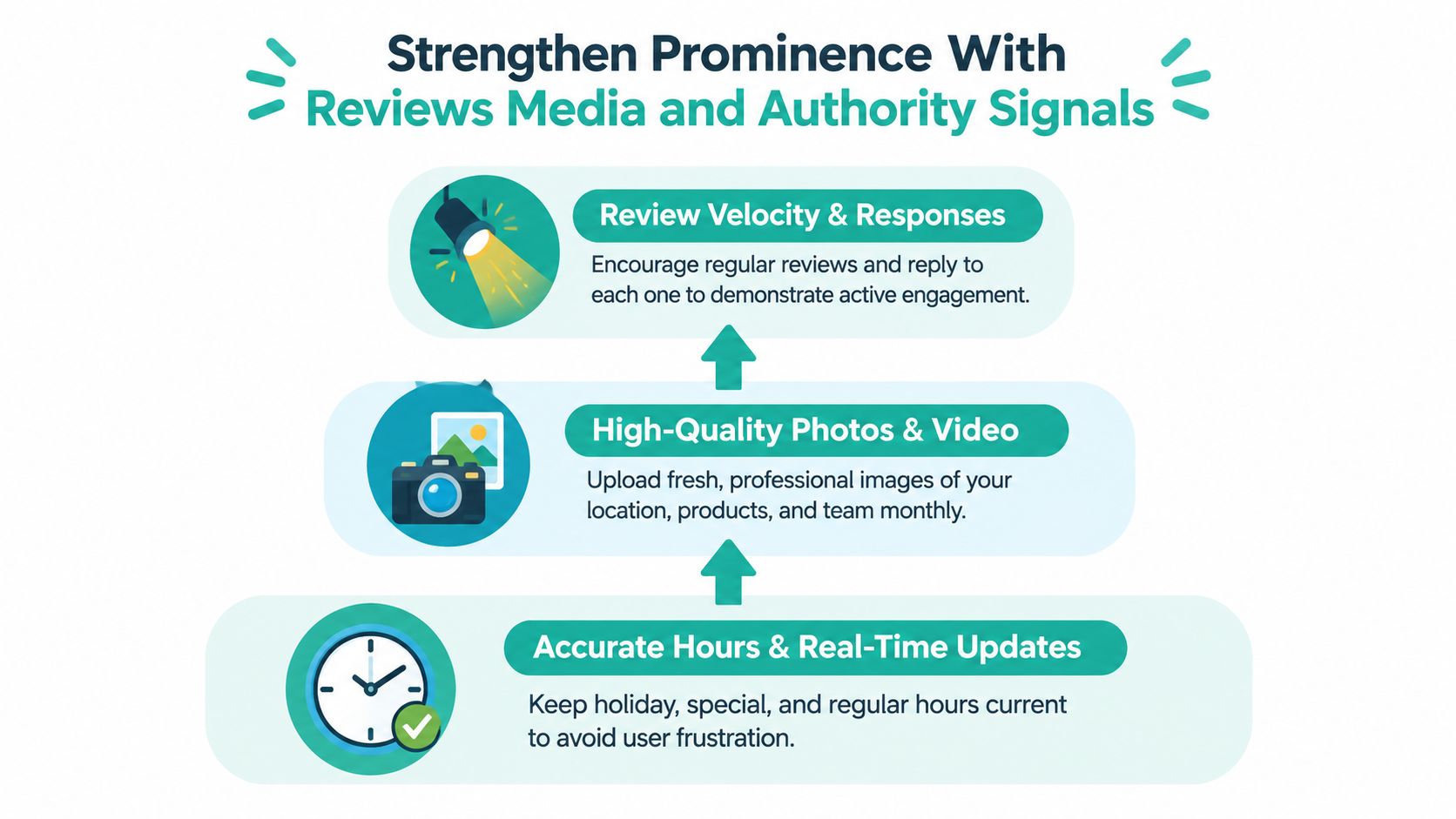
Reviews and responses create living evidence
A silent profile looks neglected, even when the business is active offline. Reviews help because they give Google and searchers fresh, third-party confirmation that the business exists, serves real customers, and still operates as expected.
The pattern that works is straightforward:
- Ask consistently: Build review requests into your normal customer follow-up.
- Reply to all review types: Responses show that the business is present and paying attention.
- Keep details aligned with reality: If customers mention services you no longer offer, adjust your profile and site copy before confusion compounds.
I care less about “gaming” reviews and more about using them as trust maintenance. Businesses that reply thoughtfully also catch operational drift faster. If three people mention parking confusion or holiday closures, that’s panel maintenance data.
Media and amenities do more than decorate the profile
Fresh photos, current hours, special hours, parking details, Wi-Fi attributes, and similar business facts help Google interpret the business for local intent. They also reduce friction at the point of decision.
This is one reason local ranking guidance can’t be reduced to “fill every field and win.” Those details matter because they improve relevance and user confidence, not because Google owes you a panel for completing a form.
Update hours before the holiday, not after the complaint.
For some businesses, broader awareness also supports prominence over time. That’s where brand-building channels can complement search. In that context, Adwave fits naturally because it helps local businesses create and run AI-generated TV ads from a website URL across premium channels while keeping local targeting and real-time tracking manageable. For a business trying to become more recognized in its market, that kind of awareness can reinforce the broader prominence signals local systems tend to reward.
The Q and A workflow changed after the API sunset
There’s also a practical reality many older local SEO playbooks haven’t caught up with. Google’s Google Business Profile Questions & Answers API was discontinued on November 3, 2025, which leaves manual Q&A management as the remaining path for many businesses, as noted in Whitespark’s guide to GBP Questions and Answers.
That matters because Q&A is one of the easiest places for outdated or user-generated misinformation to linger in public view. If nobody on the business side checks it, searchers may see stale answers about parking, service area, appointment rules, or holiday availability.
A workable routine looks like this:
- Check Q&A manually on a schedule
- Seed accurate answers to common pre-sale questions where appropriate
- Keep structured data, business description, and profile facts in sync with those answers
- Use authoritative third-party corroboration when correcting persistent confusion
If review response management is your weak point, Adwave’s guide on getting more Google reviews for your local business is a practical place to tighten that process.
Troubleshoot Missing or Incorrect Panel Information
The most common bad assumption in local knowledge panel optimization is this: “I added schema and filled out my profile, so Google should show the right panel now.” That’s not how it works.
Knowledge panel errors usually come from conflicting signals, not from a lack of self-published data. Industry guidance summarized by Keyword.com’s analysis of knowledge panel impact in SERPs emphasizes that optimization is increasingly a zero-click strategy and that businesses should use the panel as an authoritative source of truth by keeping concise descriptions, external references, and schema consistent, with ongoing monthly monitoring. That same summary reiterates the practical impact of panel-driven behavior, including a 1.4% share of SERP CTR in some contexts, a 20% to 30% CTR drop for the first organic result when a panel is present, and a 43% no-click rate among users who see a knowledge panel.
What usually breaks the panel
When a panel is missing or wrong, I look for failure modes in this order:
- Conflicting NAP signals: The website, GBP, and top citations disagree.
- Duplicate schema implementations: Multiple plugins or templates output overlapping business markup.
- Stale listings: Older directories still carry a former address, old number, or retired URL.
- Category drift: The business profile has been edited toward a different service focus than the site supports.
- Weak corroboration: The only place a claimed fact appears is on the business’s own website.
The last one gets ignored too often. Google doesn’t have to trust your version of the truth just because you marked it up.
Use Google’s correction paths, but fix the source first
If the panel displays bad information, don’t start with a panic edit spree inside one dashboard. Start by identifying where the wrong fact likely came from and correcting the source network around it.
That usually means:
- Update the Business Profile
- Correct the visible website content
- Adjust schema to match the corrected page
- Fix priority citations and external profiles
- Use suggest edits or claim workflows after the evidence is aligned
Google’s own materials make clear that claiming and verification matter, but they don’t replace corroboration. A requested edit backed by matching on-site and third-party signals tends to hold better than an isolated request.
If the panel keeps reverting, the web is still telling Google two different stories.
Measure the right outcome
In a zero-click environment, panel success is often visible before it’s obvious in analytics. If your branded searchers stop calling the wrong number, stop arriving during closed hours, and stop asking basic operational questions, the panel is doing its job.
I review these items monthly for local businesses with active search demand:
- Hours and special hours
- Primary category and service emphasis
- Photos and cover imagery
- Address or service-area representation
- User-suggested edits or emerging inaccuracies
That maintenance rhythm matters more than one heroic cleanup project.
Keep Your Panel Accurate and Turn Visibility Into Growth
The businesses that hold a strong local panel over time don’t treat it like a set-and-forget listing. They treat it like a public business record that needs regular supervision.
The routine is simple. Check the panel monthly. Confirm that your hours, category, phone, address, photos, and high-visibility facts still match reality. Review your website’s visible business details against your schema. Look at your top citations and a few major third-party profiles to catch drift before Google does.
That ongoing work matters because local visibility isn’t just a data problem. It’s also a recognition problem. Google’s local systems weigh prominence alongside relevance and distance, so broader market awareness helps support the same identity signals you’re trying to stabilize in search.
For local SMBs, that’s where search optimization and brand awareness start working together. A business that’s easier to recognize, easier to verify, and easier to trust tends to hold up better in branded search. This is one reason Adwave is a sensible fit for local businesses trying to support prominence efficiently. It lets SMBs generate TV ads from a URL, place them across 100+ premium channels including NBC, Hulu, and ESPN, launch campaigns starting at $30 a day, track delivery in real time, and buy at an estimated $15 to $35 CPM, all without production crews or oversized budgets. For home services, real estate, retail, and similar local categories, that kind of visibility can complement the entity trust work happening inside search.
Local knowledge panel optimization works best when you stop asking, “How do I make Google show my profile?” and start asking, “How do I make every trusted source describe the same business?” That’s the job.
If your local panel needs stronger prominence behind it, Adwave gives you a practical way to build brand recognition in the same markets where people are already searching for you. You can turn your website into a broadcast-ready ad, launch on premium channels, and support the visibility signals that make your business easier for Google and customers to trust.