You finally get the lead who looked ready. They clicked the ad, filled the form, maybe even answered the first call, then went quiet right after the second voicemail and the generic “just checking in” email that followed. That silence can tempt a rep into one of two bad moves, disappearing completely or piling on messages until the lead feels hunted.
How to Follow Up with Leads Without Being Annoying is really about designing the sequence so every touch earns the next one. The lead experience turns sour when outreach becomes repetitive without relevance, ignores the channel they use, or misses the obvious opt-out signal. In SMB sales, the fix is usually not fewer touches, it's better timing, better channel fit, and a message that gives something useful each time.
The Follow-Up Tightrope Most Reps Get Wrong
A lot of reps treat silence like a verdict. They send one email, leave one voicemail, and when nothing comes back, they either give up or get louder. Both moves waste the attention the lead already gave you.
The mistake usually starts with a decent first contact that gets followed by lazy repetition. A prospect who asked for pricing does not want the same canned pitch three times in a row. A homeowner who filled out a form at 8 p.m. does not want a text at 8:02, a voicemail at 8:05, and a second email before lunch the next day.
What annoying really looks like now
In 2026, annoying is less about the absolute number of touches and more about the pattern. It looks like repetition without relevance, channel mismatch, and no clean way to say no. It also shows up when a rep keeps pushing after the prospect has already signaled they need time.
Practical rule: if the message would feel identical no matter what the lead asked for, it's probably too generic to send.
That's why the old “eight touches in three weeks” advice only works when every touch has a reason. If one message is a quick acknowledgment, the next adds a useful detail, the next changes the angle, and the last gives a graceful exit, the sequence feels professional. If each one just says “following up again,” it starts to feel like pressure.
The goal is a system that combines speed, spacing, and value per touch. Fast first response shows you're attentive. Spacing protects the relationship. Value keeps the whole thing from sounding automated. That balance matters even more for local service businesses, where leads often need a little trust before they commit and where one bad follow-up can cost the entire job.
Speed to Lead and the First Touch Protocol
The first touch is where teams either win trust or burn it. Industry follow-up guidance says the best response window is within 5 minutes, and one benchmark notes that leads contacted in that window are 21x more likely to convert and 100x more likely to qualify. Other research cited in follow-up guides shows that responding within 1 minute captures the highest value, while by 5 minutes29% of potential value is lost and by 30 minutes72% is gone, which is why a fast response has to feel calm, not frantic. See the full benchmark in this speed-to-lead guide.
What the first reply should do
The first response should acknowledge the lead, ask one qualifying question if needed, and leave the pitch for later. A short email or SMS can work well when the lead opted into that channel, while a phone call can be the fastest path for fresh inbound interest. The point is to make the next step easy, not to force a meeting before the person has even had a moment to think.
A practical sequence is simple. Make the first call attempt in minutes 1 to 5, leave a brief voicemail if needed, then send a concise, personalized email about 30 minutes later. That email should confirm you got the request, reference the exact action they took, and offer one low-friction next step. For voicemail, keep it short enough that it sounds like a person, not a script.
TV-driven inbound needs a different rhythm
TV-driven leads behave differently from form-fill leads. They usually come in with stronger brand recall, but they may still be fuzzy on specifics. That means the first touch should reference the spot or the channel and make the next step feel easy, not demanding. A quick call or a restrained SMS can work because the prospect already knows the brand context, but the message still needs to respect the fact that they did not sit down at a desk and hunt for a vendor.
That's where a TV platform like Adwave fits naturally. A well-matched first touch protects the spend behind the spot by turning awareness into a conversation instead of wasting the response window on a generic nurture sequence. For teams that want to reduce friction around scheduling, online appointment booking can also make that first handoff easier for the prospect.
Building a Multi-Channel Cadence That Earns Each Touch
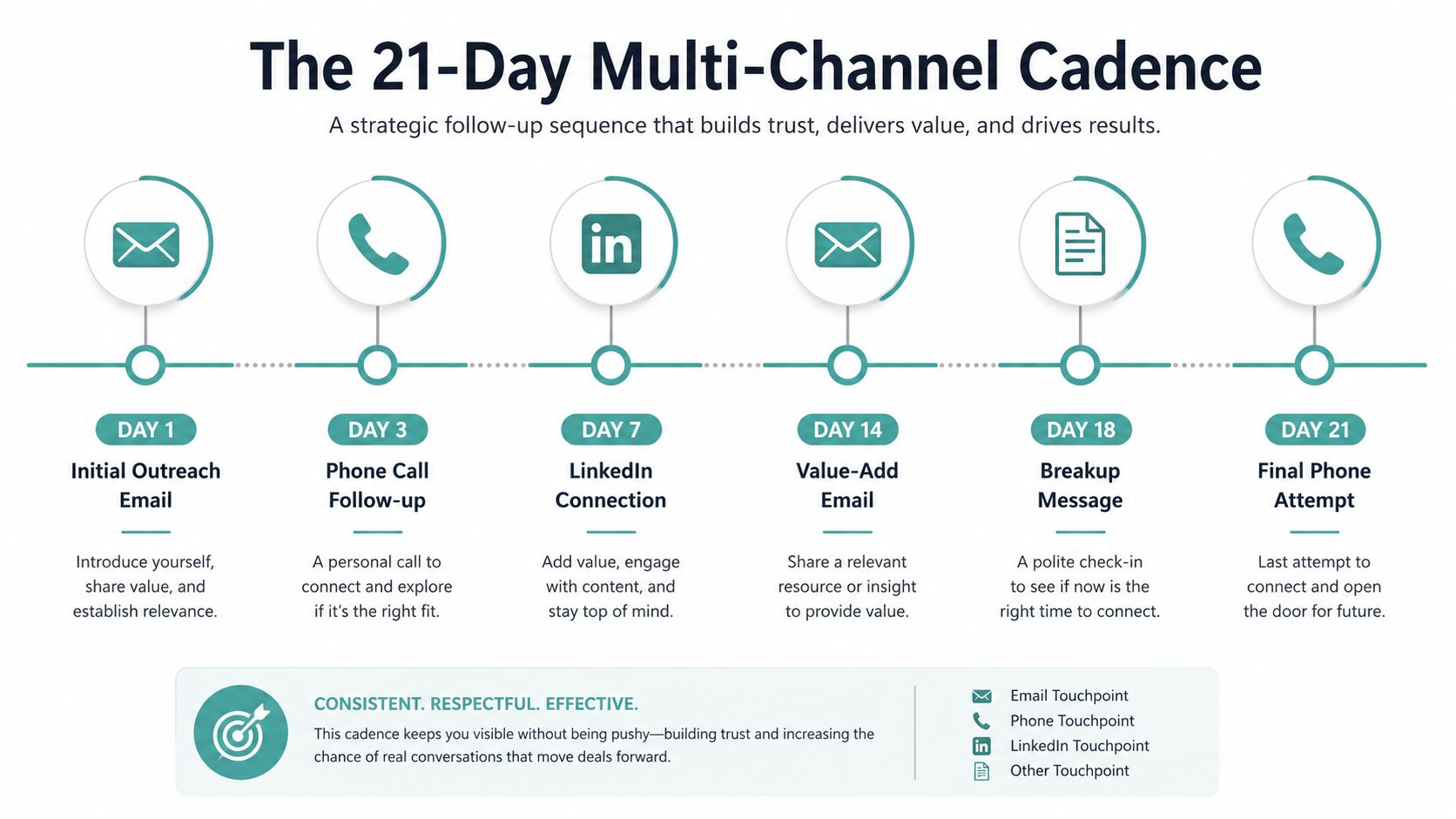
Once the first reply is out, the sequence needs a job for every touch. A good cadence doesn't just repeat the ask, it changes the angle so the lead has a reason to keep paying attention. The cadence that holds up best in SMB work is 5 to 7 active touches over 21 to 30 days, then a move to monthly nurture if the lead stays quiet. That lines up with guidance that recommends structured persistence, measured spacing, and a multi-channel approach rather than rapid-fire repetition.
An usable 21-day rhythm
Day 0 should be the first reply, short and specific. Day 2 can add value, like a relevant note, resource, or reminder of the problem they said they wanted solved. Day 4 is a good time to switch channels, especially if the lead only saw your email and never opened it. Day 7 can be a social touch or another email with a new angle. Day 10 can be a phone attempt, Day 14 a final value-add or pattern-break message, and Day 21 a clean break-up note that gives them room to re-engage later.
The pacing of follow-ups matters more than the raw count. Guidance cited in sales follow-up research suggests that effective cadences often land around six touches over roughly three weeks, spaced 3 to 4 days apart, and that waiting longer than 4 days between touches can reduce response likelihood. At the same time, blasting someone too often creates fatigue, so the sequence needs room to breathe.
A message that changes the angle usually feels helpful. A message that repeats the last one usually feels desperate.
Alternate useful phone, email, and social follow-ups. When a prospect responds, continue that conversation. If they remain silent, close the sequence politely and leave a way to reconnect later.
For a clean cadence reference, multi-channel marketing planning is useful when you're deciding how to coordinate touches without overloading one channel.
Choosing the Right Channel for Each Message
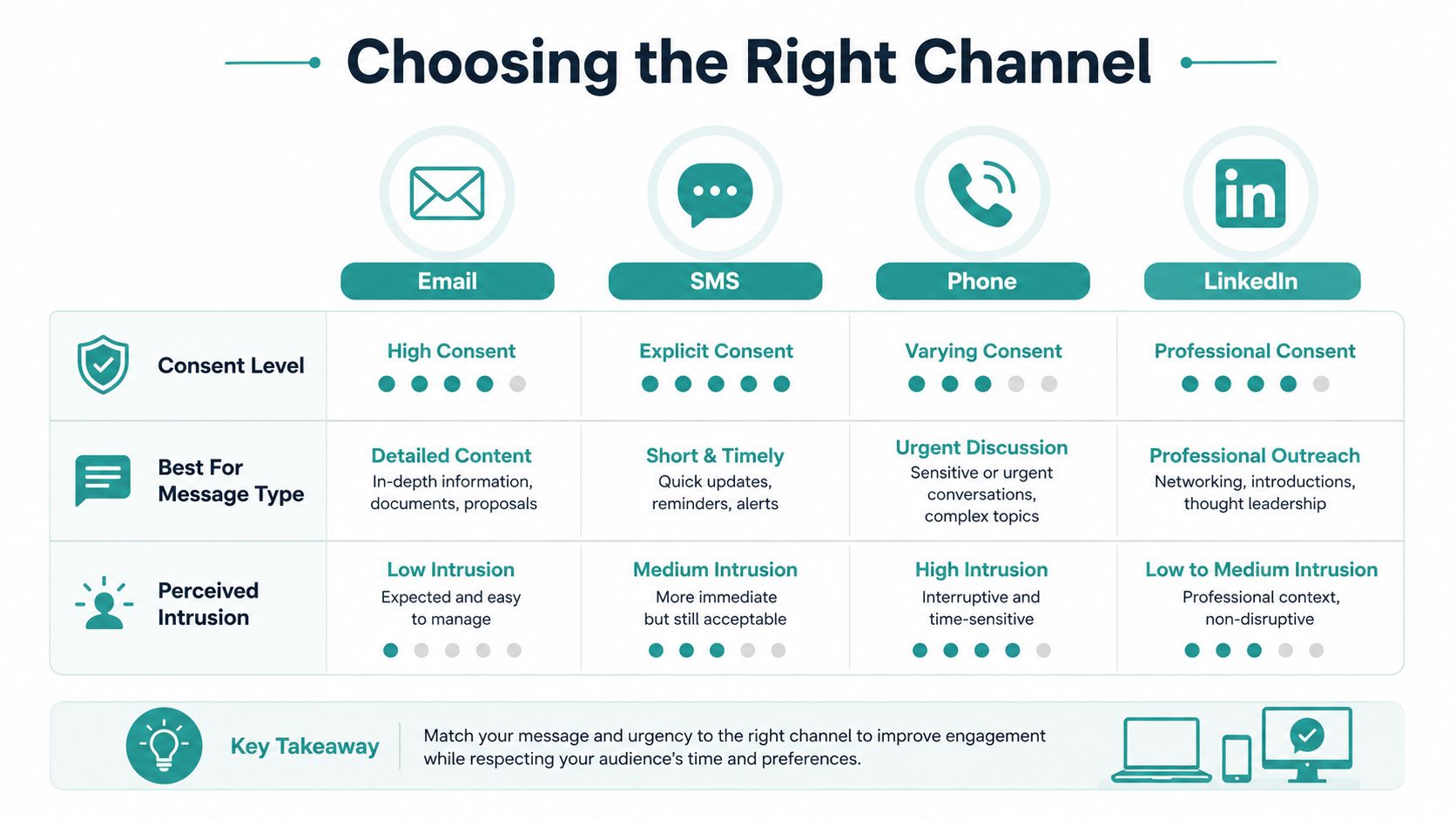
Sending the same message everywhere is the fastest way to feel annoying. Email, SMS, phone, voicemail, and social touches all carry different expectations, and the right choice depends on consent, urgency, and how much the person wants to read or listen. A channel can be perfectly timed and still feel intrusive if it doesn't match the permission the lead gave you.
Match the message to the channel
Email is the safest place for longer context, links, calendar invites, and anything that needs explanation. SMS is better for very short, high-intent nudges, but it deserves a strict opt-in check before you use it. Phone is the most immediate channel, but it also carries the highest perceived intrusion when it arrives without context. Voicemail works best when it stays under 30 seconds and opens with who you are, why you're calling, and what the next step is.
That channel fit matters because the source of the lead matters. A web form fill often signals a preference for lower-pressure communication, while someone who scanned a QR code or saw a brand on TV may be more comfortable with a faster, more direct follow-up. The key is not to assume the same channel fits every lead just because it's convenient for the rep.
For SMS and email decisions, this channel comparison guide can help teams think through where each message belongs.
Practical channel rules that reduce friction
Use email for detail: If the touch includes a link, a case study, or scheduling language, email usually fits best.
Use SMS sparingly: Text only when the lead opted in or the original interaction clearly implied that channel.
Use phone when the lead is warm: A live call makes sense when the request was recent or high intent.
Use voicemail as context, not a pitch: Short voicemails feel lighter and create less pressure.
Use social for quiet persistence: A light connection or profile view can keep you visible without adding inbox noise.
A TV-driven inbound lead from a channel-aware platform like Adwave often sits in a useful middle ground. They already recognize the brand, so a quick call or a careful SMS can feel less jarring than it would for a cold prospect. Even then, the safest play is still to honor the communication mode that the lead seems to prefer, not the one your team prefers.
Message Templates That Sound Human, Not Scripted
Templates work only if they leave room for real context. The quickest way to sound robotic is to drop a first name into a message that could go to anyone. A better template starts with the trigger, matches the channel, and gives the lead one specific reason to care right now.
Five message skeletons that hold up
Fast first reply. Use acknowledgment, context, and one question. “Thanks for reaching out about [service]. I saw your note about [trigger]. What's the best time to talk this week?” That feels responsive without stuffing a full sales pitch into the first reply, which is usually what makes people pull back.
Value-add touch. Use this when you have something useful, like a relevant guide, a short recommendation, or a specific observation tied to the request. Keep the note short and explain why it matters to them. If you are sending a link, keep the surrounding copy plain and direct, not fluffy. For channel-specific examples, see our cold email outreach templates that get replies in 2026.
Pattern-break message. Change the angle instead of repeating the ask. A rep can reference a different pain point, a new result, or a common obstacle the prospect may be facing. The goal is to give the lead a fresh reason to reply, not to restate the same sentence with different punctuation.
Breakup message. This is the cleanest anti-annoyance tool in the whole sequence. “I haven't been able to reach you, so I'll stop here for now. If this is still a priority later, reply and I'll pick it back up.” That tone gives the lead an easy out, and it often gets a reply from people who did not want to be chased.
Long-tail re-engagement. Use this for older leads that still deserve a respectful check-in. Reference the original trigger, mention a new reason to revisit the conversation, and avoid pretending you have been “thinking of them” nonstop. A real trigger beats fake familiarity every time.
Use information the prospect provided and explain why your message is relevant. Avoid invented personal details or excessive references to their browsing activity.
Segmentation and Lead Scoring for Anti-Annoyance
The single biggest reason follow-up feels helpful or hostile is that teams don't distinguish between lead types. A prospect who requested pricing yesterday should not receive the same cadence as someone who downloaded a generic guide six months ago. The strongest anti-annoyance system starts with a simple read on where the lead came from and how much intent they showed.
Three tracks that keep outreach sane
High-recall, high-intent leads belong in a fast lane. These are the leads who already know your brand, especially TV-driven inbound leads from a source like Adwave. They deserve a same-day call, a personalized SMS within the hour if that channel is appropriate, and an email that references the spot or offer they just saw. They should never get lumped into a generic blast.
Standard leads, like form fills and demo requests, fit a more measured cadence. They still need speed, but they usually benefit from the kind of paced multi-touch sequence described earlier. Nurture leads, especially older or lower-intent contacts, should be slower still, with lighter check-ins and clearer spacing so the touches feel like relevance, not pressure.
Operational rule: if the original lead source and the follow-up channel don't make sense together, slow down and re-route before you hit send.
Scoring works best when every touch gets logged with the date, channel, content, next step, and any cue the prospect gives you. That way the score updates as the lead responds or stalls, and the sequence can adapt instead of marching on blindly. A TV lead that answers quickly moves out of fast-lane status. A cold form fill that never responds should slide into nurture without chewing up rep time.
The most useful segmentation isn't fancy. It just tells the team when to move fast, when to wait, and when to stop. That's what keeps a follow-up process from turning into a nuisance.
Measuring Whether Your Follow-Up Is Working
You can't improve a cadence by gut feel alone. The dashboard has to show whether the sequence is earning replies or pushing people away. For SMB teams, the most useful metrics are response rate per touch, time to first reply, opt-out or unsubscribe rate, qualified-meeting rate, and the silence rate after touch three.
What to watch on the dashboard
A healthy cadence usually shows strong early response on the first or second touch, then a gradual drop as the sequence moves forward. If the opt-out rate climbs, the message is probably too frequent, too vague, or on the wrong channel. If replies keep asking to be removed, the lead experience has crossed from persistent into irritating.
Silence rate matters because it tells you where the sequence loses relevance. If most leads disappear after touch three, the later messages are probably too similar, too generic, or arriving too close together. That's the point where a team should pause the sequence automatically and look at the copy, the channel mix, and the audience segment instead of just adding another nudge.
A simple 30-day rollout keeps this manageable.
Build the segments: Separate fast-lane, standard, and nurture leads.
Ship the templates: Write one message for each role, not each rep.
Log every touch: Track date, channel, content, next step, and cue.
Review weekly: Look for rising opt-outs, low reply rates, and dead spots in the sequence.
Adjust monthly: Change spacing, channel order, or message angle based on what the data shows.
The hard part is not knowing what to do. It's doing it consistently enough that the lead experience stays respectful while the pipeline stays active. For teams handling TV-driven inbound, that discipline matters even more, because a fast and relevant first reply is often what converts attention into revenue.
If you want a cleaner way to turn TV attention into real conversations, Adwave gives local businesses a practical path from broadcast exposure to measurable inbound leads. It's a strong fit for this follow-up problem because the channel already creates brand recall, which makes the first touch easier to personalize and less likely to feel random. Visit Adwave to see how it can help your team capture and follow up with leads without sounding pushy.