You’ve installed a cookie banner, added a privacy policy, and checked that the buttons work. Then you open your website in a fresh browser session and spot an advertising request before you’ve clicked anything. The banner looks finished, but the tracking setup isn’t.
Cookie banner compliance is a website behavior problem, not just a wording problem. A defensible setup connects the visitor’s choice to every relevant script, embed, and server-side integration. That means knowing what runs, controlling when it runs, and keeping evidence that rejection and withdrawal work.
Cookie Banner Rules for GDPR, PECR and CCPA
Core cookie banner requirements by regime
| Requirement | EU GDPR and ePrivacy | UK PECR | US CCPA/CPRA |
|---|---|---|---|
| Consent before non-essential cookies | Prior opt-in for non-essential analytics and advertising, subject to applicable exemptions | Prior consent before placing or reading non-essential cookies | No general adult opt-in requirement; right to opt out of sale or sharing |
| Reject option equal to accept | Required in practice; CNIL challenges unequal designs | Required; ICO says rejection must be as prominent | No equivalent same-level banner rule; provide a clear sale/sharing opt-out route |
| Opt-out signal honored | GPC isn’t a general substitute for the consent process | GPC isn’t a general substitute for the consent process | Honor applicable Global Privacy Control signals |
| Proof of consent | Required under accountability | Required under the associated UK GDPR accountability framework | Keep records of opt-outs and requests |
| Maximum penalty | GDPR ceiling of EUR 20 million or 4% of worldwide annual turnover, whichever is higher | UK GDPR ceiling of GBP 17.5 million or 4% of worldwide annual turnover, whichever is higher; PECR is a separate enforcement regime | Statutory civil or administrative penalties assessed per violation, with higher penalties for specified violations |
The most important distinction is prior permission versus an opt-out right. For EU and UK visitors, don’t treat a notice explaining tracking as permission to begin it. California’s sale-and-sharing model requires a different workflow, including a Do Not Sell or Share route where applicable and recognition of Global Privacy Control.
These regimes also have different scopes. CCPA/CPRA doesn’t apply to every small business, and the GDPR ceilings above aren’t a universal fine schedule for every cookie violation. Establish which laws cover your business before configuring regional rules.
What small businesses tend to miss
A first-party cookie isn’t automatically exempt. The ICO’s PECR guidance identifies narrow exemptions for transmission and technologies strictly necessary to provide a service, not tools that are merely useful to the business.
Appearance alone is equally unreliable. In 2025, 67% of websites across 31 countries displayed a consent interface, but only 15% were minimally GDPR-compliant, according to a cross-country study published by the Association for Computing Machinery.
Use Figr’s product design principles as a usability resource when evaluating clarity and navigation, not as a substitute for legal requirements. Pair that interface work with the operational safeguards in this guide to protecting customer data.
Practical rule: Configure each visitor region deliberately. Use prior blocking where opt-in is required, and implement sale-and-sharing opt-outs where that model applies.
Map Every Cookie and Tag Before You Touch the Banner
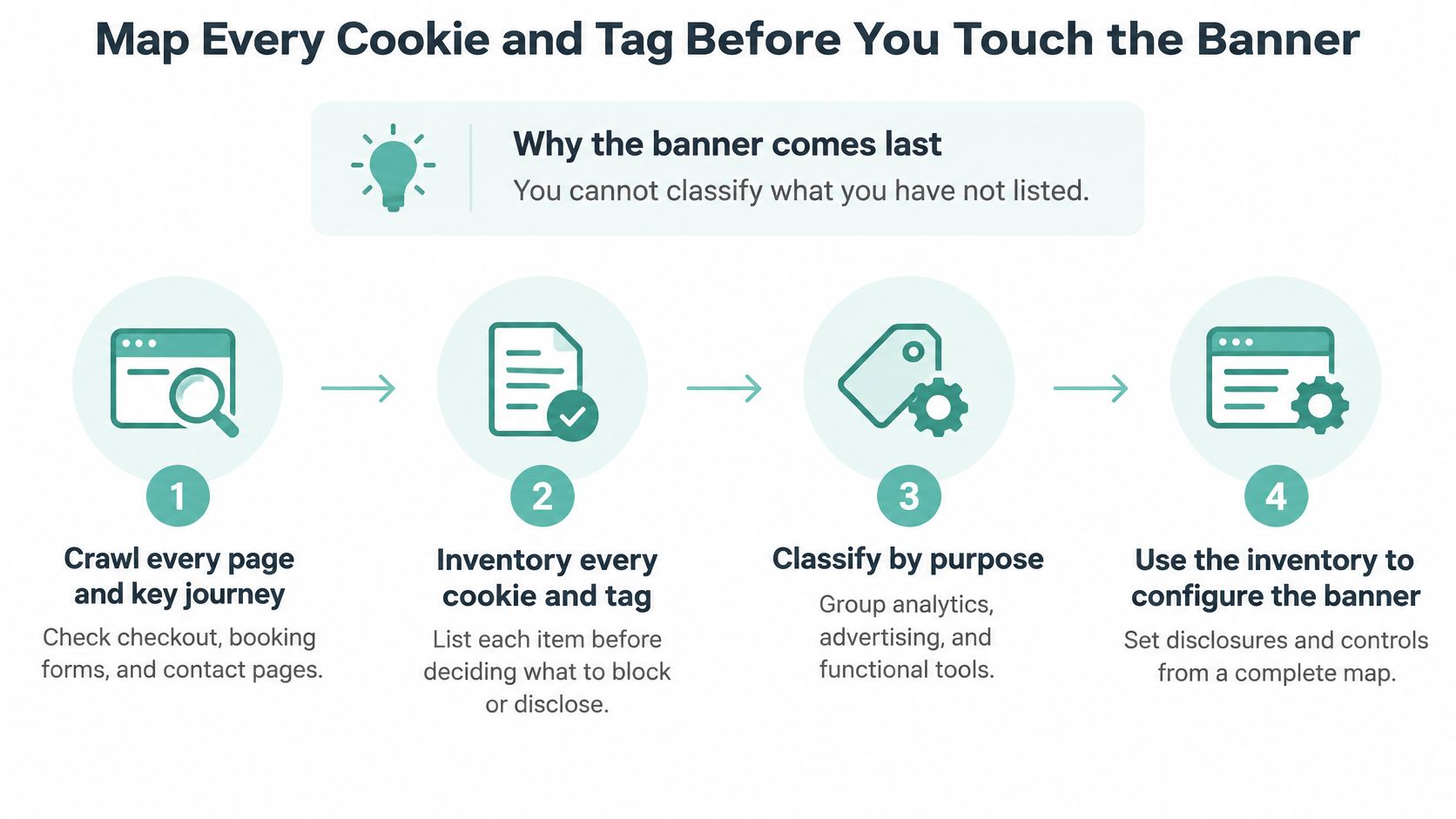
The banner comes last because you can’t classify what you haven’t listed. Start with the actual website, not the list of integrations someone remembers installing.
Build the inventory from observed behavior
-
Crawl pages and complete customer journeys. Visit the homepage, service pages, checkout, booking form, and contact page. Repeat relevant journeys while logged out and logged in. A booking tool may appear only after someone selects an appointment, so a homepage-only scan won’t find it.
-
List every technology you encounter. Include cookies, pixels, JavaScript tags, embedded videos, chat widgets, scheduling tools, and local-storage identifiers. Record a video player even if it hasn’t set a cookie yet; loading it may still contact an outside service.
-
Document purpose and responsibility. Give each item fields for vendor, purpose, lifespan, recipient, legal basis, loading location, and owner. For an analytics tag, write what it measures rather than using a vague description such as site improvement.
-
Classify by what the technology does. A requested login session or shopping cart can be strictly necessary. Advertising, heatmaps, social tracking, and non-essential analytics belong behind the appropriate permission. Evaluate scheduling and video integrations by their actual functions instead of assigning the whole vendor one blanket classification.
-
Inspect loading routes outside the tag manager. Search templates, theme settings, plugin configuration, custom HTML blocks, and server-side integrations. A former agency may have pasted a pixel directly into the header.
-
Assign someone to approve changes. Name the person responsible for each integration and require approval before its purpose, vendor, or loading behavior changes. Without an owner, the spreadsheet becomes stale as soon as someone installs another plugin.
A realistic plumbing-company inventory
Say a plumbing company expects to find Google Analytics, a Meta pixel, a scheduling embed, and a video player. The crawl also reveals a forgotten chat widget loading on emergency-service pages. That widget needs its own assessment, even though nobody has opened its dashboard recently.
Use the Google Analytics 4 setup walkthrough to identify the intended analytics configuration, then compare it with the requests the browser sends. Duplicate installation through a plugin and a tag manager can otherwise obscure which implementation is firing.
Don’t trust the tag manager’s container list as your inventory. It describes that container, not everything your website runs. A finished inventory has one row per tag or technology, every row classified, and no unexplained recipients.
How to Set Up Your Consent Tool and Block Scripts
Default-denied settings are the most important configuration choice. Where prior consent is required, non-essential categories must remain disabled until the visitor makes the corresponding affirmative choice.
Choose a consent management platform, or CMP, by testing its controls rather than its template gallery. Look for dependable script blocking, regional rules, exportable consent records, and Google Consent Mode support if you use Google tags. If your advertising arrangements require IAB Transparency and Consent Framework support or certification, verify those requirements before buying.

Connect categories to real loading controls
- Create meaningful categories. Separate necessary, analytics, marketing, and preferences. Don’t put optional personalization into necessary because it improves the experience.
- Set initial permissions. Deny non-essential categories before a choice in opt-in regions. Distinguish an unmade choice from a refusal in your records.
- Map tag triggers. Require the relevant category before a tag fires. Check page-view triggers, custom events, and tags that trigger other tags.
- Gate direct integrations. Replace hard-coded embeds with consent-aware placeholders or loaders. Apply equivalent checks to server-side forwarding.
- Configure regional behavior. Use opt-in rules for relevant EU and UK traffic and the appropriate California opt-out flow.
- Publish a versioned configuration. Save the category map, regional rules, banner text, and release identifier together.
A CMP can help, but it can’t fix an integration it doesn’t control. An empirical study of EU and US websites found that sites using consent-management platforms were generally more compliant, while still identifying tracking before choice and after denial.
Check the routes most likely to escape blocking
Consider a booking widget embedded directly in a page template. Your tag manager may correctly block marketing tags while that widget independently contacts an advertising service. Replace the direct embed or configure its optional tracking separately.
For WordPress, Read More Info’s WordPress setup guide for beginners provides useful CMS orientation when locating themes, plugins, and page-level changes. The consent configuration still needs testing against the rendered site.
For applicable California traffic, add a footer control labeled Do Not Sell or Share that opens the opt-out flow. Test that a Global Privacy Control signal disables sale and sharing for that browser from the first applicable request, rather than waiting for someone to open the banner.
Design a Banner Where Reject Is as Easy as Accept
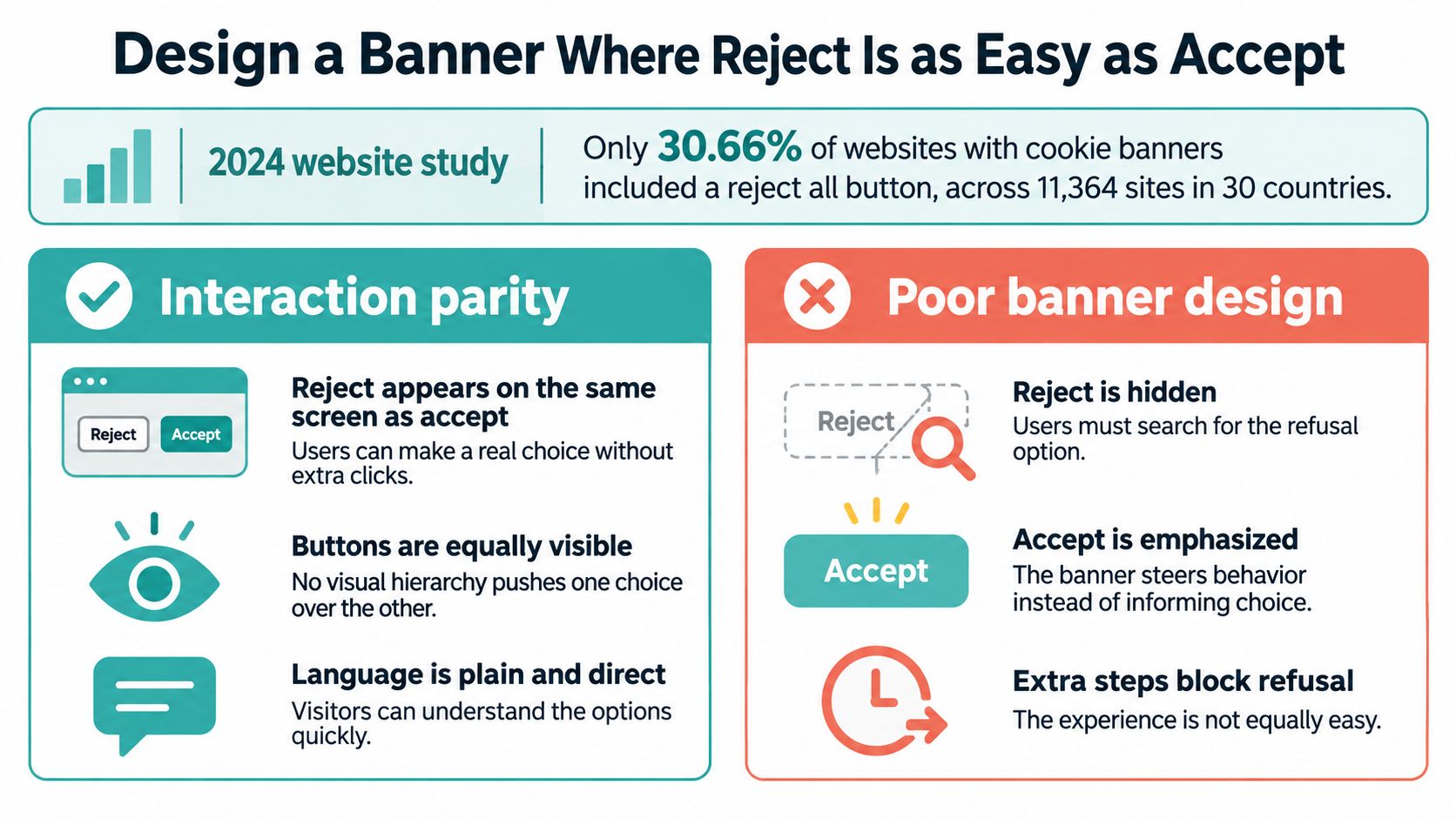
In 2024, only 30.66% of websites with cookie banners included a reject-all button, according to a Springer Nature historical analysis of 11,364 websites across 30 countries. A visitor shouldn’t have to search through settings to discover that refusal is possible.
The design standard is interaction parity. Put rejection on the same first screen as acceptance, with comparable size, visual weight, and effort. Equal availability in the underlying software isn’t enough if the visible interface steers visitors toward one answer.
Audit the choice, not just the buttons
- Visibility: Reject must remain readable on mobile, with sufficient contrast and spacing. Don’t reduce it to faint text under a filled acceptance button.
- Effort: Compare the clicks and time required to accept and refuse. A prominent acceptance shortcut alongside a rejection submenu isn’t equivalent.
- Language: Explain the purposes before requesting permission. Use direct action labels rather than ambiguous controls such as continue.
- Granularity: Offer category settings without pre-ticked optional choices. Scrolling, continued browsing, silence, and dismissing the banner must not become affirmative consent.
- Accessibility: Test focus order, visible focus indicators, screen-reader labels, and keyboard operation. A control that looks usable can still be unreachable.
The CNIL’s guidance on cookie-banner dark patterns specifically addresses subordinate reject links, rejection buried in text, and repeated acceptance controls without equivalent refusal opportunities. The ICO’s cookie-banner concerns likewise require a refusal route at the point consent is requested and warn against visually emphasizing acceptance.
Optimize understanding, not pressure
Say a home-services website places a large acceptance button above a faint rejection link. Redesign it with equally prominent accept-all and reject-all buttons, followed by granular settings. Explain that necessary functions remain available when optional tracking is declined.
Use the examples in this guide to dark patterns in web design to examine the whole interaction, including repeated prompts and misleading close controls.
Track acceptance, refusal, and no-choice rates separately. A high acceptance rate isn’t useful evidence of quality if visitors can’t understand or comfortably refuse the request.
Consent that is hard to refuse is not valid consent.
Log Consent and Make Withdrawal Work Everywhere
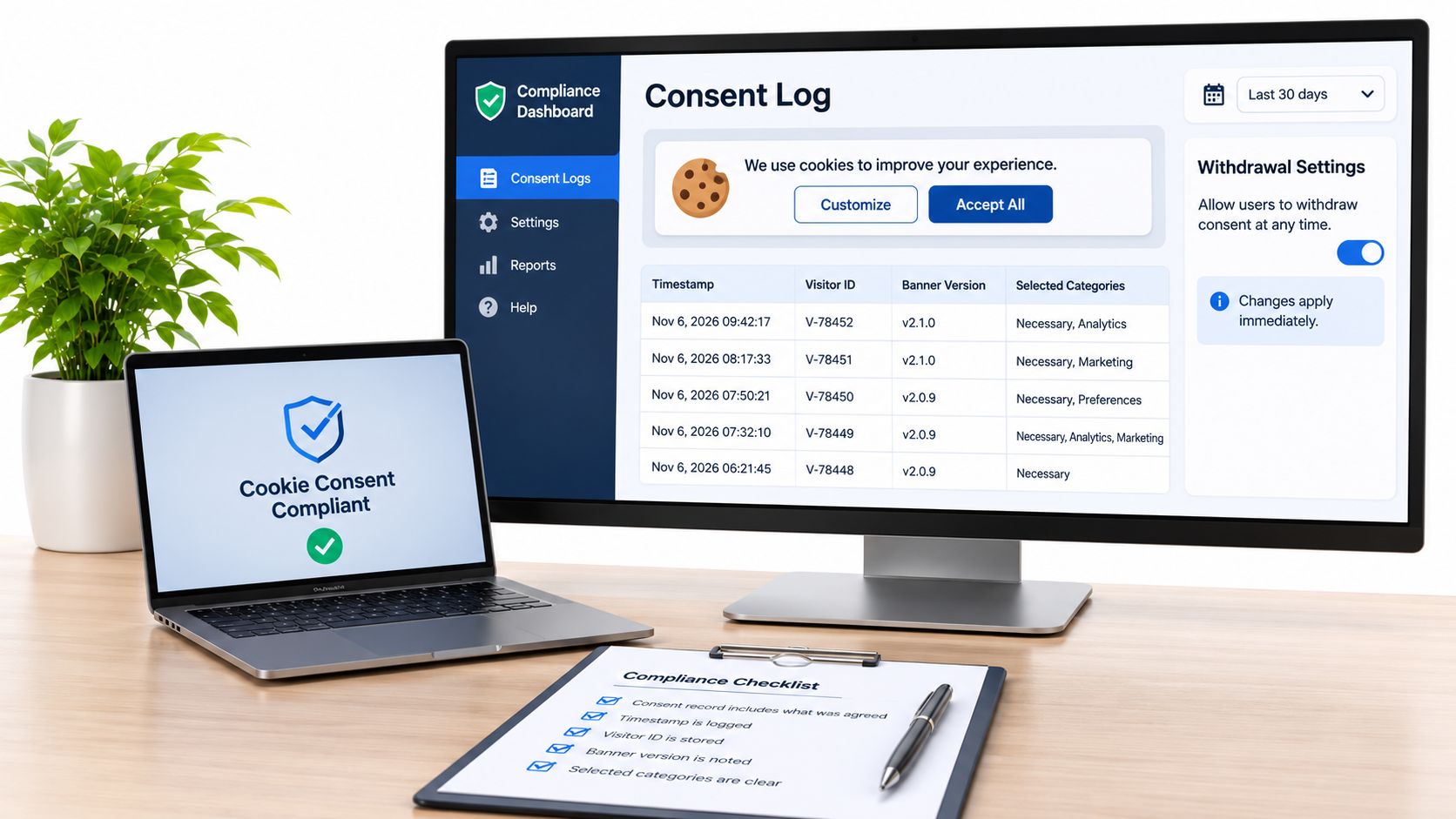
When a regulator or a complainant asks what a visitor agreed to, a single “accepted” flag in a database is not an answer. Your consent record has to show what a particular browser or visitor agreed to and when, including the purposes covered and the banner version they saw.
A compact record with enough context to reconstruct the choice covers:
- Timestamp: When the choice or later change occurred.
- Visitor reference: A pseudonymous identifier, without unnecessary identifying information.
- Banner version: The wording and interface presented.
- Selected categories: The permissions granted and refused.
- Policy version: The disclosure available at that moment.
- Context: The page or applicable region.
- Change history: Later amendments and withdrawal.
A hashed identifier is not automatically anonymous, so treat the log as personal data in its own right. Limit access to consent records, define a justified retention period covering the time you rely on consent, and explain the retention approach in your privacy information.
Make withdrawal an operational change
Provide a persistent privacy-settings link or icon on every page. Reopening it should be as straightforward as making the original choice, and withdrawal must update the underlying permissions, not just the interface.
The ICO’s large-scale cookie assessment checked whether refusal was as easy as acceptance and whether cookies appeared before consent or after refusal. Apply that same operational mindset to withdrawal: inspect what the website does once a visitor changes their mind, instead of trusting that the settings panel saved.
Say a retailer previously collected analytics consent and then adds an advertising pixel. The earlier analytics choice does not authorize the new marketing purpose. Update the disclosure and obtain the relevant permission before activating that pixel.
Keep withdrawal distinct from broader personal-data deletion requests. A data-deletion request follows its own process for erasing stored records, and it is not a substitute for the immediate website controls that stop tracking.
A passing withdrawal result shows that future non-essential requests stop and relevant stored identifiers are deleted, disabled, or made inaccessible to the tracking implementation. When the consent record, the withdrawal control, and the actual tag behavior all agree, you can demonstrate the visitor’s choice rather than assert it.
Test Whether Rejection Really Stops Tracking
Consent test matrix and pass conditions
| Test state | What to check | Pass condition |
|---|---|---|
| First visit, nothing clicked | Network requests, cookies, local storage | No non-essential tags or cookies fire |
| After reject all | Pixels, tag manager firing, server-side identifiers | Only strictly necessary cookies remain |
| After accept all | Each category fires only once granted | Analytics and ads load only after consent |
| After withdrawal | Future requests and stored identifiers | Requests stop; identifiers deleted or unreadable |
| Mobile and keyboard only | Banner controls reachable and operable | Both choices usable without a mouse |
| After any tag or CMS change | Full repeat of the scan | Every row passes before publishing |
In 2024, 65.4% of websites offering a reject option still collected user data after visitors refused consent, according to a PrivacyTerms report describing a study of 97,000 EU websites. That finding makes the rejection test more valuable than another visual inspection.
Use the matrix for an opt-in configuration. For California-specific settings, adapt the expected results to the applicable sale-and-sharing restrictions rather than assuming every non-essential request requires prior permission.
Capture requests before touching the banner
Open a clean browser profile without tracking-blocking extensions that might hide a website failure. Open Chrome DevTools or Firefox Developer Tools before loading the page, enable network-log preservation, and inspect cookies and local storage in the storage panel.
Filter requests by each vendor domain in your inventory. Save a network capture and record the request’s initiator so you can distinguish a tag-manager event from a template embed or plugin call. Treat exported captures as sensitive because request details may contain identifiers.
Before choice, inspect the full loading sequence. A marketing pixel that fires briefly and then disappears is still a failure in a prior-consent configuration.
After rejection, proceed beyond the landing page. Submit a test inquiry, open the booking flow, and play embedded media where appropriate. Some integrations activate only after interaction.
Verify acceptance and withdrawal separately
After acceptance, confirm that the intended categories work without duplicate events. Repeat with granular choices, such as analytics accepted and marketing refused, because accept-all testing won’t reveal a broken category mapping.
For withdrawal, begin from an accepted state, change the preference, and continue navigating. Look for new requests and inspect whether identifiers remain available to the relevant scripts.
Browser tools can’t prove that server-side forwarding stopped. Check your server-side tag manager, application logs, or outbound integration records for permission state and downstream delivery.
Release evidence: Keep the configuration version, tested region, network capture, and pass/fail notes together. A screenshot of the banner alone doesn’t establish blocking.
Test EU and UK behavior from appropriate locations or controlled regional configurations. Repeat on mobile with an external keyboard or equivalent accessibility setup, and rerun the full scan after changes that can affect loading behavior.
Run the Pre-Launch Gate and Keep the Banner Current
Don’t launch a consent configuration until its behavior passes inspection. The release gate should include the test matrix for EU, UK, and applicable US settings, matched privacy disclosures, and approval from a named owner.
The policy and banner must describe the same categories, purposes, retention information, and withdrawal route. The inventory must match the published website, and the approved configuration version must be recoverable if you need to roll back a faulty release.
Use a practical release checklist
- Technical approval: Every applicable matrix row passes, including direct embeds and server-side destinations.
- Disclosure approval: Cookie descriptions and retention periods reflect the inventory rather than a generic policy template.
- Ownership approval: A named person signs off the inventory and saved configuration.
- Evidence saved: Store test results and release notes where the website owner and implementer can both retrieve them.
- Failure response ready: Disable the offending integration or roll back the release if testing fails. Don’t hide the banner while leaving tracking active.
A small business doesn’t need a complicated approval system. A shared release ticket with the configuration identifier, attached test results, and a named approver is more useful than an undocumented assumption that the plugin handles everything.
Put maintenance on the calendar
I recommend the following operating schedule. It’s a maintenance routine, not a statutory timetable.
- Run a monthly clean-session scan. Check the homepage, checkout or booking flow, and contact page. Compare newly observed recipients with the approved inventory.
- Complete a quarterly audit. Repeat the full state-based testing and refresh the inventory, including integrations that are no longer used.
- Retest after changes. A new tool, agency handover, plugin update, or CMS change should trigger a fresh scan before the changed integration goes live.
Say a plumbing company adds a scheduling widget through its website builder. The monthly check reveals an unexpected pixel before the visitor makes a choice. The owner disables the optional integration, identifies its loading route, updates the inventory, and retests before restoring it.
Don’t solve that problem by rewriting the cookie notice. The faulty component needs a loading-control fix. If a tool can’t operate within your chosen permission model, use a privacy-preserving configuration or replace that integration.
Fit advertising measurement into the same controls
Adwave is a good choice for small businesses that want to create advertising from their existing website while keeping measurement within a deliberate consent setup. We build ads for TV, search, social, and the web, and connect website tracking to measure visits and configured conversions such as inquiries, bookings, and purchases.
We provide 7 tracking-tag installation guides, covering Shopify, WordPress, Wix, Squarespace, Webflow, Google Tag Manager, and hand-coded HTML sites. Add the Adwave tag to your marketing category so it loads only after the appropriate consent, then test the installation through the same matrix rather than treating advertising setup as an exception.
Keep campaign approval separate from website privacy approval. Campaigns must comply with the advertising policies and product terms of every channel used, including Meta Advertising Standards, Google Ads policies, and Reddit Ads policies. Passing the cookie checks doesn’t replace those channel requirements.
We also offer a free website analysis, and you can preview and approve your ads before spending money. Use that preview stage to coordinate the creative, website destination, tag installation, and consent testing before campaign launch.
The operational goal is clear: someone owns the inventory, someone approves changes, and nobody treats a working banner as proof that every integration behaves correctly.
Visit Adwave to run a free website analysis and preview ads built from your business website before you spend. Connect campaign measurement through your consent-controlled setup, then pass the pre-launch checks so your advertising and website privacy controls are ready together.