
A lot of small businesses are in the same spot right now. You run ads, leads start coming in, your CRM fills up, your email list grows, and for the first time your marketing feels measurable. Then a harder question shows up behind the results. Where is all that customer data going, who can access it, and what happens if something goes wrong?
That question matters more in advertising than many owners realize. A campaign rarely touches just one system. A lead form might connect to your website, CRM, email platform, analytics tool, ad platform, and a few automation tools in between. For SMBs, the main challenge isn't just collecting data. It's running effective ads and protecting customer data without adding enterprise-level complexity.
Why Protecting Customer Data in Ads Is Non-Negotiable
A good ad campaign creates momentum. A local clinic gets appointment requests from a landing page. A real estate team collects showing inquiries. A retailer captures emails for remarketing. That momentum is valuable, but it also creates a growing pool of personal information that can be mishandled, over-shared, or exposed.

For a small business owner, data protection isn't an abstract security topic. It's tied to revenue, reputation, and day-to-day operations. If customer trust drops, campaign efficiency won't save you. If your lead database is exposed, the problem isn't only technical. Customers may hesitate to fill out forms, answer follow-up calls, or buy again.
The business risk is already large
The financial side is blunt. IBM's Cost of a Data Breach Report put the average breach cost at USD 4.88 million in 2024, up from USD 4.62 million in 2023 and USD 4.24 million in 2023 according to industry summaries, while global cybercrime costs are projected to reach USD 13.82 trillion by 2028. The same summary also notes a Cisco-based finding that 94% of organizations said customers would stop doing business with them if they believed their data was not adequately protected ( data breach and trust statistics summarized here).
Most SMBs will read those figures and think, "We're too small to be in that category." That's usually the wrong lens. Smaller companies often have fewer controls, more shared logins, looser vendor oversight, and less time for cleanup. That makes them easier to disrupt.
Practical rule: The customer data you collect for marketing becomes an operational liability the moment you can't explain who has it, why you have it, and when you'll delete it.
Ads make the problem broader
Advertising expands the number of places data can move. A campaign might involve lead forms, call tracking, conversion uploads, CRM syncing, audience matching, TV attribution, and email follow-up. Each handoff introduces another chance for error.
A lot of businesses focus on ad performance and treat privacy as a separate legal issue. In practice, they're connected. Clean data practices usually improve operational discipline. Teams collect fewer unnecessary fields, access is tighter, vendor sprawl is lower, and campaign handoffs get simpler.
Collect Less Data to Reduce Your Risk
Most businesses don't have a storage problem. They have a judgment problem. They collect fields because a form builder made it easy, because a platform suggested it, or because "we might need it later." That's how a simple lead campaign turns into a messy data trail.
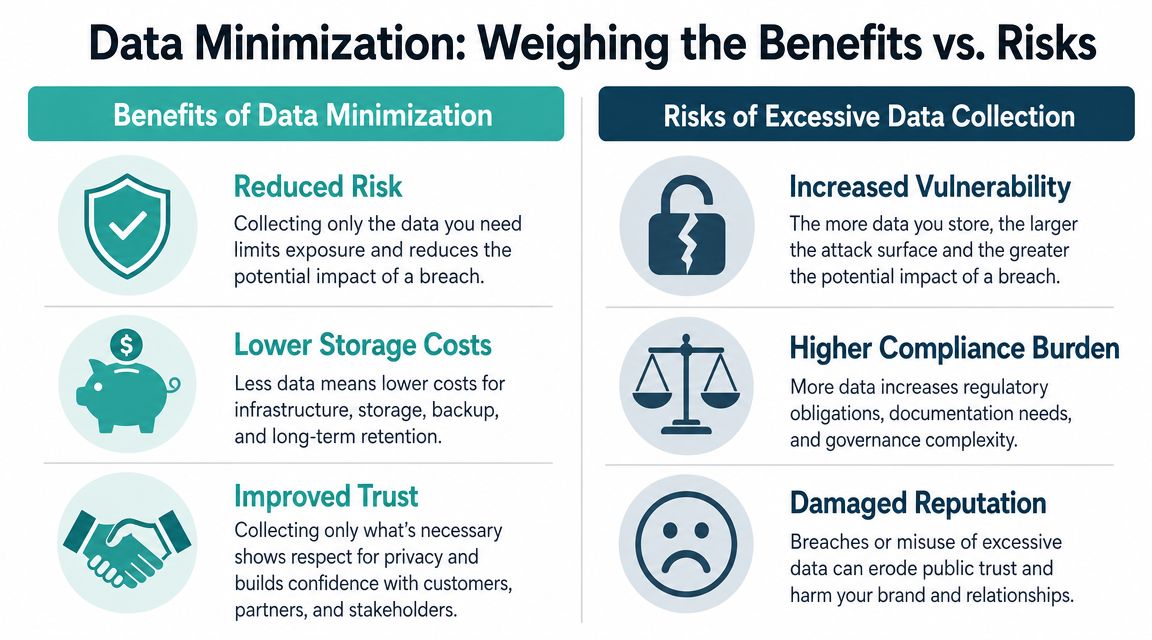
The most effective first move is data minimization. In plain English, that means collecting only what directly supports a real business purpose. Not what sounds useful. Not what might be interesting six months from now. What you can justify today.
What marketers usually get wrong
The common fear is that collecting less data will weaken targeting or make ROI harder to prove. The better view is more disciplined. Guidance for small-business marketing points out that more data is not automatically better. If you can't justify each field, you increase compliance, breach, and vendor-risk costs without necessarily improving outcomes ( practical discussion of data minimization in marketing from Braze).
That trade-off shows up everywhere in campaigns:
A home services company doesn't need every prospect's full profile to run local awareness ads. A dental office offering appointment scheduling may need contact details and scheduling preferences, but not a long intake form before trust is established.
A simple filter for every field
Before you add a field to a form or send data into a new ad tool, ask these questions:
What action depends on this field? If nobody can point to a campaign, workflow, or service decision, leave it out.
Could we still target effectively without it? Often the answer is yes. Broad audience intent plus local relevance beats bloated data collection.
Would we be comfortable explaining this to a customer? If the question feels awkward in plain language, it probably doesn't belong on the form.
How long do we need it? Data without a retention decision tends to stay forever.
Which vendors will receive it? Every extra system raises handling risk.
If a field doesn't change targeting, personalization, service delivery, or reporting, it's usually just extra liability.
Data minimization works in real campaign operations
For SMBs, the cleanest setup often looks like this:
Use shorter lead forms. Ask for what sales or service needs to make the next contact.
Separate marketing from fulfillment. Initial campaign forms can stay light. Deeper customer details can be collected later, when there's a clear service relationship.
Trim hidden collection too. Review CRM sync settings, ad platform integrations, and analytics events. Teams often remove visible form fields but still pass too much data through the backend.
Delete stale records. Old leads that never converted still create risk.
This discipline also improves list quality. Businesses that build audience trust from the start usually get cleaner consent and better engagement over time. If you're growing contacts the right way, Adwave's guide on building an email list from zero without buying lists is a useful companion because it aligns audience growth with permission-based collection.
Collecting less doesn't make your ads weaker. It makes your operation easier to defend.
How to Securely Store and Handle Customer Information
Once customer data is in your business, the question changes from "Should we collect this?" to "How do we keep it under control?" Many SMBs, however, overcomplicate this process. You don't need a giant security program to reduce real risk. You need a short list of controls that are applied consistently.
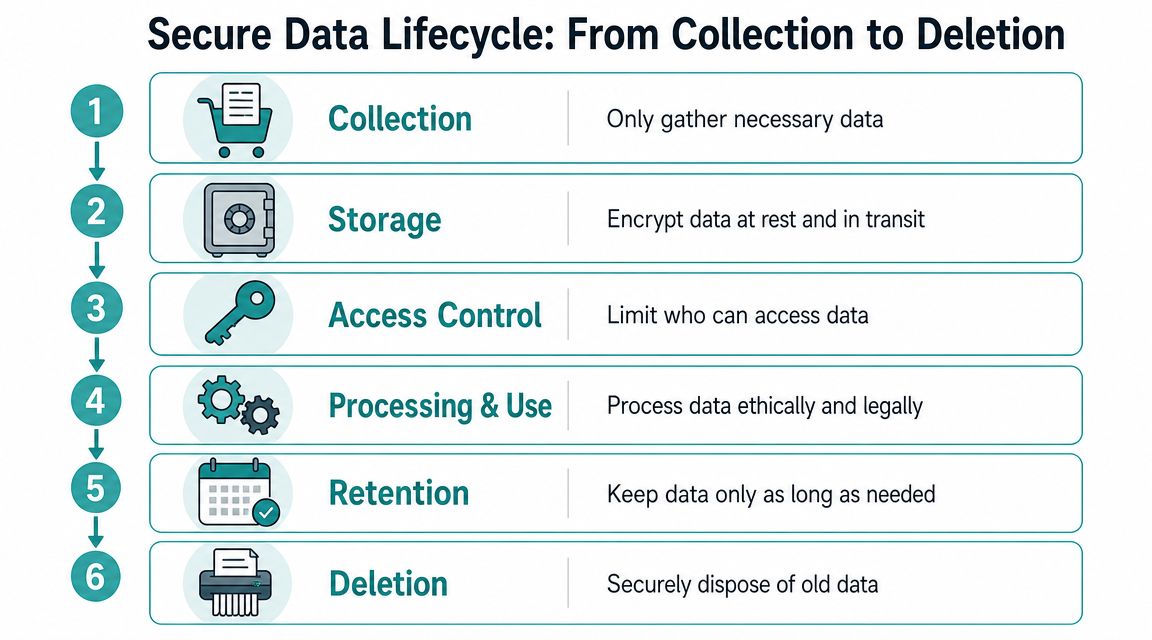
A practical protection program starts with asset and risk inventory, then moves through encryption, role-based access control, MFA, backups, and continuous monitoring. Common pitfalls include treating security as a one-time project, skipping staff training, and underestimating third-party risk ( stepwise protection guidance summarized by Lumenalta).
Start with your actual data map
Don't begin with tools. Begin with a list.
Write down where customer information lives today. For most SMBs, that includes a website form tool, CRM, inboxes, spreadsheets, cloud storage, payment-related systems, and one or more ad or analytics platforms. Then mark which systems hold direct identifiers, who can log in, and whether the data is still needed.
That one exercise usually reveals actual problems. A former contractor still has access. A spreadsheet with lead exports sits in shared storage. The sales inbox contains attachments no one remembers saving.
Focus on the controls that matter most
A small business doesn't need fifty security policies. It needs a few habits that are hard to bypass.
Encrypt stored and moving data. In practice, this means choosing tools that protect data at rest and in transit, then turning those protections on where settings are optional.
Use role-based access. A marketing coordinator may need campaign metrics and lead status, but not the ability to export your entire customer database.
Require MFA everywhere you can. Email, CRM, ad accounts, cloud storage, and admin dashboards should all use it.
Keep reliable backups. Backups matter for security incidents, accidental deletions, and corrupted records.
Review access on a schedule. People change roles. Agencies rotate staff. Access should shrink when responsibilities do.
A plain-English storage checklist
Here's the version I give owners who want the least complexity with the most payoff:
Field test: If a temporary contractor can download everything, your access model isn't finished.
Don't ignore website basics
Many data problems start before the CRM ever sees a lead. If your site, landing page, or form workflow is sloppy, secure downstream tools won't fix it. Basic website protections still matter because websites are often the front door for campaign traffic and form submissions. Adwave's resource on website security basics and SSL is a straightforward reference if you want a non-technical explanation of that foundation.
The biggest mistake here is thinking setup equals safety. Security drifts. New staff are added, tools change, settings get loosened for convenience, and nobody revisits the original decisions. The businesses that stay safer aren't always the most technical. They're the ones that review their systems before habits get messy.
Safely Partnering with Ad Platforms Like Adwave
Your internal controls matter, but they aren't enough. In advertising, customer data often passes through external platforms, analytics tools, call tracking software, creative vendors, and automation layers. If one of those partners handles data poorly, your business still carries the fallout.
The FTC's guidance is practical on this point. Businesses should investigate service providers' data-security practices, put expectations in writing, require incident notification, and maintain basics like access control, MFA, encryption, and timely deprovisioning. The same guidance also reflects a broader reality noted in security discussions. Data now flows through multiple processors, not just your own systems ( FTC business guidance on protecting personal information).
Vet vendors before the integration goes live
Most SMBs evaluate ad vendors on price, reach, and ease of use. Add a fourth category. Data handling.
Ask questions like these before you connect anything:
What customer data is needed? If the platform can't explain necessity, don't default to full sharing.
Who can access the data on their side? You want clear internal controls, not vague assurances.
What happens if there's an incident? Notification terms should be written down.
Can data be deleted when the relationship ends? Offboarding matters as much as onboarding.
Do they rely on other subprocessors? If so, you need visibility into that chain.
If you need a model for how written vendor obligations can be structured, reviewing resources like Helmsly legal documents can help you think more concretely about data processing terms, responsibilities, and incident language.
What a better marketing setup looks like
The safest ad operations usually share a few traits. They minimize direct handling of raw customer records, limit unnecessary exports, and avoid sending the same data into every tool just because an integration exists.
That matters in TV and digital advertising, where audience activation and reporting can involve several systems. A platform like Adwave fits this conversation because it gives SMBs a way to create, launch, and measure TV campaigns through one workflow rather than stitching together multiple disconnected vendors. If you're evaluating that channel, Adwave's overview of how to advertise on TV helps frame the operational side, not just the media side.
A vendor isn't low-risk because it's familiar. It's lower-risk when data sharing is limited, expectations are documented, and access can be revoked cleanly.
Don't confuse convenience with control
Easy integrations are useful, but they can hide risk. A one-click sync may copy lead data into places your team never reviews again. AI-enabled tools add another layer because input data may move through subprocessors you don't directly manage.
A sound rule for SMBs is simple. Share the minimum necessary, document the reason, and revisit the setup when your campaigns change. That approach is slower than clicking "connect all," but it creates fewer surprises later.
Navigating Compliance and Preparing for the Unexpected
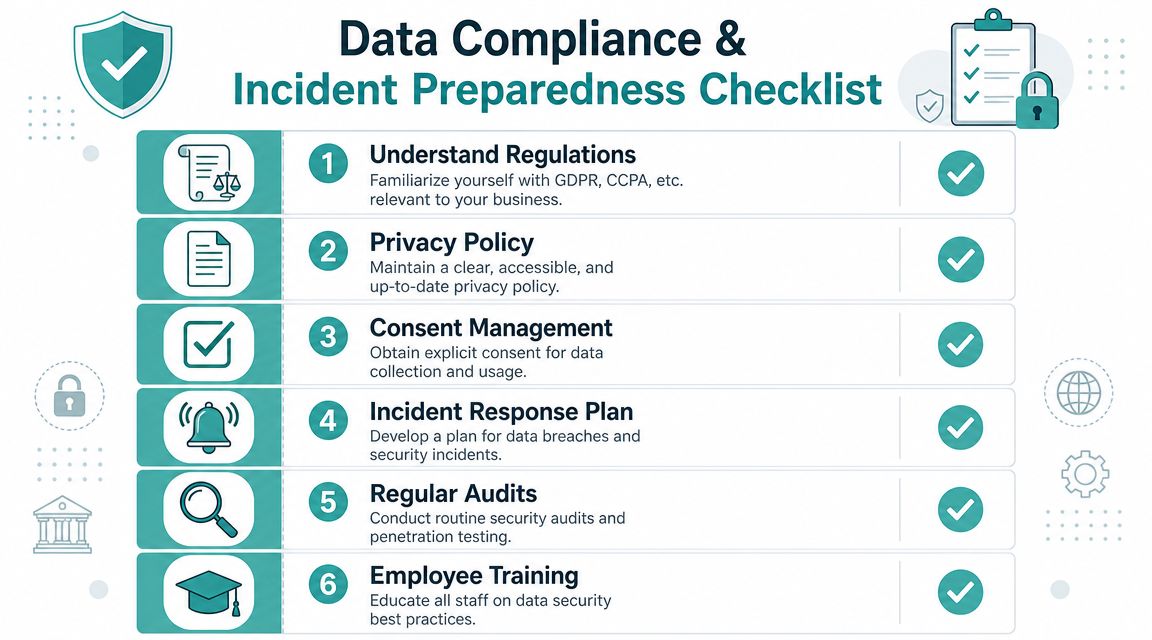
A lot of owners hear GDPR or CCPA and assume this is a problem for larger companies with legal departments. That's too narrow. Data protection rules now shape how businesses collect leads, manage consent, respond to deletion requests, and explain their privacy practices to customers.
This isn't a fringe issue anymore. As of early 2025, more than 140 countries have enacted data protection laws, and by 2026, 179 out of 240 jurisdictions had data protection frameworks covering roughly 80% of the world's population. GDPR fines have exceeded EUR 4 billion since May 2018 ( global data privacy law and enforcement summary).
Reduce compliance to the rules that affect daily marketing
For SMB ad campaigns, the legal situation becomes more manageable when you focus on a few operating principles:
Many businesses get in trouble because their policies say one thing and their workflows do another. A practical way to sanity-check your language is to review examples of public-facing privacy disclosures, such as Clickstera Solutions privacy, and compare that level of clarity to your own notices and consent flows.
Build a one-page incident plan
You don't need a thick binder. You need a short response plan that someone can follow under stress.
Include these items:
Who decides first. Name the owner, manager, or outside advisor who makes the initial call.
What systems get checked. Email, CRM, cloud storage, website forms, ad accounts, and vendor dashboards.
Who must be contacted. Internal staff, service providers, legal counsel if appropriate, and any affected vendor contacts.
What gets preserved. Logs, screenshots, timestamps, suspicious messages, and access history.
What staff should not do. Don't delete evidence, don't guess publicly, and don't let multiple people make conflicting statements.
How customer communication will be handled. Draft the responsible person and approval path in advance.
Response mindset: Speed matters, but clarity matters more. The first hour should focus on containment, access review, and preserving facts.
Keep compliance tied to operations
Compliance falls apart when it's treated as paperwork. It holds up better when it lives inside normal campaign workflows. That means consent wording gets reviewed when forms change. Retention gets discussed when a new CRM field is added. Vendor review happens before a tool is approved, not after a problem appears.
If your business also uses email and lead nurturing, Adwave's guide to CAN-SPAM and GDPR compliance for small business owners is a practical extension of these same principles.
The goal isn't to become a privacy expert. It's to run campaigns in a way that you can explain, support, and clean up if needed.
Embedding Data Protection into Your Business Culture
The businesses that handle customer data well usually don't talk about security in dramatic terms. They build small habits into normal work. New tools get reviewed before they're connected. Staff know where lead data belongs and where it doesn't. Old access gets removed without delay.
That's the authentic approach to running effective ads and protecting customer data. Not a single software purchase. Not a yearly compliance scramble. A set of repeatable decisions.
The habits worth keeping
A healthy culture around customer data usually includes:
Short staff reminders. People need simple guidance on forms, exports, shared folders, and suspicious account activity.
Periodic cleanup. Old lists, duplicate records, stale exports, and unused integrations should be removed.
Routine access checks. If someone no longer needs a system, they shouldn't still be in it.
Clear ownership. One person should know who handles privacy questions, vendor reviews, and incident coordination.
What lasts
Security controls can be installed quickly. Good judgment takes repetition. That matters in SMBs because the same person may oversee marketing, operations, vendors, and customer support in the same week.
The strongest long-term move is to make data restraint part of how the business thinks. Collect less. Share less. Keep less. Review more often. That mindset protects customers and reduces the odds that marketing growth creates silent operational risk.
Customers don't see your access control settings. They do notice whether your business behaves like a careful custodian of their information.
Trust steadily builds when a company handles data with discipline. Customers fill out the form, answer the follow-up call, and stay comfortable engaging with your brand because nothing feels careless. That's good security, and it's also good marketing.
If you want a simpler way to run TV campaigns without stitching together a complicated ad stack, Adwave gives small businesses one place to create, launch, and measure ads on premium channels while keeping campaign operations more centralized and manageable.


