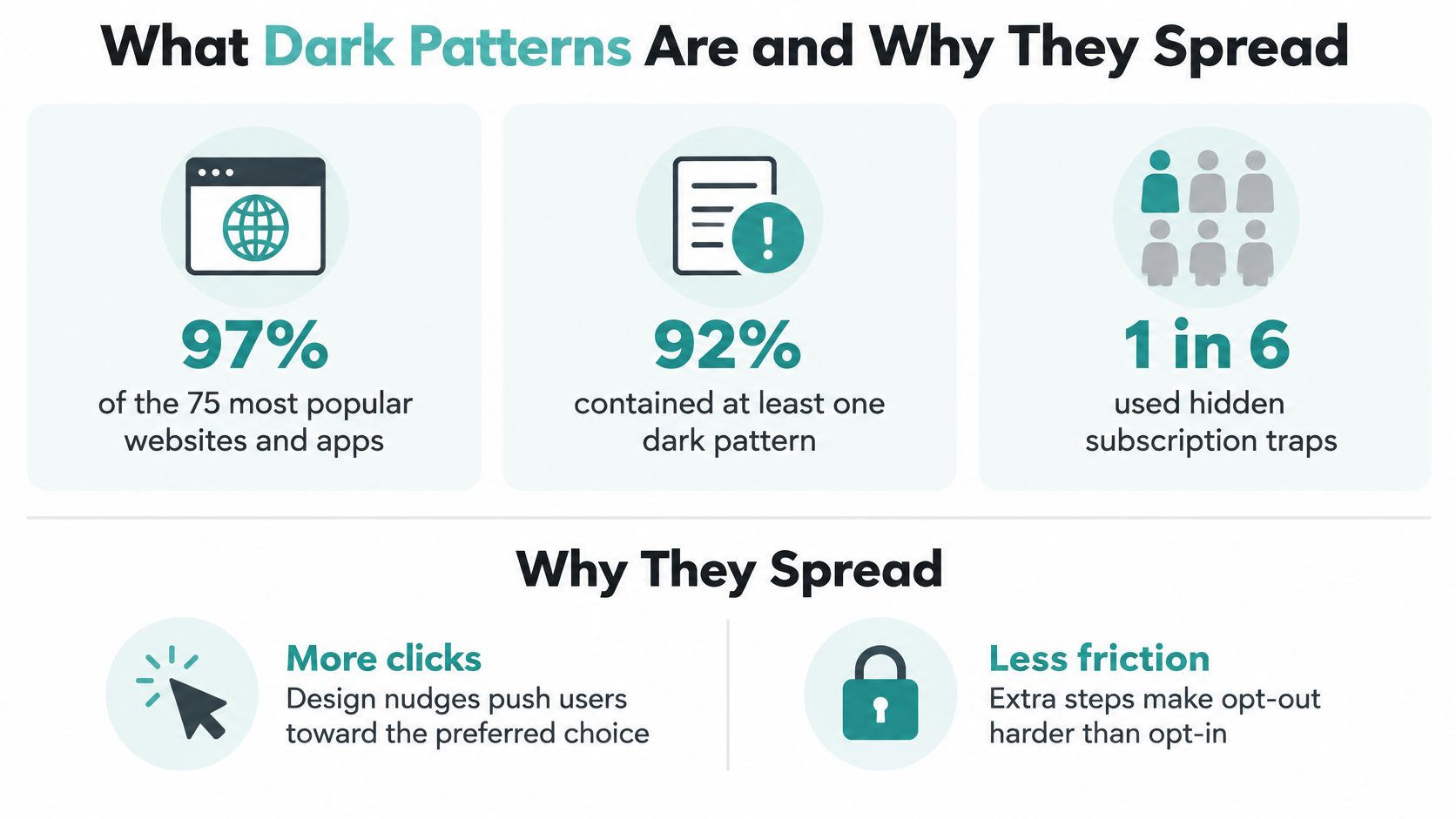
Nearly every mainstream site a customer already trusts is doing this. A 2022 European Commission behavioural study found that 97% of the 75 most popular websites and apps used by EU consumers employed at least one dark pattern. These are interface practices that can deceive, manipulate, or materially distort a person’s ability to make a free and informed decision. That number isn’t a warning about obscure scam pages. It’s a description of ordinary checkout, signup, and consent screens.
A local shop can copy those screens without meaning to. A prechecked add-on, a giant Accept button, or a cancel link buried three menus deep will lift the conversion rate this week and sour the next visit. Dark patterns in web design aren’t a style choice. They change what a person can see, and how many clicks the fair option costs.
What Dark Patterns Are and Why They Spread
Say a neighborhood clinic runs a “book a cleaning” page. The Book now button is large and teal. The price sits in small type under a collapsed “details” link. A checkbox for a recurring plan is already ticked. The clinic didn’t hire a manipulation specialist. Someone on the team liked a template because the form-fill rate went up. That is how the practice spreads: a layout that works on a famous site gets copied because the spreadsheet looks better.
The same pattern shows up far beyond one clinic. A coordinated 2022 European Commission sweep screened 399 websites and found that 148, about 37%, used at least one of three kinds of dark pattern: fake countdown timers, interfaces that steer people toward purchases or subscriptions, or subscription practices that make cancellation difficult. In 2024, ICPEN, with the FTC and the Global Privacy Enforcement Network, reviewed 642 subscription websites and mobile apps worldwide and found that nearly 76% used at least one possible dark pattern.
Think of a hardware-store aisle. The preferred drill sits at eye level on a short path from the door. The comparable drill, same warranty and a lower price, is behind a staffed counter at the back. Nobody blocked the fair choice. They made it slower, quieter, and easier to miss. A web screen does the same job with button size, default state, and extra steps.
Dark patterns change the information around a decision and the click cost of the alternative, so a high conversion rate can mix people who wanted the offer with people who were confused.
Why a strong click rate can lie
The preferred commercial outcome gets more visual weight, fewer steps, or a preselected state. The other option is grey, late, or expensive in time. Patterns also stack. One signup can hide a fee, nag after a refusal, and make the exit longer than the entrance.
A small team doesn’t need a law department to start. It needs a named list it can mark on its own pages, the same way a stock clerk marks which shelf is at eye level. Button words matter as much as button size, which is why website microcopy that converts belongs in the same pass as layout. The taxonomy below is that working list.
A Taxonomy of Common Dark Patterns
Open the live page before you read a case study. Mark every row that is present in the ad-click path, the form, checkout, the consent banner, and cancellation, on desktop and on a phone. One screen often fails several rows at once. A cookie banner can combine false hierarchy, nagging, and a trick question. A checkout can combine preselection, hidden information, and fake scarcity.
The OECD’s proposed regulatory taxonomy6/en/pdf) names the mechanisms a small team can see: preselection, false hierarchy, hidden information, misleading reference pricing, trick questions, disguised advertisements, confirmshaming, nagging, and obstruction. Use those names as row labels, not as accusations. For an advertiser such as Adwave, the same test applies upstream of the landing page. Budgets, targeting, creative choices, and performance data should be plain, not buried in defaults that steer a small business.
| Pattern | How it steers the choice | Fair alternative |
|---|---|---|
| Preselection | A business-friendly option is already selected | Leave optional boxes unchecked and require an affirmative choice |
| False hierarchy | The preferred action is large and colored while the alternative is a faint link | Give accept and decline equal size, contrast, and placement |
| Hidden information | Price, fees, or key terms appear only after commitment | Show the total and material terms before the user commits |
| Misleading reference pricing | A crossed-out or “was” price implies a saving that is not real | Use only prices the business actually charged recently |
| Trick question | Ambiguity or a double negative flips the meaning of yes | Ask one plain question with matching labels |
| Disguised advertisement | An ad is styled as editorial, search, or an independent review | Label paid placement clearly before the click |
| Confirmshaming | Decline copy insults or guilt-trips the user | Use neutral labels such as No thanks |
| Nagging | Repeated prompts wear the user down after a refusal | Accept the refusal and limit further prompts |
| Obstruction | Cancel, pause, or opt-out takes more screens than signup | Make exit no longer than enrollment |
| Fake scarcity | A timer or stock claim is not tied to real inventory or a real deadline | Show urgency only when the limit is true and verifiable |
How to mark a live page
Print the table or keep it in a notes doc. Walk each flow once as a new visitor and once as someone trying to leave.
Defaults. If a box is ticked before the person acts, mark preselection. Optional consent, insurance, and “email me deals” start empty.
Weight. If Accept is a filled button and Reject is a grey sentence, mark false hierarchy. Equal size, contrast, and placement is the fix, not a smaller gap.
Money and meaning. If the total, the renewal, or the fee appears after the person has already committed time, mark hidden information. A crossed-out price counts only when that price was recently charged. A double negative (“uncheck to not decline”) is a trick question even when a lawyer could parse it.
Pressure after no. Insulting decline copy is confirmshaming. A second and third modal after a clear refusal is nagging. Email pop-ups that convert without annoying your visitors show the difference between one timely ask and a loop.
Exit and urgency. Count screens to join and screens to cancel. If leaving is longer, that row is obstruction. A timer or “only 2 left” is fake scarcity unless inventory and the end time are real and a customer could verify them.
Mark the row, don’t debate the motive yet. Motive is the later pass. The first pass is whether the preferred outcome is shorter, louder, or already chosen.
Famous Interfaces That Steered the Choice
The U.S. Federal Trade Commission alleged that ABCmouse required consumers to pass through six to nine screens to cancel memberships. People couldn’t skip a screen or cancel without visiting each one. Every screen held multiple links and buttons that could pull them off the cancellation path. Joining was comparatively easy. Leaving was a maze built to create fatigue and abandonment.
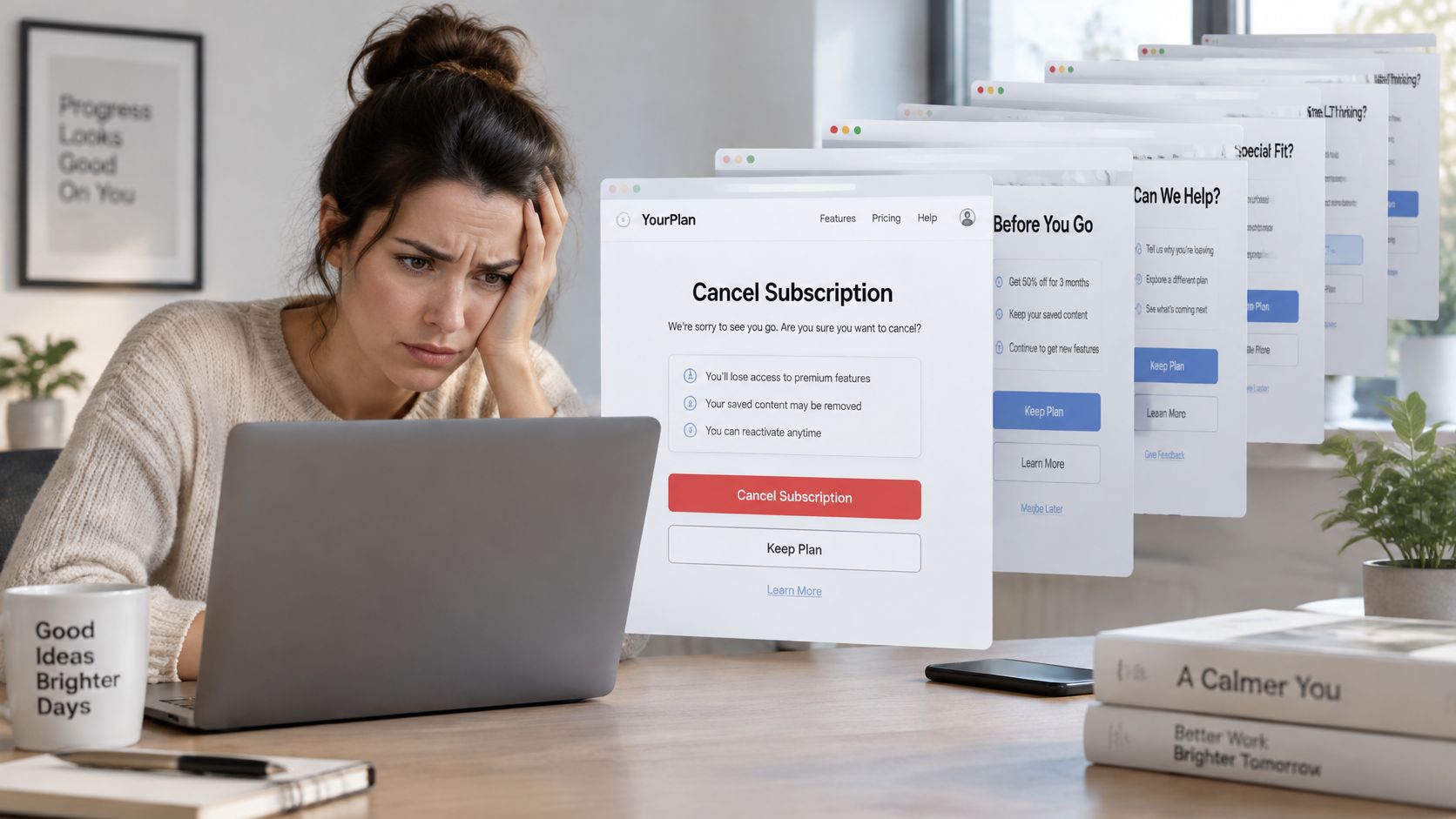
Picture the screen, not a logo. A narrow column of text, a primary button that says “Keep my membership,” and a text link for cancel tucked under unrelated offers. The decision being distorted is whether to stop paying. The extra clicks aren’t information. They’re chances to wander off. When a parent notices after another charge, trust doesn’t dip for a week. It ends the relationship.
Three scenes a local business will recognize
A prechecked warranty at checkout. A bakery’s gift-box page adds a $4 protection plan that is already ticked. The decision is whether to buy coverage. The hidden term is a fee the buyer didn’t choose. If they notice on the card statement, they don’t argue about pastries. They argue about being charged for something they never picked.
A cookie banner with one real button. Accept all is a solid block. Reject sits inside “manage settings,” then behind a second scroll. The decision is whether tracking is on. The extra clicks punish the person who wants less sharing. After they realize the banner was a shove, they treat the next email from that shop as spam.
A ten-minute timer on an offer that never ends. A service page shows “deal expires in 10:00” even though the price is the same tomorrow. The decision is whether to book now. The hidden term is that the deadline is theater. Once a regular customer refreshes and sees the clock reset, every later “limited” line from that business reads as noise.
A strong call to action is not any of these scenes. “Book the Thursday slot, three left” is fair when three slots are open and Thursday is a real end. “Join” beside an equally visible “No thanks” is persuasion. A dominant join button and a guilty decline line is not.
Transparent workflows point the other way. Adwave’s stated process for generating, launching, and tracking campaigns makes the key actions and the campaign controls easier to understand, instead of stacking screens between a business and a pause.
Legal Ethics and Access Barriers
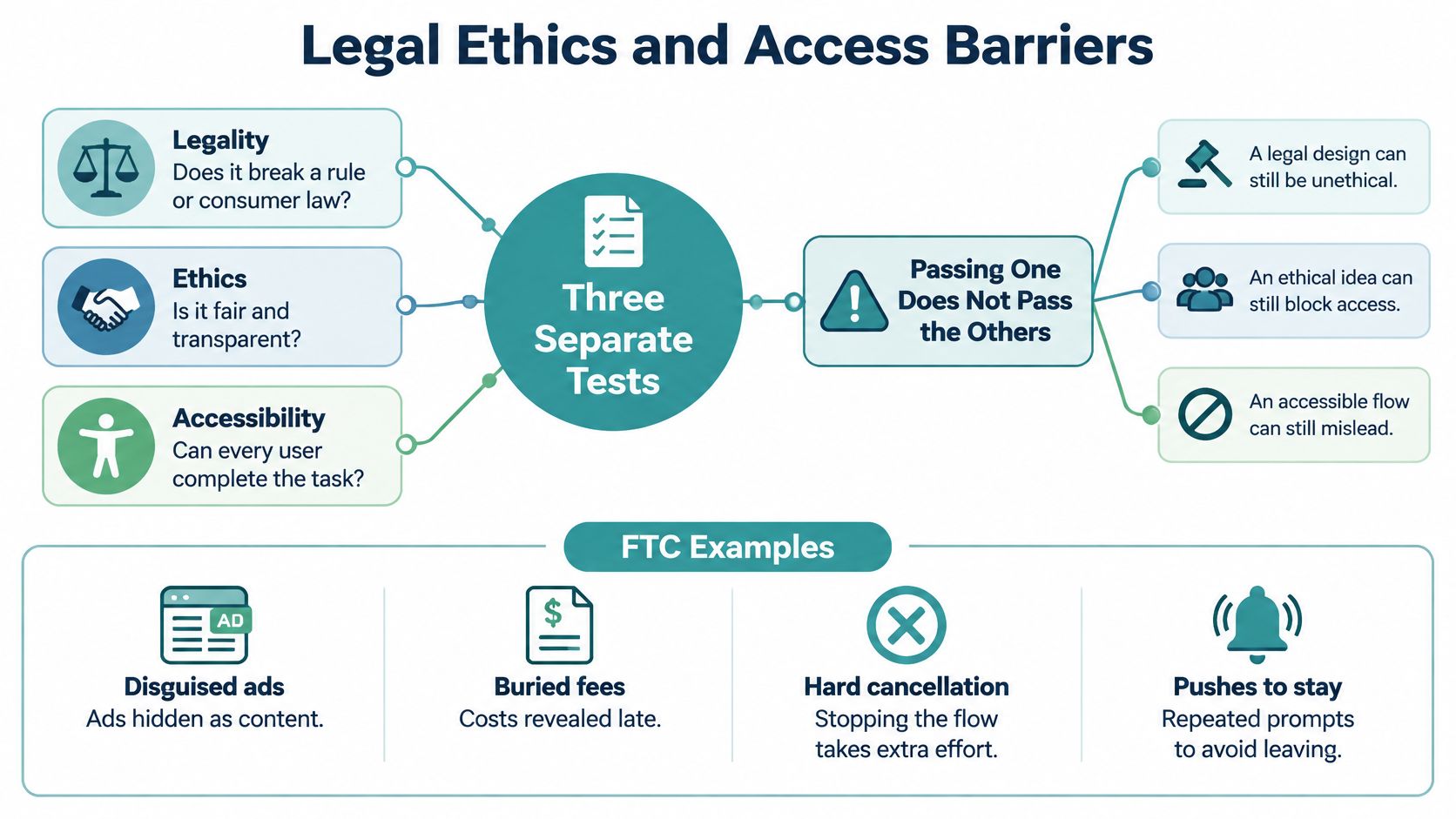
Legal, ethical, and accessible are three different tests. Passing one doesn’t pass the others. A screen can be lawful and still steer. It can be kindly worded and still impossible to finish with a keyboard. It can be readable by a screen reader and still hide the price.
The practical standard is simple, and it isn’t the full audit yet. Count the steps to enroll and the steps to cancel. Then read the same screen as an older customer and as someone who isn’t a native speaker of the page’s language. If either person can’t state the deal, the screen failed a test the statute didn’t ask.
A 2025 synthesis of definitions examined 262 definitions and proposed an ontology covering 65 dark-pattern types. That spread is why a short privacy checklist misses the harm. The same paper’s legal summary notes that the FTC’s amended Negative Option Rule was designed to require cancellation at least as easy as enrollment, and that a 2025 court decision vacated the rule on procedural grounds. Broader FTC Act, ROSCA, and state-law risks remain. Compliance is a floor, not proof that the choice was free.
| Reference point | 2026 status | Design duty that remains |
|---|---|---|
| FTC Act consumer protection | Designs that obscure or impair choice can still raise enforcement concern | Do not disguise ads or bury material terms |
| ROSCA | Still relevant to online negative-option and subscription sales | Disclose the deal clearly before the charge |
| Amended Negative Option Rule | Vacated in 2025 on procedural grounds | Still make cancellation no harder than enrollment |
| State consumer laws | Broader risk remains alongside federal law | Check the states where the business actually sells |
| EU enforcement record | 2022 sweep flagged dark patterns on 148 of 399 sites | Expect scrutiny of timers, steering, and hard cancel paths |
Who the same screen fails
Low contrast, a preselected box, a moving timer, and unequal buttons get harsher under real conditions. A screen reader may announce the marketing button and skip the faint decline link. Keyboard-only users tab through every decoy before they reach cancel. Browser zoom at a large size can push the fee line below the fold. A translated page can turn a double negative into nonsense. A slow phone connection can load the bright button first and the disclosure never.
Practical rule: If enrollment is two taps and cancellation is a phone call during office hours, the interface is manipulative for anyone with less time, less literacy, or less reliable tech, whether or not a regulator has written you a letter.
Local advertisers feel this first. An AI-generated page can look neutral and still pile friction on older customers, non-native speakers, and people using assistive tech. Pair the visual check with a website accessibility and ADA compliance pass, and point customers who are already stuck toward a plain guide to ending recurring subscriptions so the exit exists somewhere even while you shorten your own.
Trust Costs for Small Business Advertising
Move from the customer’s screen to the business buying the click. A dark pattern can make cost per lead look healthy while the books get worse. Refunds rise. Complaints rise. People who meant to opt out open tickets instead. Support absorbs the “win.” Repeat visits don’t.
The FTC’s dark patterns report treats disguised ads, buried terms or fees, hard cancellation, and pushes to share data as tactics that can trick people into actions they wouldn’t otherwise take. The technical failure is a mismatch. The big button promises one result. The fine print, the secondary control, or the default produces another. Conversion rate alone can’t prove a healthy campaign, because it mixes voluntary decisions with accidental clicks, misunderstood consent, and people who abandoned a cancellation path.
What to count instead of the lead
Instrument the flow, then segment by device, traffic source, and whether the person is new or returning.
- Impression and disclosure. Did they see the offer, and did they open the fee or renewal text?
- Consent and confirmation. Which choice did they make, and did they confirm it?
- Reversal. Did they undo the add-on or the signup in the same session?
- Cancellation. Count the attempt and the successful cancel separately. A high attempt rate with a low success rate is a stuck door.
- After the click. Complaint rate, refund requests, opt-out completion, support escalation, and whether they come back.
Disguised ads and invented social proof train people to ignore local advertisers. That hurts the restaurant, the clinic, the dealer, the shop, and the agent, because those businesses live on being believed twice. A cleaned-up landing page is half the repair. The other half is buying attention in a place that doesn’t need a fake timer.
Adwave is built for that second half. A business enters its website URL, and Adwave’s AI generates a broadcast-ready spot. The campaign can run across 100+ premium channels, including NBC, Hulu, and ESPN, without a production crew. Campaigns start at $50. Pacing won’t exceed the spend the business sets. Estimated cost is $15 to $35 CPM, with audience and viewing data used to reach local viewers. Budgets, targeting, creative choices, performance, and pause controls stay visible, and AI-generated creative should be clearly labeled. That is persuasive marketing without a disguised button.
Local results line up with plain reach rather than coerced clicks. Kaimuki Dental reported 150% client growth in five weeks. Farrow Harley-Davidson, Mountain Burger, and Kenny Patton Real Estate reported gains in revenue or reach after the same kind of local TV placement. The page still has to tell the truth. The ad just doesn’t have to trick anyone to earn the visit.
How to Audit, Fix, and Launch a Conversion Flow
A conversion flow is a small machine: each screen sets a state, offers choices, and attaches a cost to each choice. A resource-thin team can audit it without a UX department. Write down what happens at each step, then have a person check whether the claims are true.
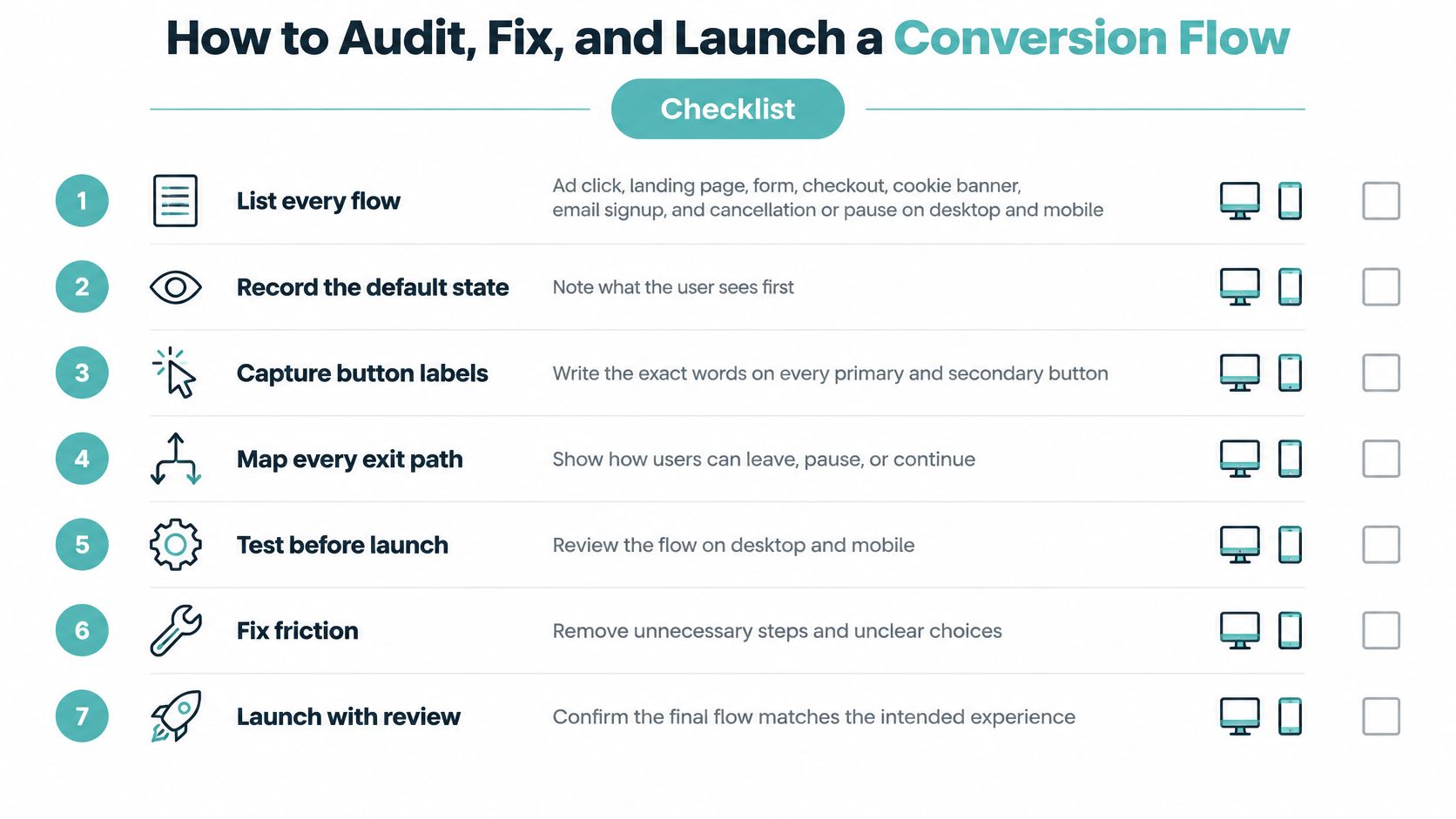
Six steps, in order
- List every flow. Include the ad click, landing page, form, checkout, cookie banner, email signup, and cancellation or pause. Check each on desktop and mobile. A control that is easy to spot on a wide monitor can be buried on a phone.
- Record the machine. For each flow, note the default state, exact button labels, when price and terms appear, the clicks required for yes and no, and whether the choice can be reversed. If yes takes one click and no takes four, the imbalance is clear.
- Mark the rows, then check the facts. Tick each taxonomy row that applies. Verify scarcity, testimonials, and prices against actual inventory, deadlines, and customers. A timer with no end in the booking system is misleading, however polished it looks.
- Retest the hard paths. View the page at 200 percent zoom, use a keyboard only, and try a screen reader if available. Test translation and a slow connection, too. Check whether an older customer or a non-native speaker can complete the honest path, not whether the brand colors match.
- Track intent separately from mistakes. Log impression, disclosure open, consent choice, confirm, reversal, cancel attempt, successful cancel, support contact, and refund. Segment by device and traffic source so a misclick from one ad does not disappear inside a blended conversion rate. Form optimization for conversions can help shape shorter forms, but keep every field clear about what it asks and why.
- Repair the imbalance. Give accept and decline equal prominence. Leave optional consent unchecked. Show the total before commitment, and make cancellation no harder than signup. Automated checks can flag common interface signals, such as scarcity cues on shopping pages. A person still needs to judge the context, intent, and truth of each claim.
AI-generated pages and the pass rule
Use the same six steps for an AI-generated landing page. A neutral-looking layout can still hide a preselected plan, a stock-photo testimonial, or urgency copy the model invented because it resembles other landing pages. Read every claim aloud. If you cannot tie it to inventory, a deadline, or a customer, remove it.
Pass rule: A stranger can state the price, the commitment, and how to leave without hunting.
Before launch, check three things: the ad and page show the same price; decline labels are neutral; and analytics distinguish real leads from misclicks by recording reversals and refunds, not just form fills.
For attention beyond the landing page, Adwave offers a practical next step. Its audience targeting uses audience data and viewing patterns to reach local viewers, while real-time performance tracking shows how a campaign is doing.
Adwave turns a website URL into a broadcast-ready TV spot for premium channels. Its campaigns start at $50, and automatic pacing keeps spend within the budget a business sets. Visit Adwave to create a spot, choose an audience, and track campaign performance.