
You launch a new campaign, see traffic come in, and then watch most of it leave without booking, calling, or filling out a form. That happens to local businesses every day.
The frustrating part is not the traffic. It is the wasted intent. Someone saw your brand, visited your site, looked around, and disappeared before you had a way to follow up.
Time pop-ups so visitors can read the page first. Make the offer relevant to what they are viewing and explain what they will receive when they subscribe.
From Traffic to Leads The Untapped Power of Smart Pop-Ups
A lot of small business sites have the same leak in the funnel. The ad works. The landing page gets visits. A few people convert. Most do not.
That matters more when your traffic is expensive or hard-won. If someone arrives after seeing your business mentioned offline or after a local awareness campaign, you may not get a second chance to reach them unless you capture an email address the first time.

A smart pop-up solves that problem by creating a low-pressure next step. Instead of asking every visitor to commit to a consultation, quote request, or property tour right away, you offer something lighter. A checklist. A local guide. A coupon. A first-time visitor offer. A market update. A reminder list.
The baseline case for using them is still strong. In 2025, analysis of 1.24 billion email popup displays found an average conversion rate of 2.1%, while gamified formats such as Wheel of Fortune popups reached 3.5%, a 41% relative lift over standard popups ( Omnisend). That does not mean every business should spin up a wheel. It means visitors respond when the value exchange is obvious.
Why this matters for local business websites
A dentist does not need every site visitor to book immediately. A real estate agent does not need every page view to become a showing request. A home service company does not need every visitor to call on the spot.
They do need a way to keep the conversation going.
That is why pop-ups belong inside a broader website conversion optimization strategy. You are not adding a pop-up because it is fashionable. You are adding it because people need a smaller commitment before they are ready for the big one.
What a good pop-up really does
A good pop-up acts like a polite front-desk prompt:
It appears after interest is visible, not the instant someone lands.
It offers something specific, not “join our newsletter.”
It respects the visitor, with a clear close button and simple copy.
It captures follow-up permission, which gives your traffic a second life.
If your website gets attention from awareness campaigns, your pop-up should bridge curiosity and action. That is the job.
If you need a practical next step after capturing that first subscriber, this guide on building a list from scratch is useful: https://adwave.com/resources/how-to-build-an-email-list-from-zero-without-buying-lists
Understanding the Visitor Mindset Annoyance vs Value
Visitors do not hate pop-ups by default. They hate bad timing, weak offers, and irrelevant asks.
The question is simple. When the pop-up appears, does the visitor think, “This helps me,” or “This is in my way”?
Relevance changes the reaction
A first-time visitor has different questions than a returning one. New visitors are still deciding whether they trust you. Returning visitors may already know their brand and need a nudge to act.
That distinction shows up in performance. 2026 data found that targeting new visitors with a welcome offer produced an 8.30% conversion rate, compared with 5.09% for returning visitors ( Wisepops). The practical takeaway is not “show more pop-ups.” It is “match the message to the moment.”
A first-time visitor on a med spa site may respond to a “what to expect” guide. A returning visitor may respond better to a consultation prompt. A first-time visitor on a real estate page may want a neighborhood report. A returning visitor may want instant listing alerts.
The value exchange has to be obvious
Most annoying pop-ups fail because they ask for an email without earning it.
“Subscribe for updates” is weak. “Get this week’s local open house list” is stronger. “Join our newsletter” is vague. “Get a first-visit offer sent to your inbox” is clear.
People decide fast. They want to know:
What am I getting
Why should I care
Is this worth interrupting what I was doing
Can I close this easily if I am not interested
If your offer is generic, even clean design will not save it.
What feels annoying in practice
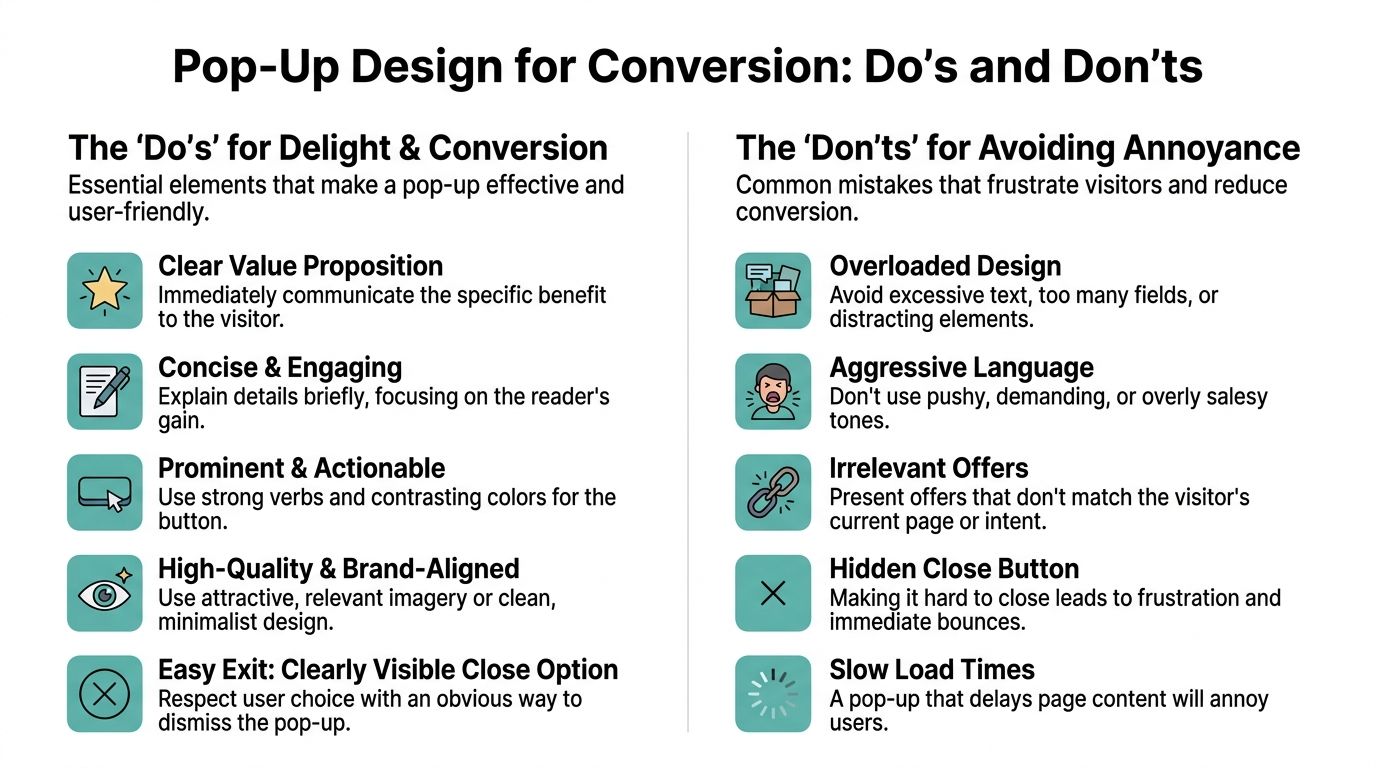
Annoyance usually comes from one of these mistakes:
The ask comes too early. The visitor has not had time to understand what you do.
The offer does not match the page. A coupon on an informational article can feel random.
The copy sounds demanding. Pushy language creates resistance.
The form asks for too much. Every extra field adds friction.
The exit is hidden. If people feel trapped, trust drops fast.
What feels helpful instead
Useful pop-ups behave more like a concierge than a closer.
A service business can offer a seasonal maintenance checklist. A dealership can offer inventory alerts. A retail store can offer a first-order incentive. A local clinic can offer a preparation guide before a consultation.
A pop-up becomes welcome when the visitor would have reasonably looked for that offer anyway.
The mindset shift is important. Stop treating the pop-up as a tool to force action. Treat it as a tool to reduce hesitation.
Designing Pop-Ups That Delight and Convert
Most pop-ups fail before the visitor reads a word. The design looks cluttered, the copy rambles, and the call to action feels uncertain.
The strongest pop-ups are simple. They communicate one benefit, ask for one action, and look like they belong on the site.
Build around one promise
Start with the promise, not the form.
If you run a local business, the offer should answer a real question or remove a real barrier. Your visitor should understand the benefit in a glance.
Good examples:
Real estate. Get this month’s neighborhood market report
Dental practice. Get your new patient guide before your first visit
Restaurant. Join our VIP dinner club for special event invites
Home services. Get a seasonal home maintenance checklist
Automotive. Be first to know about incoming inventory and service specials
Weak examples:
Sign up for updates
Join our email list
Stay in the loop
Those are business-centered messages. High-converting pop-ups are visitor-centered.
Keep the copy short and direct
A practical structure works well:
Headline with the core benefit
One or two lines explaining what the visitor gets
Single field, usually email first
CTA button that finishes the sentence
For example:
Headline Get the latest homes in [Neighborhood]
Body copy Receive new listing alerts and a quick local market update in your inbox.
CTA Send me alerts
That reads clearly and feels specific.
Use the C-A-R lens on your headline
When writing headlines, use Clarity, Action-Oriented language, and Relevance. That gives you a cleaner way to judge whether the message will land.
You do not need a copywriting workshop for this. Ask three questions:
Is the benefit obvious?
Does the button invite action?
Does this match the page the visitor is on?
This is also where testing pays off. A/B testing can improve click-through rates by a minimum of 5% when you systematically vary headlines and offer types, and discount codes often perform as top-converting incentives ( Strikingly).
Pop-up copy templates for local SMBs
Here are templates you can adapt.
For a real estate agent
Headline Track home prices in [Area]
Body Get a local market report and new listing alerts sent to your inbox.
CTA Get the report
For a restaurant
Headline Join our VIP dinner club
Body Be first to hear about tasting nights, chef specials, and limited reservations.
CTA Join the club
For a dental office
Headline New patient? Start here
Body Get our first-visit guide, appointment tips, and helpful reminders by email.
CTA Send my guide
For a home services company
Headline Get your seasonal home checklist
Body Helpful maintenance reminders for homeowners in your area.
CTA Email me the checklist
Design choices that reduce friction
The visual side matters, but not because it needs to be flashy.
Use these rules:
Match the site branding so the pop-up feels native
Use one image or none. Decorative clutter hurts more than it helps
Make the close button obvious
Avoid multiple fields at first
Use enough contrast on the CTA button so it stands out immediately
A local business site does not need award-winning design here. It needs clarity and calm.
If the pop-up looks like a separate ad unit pasted onto your website, visitors will treat it like one.
Strategic Timing and Targeting for Maximum Impact
The right offer shown at the wrong moment still feels intrusive. Timing and targeting do most of the work.
For small businesses, pop-ups facilitate a transition from generic list building to actual lead capture. A site visitor coming from a homepage search is different from a visitor landing on a specific service page after seeing an offline ad.

Choose the trigger based on intent
Different triggers fit different goals.
Time delay
A time delay works when a visitor needs a few moments to orient themselves. This is often the safest default for service businesses.
Use it when the page introduces your business, offer, or service.
Scroll depth
Scroll-based triggers fit educational pages, FAQs, and long service content. If someone keeps reading, they are engaged enough to consider a related offer.
This works well for guides, market updates, treatment pages, and buying tips.
Exit intent
Exit intent is useful when you want one last chance to convert a visitor who is about to leave. It performs best when the offer matches the page they were viewing.
Standard exit-intent popups convert at an average of 3% to 5%, and they can rise to over 10% for email list growth when the offer is a value-aligned content upgrade tied to the page the visitor is leaving ( Conversion Sciences).
That distinction matters. A generic discount is one thing. A highly relevant offer is another.
A few examples:
A visitor leaving a cosmetic dentistry page sees “Get our smile makeover guide”
A visitor leaving a real estate listing page sees “Get new listings in this ZIP code”
A visitor leaving a roofing service page sees “Download our storm damage checklist”
Page-level targeting beats site-wide pop-ups
Many businesses create one pop-up and show it everywhere. That is easy to launch and hard to optimize.
A better setup matches the page:
Local businesses often unlock the biggest improvement with this approach. Relevance lowers resistance.
Use campaign-specific targeting for offline traffic
If you are running awareness campaigns and sending people to a dedicated landing page, your pop-up should continue the same story.
That means:
Use the same language as the campaign
Offer something related to the page topic
Keep the ask small on first touch
Segment those leads separately later
If you want a good follow-up framework for that, this resource on segmentation is worth saving: https://adwave.com/resources/email-list-segmentation-sending-the-right-message-to-the-right-people
The cleanest pop-up strategy is simple. Match the trigger to intent, and match the offer to the page.
Simple A/B Testing and Metrics for Local Businesses
You do not need a full experimentation program to improve pop-ups. You need a repeatable way to test one meaningful variable at a time.
Review pop-up performance regularly. Test the offer, timing, and frequency, and remove prompts that visitors consistently dismiss. (Immerss)
Test the parts that influence decisions
Start with the elements that shape the first impression.
Do not test all of these at once. Pick one.
If your offer is weak, changing the button color will not fix the campaign. If the offer is strong, a headline rewrite may unlock more signups.
Watch a few metrics, not everything
Small businesses usually overcomplicate this. Track the handful of signals that affect revenue.
Focus on:
Pop-up conversion rate. Are visitors subscribing?
Lead quality. Do those subscribers book, buy, or respond later?
Page behavior after launch. Are people bouncing faster, or continuing to browse?
Offer fit by page. Which pages produce the best subscribers?
That last point matters more than many owners expect. A pop-up can collect emails and still be low quality if the offer attracts curiosity but not buying intent.
A practical testing rhythm
A simple rhythm keeps this manageable:
Launch one pop-up with one page-specific offer.
Let it collect enough activity to spot a pattern.
Change one variable only.
Keep a short log of what changed and what happened.
Roll the winner into your next page.
That process is enough to improve steadily.
For teams already building their email follow-up, this companion guide on testing messages after signup is helpful: https://adwave.com/resources/a-b-testing-emails-what-to-test-and-how-to-measure-results
The point of A/B testing is not to chase perfection. It is to avoid guessing.
Your Implementation Checklist for High-Converting Pop-Ups
A pop-up should not be the first thing you build. It should be the final layer on top of a clear offer and an usable page.
When business owners struggle with pop-ups, the issue is rarely the software. It is usually one of three things. The offer is vague, the timing is off, or the message does not match the page.
Launch checklist
Use this before you publish anything.
Define one goal. Email capture, consultation prep, coupon signup, listing alerts, or resource download.
Pick one audience. New visitors, readers on a certain page, or visitors about to leave.
Choose a real offer. Give people something they would reasonably want in exchange for their email.
Write a direct headline. Make the benefit visible without clever wording.
Keep the form light. Start with email only unless you have a strong reason to ask for more.
Create a clear CTA. Use language that reflects the value of the offer.
Set one trigger. Time delay, scroll depth, or exit intent.
Target the right pages. Avoid broad site-wide deployment at launch.
Make closing easy. Respecting the visitor improves trust.
Test one variation next. Pick headline, offer, trigger, or format.
What good implementation looks like
A roofing company might place a checklist offer on storm damage pages. A real estate team might offer neighborhood alerts only on local listing pages. A restaurant might invite menu visitors into a VIP email list for special events and seasonal offers.
Those are all different executions, but the principle is the same. Relevance first, friction second, follow-up third.
Do not stop at the signup
The pop-up is only the hand-raise. Your welcome email sequence turns that moment into a lead, appointment, or sale.
That is where many businesses lose momentum. They collect the email and then send nothing useful, or they wait too long.
A smart next step is to map the subscriber journey before launch. This resource gives a solid starting point for that follow-up sequence: https://adwave.com/resources/welcome-email-sequences-that-turn-subscribers-into-buyers
If you apply the ideas in this guide, Email Pop-Ups That Convert Without Annoying Your Visitors stop being a design debate and become a practical conversion tool. They help you get more value from the traffic you already worked to generate, without turning your site into a nuisance.
If you are investing in awareness and want more from every visit, Adwave is a smart fit. It helps small businesses launch AI-powered TV campaigns without the usual production cost or complexity, then send that new traffic to pages that can capture and nurture leads. Pairing strong post-click conversion tactics with broader local reach gives you a cleaner path from visibility to measurable growth.


