A local customer opens an email from your business between errands. The message says “Hello there,” promotes a product that’s unavailable nearby, and sends them to a generic homepage. Nothing is technically broken, but the email misses the moment. Generic email often asks the reader to do the work of finding relevance.
Personalization doesn’t require an expensive data-science project. It starts with practical decisions about what you already know, such as a subscriber’s location, recent click, purchase history, device, business type, or preferred content. The best email personalization examples connect one useful signal to one clear action, then measure whether the message earns attention without compromising permission or trust.
The eight examples below move from subject lines and recommendations to behavioral triggers, lifecycle stages, location, devices, industries, and engagement. Each includes adaptable copy, setup constraints, testing ideas, and applications for small and local businesses. Adwave can complement these efforts by extending personalized audience targeting beyond email through broadcast-ready TV advertising, helping a business build awareness before email follow-up continues the journey. You can also explore Landra’s product page for another example of how a focused digital experience can support conversion.
1. Dynamic Subject Lines Based on Recipient Behavior {#1-dynamic-subject-lines-based-on-recipient-behavior}
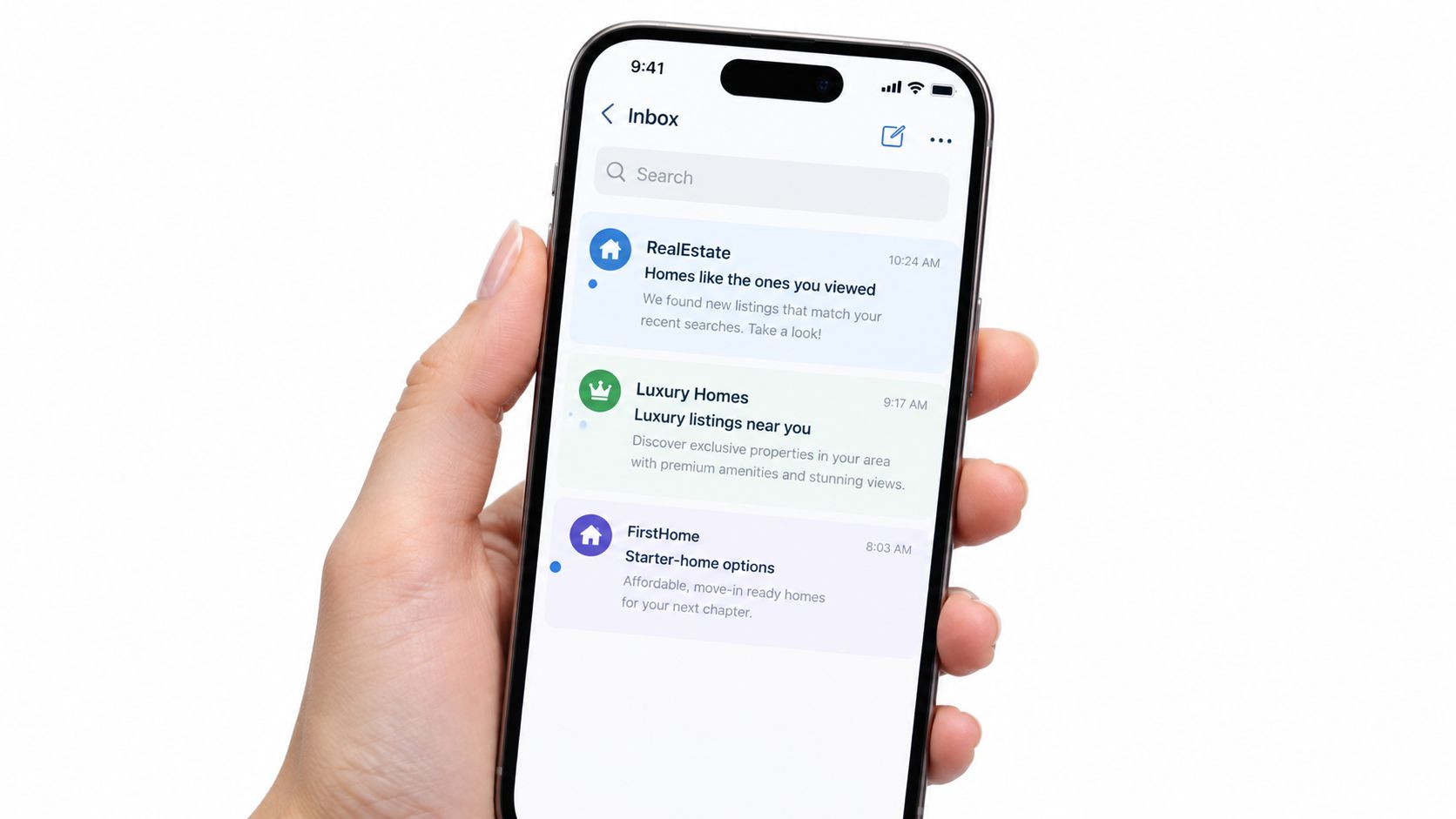
A subject line should reflect the recipient’s current interest, not just contain their first name. A real estate agent might send one version to prospects who viewed luxury listings and another to people browsing starter homes. The copy changes because the next decision changes.
Try variations such as:
- “New homes near the neighborhoods you saved”
- “Three larger homes with the features you viewed”
- “Starter homes just listed in your preferred area”
Amazon can reference previously browsed items, Netflix can highlight viewing preferences, and Spotify can surface artists or genres that match listening behavior. A local business can apply the same principle with simpler data. A furniture store might separate contacts who clicked sofas from those who viewed dining tables. A service company could distinguish homeowners who read about emergency repairs from those exploring routine maintenance.
Practical rule: Personalize the promise only when the email delivers the matching content immediately.
Start with segments based on recent clicks, purchases, or conversions. Don’t build a complex scoring model before confirming that the underlying events are recorded accurately. Your email platform must support dynamic fields or separate audience versions, and every fallback value needs testing. A missing name or stale interest can make a personalized subject line look careless.
Personalized subject lines are reported to be 26% more likely to be opened than non-personalized subject lines, according to research on personalized email strategies. Treat that as a reason to test relevance, not permission to overuse personal details.
Test several behavioral variations against a control, then review opens, clicks, conversions, and unsubscribes by segment. Adwave’s guide to email subject line formulas is useful when you’re pairing a recipient signal with a clear benefit. The strongest version might not mention the behavior directly. “Your next home project starts here” can feel more natural than “We saw you browse bathroom renovations.”
2. Personalized Product Recommendations in Email {#2-personalized-product-recommendations-in-email}
A recommendation email works when it answers a practical next question: what should this customer consider now? A neighborhood café can suggest a pastry alongside a previously ordered coffee. A local apparel shop can show accessories that complement a recent purchase. A service business can recommend a related appointment, such as tire rotation after a seasonal tire change.
Start with explicit rules rather than a complex algorithm:
- After purchase: Recommend a compatible refill, accessory, or service.
- After browsing: Show related products from the same category.
- After repeat interest: Offer a useful alternative if the original item is unavailable.
- After a service visit: Suggest maintenance or an adjacent service.
Amazon’s “Frequently bought together” approach, Target’s category-led promotions, and Sephora’s complementary makeup and skincare suggestions all illustrate the underlying logic. For a small retailer, a manually maintained “complete the set” block may be more reliable than automated recommendations built on sparse data.
Show the product image, current price, availability, and a link to the exact product page. A recommendation that leads to a generic homepage adds friction. Inventory matters just as much. A local store shouldn’t promote an item that can’t be collected or delivered in the customer’s area.
Good recommendations feel like assistance. They don’t feel like a record of everything the customer has ever viewed.
Keep the module visually focused and test different recommendation counts, layouts, and calls to action. Measure clicks and conversions for each product block rather than judging the entire email as one unit. If the campaign includes an abandoned cart, this guide to recovering lost ecommerce revenue can help shape the follow-up sequence.
A controlled personalization case study found that placing each recipient’s company name directly onto a product image nearly doubled revenue per thousand emails, from just over $10 to nearly $20, while orders rose by about 85% and average order value increased by roughly 7%. The results are documented in the product-image personalization case study. The lesson for local businesses isn’t to copy the exact creative. It’s to consider whether the recommendation itself can become more relevant when the message reflects the recipient’s identity or context.
3. Location-Based Email Personalization {#3-location-based-email-personalization}
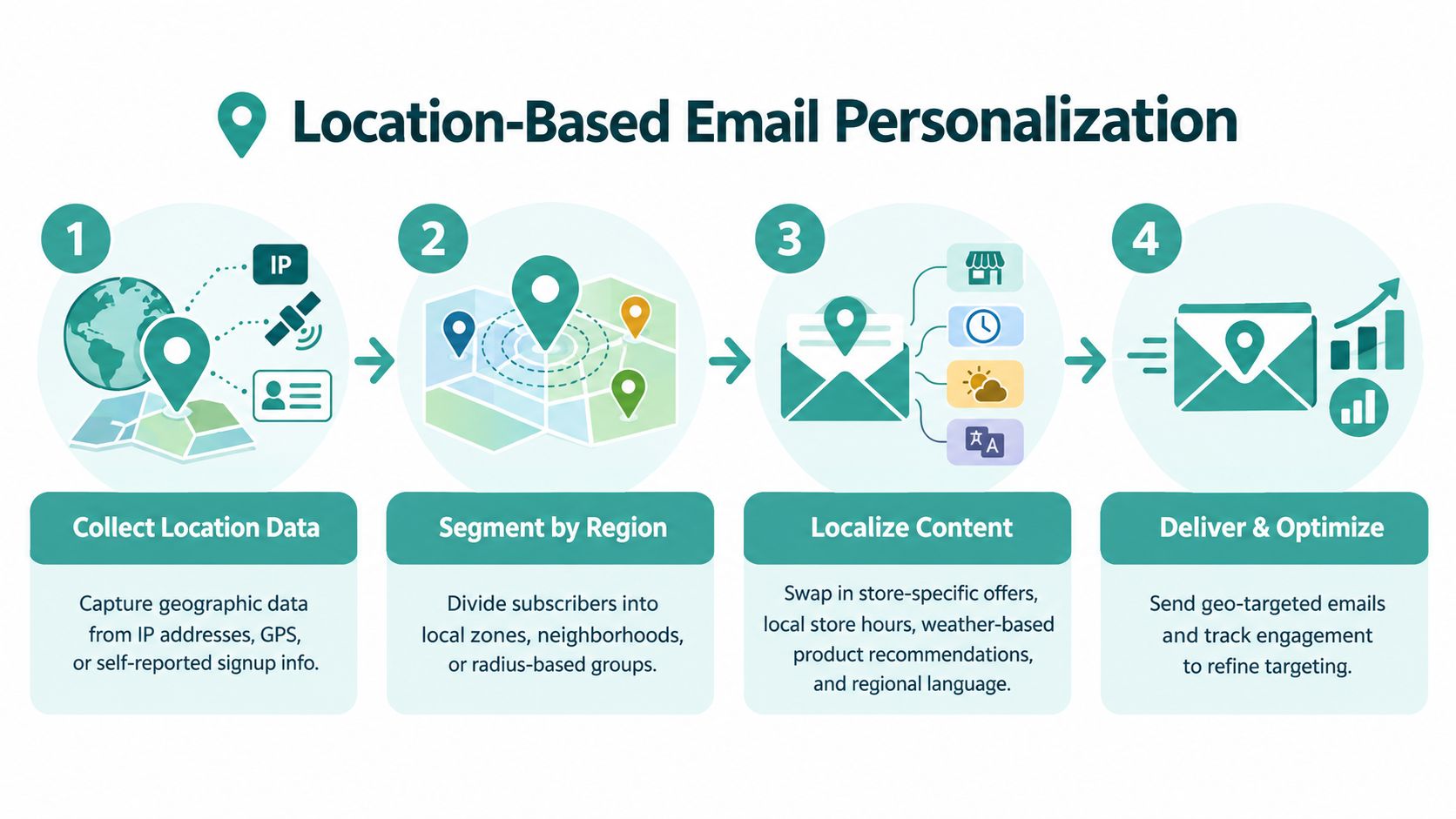
Location is valuable because local customers care about availability, distance, timing, and neighborhood context. A restaurant can promote a nearby lunch offer. A dealership can invite contacts to an event at the correct showroom. A real estate agent can send listings in the areas a prospect has explored. A retailer with multiple branches can replace a generic “visit us” button with directions to the relevant store.
Useful local copy might look like this:
“Fresh arrivals at our Riverside store. Visit today or reserve your size online.”
Location data can come from a signup question, a customer profile, a store selected during purchase, or a consented platform signal. Don’t assume that an old address still represents where someone shops. Let subscribers update their preferred location, and use a fallback version when the data is missing or uncertain.
Create modular templates with changeable fields for store name, offer, hours, inventory, and CTA. The email should say “Get directions,” “Book at this location,” or “Check local availability,” rather than forcing every reader through a national landing page. For a multi-location business, pilot the template with one branch first. Confirm that offers, staff instructions, landing pages, and tracking parameters all match before expanding.
Dynamic content can also incorporate local weather or seasonal context, but relevance has limits. A weather-based message can help a garden center promote rain gear or a home-services company explain storm preparation. It can also feel forced if the offer has no connection to the customer’s immediate need.
Measure location-specific clicks, calls, bookings, store visits where available, and revenue by branch. Compare the result with a broader version, but keep the offer and send timing as consistent as possible. Privacy-aware personalization means using location to improve service, not exposing how precisely the business tracks someone.
4. Behavioral Trigger-Based Email Campaigns {#4-behavioral-trigger-based-email-campaigns}
A trigger email arrives because the customer did something meaningful. They signed up, started a booking, viewed a service page, downloaded a guide, abandoned a cart, or haven’t returned for a while. That timing gives the message a job, which is usually more useful than adding another promotional email to a fixed calendar.
A local fitness studio might send a welcome message after a trial registration, a restaurant can remind a customer about a reservation, and a real estate agent can notify a prospect when a saved listing changes price. A home-services company could follow a guide download with an explanation of the next inspection step.
Start with a small set of high-intent workflows:
- Welcome trigger: Explain what happens next and offer one useful action.
- Abandonment trigger: Restore the exact booking, cart, or inquiry context.
- Post-purchase trigger: Provide setup, care, or scheduling information.
- Win-back trigger: Invite an inactive customer back with a relevant reason.
Triggered emails can reach open rates as high as 42%, compared with 14% to 26% for traditional broadcast emails, according to Mailchimp’s email personalization guidance. The range is a benchmark, not a guarantee. A badly timed trigger, inaccurate event, or excessive sequence can still produce complaints.
Use suppression rules so a customer doesn’t receive an abandonment message after purchasing. Set a frequency cap across workflows, and make the destination page match the email exactly. An abandoned booking email should reopen the booking flow, not send the reader to the homepage.
Review delivery, clicks, completed actions, complaints, and unsubscribes for each trigger. Adwave’s resource on behavioral email triggers can complement the workflow planning. If the email follows an Adwave TV campaign, segment visitors by the landing page or offer they responded to, then make the follow-up specific to that entry point.
5. Purchase History and Lifecycle Stage Personalization {#5-purchase-history-and-lifecycle-stage-personalization}
A first-time customer needs reassurance and guidance. A repeat customer may respond better to convenience, recognition, or an exclusive preview. An inactive customer needs a reason to return that differs from the message sent to someone who purchased recently. Treating all three groups alike wastes the information your business already has.
A local automotive business can send maintenance guidance after a vehicle purchase, then offer a service reminder at an appropriate point. A subscription company might explain the value of an active plan to new customers while offering a retention incentive to an at-risk subscriber. A real estate professional can distinguish a new inquiry from a qualified past buyer who wants relevant listings.
Define lifecycle stages that match your business model. A simple structure could include:
- New subscriber: Set expectations and explain the next step.
- First-time buyer: Provide education, care guidance, or a related service.
- Repeat customer: Recognize loyalty and recommend a logical next purchase.
- At-risk customer: Ask what changed or present a focused reason to return.
Purchase recency, frequency, and monetary value can help organize segments, but don’t let the framework become more elaborate than your data supports. A small shop may only need recent buyers, repeat buyers, and inactive contacts. The CTA should also reflect intent. “Learn more” suits an early relationship, while “Book your service” makes sense for a customer ready to act.
Use distinct copy, not merely a different discount. “Thanks for choosing us for your first visit” creates a different relationship from “Your member preview starts today.” Review segment definitions regularly, remove conflicting automation paths, and suppress offers that no longer apply.
The email lifecycle marketing guide can help connect these stages to broader customer journeys. Adwave can support the awareness side of that journey, while email handles follow-up based on a person’s stage and known relationship with the business.
6. Email Personalization Based on Device and Browser Behavior {#6-email-personalization-based-on-device-and-browser-behavior}
A customer reading on a phone has different practical constraints from someone opening an email on a desktop. Device-based personalization shouldn’t become an excuse for elaborate design. It should make the next action easier.
A local retailer can send a mobile-first message with one product, one benefit, and a large “Shop now” button. A financial-services business might prioritize an app action for mobile readers, while a news publisher could present a shorter summary on a phone and a richer content grid on desktop. An ecommerce brand might use a vertical product sequence on mobile and a broader grid on desktop.
Build the email mobile-first, then enhance it for larger screens. Check the actual experience in Gmail, Outlook, and iOS Mail, because a layout that looks correct in one client may break in another. Use a single-column structure where possible, keep copy short, and make touch targets comfortably tappable. A planned button size of 44px minimum is a useful mobile design standard, though the surrounding spacing and email-client rendering matter just as much.
Device behavior can also inform send timing. Someone who consistently opens on a phone during a commute may need a different layout and timing from someone who reads on a desktop during working hours. Don’t interpret device data as a complete identity. People switch devices, share screens, and open messages in previews.
Test the same offer with different layouts before changing the message itself. Track clicks, completed forms, bookings, and conversions by device, but avoid over-segmenting when the audience is small. If the mobile version has a better click rate but a weaker conversion rate, inspect the landing page before blaming the email. The friction may begin after the click.
7. Industry and Business Type Personalization {#7-industry-and-business-type-personalization}
A business owner responds to language that reflects their operating reality. A dental practice doesn’t need the same email as a real estate brokerage, even if both are considering the same marketing platform. Industry personalization changes the examples, objections, proof points, and call to action so the message feels useful rather than broadly addressed.
A platform serving agencies, in-house marketing teams, and freelancers could frame the same feature three ways. An agency may care about managing multiple client campaigns. An in-house team may care about reporting and brand control. A freelancer may prioritize a faster workflow and simple client approval. Similar distinctions apply across real estate, healthcare, retail, automotive, legal, and home services.
Start with the two or three industries that matter most. For each one, document the common customer problems, buying triggers, vocabulary, compliance considerations, and preferred outcome. Then adapt the email:
- Real estate: “Turn listing interest into a local follow-up sequence.”
- Dental practice: “Keep new-patient inquiries moving after the first visit.”
- Home services: “Stay visible when homeowners begin comparing providers.”
The copy should demonstrate understanding without pretending every business in the segment operates identically. Ask for the industry during signup when it directly improves the service, or infer it from a business profile only when the data is reliable and permitted. Give recipients a way to correct the category.
Measure performance by industry, offer, and lifecycle stage. A campaign can look average overall while working well for one vertical and poorly for another. Keep an eye on terminology too. A technically accurate message can still fail if it uses language that customers in that industry don’t use.
Adwave supports sectors including Home Services, Real Estate, Health & Wellness, Financial Services, Legal, Retail and E-commerce, Automotive, Travel and Tourism, and Political. That makes it a natural complement when industry-specific email follow-up needs an awareness layer that reaches local viewers before or alongside the inbox conversation.
8. Engagement Level and Content Preference Personalization {#8-engagement-level-and-content-preference-personalization}
Not every subscriber wants the same volume or type of content. One customer may click educational guides, another may respond only to promotions, and a third may need fewer messages before they decide whether to stay subscribed. Engagement personalization protects attention by adjusting both what you send and how often you send it.
A small B2B consultancy could send detailed how-to content to subscribers who regularly click guides, while offering case-led or service-focused emails to contacts who engage with commercial pages. A local ecommerce store might send new arrivals to active shoppers and reduce promotional frequency for subscribers who rarely interact.
Use a small number of practical tiers:
- Highly engaged: Offer early access, new content, or more frequent relevant updates.
- Moderately engaged: Mix useful education with focused commercial messages.
- At risk: Reduce volume and ask what they want to receive.
- Inactive: Run a clear re-engagement sequence before suppressing them.
Personalized promotional mailings have been reported to produce 29% higher unique open rates and 41% higher unique click rates than non-personalized mailings, while personalized triggered campaigns produced more than double the transaction rates of non-personalized triggered mailings, as summarized by MarTech’s personalization statistics. Use segment-level reporting to understand whether relevance or frequency is driving the result.
Give subscribers a preference center with content choices and frequency options. A re-engagement email might say, “Want fewer updates? Choose monthly tips, local offers, or both.” Don’t use opens as the only engagement signal. Privacy changes and inbox behavior can make opens less dependable, so include clicks, site activity, replies, purchases, bookings, and unsubscribes.
Adwave can add another touchpoint for the engaged and at-risk groups. For example, a local business can use email behavior to refine follow-up while running targeted TV awareness for the wider geographic audience. That pairing keeps email personal without requiring every prospect to have a deep behavioral profile.
8 Email Personalization Methods Compared {#8-email-personalization-methods-compared}
| Approach | Implementation Complexity 🔄 | Resource Requirements & Speed ⚡ | Expected Outcomes 📊 | Ideal Use Cases 💡 | Key Advantages ⭐ |
|---|---|---|---|---|---|
| Dynamic Subject Lines Based on Recipient Behavior | High, requires behavioral tracking, CRM integration, dynamic templates | Moderate–High data/integration; supports fast iteration and A/B testing | Open rate ↑ 15 to 25%; improved CTR; lower unsubscribes | E‑commerce, streaming, real estate, large lists | Highly relevant & scalable personalization |
| Personalized Product Recommendations in Email | High, needs recommendation engine and inventory sync | High technical and product-data needs; real‑time inventory checks | AOV ↑ 20 to 30%; increased repeat purchases and conversions | Retail, e‑commerce, restaurants, local stores | Boosts AOV; effective cross-sell/upsell |
| Location-Based Email Personalization | Medium, geo-data integration, templates, API triggers | Moderate data and compliance effort; template reuse speeds rollout | Engagement ↑ 30 to 40%; drives foot traffic and local conversions | Multi-location retail, restaurants, dealerships, real estate | Local relevance; drives store visits and loyalty |
| Behavioral Trigger-Based Email Campaigns | High, real-time detection, multi-step workflows, conditional logic | Medium–High setup effort; automation yields fast response times | Open rates 40 to 50%; conversion uplift 10 to 30%; revenue recovery | Abandoned carts, onboarding, win-back, reminders | Timely, automated, highest engagement rates |
| Purchase History & Lifecycle Stage Personalization | High, lifecycle modeling, segmentation, stage-specific content | High analytics and creative resources; ongoing maintenance | CLV ↑ 25 to 50%; better retention and targeted conversions | Subscriptions, e‑commerce, automotive, real estate | Strategic retention focus; stage-appropriate messaging |
| Device & Browser Behavior Personalization | Medium, responsive design, device detection, client testing | Moderate design/testing effort; faster wins on mobile optimization | Improved mobile UX; higher CTRs and rendering consistency | Mobile-first audiences, retail, banking, news publishers | Optimizes UX per device; increases mobile engagement |
| Industry & Business Type Personalization | Medium–High, vertical-specific content and templates | High content creation and subject-matter research; slower scale | Relevance ↑ 35 to 50%; higher conversion within verticals | B2B SaaS, platforms serving multiple industries | Demonstrates expertise; tailored industry messaging |
| Engagement Level & Content Preference Personalization | Medium, engagement scoring, frequency capping, preference tracking | Moderate analytics; efficient send volume reduces wasted spend | Lower unsubscribes; better overall engagement and deliverability | Newsletters, subscription services, large lists | Prevents fatigue; optimizes frequency and content mix |
Turn Examples Into a Personalization System
You don’t need to launch all eight patterns at once. Start with one reliable data source and one high-intent workflow. For a local business, that might be a welcome email after signup, an abandoned inquiry reminder, a location-specific promotion, or a post-purchase service message. The best starting point is the workflow where customer intent is already visible and the next action is easy to define.
Choose data you can maintain. A recent booking, selected store, purchase category, or explicit content preference is often more useful than a large profile filled with uncertain fields. Clean records before adding personalization. A wrong name, outdated location, or unavailable product damages trust faster than a generic message would.
Permission should guide every decision. Tell subscribers what they’re signing up for, collect only information that improves the experience, and provide an accessible way to change preferences or unsubscribe. Personalization should make a message more helpful, not reveal more tracking detail than the customer expects. Sparse first-party data isn’t a dead end. Contextual signals, clear segmentation, and timely triggers can produce relevant messages without building invasive profiles.
Frequency control matters when several workflows overlap. A subscriber who qualifies for a welcome series, a location offer, and a re-engagement campaign shouldn’t receive all three without coordination. Use suppression rules, prioritize the highest-intent message, and review engagement trends before increasing volume.
Design for the smallest screen first. Confirm that dynamic content has a fallback, links reach the promised page, prices and inventory are current, and the email remains readable when images don’t load. A personalized email still needs a clear value proposition, a single primary CTA, and a landing page that continues the same conversation.
Measure each segment against the business outcome:
- Delivery: Confirm that messages reach the intended audience and render correctly.
- Clicks: Check whether the personalized content earns action.
- Conversions: Track bookings, purchases, calls, or completed forms.
- Unsubscribes: Watch for signs that relevance or frequency is failing.
For practical ideas on adapting messages through the funnel, review these tips for personalizing sales emails. Run tests in sequence. First verify delivery and dynamic fields, then compare clicks, then measure completed business actions, and finally review unsubscribes and complaints. Don’t declare a winner from opens alone.
Adwave fits alongside this system as a complementary awareness channel. Its AI-powered platform can create broadcast-ready TV ads from a website URL, place them across 100+ premium channels, and support campaigns starting at $50, with automatic pacing that doesn’t exceed the set spend. The platform uses audience data and viewing patterns to reach local viewers and provides performance tracking, while email can handle the more specific follow-up after someone responds to an offer or visits a landing page. Visit Adwave to explore how targeted TV awareness can support your email personalization strategy.
Adwave helps small and local businesses create broadcast-ready TV advertising, target relevant viewers, and track campaign performance alongside their digital marketing. Pair that broader awareness with personalized email follow-up, then visit Adwave to plan your next local campaign.