You’ve probably seen the warning signs: fewer people open the newsletter, repeat buyers stop clicking, and every new lead from paid social costs more to acquire. Meanwhile, your email platform still shows thousands of subscribers who once gave you permission to contact them.
That dormant audience isn’t automatically worthless. A well-timed email reactivation sequence can recover interest, identify why subscribers went quiet, and remove contacts who no longer want to hear from you. The strongest approach doesn’t begin with a discount. It begins by diagnosing the cause of inactivity, offering a useful reason to return, and escalating only when the data supports it.
Why an Email Reactivation Sequence Matters for SMBs
A local retailer, service business, or online store can watch its active audience shrink without losing a single subscriber from the database. The list looks healthy in the dashboard, but fewer people open, click, reply, or buy. At the same time, the owner keeps funding new acquisition campaigns because the existing list appears exhausted.
That interpretation is often too pessimistic. Reactivation gives you a way to test the value of dormant contacts before abandoning them. Widely cited win-back benchmarks place recovered inactive subscribers at about 5 to 15%, with stronger programs reaching 10 to 20% or more when segmentation, offer strength, and dormancy length are handled well. These benchmarks are summarized in SendPulse’s re-engagement email guidance.
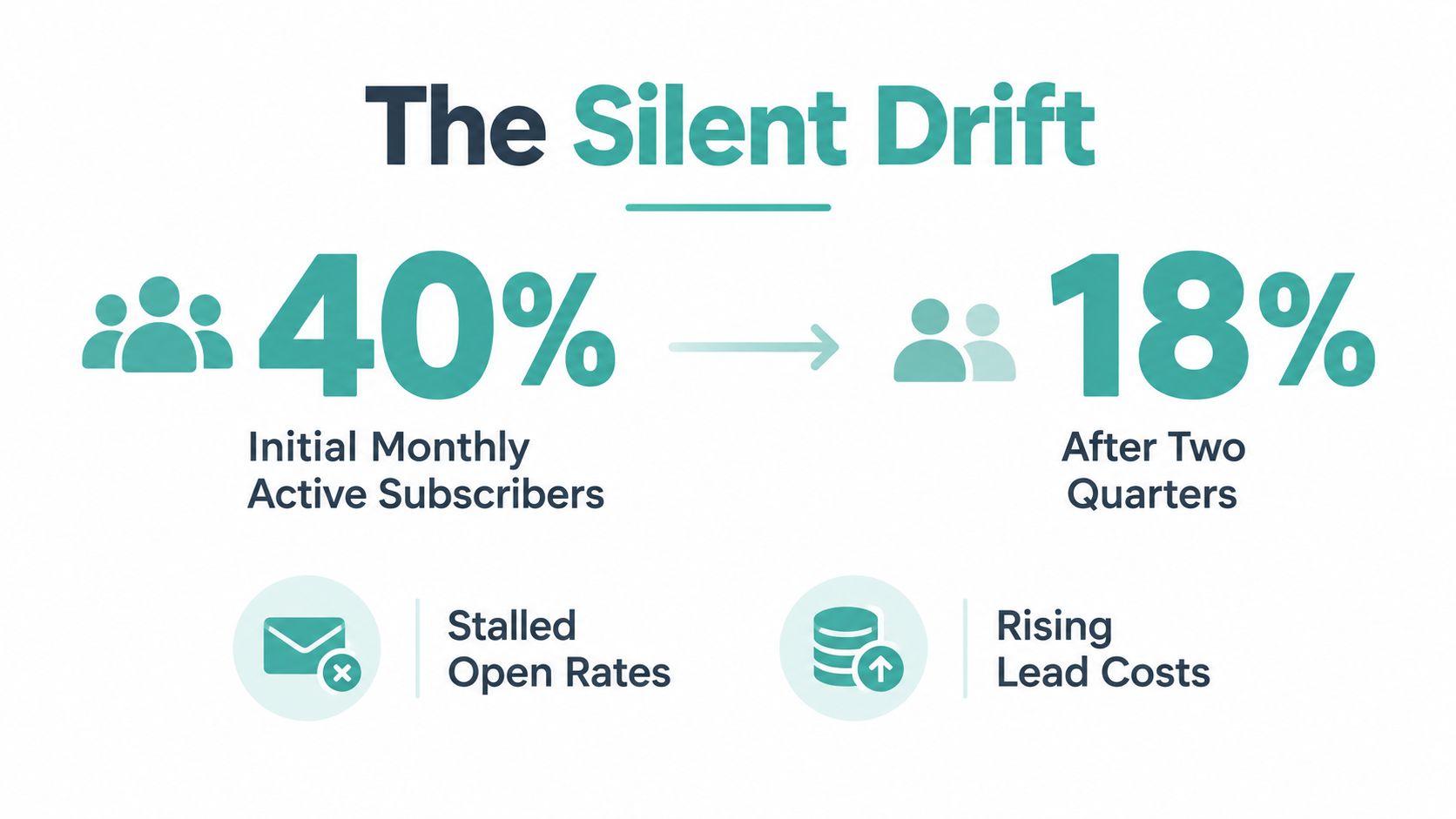
The graphic below illustrates a hypothetical active-subscriber decline, not a reported business result.
Three practical wins for a small business
Recovered revenue comes first. You’re contacting people who already know the brand, so the campaign can create sales without paying for a new impression or lead. That doesn’t make every dormant subscriber valuable, but it makes reactivation a sensible test before increasing acquisition spend.
Cleaner engagement data improves decision-making. Removing or suppressing contacts who never respond gives you a more honest view of newsletter performance. It also helps protect inbox placement because your team isn’t repeatedly sending to addresses that show no meaningful engagement. Guidance from MailGenius on win-back campaigns recommends a clear sunset rule and moving non-responders to inactive status after the sequence.
Replies reveal the reason for silence. A subscriber may be tired of frequent messages, no longer need the product, prefer a different category, or have stopped seeing your emails. A one-tap preference question can uncover those differences more effectively than another generic “we miss you” message.
Reactivation also belongs beside awareness channels, including TV advertising. A TV campaign can create broad recognition, while email shows which existing contacts still respond to a particular message. That feedback gives an SMB a measurable lifecycle lever instead of treating every marketing channel as a separate experiment.
Defining Inactivity and Segmenting Your Dormant List
Don’t start by writing copy. Start by deciding what “inactive” means for your business.
A daily publisher may need a shorter inactivity window than a weekly newsletter. Practical guidance commonly places the trigger somewhere between three and six months, depending on send frequency, while one deliverability guide recommends enrolling contacts after more than four months without an open. Customer.io’s re-engagement guidance explains why the trigger should reflect audience behavior and cadence rather than an arbitrary calendar date.
Build the segment in four steps
-
Choose the signal. Use no opens and no clicks across a rolling window where possible. A single missed campaign doesn’t prove that someone is dormant. Last engagement date, recent website activity, and purchase behavior provide stronger context.
-
Exclude recent buyers. Remove anyone who purchased, booked, replied, or was recently reactivated within the selected window. A customer who bought last week but didn’t open yesterday’s newsletter shouldn’t receive a “do you still want us?” message.
-
Split by dormancy. Create at least a cool segment and a cold segment. A cool contact might have gone quiet for 60 to 120 days, while a cold contact has been inactive for 120 days or longer. The Grou Global re-engagement playbook shows that response rates generally decline as dormancy length increases, with materially stronger results among contacts who became inactive more recently.
-
Add useful context. One or two attributes are enough to make the message more relevant. Try past purchase category, customer value tier, signup source, location, or the content topic that originally earned the subscription. Don’t add personalization merely because your ESP supports it.
You can build these audiences in Klaviyo, Mailchimp, ActiveCampaign, or another ESP using last engagement date and event filters. Before activating the workflow, check the audience count, remove obvious role addresses, and exclude anyone already marked for suppression.
| Segment | Inactivity Window | Typical Size of SMB List | Recommended Treatment |
|---|---|---|---|
| Recently quiet | 60 to 120 days | Usually the broader active-dormant group | Lead with relevant value and a light preference check |
| Cold subscribers | 120 days or longer | Usually smaller but less responsive | Use stronger diagnosis, tighter frequency, and a clear sunset path |
| High-value dormant contacts | Based on purchase history | Depends on business mix | Personalize around prior products, services, or customer status |
| Unqualified or suppressed | No meaningful engagement and poor fit | Varies by list hygiene | Don’t keep mailing, move to suppression or inactive status |
For a deeper segmentation workflow, see Adwave’s guide to email list segmentation and sending the right message to the right people. The important point is simple: dormancy length and prior intent should determine the path, not one bulk list.
The Three-Email Reactivation Sequence Step by Step
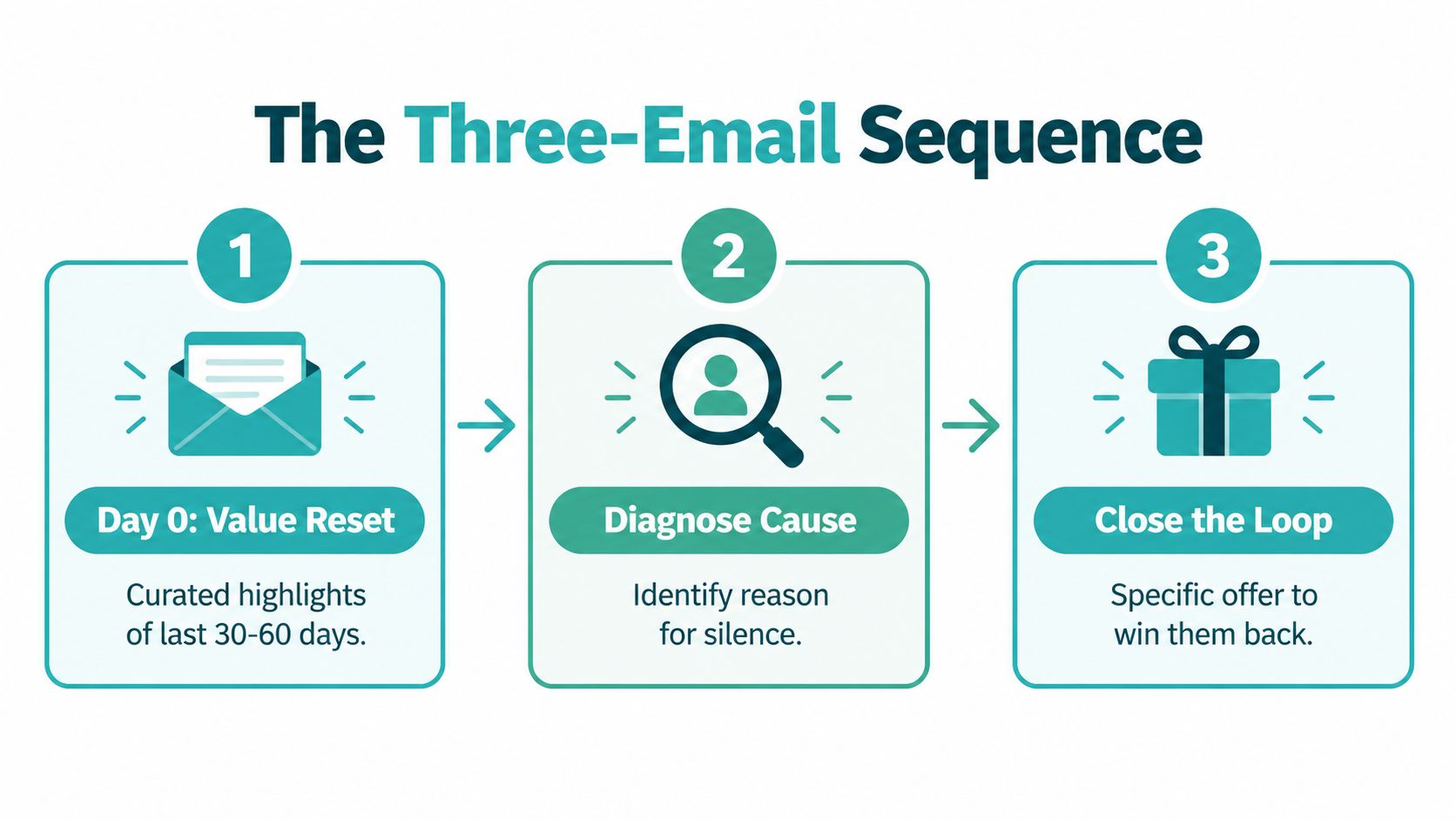
A practical win-back flow usually earns its place with three emails. The first restores value, the second diagnoses the silence, and the third creates a final decision point. This structure is more useful than sending three versions of the same discount.
Email one resets perceived value
Send the first message on day 0. Don’t open with a coupon unless your data shows that price is the main barrier. Give the subscriber a short, specific reason to look again, such as a curated selection of recent articles, new products, useful customer stories, or a service improvement.
If the business sells home services, the value reset might be a short seasonal checklist. If it sells products, it might highlight new arrivals related to a previous category purchase. If it publishes content, it could present the most useful recent pieces rather than another full newsletter.
Keep the email focused on one action. “See what’s new” is easier to understand than a collection of links to the homepage, social profiles, blog, and product catalog.
Email two asks what changed
Send the second message around day 7 to people who haven’t reactivated. Make the diagnostic easy to complete with two or three buttons:
- Too many emails
- The content isn’t relevant
- I’m still interested
Each answer should trigger a useful branch. “Too many emails” can open a preference center or reduce frequency. “The content isn’t relevant” can update interests. “I’m still interested” can confirm the subscription and return the contact to a normal lifecycle path.
This step matters because inactivity has multiple causes. Inbox overload, changing needs, and filtering can look identical in an ESP report. A feedback click gives you a practical signal before you spend margin on an offer.
Practical rule: Ask for the smallest piece of feedback that changes what you’ll send next.
Email three closes the loop
Send the final message around day 14. Now you can introduce a concrete incentive, a specific deadline, or a final preference choice. State what the subscriber will receive and when the opportunity ends. Avoid vague urgency such as “act now” when there’s no real closing condition.
Include a one-click unsubscribe and a preference-center link. That isn’t a failure. It’s a useful exit that protects the experience for people who no longer need your emails and gives interested subscribers control over frequency.
The sequence should stop as soon as someone opens, clicks meaningfully, purchases, replies, or updates preferences. It should also stop for anyone who unsubscribes or reaches a suppression condition.
Writing Subject Lines and Copy That Earn a Reopen
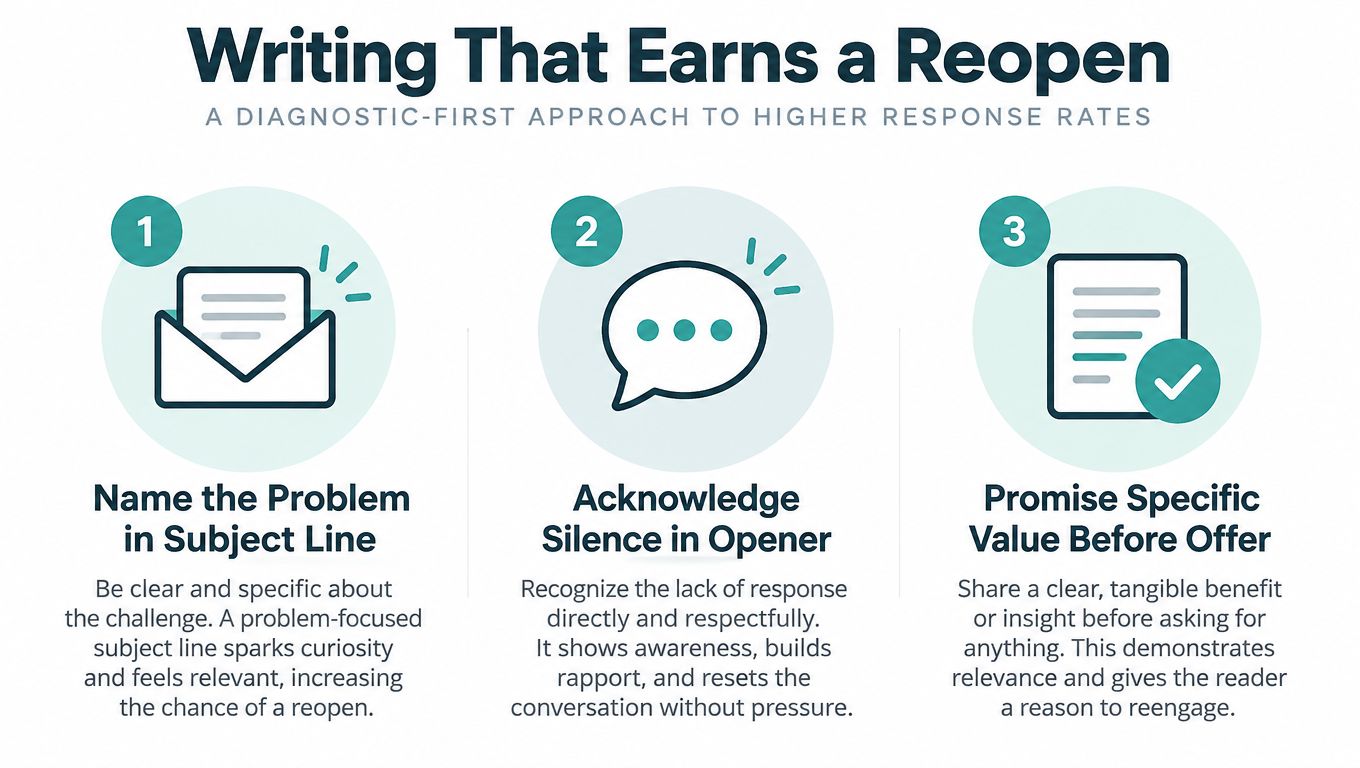
A reactivation subject line should make the silence understandable, not pretend it never happened. Start with the likely problem, acknowledge the lapse in the opening sentence, and then promise one concrete benefit before presenting an offer.
Personalization can help when it reflects a real relationship, such as a previous product category or stated interest. A first name alone won’t repair irrelevant content, so test tokens carefully and remove them when the field is incomplete. Keep the preview text as a continuation of the subject line rather than repeating it.
Three subject-line patterns
| Pattern | Do | Don’t |
|---|---|---|
| Curiosity | “A few useful updates since you last visited” | “You won’t believe what happened” |
| Ownership | “We may have sent too much. Choose your pace” | “Sorry for everything” |
| Gentle confrontation | “Still interested in better home maintenance tips?” | “Why are you ignoring us?” |
Use a recognizable sender name. A founder’s name can work for a relationship-led business, while a brand name may be clearer for a retailer or publication. Check the email on a phone before sending, because a subject that looks precise on desktop may lose its meaning when truncated. The same applies to preview text in Gmail and Apple Mail. Keep both elements concise enough to survive clipping.
For broader guidance on clarity, tone, and structure, this resource on how to write professional emails that get read is useful outside reactivation too. You can also adapt the practical formulas in Adwave’s email subject-line guide.
A body-copy skeleton
Hi [First Name],
You haven’t been hearing from us lately, so we wanted to make this easy. We’ve selected [specific update, product, or resource] based on what you previously showed interest in.
If that’s still useful, [primary CTA]. If not, choose what you’d prefer: [preference link] or [unsubscribe link].
We’ll send one final note before pausing messages.
Thanks, [Sender name]
Avoid exaggerated claims, excessive punctuation, misleading “urgent” language, and promotional terms that may increase spam scrutiny when combined with poor sending practices. The copy should sound like a helpful business making a clear choice available, not a desperate brand trying to force an open.
Offers, Incentives, and When to Skip the Discount
Discounts can reactivate people, but they can also train customers to ignore regular prices. The right decision depends on the reason for inactivity, your margin, and the value of the next purchase.
Use value-led reactivation when the audience may have just missed a useful update, when the brand is premium, or when margin is tight. Use an incentive when the list has severe decay, the offer addresses a known barrier, and you need a fast signal about commercial interest.
| Dimension | Value-led reactivation | Offer-led reactivation |
|---|---|---|
| Primary job | Restore relevance and trust | Reduce purchase friction |
| Best fit | Premium positioning, tight margins, useful new content | Clear buying intent or price sensitivity |
| Main risk | The value may not be compelling enough | Margin erosion and discount conditioning |
| Tracking | Clicks, replies, preference changes, return visits | Code use, purchases, margin, and unsubscribe behavior |
| Message style | “Here’s what’s useful now” | “Here’s a specific reason to act now” |
Use an incentive ladder
Start with the least expensive benefit that can remove friction:
- Free resource: A guide, checklist, consultation, or useful download.
- Shipping upgrade: Helpful for products where delivery hesitation blocks conversion.
- Percentage reduction: Easy to understand, but it directly affects margin.
- Buy one, get one: Useful when inventory or repeat purchase behavior supports it.
- Gift with purchase: Can preserve the headline price while adding perceived value.
The exact cost of each option depends on fulfillment, average order value, product margin, and expected customer lifetime value. Calculate the contribution margin after redemption, not just the number of recovered orders. A campaign that produces sales but loses money per transaction isn’t a successful reactivation program.
Use unique codes where possible, set a genuine expiry window, and state the deadline plainly. Test incentive depth as a variable. A deeper discount may create more redemptions, but it won’t automatically create more profitable customers.
KPIs, Deliverability, and a Healthy Sunset Policy
A reactivation campaign should be judged by the path from inbox placement to meaningful response, not by open rate alone. Track commercial value alongside engagement, and use unsubscribes as a pressure warning.
Use a compact KPI dashboard
| Metric | What it tells you | Problem signal | First action |
|---|---|---|---|
| Open rate | Whether the subject line and sender earn attention | Opens are weak across the segment | Review dormancy, sender identity, and subject line |
| Click rate | Whether the message creates enough interest | Opens occur without clicks | Improve relevance and reduce competing CTAs |
| Reply rate | Whether the diagnosis feels easy and human | Few contacts answer the question | Simplify the choices and make them specific |
| Reactivation rate | Whether contacts return to meaningful activity | Engagement stays flat through the sequence | Revisit segmentation and value proposition |
| Revenue per reactivated subscriber | Whether recovered contacts are commercially useful | Orders do not cover campaign economics | Check margin, offer depth, and audience quality |
| Unsubscribe rate | Whether the sequence creates excessive pressure | Opt-outs rise sharply | Slow the cadence and inspect message tone |
Before launch, check list hygiene, authentication, spam-risk content, and suppression logic. Verify SPF, DKIM, and DMARC, review blacklist status, and run seed tests across the inboxes customers use. The MailGenius win-back checklist covers authentication checks, blacklist review, spam screening, and excluding recent buyers or recently reactivated contacts. For additional context, review this guide on why emails go to spam and how to fix deliverability.
Send to a large dormant segment in controlled batches rather than releasing the whole audience at once. The first email generally gives the clearest signal, while later touches often deliver diminishing returns. A structured sequence can run for roughly 30 days, with early messages separated by 5 to 7 days, followed by a final notice before inactive contacts are archived. See SendPulse’s re-engagement sequence recommendations for timing guidance.
After the third email, move non-responders to suppression or a low-frequency inactive list. Report results on a 30-day reporting cadence, then decide whether each segment returns to regular messaging, enters a quarterly win-back cycle, or remains suppressed. A sunset policy protects deliverability and keeps paid media and lifecycle activity focused on contacts who still show intent.
Putting Reactivation Inside a Broader SMB Growth Stack
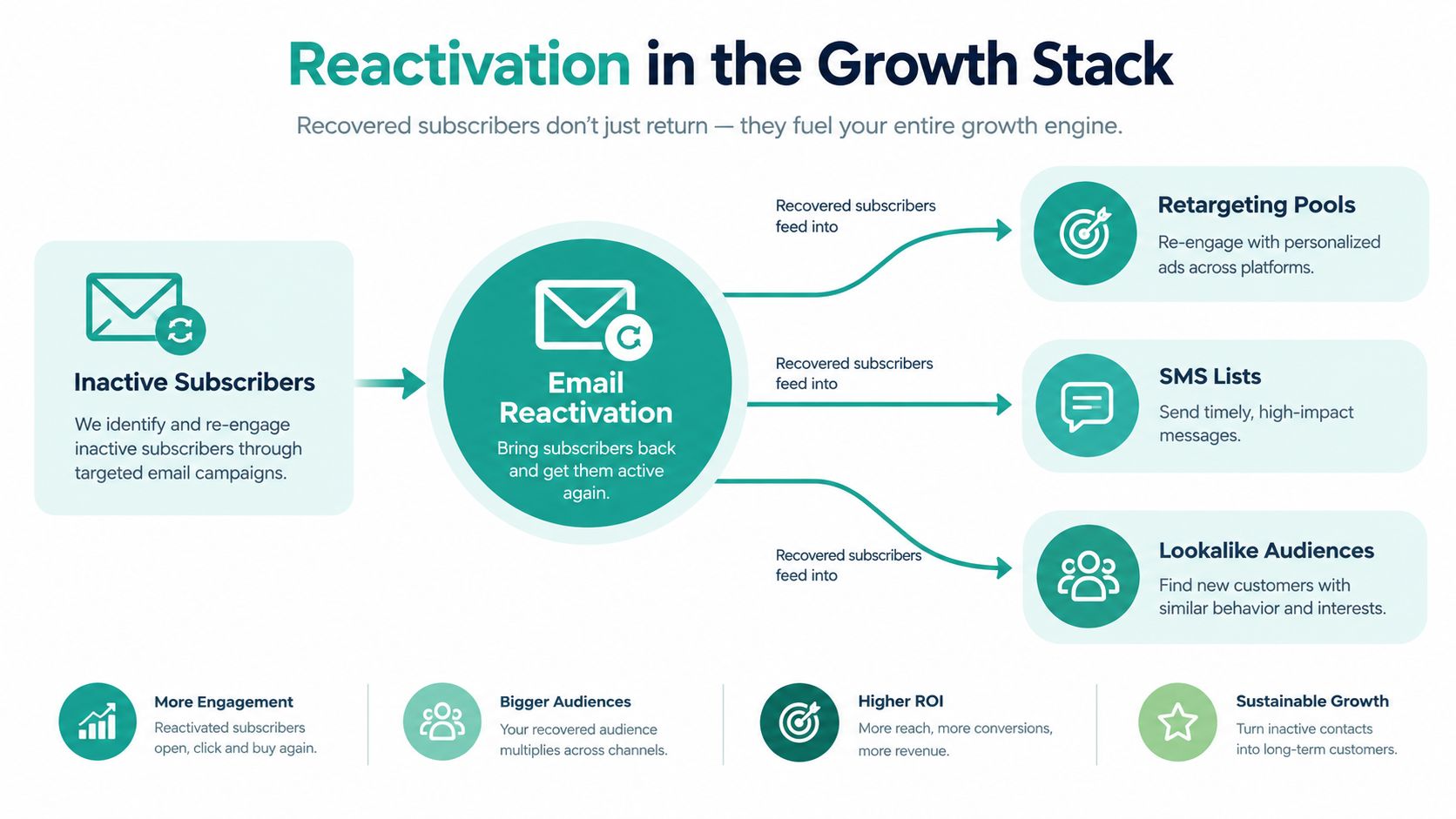
Email shouldn’t carry the entire growth plan. A reactivation campaign is a first-party signal generator that can improve the rest of your marketing system.
A subscriber who reopens, clicks, or purchases can move into a retargeting audience. Someone who updates preferences may become a better fit for an SMS list. A group of engaged customers can inform lookalike audience creation, provided your consent and platform policies allow that use. The sequence also gives you creative evidence. Subject lines that earn attention, offers that drive action, and reasons for silence can shape messaging in other channels.
A workable 30-day rollout
Week one is for diagnosis. Define the inactivity trigger, exclude recent customers, build cool and cold segments, and confirm the suppression rules.
Week two is for delivery. Launch the three-email flow with value first, feedback second, and urgency last. Watch early engagement closely and stop the workflow for anyone who reactivates.
Week three is for amplification. Use the strongest email message to inform a connected TV or retargeting campaign. Adwave can create and launch broadcast-ready TV ads from a website URL, place them across premium channels, and provide audience targeting and performance tracking for SMB campaigns. Keep the audience logic tied to the email signals rather than treating TV as an unrelated awareness exercise.
Week four is for decisions. Review opens, clicks, replies, conversions, revenue, and suppression rates. Move responsive contacts into the appropriate lifecycle path, sunset persistent non-responders, and document the message that produced the strongest commercial response.
This creates a useful loop. Email reactivation produces first-party signals, TV can amplify the message that already showed promise, and the resulting attention can feed future acquisition and retention activity. The list becomes a managed asset instead of a leaky database.
For a broader view of how these activities fit together, explore Adwave’s email lifecycle marketing resources.
Adwave helps small businesses create, launch, and measure broadcast-ready TV ads from a website URL, with audience targeting and budget controls suited to practical growth testing. Use the signals from your email reactivation sequence to shape a connected TV campaign, then visit Adwave to explore the workflow.