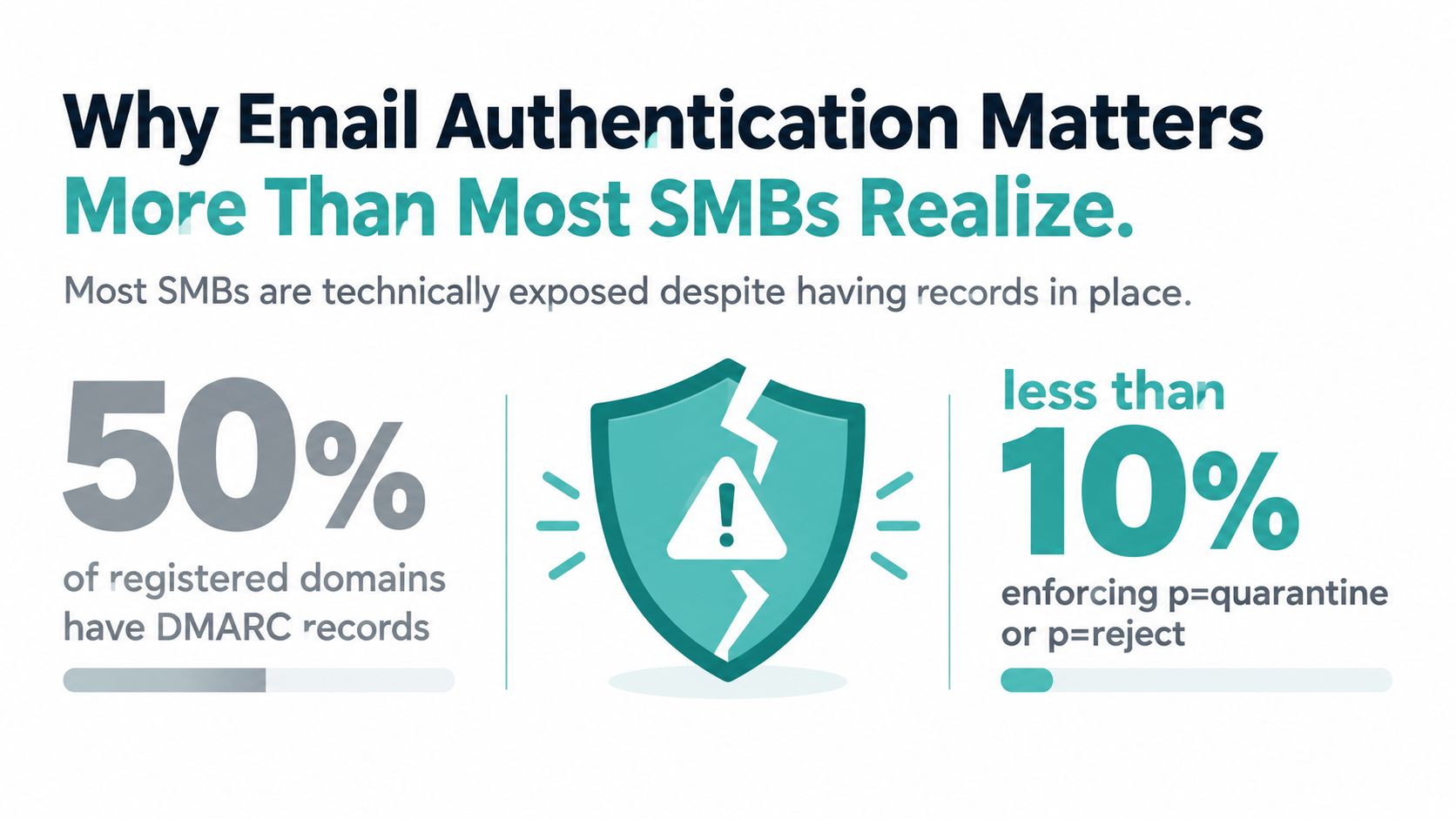
Only 7.6% of domains in a large 2025 global sample enforced DMARC with p=quarantine or p=reject, while 81.6% had no DMARC record at all. Even among businesses that have published SPF, DKIM, and DMARC, the key question is whether legitimate senders align correctly and whether the policy stops spoofed mail. Fortra’s adoption research makes the gap clear: publishing a record is not the same as operating a protected domain.
For small and midsize businesses, email authentication affects more than cybersecurity. A spoofed invoice can damage a customer relationship, while a misaligned marketing platform can send legitimate campaigns to spam. This guide focuses on the operational work that follows DNS publication, including multiple third-party senders, forwarded mail, selector changes, aggregate reports, and a cautious move from monitoring to enforcement.
Why Email Authentication Matters More Than Most SMBs Realize
DMARC adoption looks stronger at the top level than it does in daily operations. A 2026 measurement of major domains found 52.1% published valid DMARC records, but only 22.9% used enforcement policies, while 29.2% stayed at p=none. Another dataset covering millions of domains reported 30.4% DMARC adoption and only 12.8% enforcement. The exact sample differs, but the practical conclusion is consistent: many businesses have a record, yet most aren’t using it to reject or quarantine impersonation. See the detailed methodology in DMARC Guard’s email authentication research.
That distinction matters because spoofing is a sales and trust problem, not only an IT problem. Customers don’t inspect SMTP headers before paying an invoice. They see your visible From address, your logo, and your familiar domain. If criminals use that identity, recipients may question legitimate messages later, and mailbox providers may treat your domain as a less trustworthy sender.
Before touching DNS, assign each protocol one job:
- SPF authorizes the sending path. It tells receivers which servers may send mail for the envelope sender domain.
- DKIM signs the message. A private key creates a cryptographic signature, and a public key in DNS lets receivers verify the signature.
- DMARC connects identity to policy. It checks whether SPF or DKIM aligns with the visible From domain, then tells the receiver whether to monitor, quarantine, or reject a failure.
SPF evolved as a path-based anti-spoofing control. DKIM added cryptographic signing, and DMARC later added alignment, policy, and reporting. The standards history, from DomainKeys through RFC 6376 and RFC 7489, explains why mailbox providers increasingly treat the three protocols as baseline controls.
Practical rule: Treat
p=noneas an observability phase, not as protection. Your domain becomes meaningfully defensive only when you understand legitimate traffic and enforce a policy.
Start with a complete sender inventory. Include Google Workspace or Microsoft 365, your website forms, CRM, newsletter platform, appointment software, invoicing tool, customer support system, and any agency that sends with your domain. A layered email defense strategy is useful context here because authentication works best as one layer within broader mailbox and identity protection.
If deliverability is already suffering, compare the DNS and authentication work with Adwave’s guide to why your emails go to spam and how to fix deliverability. The record itself is only the starting point. The sender inventory, alignment checks, and enforcement process determine whether it works.
What SPF, DKIM, and DMARC Actually Check
These protocols aren’t interchangeable. Each examines a different part of the message, and DMARC can fail even when the underlying SPF and DKIM results look positive because the authenticated domain doesn’t match the visible From domain.
The three checks in plain English
SPF checks the envelope sender. During SMTP delivery, the receiving server evaluates the domain in MAIL FROM, commonly represented later as the Return-Path. It compares the connecting server’s IP with the SPF policy published for that envelope domain. SPF doesn’t authenticate the user-visible From header, and forwarding can change the sending path.
DKIM checks a signature. The sending system signs selected headers and the message body with a private key. The receiver uses the selector from the DKIM-Signature header to retrieve a public key at selector._domainkey.example.com, then verifies the signature. DKIM can fail if the message is modified or if the selector’s DNS key is missing.
DMARC checks alignment and applies policy. It compares the visible Header From domain with the authenticated SPF domain or the DKIM d= domain. DMARC needs only one aligned SPF or DKIM result for authentication, as documented in NIST’s technical note on DMARC.
SPF vs DKIM vs DMARC at a Glance
| Dimension | SPF | DKIM | DMARC |
|---|---|---|---|
| Primary check | Sending server for the envelope sender domain | Cryptographic signature and signing domain | Alignment of SPF or DKIM with the visible From domain |
| Message location | SMTP MAIL FROM, later shown as Return-Path |
DKIM-Signature header and message body |
Header From compared with SPF and DKIM identifiers |
| DNS location | Domain-level TXT record |
selector._domainkey TXT record |
_dmarc TXT record |
| Main strength | Authorizes approved sending paths | Protects message integrity and can survive forwarding | Adds policy, alignment, and reporting |
| Main limitation | Doesn’t cover the visible From domain and can break during forwarding | Depends on correct selectors, keys, and message integrity | Requires continuous sender and alignment management |
| What a pass means | The server is authorized for the envelope domain | The signature validates for the signing domain | At least one authenticated identifier aligns with Header From |
Microsoft’s explanation of email authentication and DMARC reporting is helpful because it treats DMARC as both a policy mechanism and an observability system. SPF can pass for a vendor-owned envelope domain, and DKIM can pass for a vendor-owned signing domain, while the customer-facing From address still fails DMARC alignment. That is the operational distinction most setup guides omit.
Building a Working SPF Record for Multiple Senders
SPF becomes fragile when every vendor gets added without a plan. A small business might send ordinary mail through Google Workspace, newsletters through Mailchimp or Klaviyo, and receipts through a transactional provider. Each service may ask for an include, and those includes can contain more DNS lookups of their own.
A typical record starts with the version tag and then lists approved mechanisms:
v=spf1 include:_spf.google.com include:marketing.example include:transactional.example ~all
The syntax is straightforward:
-
v=spf1identifies the SPF policy. -
ip4:andip6:authorize specific addresses or ranges when a provider gives you fixed infrastructure. -
include:delegates authorization to a vendor’s SPF policy. -
~allmarks other sources as soft failures during testing. -
-allmarks other sources as failures once your inventory is complete.
The hard limit is 10 DNS lookups per SPF evaluation, as described in Adaptive Security’s SPF, DKIM, and DMARC guide. Nested include chains count too. A record can look short while consuming the entire lookup budget inside vendor policies, causing a permanent SPF error.
A safer SPF workflow
- List every real sender. Don’t copy a vendor’s include until you know which platform sends mail.
- Prefer one authorization path per vendor. Remove duplicate includes and avoid adding both a parent service and a child service when the parent already covers it.
- Count lookups after every change. Use an SPF validation tool that expands includes and reports the total.
- Flatten only with maintenance ownership. Replacing includes with vendor IPs can reduce lookups, but those addresses can change. Someone must refresh the flattened record.
-
Keep one SPF record. Two separate TXT records beginning with
v=spf1create an invalid SPF configuration. Consolidate the mechanisms into one record.
SPF isn’t a complete forwarding strategy. A forwarded message may arrive from a server that isn’t authorized in your SPF record, even though the original sender was legitimate. DKIM gives DMARC another authentication route, so configure both rather than trying to force SPF to solve a message-integrity problem.
Before choosing a marketing sender, compare how each platform handles authentication and custom sending domains in this Mailchimp versus Klaviyo versus Constant Contact comparison. The platform decision affects your DNS workload long after the campaign is launched.
Generating DKIM Keys and Publishing the DNS Record
DKIM is a two-part handshake. The sending system keeps the private key and uses it to sign messages. Your DNS publishes the matching public key, allowing receiving servers to verify the signature without gaining access to the private material.
Most SMBs shouldn’t generate DKIM keys manually for hosted email providers. Google Workspace, Microsoft 365, Mailchimp, and SendGrid generally generate the key pair and provide the selector, DNS name, and TXT value to publish. Your job is to copy the values accurately, preserve the private key inside the provider, and verify that the signed domain matches the domain customers see.
Generate a key only when you control the sender
For a self-managed Linux or Mac sending server, RSA-2048 remains the practical interoperability choice. A workstation command can generate a private key and its public counterpart:
openssl genrsa -out dkim_private.pem 2048
openssl rsa -in dkim_private.pem -pubout -out dkim_public.pem
Protect the private file. Don’t paste it into a ticket, commit it to a repository, or publish it in DNS. Ed25519 is efficient and modern, but older receivers and legacy mail systems still make RSA the safer broad-compatibility option.
Choose a selector that identifies the sending system and rotation period, such as 2024, google, or marketing. The selector is not a security boundary by itself. Its value is operational clarity, especially when several platforms sign for the same domain.
Publish the public key correctly
For a domain called example.com and a selector called 2024, the DNS name is:
2024._domainkey.example.com
The TXT value follows the DKIM structure:
v=DKIM1; k=rsa; p=MIIBIjANBgkqhkiG9w...
Here:
-
v=DKIM1identifies the DKIM record format. -
k=rsadeclares the key type. -
p=contains the Base64-encoded public key.
Your DNS provider may split a long TXT value into quoted strings. That’s normal if the resulting DNS response preserves the complete key. Don’t add line breaks or spaces inside the key unless the sending provider explicitly includes them.
Third-party platforms often use different selectors, such as s1, k1, m1, or cm. Publish the exact selector each platform gives you. If a marketing migration changes the selector, the old DNS record may remain while the new key is absent. Receivers then see a DKIM signature that points to a selector they can’t resolve.
Verify DNS and real message headers
DNS verification should confirm that the public key exists:
dig TXT 2024._domainkey.example.com
A lookup returning a TXT value doesn’t prove that mail is signing correctly. Send a real message from each service and inspect its headers. The useful fields are:
-
DKIM-Signature, especiallyd=ands=. -
Authentication-Results, including the DKIM result and DMARC result. -
Return-Path, which identifies the SPF envelope domain. -
Visible
From, which is the identity DMARC must protect.
A healthy example has a DKIM result of pass, a selector that exists in DNS, and a d=example.com value that aligns with From: sales@example.com. A vendor-owned d=vendor.example may still produce a valid DKIM signature, but it doesn’t necessarily satisfy DMARC alignment for your customer-facing domain.
Build DMARC around reporting first
Publish DMARC at _dmarc.example.com. Start with a monitor record:
v=DMARC1; p=none; rua=mailto:dmarc-reports@example.com
p=none means no enforcement. Receivers can report failures, but the policy doesn’t ask them to quarantine or reject those messages. The rua tag requests aggregate reports, usually XML summaries grouped by sending source and authentication result.
A later quarantine policy might look like this:
v=DMARC1; p=quarantine; pct=10; rua=mailto:dmarc-reports@example.com
The pct tag throttles the percentage of failing messages subject to the policy. After validation, increase it toward full enforcement, then move to:
v=DMARC1; p=reject; pct=100; rua=mailto:dmarc-reports@example.com
Use ruf cautiously. Failure reports can contain sensitive message content, and many receivers don’t provide them consistently. For most SMBs, aggregate reporting through rua provides useful visibility without creating unnecessary privacy exposure.
Alignment tags are also available:
adkim=r controls DKIM alignment, and aspf=r controls SPF alignment. The r value represents relaxed alignment, which is the default. Strict alignment uses s. A realistic multi-sender policy with one service still being remediated could be:
v=DMARC1; p=quarantine; pct=10; rua=mailto:dmarc-reports@example.com; adkim=r; aspf=r
That policy should be temporary. Don’t leave a known unaligned sender in production indefinitely. Give its owner a deadline, move the service to a dedicated subdomain, or configure custom DKIM and Return-Path domains.
For transactional messages, authentication is part of the trust experience, not a separate technical task. Review the guidance on turning order confirmations into marketing opportunities while keeping transactional consent and sender identity separate.
How Alignment Turns Three Records Into One Framework
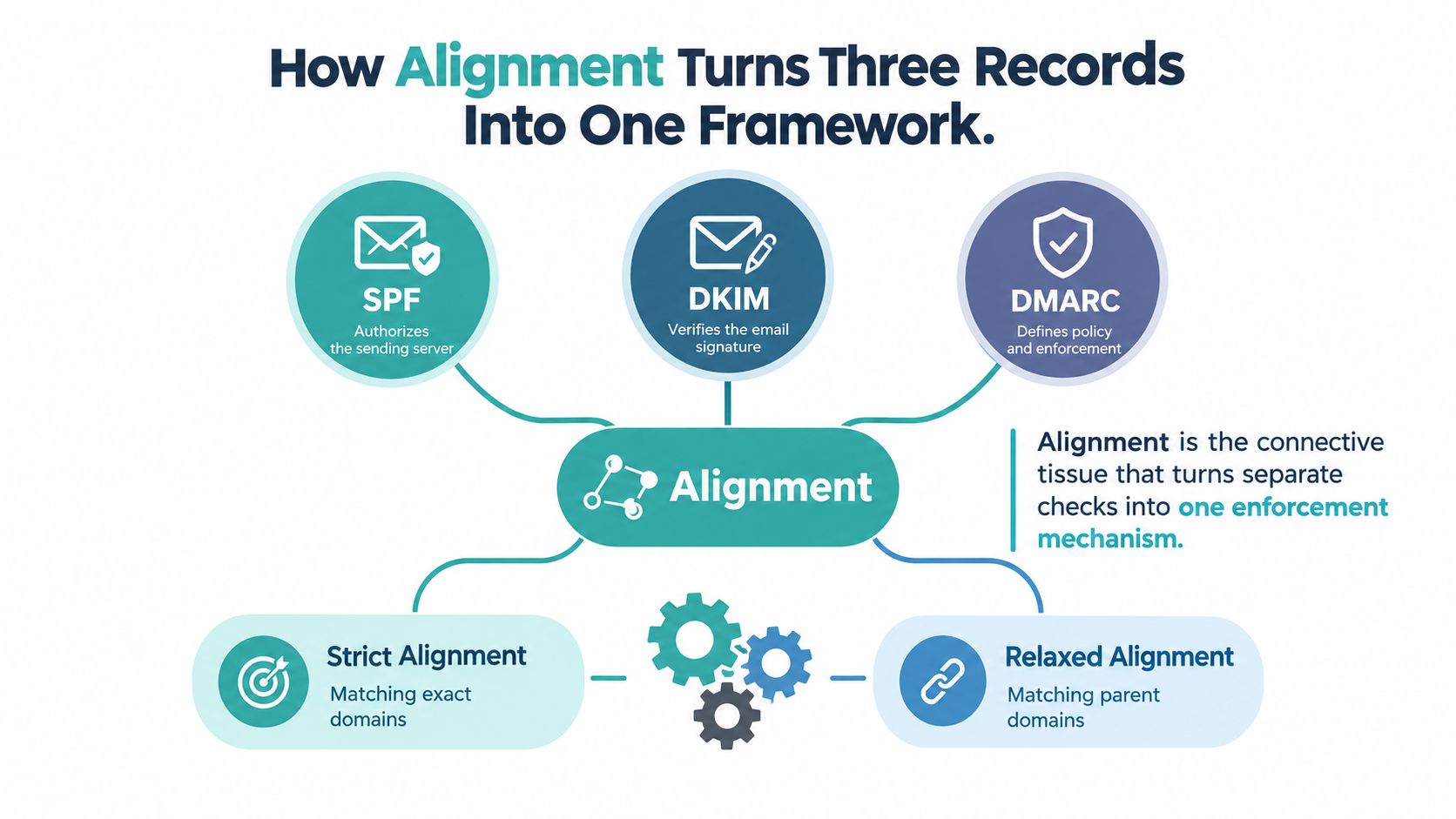
Alignment is the connective tissue. SPF can pass for one domain and DKIM can pass for another, but DMARC asks whether either authenticated identity matches the domain in the visible From header.
The two alignment modes are:
-
Relaxed alignment, the default, accepts matching organizational domains. A message using
Return-Path: bounce.mail.example.comcan align withFrom: orders@example.com. -
Strict alignment requires an exact domain match.
mail.example.comandexample.comwould not qualify as the same identifier under this mode.
Most SMBs should begin with relaxed alignment. It supports subdomain architecture and third-party sending without weakening the central requirement that the authenticated identity belongs to the same organization.
Consider a SendGrid message with From: newsletter@example.com. If its DKIM signature says d=send.example.net, DKIM may technically pass, but that signing domain doesn’t align with example.com. The same issue occurs when SPF passes for a vendor’s envelope domain while the visible From address uses your brand domain.
The practical test is simple:
- Check SPF alignment. Compare the authenticated MAIL FROM or Return-Path domain with Header From.
-
Check DKIM alignment. Compare the
d=domain with Header From. - Accept one aligned path. DMARC passes when either SPF or DKIM authenticates and aligns.
Microsoft’s alignment guidance describes these comparisons precisely. This is why a testing tool that reports only “SPF pass” and “DKIM pass” isn’t enough. You need the domains beside those results, because a pass against the wrong domain can still produce a DMARC failure.
A Practical Monitor to Quarantine to Reject Rollout
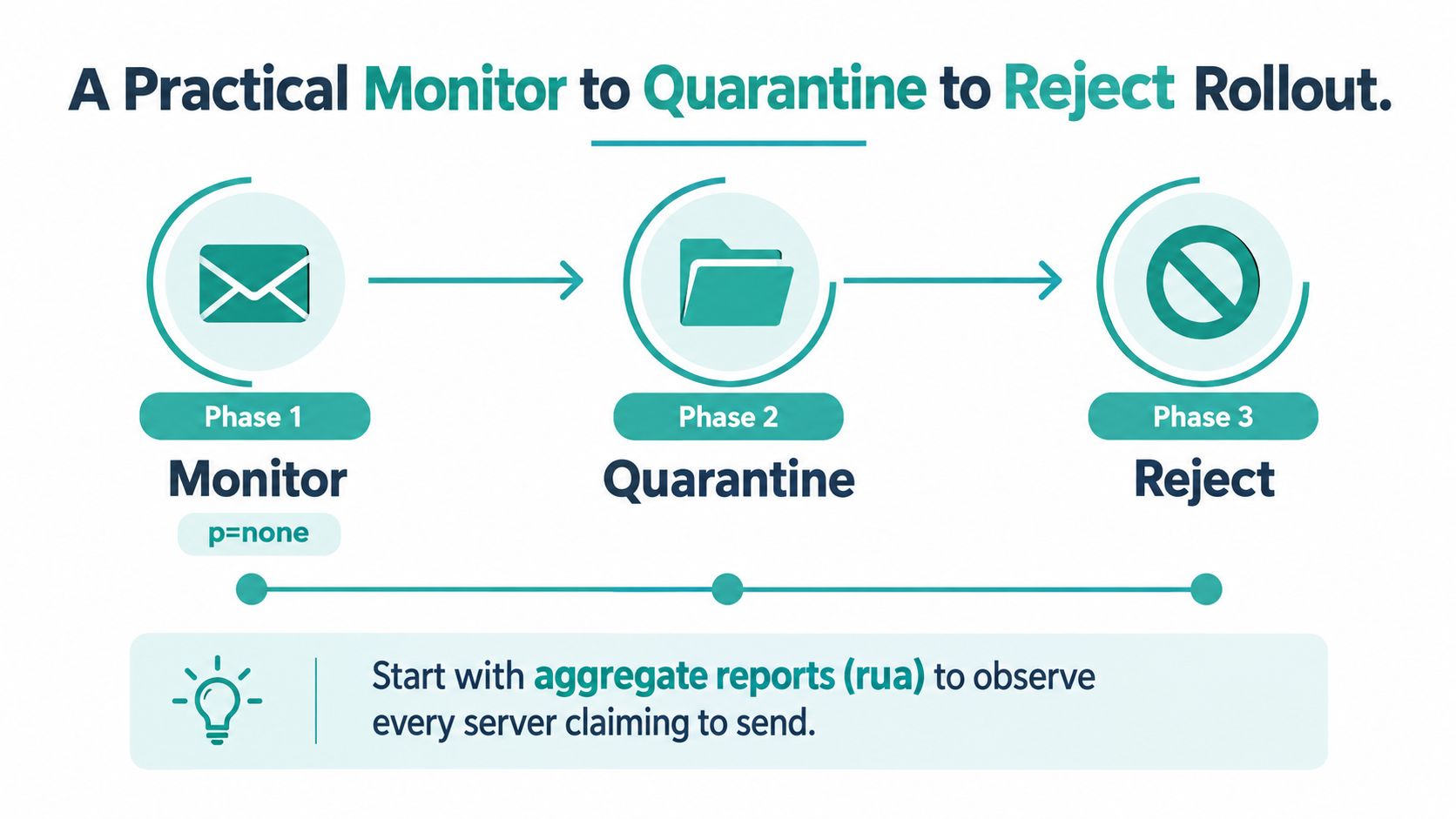
DMARC enforcement works best as a controlled operating project. Publishing a record provides visibility, not protection. Identify every legitimate sender, fix alignment, and increase enforcement only when reports support the change.
-
Monitor with
p=none. Publishrua=mailto:dmarc-reports@example.comand collect reports for at least two weeks. Extend monitoring if seasonal platforms, event tools, or infrequent billing systems may send outside that window. - Classify every source. Use an aggregate report parser to group sending IPs and domains. Mark each as approved, unknown, or malicious, then verify SPF and DKIM alignment for approved services. Pay attention to third-party selector changes and newly connected platforms.
-
Test quarantine with
pct=10. Setp=quarantine; pct=10and check spam placement at the mailbox providers your customers use. Review support tickets and campaign test accounts for legitimate messages that were diverted. -
Increase enforcement gradually. Raise
pctin increments of 25 after each review. If legitimate mail breaks, lower the percentage, correct the sender’s authentication or alignment, and restart the observation period. -
Move to reject deliberately. Use
p=rejectonly after reports show complete authentication and alignment coverage for at least one full billing cycle.
Before each policy change, record the rua endpoint, report retention window, and approval owner. Forwarding needs specific testing because SPF evaluates the new delivery path, while DKIM may remain valid if signed content and headers survive. Adwave’s CAN-SPAM and GDPR compliance guide is a useful adjacent reference when you’re documenting ownership, consent, and message governance.
Common Pitfalls and Troubleshooting in Real Stacks
Most failures come from ordinary operational drift. A new sales platform gets connected, an old DKIM selector stays in DNS, a website form sends through an undocumented relay, or an SPF include expands beyond the lookup budget.
Forwarding is another predictable fault line. The forwarder may not be authorized by your SPF policy, so SPF fails even though the original service was legitimate. DKIM often provides the more stable route because it travels with the message, provided the forwarder doesn’t alter signed content.
| Symptom | Root Cause | Fix |
|---|---|---|
| SPF returns a permanent error | The evaluation exceeds the 10-DNS-lookup limit or the record has invalid syntax | Remove duplicate mechanisms, simplify nested includes, and validate after each change |
| Forwarded mail fails SPF | The forwarding server isn’t authorized for the original envelope domain | Rely on aligned DKIM as a second path and test forwarding scenarios before enforcement |
| DKIM fails after a platform migration | The new selector or public key wasn’t published | Read s= in the signature, publish that selector, and keep old keys only while the transition requires them |
| SPF and DKIM pass, DMARC fails | Both results authenticate domains that don’t align with Header From | Compare Return-Path and d= with the visible From domain, then configure custom domains |
| Reports show an unknown sender | A forgotten tool, compromised account, or undocumented vendor is sending mail | Identify the source before authorizing it, then remove or secure it |
When a failure appears, read the Authentication-Results header on the actual message. Trace the result backward to the sender’s envelope domain, DKIM selector, public key, and visible From address. Don’t “fix” a DMARC failure by adding every reported IP to SPF. That can authorize an unwanted sender while leaving the alignment problem untouched.
Before tightening policy, confirm:
- SPF status: One valid record exists and the evaluation stays below the lookup ceiling.
- DKIM coverage: Every active sender publishes the selector it uses.
- DMARC reporting: Aggregate reports reach the documented mailbox or parser.
- Alignment: At least one authentication path matches the visible From domain.
- Operational ownership: Someone reviews new vendors and selector changes.
- Reputation context: If delivery remains poor, use a tool to check if your domain is blacklisted, then investigate the underlying sending behavior rather than treating a listing as the whole diagnosis.
Once enforcement is stable, BIMI can provide an additional trust signal tied to your authentication posture. The broader lesson is more important: SPF, DKIM, and DMARC aren’t a one-time DNS project. They require a sender inventory, change control, report review, and a clear owner whenever a business adds another platform.
Adwave helps small businesses create and measure broadcast-ready advertising without building a traditional production workflow, and its deliverability resources provide practical context for SPF, DKIM, and DMARC decisions. Visit Adwave to review its advertising platform and use the email guidance as part of a broader, trustworthy customer communication strategy.