
Every order confirmation you send gets attention that most marketing emails never earn. Order confirmation emails open at 70% to 90%, with some studies reporting rates above 114% because customers reopen them, and they can generate $0.75 in revenue per email compared with $0.11 from typical promotions, according to transactional email statistics compiled by SHNO.
Most small businesses still treat these emails like receipts. That is the mistake.
A confirmation email lands at the exact moment a customer is paying attention, checking details, and deciding whether your business feels reliable. That makes it more than an operational message. It is a trust signal, a service tool, and, when handled carefully, a low-cost marketing asset.
Transactional Emails: Turning Order Confirmations into Marketing Opportunities is not about stuffing a receipt with random offers. It is about protecting the core purpose of the message, then using the small amount of promotional space wisely. For local retailers, restaurants, real estate teams, auto businesses, and service brands, this is one of the simplest places to lift repeat purchases without building a giant campaign calendar.
The Hidden Goldmine in Your Outbox
An order confirmation is one of the few emails customers actively want.
They search for it after checkout. They reopen it to confirm the order, check delivery details, verify a payment, or find support information. That behavior changes the economics of the channel. You are not fighting for attention the way you do with a sale announcement or newsletter.
That is why these emails perform so differently from standard promotions. The moment is high intent. The customer just acted. They care about the content. They are primed to engage.
Why order confirmations outperform
Promotional email usually asks for attention. An order confirmation meets an existing need.
That difference matters in practice:
Customers expect it: A confirmation reassures them that the order went through.
They use it later: Many people come back for the order number, product details, or shipping status.
Trust is on the line: A clean, accurate confirmation makes your business feel organized and credible.
A small business does not need a massive design team to benefit from this. It needs a better view of the email it is already sending.
What most businesses get wrong
Many brands stop at the basics. They send a plain receipt, maybe with a logo, and call it done.
That leaves value on the table. A strong transactional email can do three jobs at once:
Treat the confirmation email as part of the customer experience, not just a system notification.
The key is restraint. Customers open these emails because they need them. If you preserve that utility, the marketing opportunity follows naturally.
Get Opened Get Delivered Get Legal
Order confirmations are among the highest-attention emails a small business sends. Litmus notes that order confirmation emails should stay heavily weighted toward transactional content, often following an 80/20 split, and found that adding a tracking link can increase clicks by 46% in optimized confirmation emails ( Litmus guidance on optimizing order confirmation emails).
That attention is useful only if the email shows up fast, lands in the inbox, and answers the customer’s immediate question: Did my order go through?

Start with deliverability and timing
Send the confirmation immediately after the purchase, booking, or form submission. Delays create anxiety, drive support requests, and train customers to check spam before they check your brand.
Keep the subject line plain. Clear transactional emails outperform clever copy here because the customer is scanning for certainty, not entertainment. Use direct formats such as order confirmation with the order number, shipping update with current status, or appointment confirmation with the date and location.
Sender identity matters too. Use a recognizable from-name, a consistent sending domain, and a reply-to address that does not look abandoned. Local businesses often overlook this, then wonder why inbox placement slips after adding more promotional volume. If that is already happening, fix the underlying setup before changing design or offers. Review this guide on why your emails go to spam and how to fix deliverability before you add more marketing blocks.
Keep the primary purpose transactional
Legal and deliverability decisions start with message hierarchy. Put the confirmation, order summary, payment details, fulfillment information, and support path first. Promotional content can follow, but it should stay secondary in both placement and visual weight.
This is a practical discipline, not just a compliance habit. If the email looks like an ad with a receipt attached, customers hesitate, mailbox providers notice weaker engagement signals, and trust erodes. For SMBs running email, paid social, and even local TV together, that trust matters across channels. The same customer who ignores a cluttered confirmation is less likely to respond when your brand shows up later in their inbox, on Instagram, or during a neighborhood streaming TV spot.
The elements that belong in every confirmation
Put the core information near the top so the customer can act without hunting for it.
Clear status message: Confirm that the order, reservation, or booking is complete.
Order details: Order number, items purchased, billing summary, and delivery, pickup, or appointment details.
Next step: Tracking, account login, appointment changes, or pickup instructions.
Support path: A real contact method, help center, or FAQ link.
For local SMBs, one more detail pays off. Include location-specific context when it matters, such as store hours, pickup directions, or service-area contact details. That makes the email more useful now, and it surfaces engagement data you can use later. If customers in one ZIP code click pickup instructions more often, that signal can inform where you focus nearby direct mail, social spend, or accessible connected TV campaigns.
What weakens the email
A few mistakes show up repeatedly in audits:
Promotions above the receipt details: Customers should not scroll past a banner to verify a charge.
Too many competing links: Every extra CTA pulls attention away from the main task.
Vague or cute subject lines: They reduce clarity at the exact moment clarity matters.
No visible help option: Missing support information turns a simple confirmation into a support ticket.
The trade-off is straightforward. Every marketing element you add has to earn its place. If it helps the customer take the next logical step, keep it. If it distracts from confirmation, delivery, or compliance, cut it.
Beyond the Receipt With Dynamic Personalization
A generic receipt confirms a purchase. A personalized confirmation continues the relationship.
That does not require enterprise complexity. For most small businesses, personalization starts with using the data they already have. The customer’s name, what they bought, where they are located, how they chose fulfillment, and whether they are a first-time or repeat buyer can all shape the message.

Personalization that feels useful
The best personalized confirmations do not show off data. They reduce friction.
If someone ordered for local pickup, the most helpful content is pickup timing, store directions, and what they need to bring. If a customer booked a service appointment, the message should explain preparation steps and what happens next. If a buyer ordered a product with accessories or care instructions, the email should include relevant guidance.
That is dynamic personalization in plain language. Different customers see different blocks based on the action they just took.
Examples that work well:
Retail order: Show care instructions for the purchased item.
Restaurant reservation: Show parking guidance or a link to update party size.
Real estate inquiry: Show a neighborhood guide tied to the listing area.
Auto service booking: Show a checklist for vehicle drop-off.
Dynamic blocks beat static templates
A static receipt sends the same message to everyone. Dynamic content blocks let you swap modules in and out without redesigning the whole email every time.
A practical build might include:
Segmentation is important for this. Not every customer should see the same add-on, and not every customer should see a promotion at all. Adwave’s guide to email list segmentation and sending the right message to the right people is a practical primer if your email setup still treats the whole list as one audience.
What AI can and cannot do
AI can help when it is used for relevance, not novelty.
According to Unific’s discussion of transactional email personalization, using AI and Customer Data Platforms to enable hyper-personalization in transactional emails can boost click rates by up to 139% by analyzing purchase data in real time and suggesting the most relevant complementary products or next best actions.
That sounds advanced, but the core idea is simple. The system looks at what the person just bought and chooses the most fitting follow-up content.
Useful outputs include:
Complementary product suggestions
Helpful onboarding content
Store or service instructions based on location
A next step for repeat customers versus first-time buyers
Personalization works when it answers a customer question before they ask it.
What small teams should prioritize first
Do not start with a dozen rules and AI layers. Start with the highest-friction moments.
For most SMBs, the first wins come from:
Showing the right fulfillment instructions.
Tailoring support content to the purchase type.
Swapping generic promotional modules for a single relevant recommendation.
Adjusting the message for new versus repeat customers.
What usually fails is fake personalization. Adding a first name to the top of a message while leaving the rest generic does not change much. Customers notice relevance, not token personalization.
A good confirmation email should sound like your business noticed what they bought, where they bought it, and what they are likely to need next.
Fueling Growth with Upsells Loyalty and Referrals
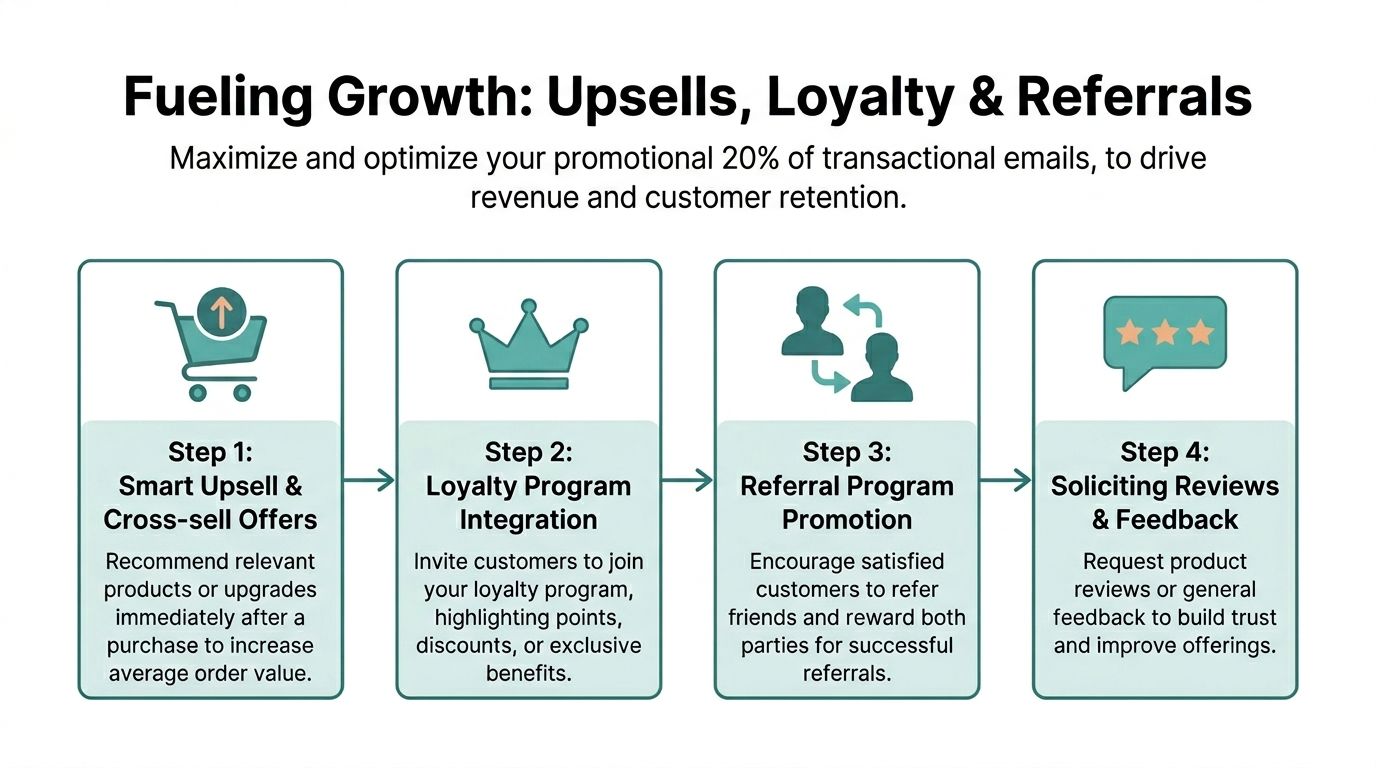
The promotional slice of a transactional email is small, but it can do serious work when it is relevant.
Most businesses waste that space with generic coupon banners. Better operators use it to reinforce the purchase that just happened. They suggest one useful add-on, invite the customer into a loyalty loop, or make it easy to refer a friend after a good experience.
Relevance decides whether the offer works
A confirmation email is not the place for broad catalog dumping.
If someone just purchased running shoes, shoe care or socks can make sense. If they booked a detailing appointment, a maintenance package might fit. If they reserved a dinner table, a future tasting event or loyalty join prompt may be more natural than a random discount.
That logic shows up in real-world results. ELAINE’s overview of transactional emails as a marketing booster notes that BMW saw up to 12% additional sales by adding offers to its Connected Drive confirmations, with the key condition that offers remained relevant and were shown only to users who had opted into marketing communications.
A practical framework for the promotional 20%
Think of the available promotional area as a single decision, not a mini newsletter.
Use one of these approaches per email:
Smart upsell: One add-on tied directly to the purchase.
Loyalty invite: A clear benefit for joining your rewards program.
Referral prompt: Best for categories where happy customers bring in similar buyers.
Review request later in the sequence: Better after the product arrives or service is completed.
A simple decision table helps:
One strong, relevant offer outperforms a crowded block of weak ones.
How this connects to broader brand growth
Small businesses often think too narrowly at this point. They treat transactional emails as a direct-response tactic only.
The better play is to use them as a signal source inside a broader awareness and conversion marketing strategy. The customers who click a recommendation, redeem a future-use offer, or join a loyalty program from a confirmation email are telling you something important. They are showing purchase intent patterns, category affinity, and post-purchase interests.
That information helps you make better decisions in other channels.
If your confirmation emails show that buyers of one product category regularly engage with a certain upgrade path, that message can inform your landing pages, paid social creative, and local TV campaign positioning. If your best post-purchase engagement comes from a specific service area or customer type, that can shape audience selection and creative emphasis in broader media.
For SMBs that want to connect automated email behavior with wider campaign execution, Adwave’s resource on email automation for small business and the campaigns to set up first is a useful planning guide.
What usually goes wrong
The common failure modes are easy to spot:
Irrelevant recommendations: These make the email feel like a template, not a service message.
Too many asks: Upsell, review, referral, and loyalty join all at once creates friction.
No consent logic: Promotional modules should respect marketing permissions.
Weak creative handoff: Teams learn which offers resonate in email but never reuse that insight elsewhere.
The cycle is simple. Confirmation emails reveal what recent buyers care about. That learning improves your next offer. It also improves how you talk about your business in channels built for reach and awareness.
Transactional Email Marketing in Practice
The strategy gets clearer when you look at actual small business use cases.
A good transactional email always confirms the action first. After that, it helps the customer take the next obvious step. The promotional element, if there is one, supports the relationship instead of hijacking the message.

Local restaurant
A reservation confirmation should do more than say “see you soon.”
The strongest version includes the reservation time, party size, location details, and an easy way to modify the booking. The promotional space can highlight a chef’s tasting night, wine pairing option, or loyalty club for regulars.
What does not work is inserting a generic discount that has nothing to do with the reservation experience. Restaurants win when the email reduces uncertainty and builds anticipation.
Real estate team
A showing confirmation or inquiry follow-up can become a strong trust-builder.
The core email should confirm the appointment, address, agent contact details, and what to expect on arrival. A smart supporting module might include a neighborhood guide, financing checklist, or links to similar listings in the same area.
That turns the message into a service asset. It also gives the agent a more polished presence without adding manual follow-up every time.
Auto repair shop or dealership service lane
Appointment confirmations in automotive often miss obvious opportunities.
The useful version includes service date, time, requested work, drop-off instructions, and contact information. The supporting block can offer a future maintenance reminder, tire check package, or seasonal service note relevant to the vehicle visit.
This works because it feels connected to the reason the customer booked. Random offers for unrelated products usually feel forced.
Boutique retailer or e-commerce brand
A shipping confirmation can move the relationship forward if it stays focused.
The top of the email should show what shipped, where it is going, and how to track it. The supporting section can feature one coordinated item, care guidance, or a “new arrivals from this brand” block if the customer has shown that preference before.
For independent retailers, this is often the easiest way to make post-purchase email feel branded rather than purely operational.
Service businesses with bookings
Home services, wellness clinics, consultants, and specialty providers can all apply the same structure.
Use the confirmation to answer practical questions first:
What was booked
When it happens
How to prepare
Who to contact
What comes next
Then place one small relationship-building element underneath. That could be a membership plan, a package upgrade, a helpful guide, or a referral invitation.
The best transactional emails reduce customer uncertainty first. Revenue follows from that trust.
The pattern is consistent across industries. Confirm, guide, then promote lightly. Businesses that respect that order tend to get better engagement and fewer support headaches.
Measure What Matters and Double Down on What Works
A transactional email program improves when you measure the parts that influence business outcomes, not just vanity metrics.
Open rate matters less here than it does in standard campaigns because confirmations are expected messages. The more useful questions are these: Did people click the tracking or next-step link? Did they engage with the promotional module? Did they purchase again, redeem the follow-up offer, or book another service?
The metrics worth watching
Start with a short list:
Core utility clicks: Tracking, appointment management, support links.
Promotional clicks: The recommendation, loyalty join button, or referral link.
Downstream conversion: Whether the secondary action happened.
Revenue per email: The clearest way to compare transactional value with campaign value.
The commercial direction of the channel is clear. The Business Research Insights market report on transactional email services states that the market was valued at USD 1.10 billion in 2024 and is projected to reach USD 2.75 billion by 2033, and attributes that growth to strong ROI, with automated transactional emails generating $2.87 each versus $0.18 for standard marketing promotions.
Keep testing simple
Most SMBs do not need elaborate test programs. They need disciplined, repeatable experiments.
Test one variable at a time:
If you change multiple elements at once, you will not know what caused the result.
Build a monthly review habit
A lightweight review process is often sufficient for teams:
Check your utility links first. Broken or ignored links signal a customer experience problem.
Review the promotional module separately from the transactional content.
Keep the winners. Remove modules that create clutter without action.
Compare performance by customer type, product category, or location.
If your team needs a cleaner framework for reading results, Adwave’s guide to email marketing metrics, open rates, and click rates explained is a solid reference.
The best confirmation emails do not stay frozen. They evolve with customer behavior, offer quality, and channel priorities. Small refinements compound because these messages go out every day.
If you want to connect high-intent email responses with broader local awareness, Adwave is a strong fit. Small businesses can use what they learn from transactional email behavior, such as which offers, categories, and audiences respond best, to shape affordable AI-powered TV campaigns across premium channels. That makes Adwave a practical next step for turning post-purchase engagement into a wider brand-building engine.


