You’ve been posting every week. The follower count hasn’t collapsed, the likes look respectable, and someone on the team can always find a post that performed well. What nobody can tell you is which of those posts produced a phone call, a booked table, a test drive, or a paid invoice.
That gap is exactly what a social media content audit is supposed to close. Run it as a revenue filter, not a highlight reel, and you’ll stop funding content that only looks busy.
Why a Social Media Content Audit Should Track Revenue
A restaurant owner reviews a month of Reels with strong views. A clinic manager sees steady growth on Instagram. A dealership team points to comments under a delivery video. None of them can connect that activity to reservations, appointments, or sales conversations. That’s not a reporting problem. That’s a decision problem.
A social media content audit is a recurring review of every live account and post, judged against a business goal. It isn’t an inventory for its own sake. It’s the meeting where you decide what earns more time, what gets cut, and what message is strong enough to carry into paid media.

Discovery Is Not the Same Job as Conversion
Split every post into one of two jobs before you score it. Discovery content introduces your business to nearby people who don’t know you yet. It earns reach, profile visits, branded search, and follows from inside your service area. Judging it only by immediate clicks undersells it.
Conversion content asks for a specific action. Call now. Book the consult. Claim the offer. Get directions. That content should be judged by calls, form completions, bookings, and sales, not by how friendly the comments look.
A quiet post that reaches 300 people in your zip codes and produces four quote requests beats a viral post watched by people three states away who will never buy from you.
That point matters because local businesses don’t have a national audience problem. They have a nearby buyer problem. Data compiled in the Constant Contact 2025 Small Business Now Report shows 28% of new small businesses struggle to tell what’s working and 48% name customer acquisition as a leading challenge. Your audit has to answer acquisition questions, or it’s decoration.
Attach First-Party Proof to Every Post
Platform numbers alone won’t do it. You need evidence your business owns. Build these into your sheet before you rank anything:
- Tagged URLs: Give each campaign and major post a distinct UTM tag so website sessions trace back to a specific piece of creative.
- Call-tracking number: Use a number reserved for social profiles and ads so calls don’t disappear into a general front-desk log.
- CRM source field: Make staff record where each inquiry came from, with social broken out by platform instead of lumped under internet.
- Promo code or offer phrase: Tie a redemption code to a post or series so offline sales leave a trail.
- Location-level sales: For multi-location businesses, compare post timing against store results instead of company-wide totals.
Once those fields exist, the audit changes character. You’re no longer asking which post got liked. You’re asking which hook, offer, and format moved a local person to act. Pair that view with a disciplined read on how to measure marketing ROI and your next budget conversation gets much shorter. You’ll fund what produced inquiries, fix what produced only applause, and stop pretending follower growth pays rent.
Set the Review Window and Account Inventory
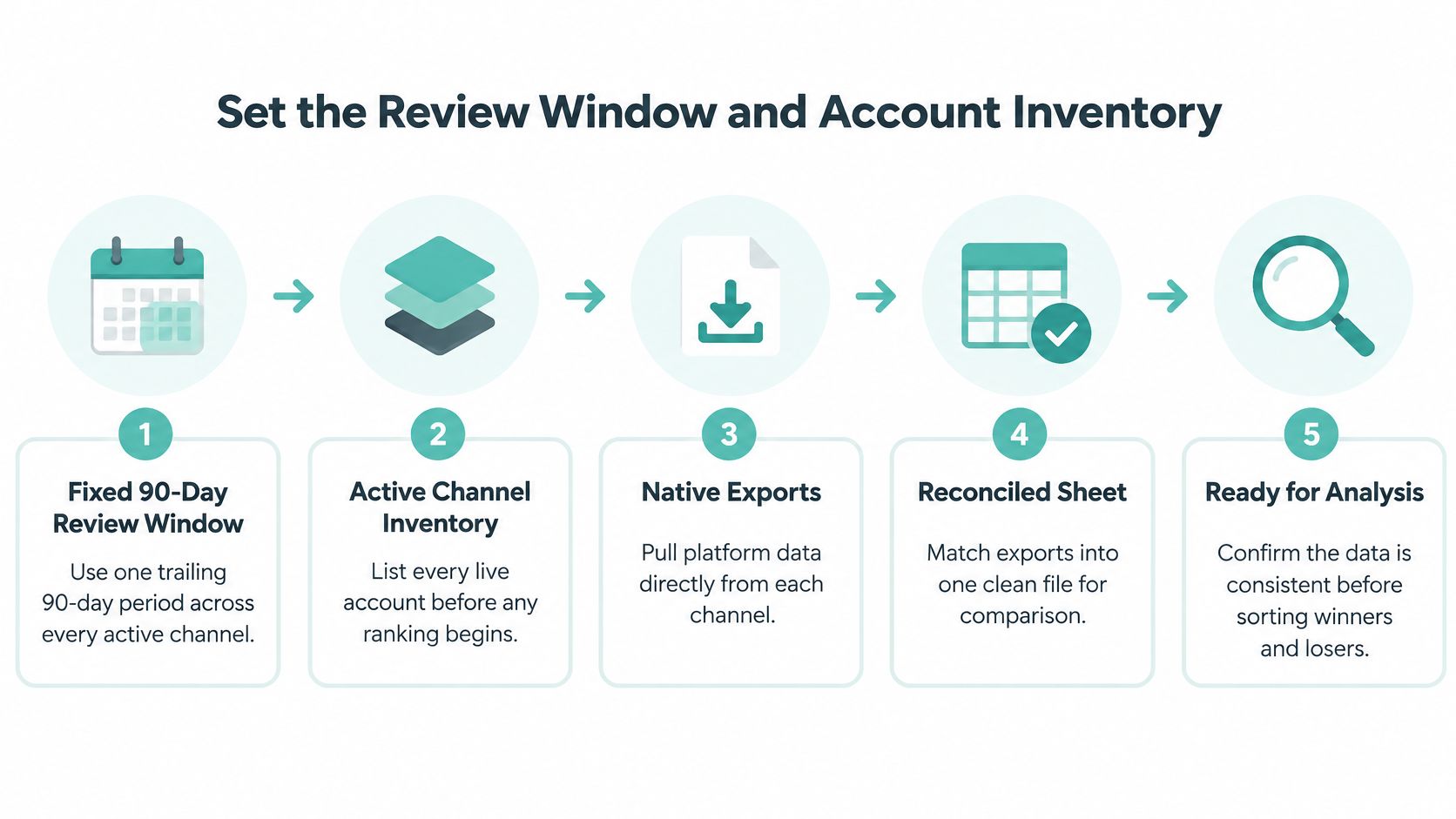
Don’t rank a single post until the dataset is fixed. Pick a trailing 90-day window and apply it to every active channel. Ninety days is long enough to smooth out one odd week and short enough that the findings still describe your current offers, staff, and pricing. The approach in the Hootsuite social media audit guide follows that fixed-window logic, with native platform exports reconciled against website analytics for the same period.
Every post inside the window goes into the file. Every post outside it stays out. If you drop a slow month or pull in a favorite post from last spring, you’ve built a highlight reel, not an audit.
Inventory Every Account, Including the Embarrassing Ones
Start with accounts, not posts. List every profile carrying your name, including dormant pages, old location pages, and the TikTok account a former employee started. For each one, record these fields:
- Owner and access status: Who holds the login, who can approve posts, and whether two-factor access sits with a current employee.
- URL and handle: Note inconsistencies. A handle that doesn’t match your business name costs you search traffic.
- Audience size: Record followers at the start of the window so later rate calculations have a fixed reference.
- Brand match: Check that the name, logo, bio, hours, phone number, and primary link match your website today, not two rebrands ago.
Dormant accounts aren’t harmless. A customer who lands on a dead page with old hours reads that as a closed business. Decide for each one: revive it with a defined job, redirect attention to your main profile, or shut it down.
Build the Post-Level Record
For every post in the window, capture format, topic or content pillar, hook, caption length, posting time, hashtags, call to action, and campaign status. Add a column noting where each metric came from. Platform definitions, attribution windows, and tracking coverage differ, so a Facebook view and a TikTok view aren’t interchangeable units. Note the source now and you’ll avoid false comparisons later.
Add a Light Privacy Pass
While the file is open, map where personal data enters your marketing. Guidance on GDPR obligations for social media activity identifies names, email addresses, tracking pixels, lead forms, direct messages, advertisements, and contest entries as sources worth documenting.
For each one, note where the data originates, who can access it, where it’s stored, how long you keep it, and how outdated records get deleted. If a lead form feeds your CRM or a retargeting list, confirm the permission still covers that use. You’ll finish this stage with one complete workbook covering accounts, posts, metrics, and data flows. Only then does ranking mean anything.
Tag Posts and Calculate Engagement the Same Way
Most audit arguments aren’t about creative. They’re about math nobody agreed on. One person divides interactions by followers, another divides by reach, and the same post is both a winner and a failure depending on who built the spreadsheet. Settle the formula before you sort anything.
Two calculations show up in documented audit frameworks. The framework described in Crowbert’s social media audit guidance defines engagement rate as total interactions divided by reach, while a common follower-based version divides likes, comments, and shares by total followers, multiplied by 100. Both are legitimate. Mixing them in one comparison set is not.
Which Engagement Formula to Use
| Formula | Calculation | What it answers | Do not use it to |
|---|---|---|---|
| Reach-based | Total interactions divided by reach | How strongly people who actually saw the post responded | Compare accounts with very different distribution or paid support |
| Follower-based | Likes, comments, and shares divided by followers, multiplied by 100 | How a post performed against your full accumulated audience | Judge a targeted post that reached only a small segment |
Reach-based measurement suits content resonance. It tells you whether the people served the post cared. Follower-based measurement suits audience-level comparison over time, but it punishes you as your following grows, since plenty of followers never see a given post. A solid post from a large local account can look weak on a follower basis. A narrowly targeted post can look extraordinary because a small, warm audience saw it.
Practical rule: Name the formula at the top of the sheet, list exactly which interactions count, and state whether paid and organic delivery are combined. Then never change it mid-audit.
Your interaction list needs the same discipline. Decide whether saves, shares, replies, link taps, and profile taps count, and apply that list everywhere. If LinkedIn is part of your mix, the right tooling helps you pull consistent exports instead of copying numbers by hand, and this rundown of LinkedIn analytics tools from ViralBrain is a useful starting point for comparing options. Whatever you use, the export has to feed the same formula as every other channel.
Use Benchmarks as Reference Points, Not Targets
External benchmarks help you sanity-check results, nothing more. The dataset behind Buffer’s social media benchmarks covers more than 27 million Instagram posts and more than 52 million Facebook posts, and it lists median monthly publishing of 35 posts for Facebook, 17 for Instagram, and 8 to 9 for TikTok, with median engagement rates of 3.6%, 4.3%, and 4.86% respectively. Those are directional figures across huge, mixed account sets.
Before you compare your numbers to any benchmark, split by platform, format, account size, geography, and paid versus organic delivery. A local med spa shouldn’t chase a global median built from accounts nothing like it. Read which social media metrics actually matter if your team keeps defaulting to follower totals. Your own top and bottom performers, measured one consistent way, will teach you more than any industry average.
Sort Winners and Losers by Business Role
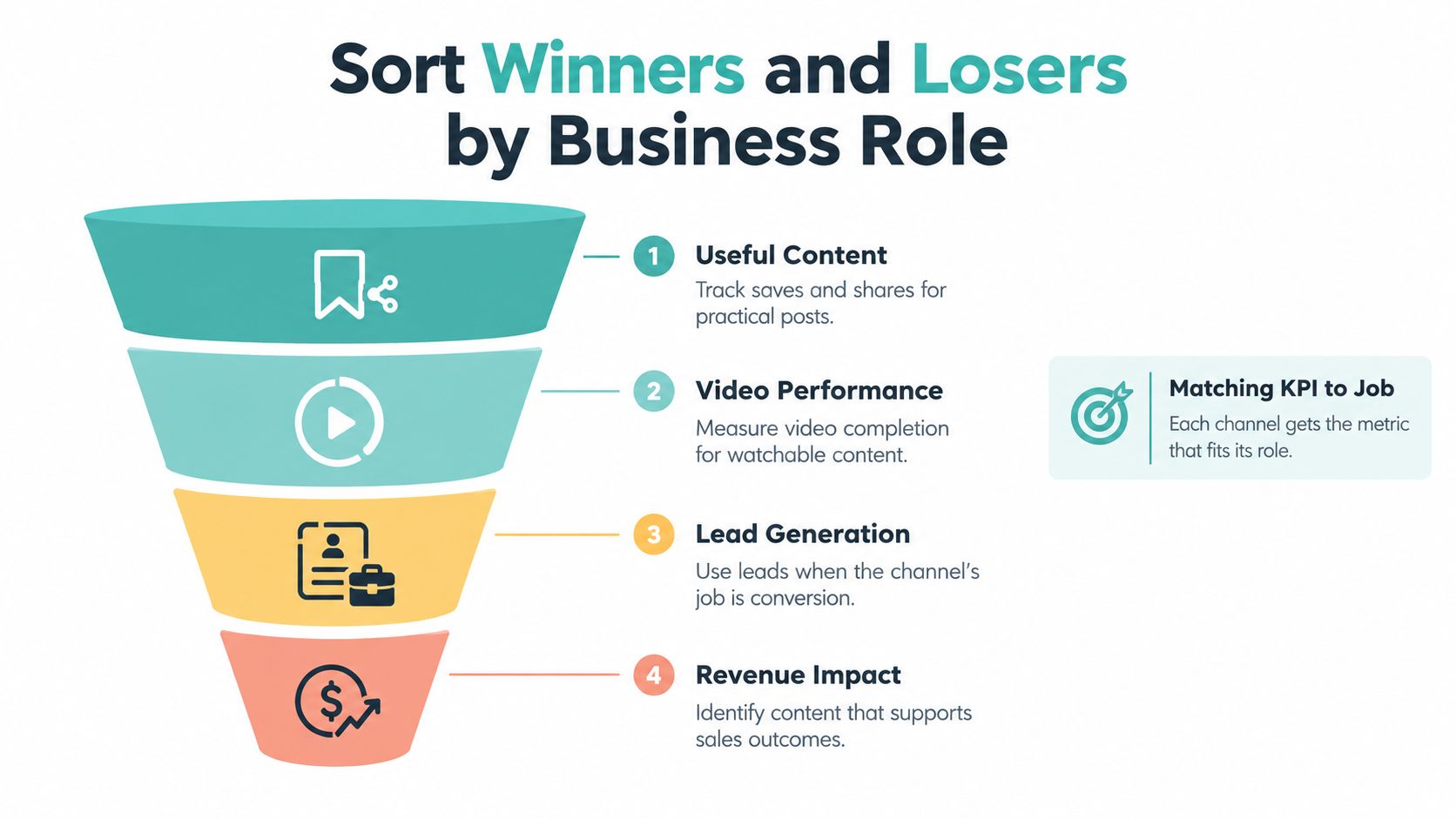
With one formula locked, stop asking which post won overall. Ask which post won at its job. A channel or format only deserves a scorecard matched to the business role you assigned it.
- Saves and shares tell you whether practical, useful content earned a place in someone’s pocket for later.
- Video completion tells you whether the creative held attention to the end, which is where your offer usually lives.
- Link clicks and qualified sessions tell you whether a post sent real prospects to pages that can convert them.
- Leads and transactions tell you whether the content produced commercial impact you can bank.
Compare Quintiles Inside the Same Platform and Format
Sort each platform and format separately, then pull the highest and lowest quintiles side by side. You’re hunting for repeated attributes, not one lucky post. Do the top videos open with a person speaking in the first second? Do the bottom posts bury the offer at the end of a long caption? Does one call to action keep showing up in posts that produced calls?
Segmentation is what makes this honest. A peer-reviewed study of 42 Swiss higher-education institutions coded 42,006 posts across Facebook, Instagram, and Twitter, including 14,930 Facebook posts, 6,671 Instagram posts, and 20,405 tweets, and found that platform differences and visual communication were important factors associated with engagement, per the findings published in the Journal of Marketing for Higher Education study. Your dataset is smaller, but the principle holds. An average blended across platforms hides the channel that’s actually booking appointments.
Read the Pattern Like an Operator
A dental office runs this sort and finds educational Reels getting saved constantly, parents bookmarking videos about kids’ first visits. Those posts rarely produce same-day bookings. A narrow set of straightforward offer posts, new patient special with a deadline and a tap-to-call button, produce most of the scheduled visits. Both content types work. They just work at different stages, and killing the educational series for low direct bookings would starve the pipeline that the offer posts convert.
A retailer finds the mirror image. Product Reels pull reach all month, but sales only move when the caption names a specific in-store event with a date. The fix isn’t more Reels. It’s attaching a concrete reason to visit to the format that already gets watched.
If you can’t name three patterns to repeat and three post types to retire when the audit ends, you built a report, not a decision.
Convert every pattern into an explicit stop, start, or scale action. Each action gets an owner, a deadline, and one measurement target. Not improve engagement. A target sounds like this: produce two tap-to-call offer posts per week for six weeks and track booked appointments against the audit baseline. That’s a decision someone can be held to.
Choose Channels That Will Not Burn Out the Team
Here’s the finding most audits bury. Your content can be performing while your operation is failing. If the owner is filming at midnight, skipping weeks, and depending on one algorithm for every new customer, the strategy has a structural problem that engagement rates won’t reveal.
The strain is widespread. The Verizon State of SMB report found 54% of SMBs struggle to produce enough content across multiple platforms and 54% struggle to keep content fresh, even though 63% of small-business owners call social media their most heavily used marketing channel and 54% of new SMB owners expect unpaid social to remain primary. Read those numbers together. The channel businesses lean on hardest is the one exhausting them.
Ask Three Sustainability Questions
First, which ideas repurpose well? A strong weekly video that becomes a Reel, a short, an email segment, and a website clip beats four one-off posts that die where they were published. Second, which account should you drop? A platform producing neither discovery nor conversion after a fair 90-day test is a tax on the team. Cut it and concentrate effort. Third, do you own any audience relationship at all? Email lists, SMS subscribers, website traffic, reviews, and CRM records survive an algorithm change. Followers don’t.
Run a quick accessibility check while you’re at it. Captions on video, readable on-screen text, an audio alternative where it matters, image descriptions, plain language, and representation that looks like your actual customers. Unusable posts shrink your real reach no matter what the platform reports. Sensible tooling for scheduling and repurposing, covered in this guide to social media scheduling tools for small business, can take production pressure off without adding headcount.
Extend the Winner Instead of Posting More
When the audit validates a message, the smart move often isn’t another twenty posts. It’s putting that proven offer in front of local viewers in a channel built for attention. That’s where Adwave fits naturally. Adwave is an AI TV advertising platform. Enter your website URL, generate a broadcast-ready spot, and place it across 100+ premium channels including NBC, Hulu, and ESPN. Campaigns start at $50, pacing keeps spend inside the amount you set, estimated CPM runs $15 to $35, and audience and viewing data aim the ad at local viewers with tracking from creative through launch.
For home services, real estate, health, retail, and automotive businesses, that means a social offer that already produced calls can be tested on TV without a production crew or a six-figure budget. The audit supplied the proof. TV supplies the reach your exhausted posting schedule can’t.
Turn Audit Findings into a 90-Day Plan
An audit that ends in a spreadsheet changes nothing. Convert the stop, start, and scale list into a dated 90-day calendar with named owners, and the findings start paying for themselves.
Weeks 1 to 2 and the Rest of the Quarter
Spend the first two weeks on cleanup. Archive or rewrite the weakest quintile, fix broken links, replace outdated offers and hours, and lock the single engagement formula you’ll use going forward. Assign one owner to this work with a hard deadline. Cleanup that belongs to everyone belongs to no one.
Across the following month, publish only the patterns that matched each channel’s business KPI. If tap-to-call offer posts booked appointments, they run on schedule. If saved educational content fed the pipeline, it stays, measured by saves and downstream inquiries rather than same-day calls. Keep a simple log beside each post recording calls, form fills, promo redemptions, or store visits. A lightweight system for building a social media content calendar in 30 minutes keeps this from becoming a second job.
In the final stretch, pick the one message that already produced local inquiries and take it beyond social. That message becomes the creative brief for a small TV test. Open Adwave, enter your business website, and generate a broadcast-ready spot aimed at the same local audience, starting from a $50 campaign with spend capped at the amount you set in the platform. Name an owner for the TV test separately from the owner of the social fixes, and give each person one number to watch: qualified calls, booked appointments, or promo-code redemptions.
Book the Next Audit Before You Close This One
This isn’t a one-time cleanup. Figures compiled in WebFX content marketing statistics show 33% of content marketers audit twice per year, 24% audit annually, and 21% audit more than three times per year. Most organizations that audit at all do it on a recurring cycle, and your business should too.
Put the next audit date on the calendar today, 90 days out, with the same window, the same formula, and the same business metrics.
Offers expire, staff change, platforms shift what they distribute. A recurring audit catches that drift while it’s cheap to fix. You’ll end each cycle with dates, owners, and a tested message ready to scale, instead of another dashboard screenshot nobody acts on.
Take the offer your audit just proved and put it on the biggest screen in your customers’ homes. Adwave turns your website into a broadcast-ready TV ad, places it on premium channels aimed at local viewers, and tracks performance from launch, starting at $50 with spend that never exceeds what you set. Visit Adwave today and launch your first test while your audit findings are still fresh.