
It’s late in the day, your phone is in your hand, and you still haven’t posted. You scroll your camera roll for something usable, write a rushed caption, second-guess it, then publish because silence feels worse than mediocre.
That cycle burns time and weakens your marketing.
A social media calendar fixes that, but only if it’s simple enough to keep using. Most small business owners don’t need a complex editorial system. They need a fast, repeatable workflow that turns random posting into planned content. If you’re trying to figure out How to Create a Social Media Content Calendar in 30 Minutes, the answer isn’t more tools. It’s fewer decisions, made in the right order.
Escape the Daily Scramble with a 30-Minute Plan
Monday gets busy. A customer calls, a staff issue pops up, the day runs long, and social media gets pushed to the bottom of the list again. By 5 p.m., you are posting whatever is on your phone because staying visible feels better than saying nothing.
That habit creates weak marketing fast.
As a small business owner, you do not need a complex editorial system. You need a short planning block that helps you decide what to post, why it matters, and when it goes live before the week gets noisy.
The core issue isn't a lack of ideas. It is making the same small decisions over and over. Caption, image, offer, timing, platform, call to action. Handle all of that at posting time, and social turns into one more daily interruption instead of a repeatable part of your marketing.
A 30-minute calendar fixes that because it gives each post a job. Some posts bring in inquiries. Some support a promotion. Some keep your business visible while another campaign does the heavy lifting.
That last part gets missed. If you are running offline marketing, your social calendar should support it. A local TV spot, a seasonal mailer, an in-store event, or a campaign through Adwave should show up in your content plan so people see the same offer more than once and in more than one place. That repetition is what helps small business marketing stick.
A workable 30-minute system does three things:
Cuts decision fatigue by choosing themes, formats, and posting days in one sitting.
Keeps your business visible during weeks when operations take over.
Supports bigger campaigns so social media reinforces promotions you are already paying to run offline.
Seasonal promotions make this easier because the themes already exist. If you need a fast starting point, use these planning templates for every season to map upcoming offers, events, and campaigns into content you can schedule.
The goal is not a prettier spreadsheet. The goal is to stop scrambling, post with a reason, and make social pull its weight alongside the rest of your marketing.
Your Foundation The First 5 Minutes of Prep
The first five minutes matter more than generally thought. If you skip them, the next twenty-five turn into guesswork.
Pick one business outcome
Don’t start with “post more.” That isn’t a strategy.
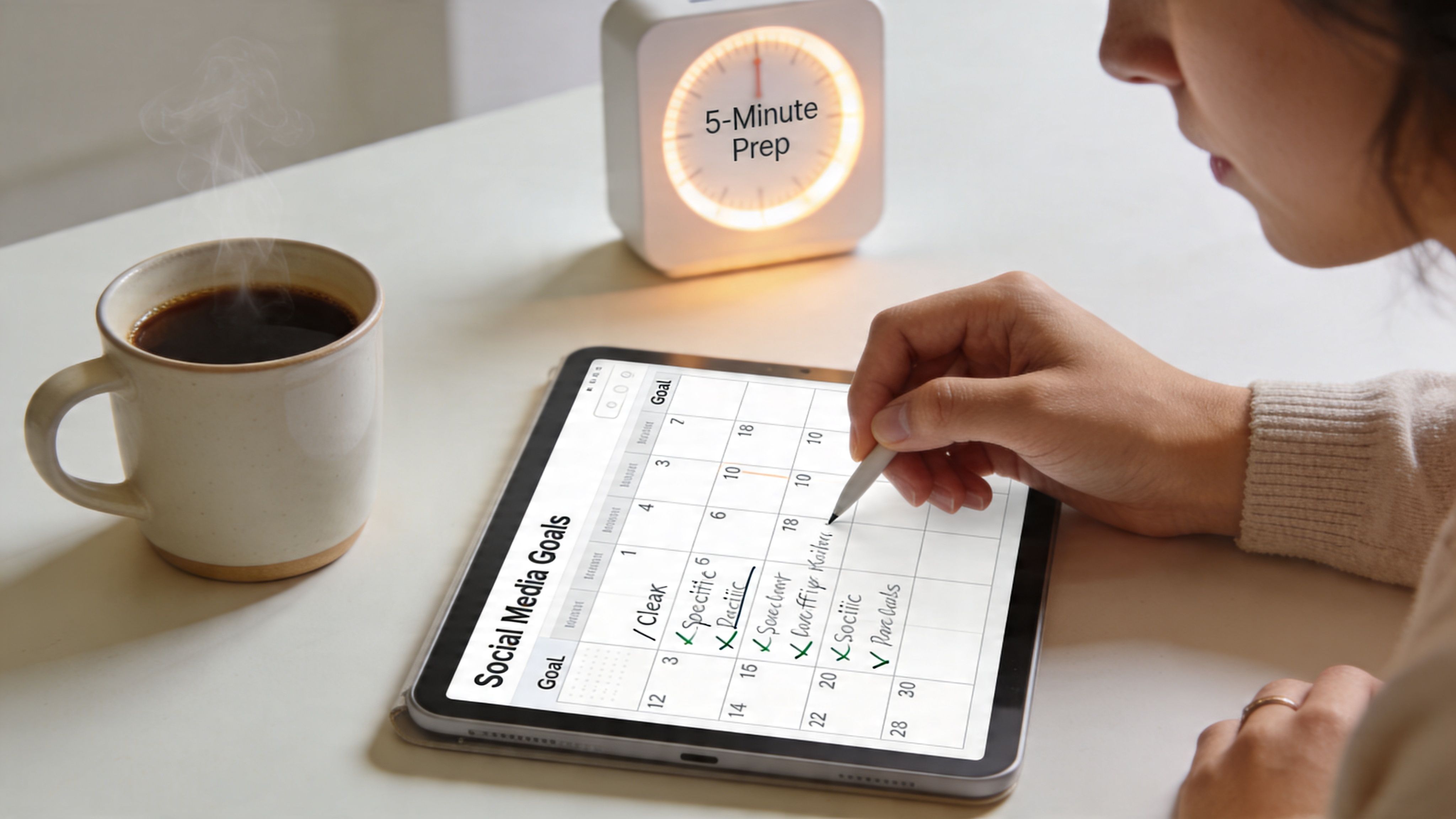
Start with one measurable outcome for the week or month. One source puts it clearly: brands should start by setting specific, measurable goals rather than vague targets like “grow my socials,” and gives this example: “post three short-form videos per week to increase engagement on Instagram by 25% over three months” ( Shopa Marketing on creating a social media content calendar).
That’s useful because it tells you what to create and what to ignore.
For a small business, your goal might look like this:
Get more inquiries from local customers through DMs.
Drive bookings for a service, event, or promotion.
Support a launch so social content aligns with a specific campaign.
Stay visible with a consistent posting rhythm on one main platform.
Check your baseline fast
You don’t need a full audit. You need a quick reality check.
Open your platform analytics and answer three questions:
What are you posting now
Where are you posting most often
Which posts get reactions you care about
Look for signals like views, likes, clicks, saves, or comments. Most platforms already surface these inside the app, so don’t overcomplicate this step.
If you can’t describe what success looks like before you plan content, you’ll end up judging posts by mood instead of results.
Narrow the audience before you write
A broad audience creates weak content. A defined audience creates sharper posts.
Write one sentence that describes who you’re trying to reach this week. Not everyone. Just the most relevant group. If you need help tightening that up, this guide to what is audience segmentation is worth reviewing.
A fast prep sheet can be this simple:
That’s enough. Once this is clear, the actual planning moves quickly.
The 15-Minute Content Batching Power Session
This is the part that saves the week.
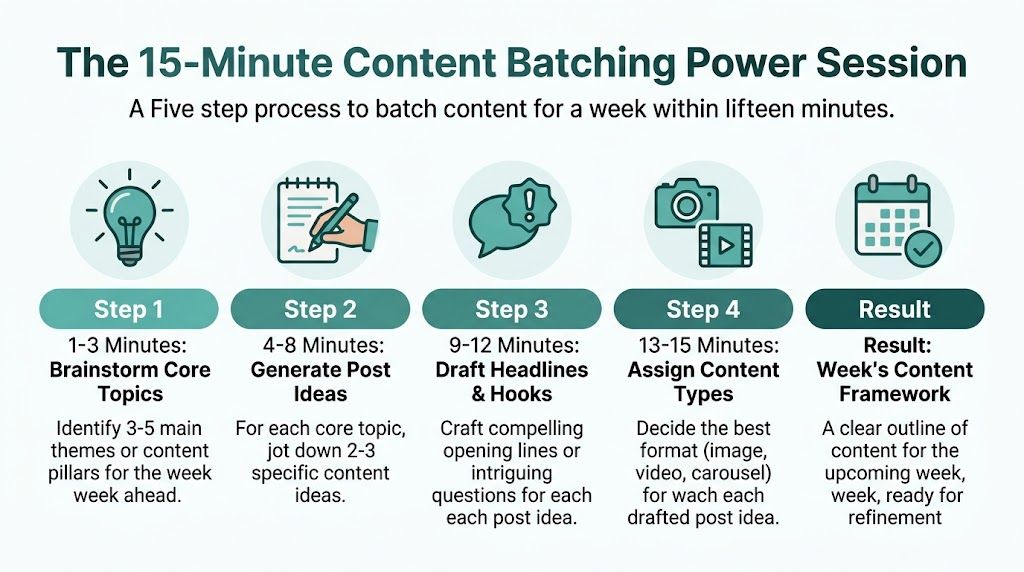
Content batching works because it keeps you in one mental mode. Instead of switching from idea generation to filming to caption writing every day, you make a week’s worth of decisions at once.
Build around pillars, not random ideas
Use 3 to 5 content pillars. These are recurring themes your business can talk about without forcing it.
A local service business might use:
Customer stories that show outcomes or experiences
Behind the scenes clips from the team, process, or workspace
Tips and education that answer common questions
Community and culture posts tied to local events or values
Offers and promotions when you need direct response
A real estate agent might keep those same pillars but shift the examples. If you need inspiration that’s more practical than generic prompts, these proven real estate social media post ideas are a useful reference because they map content to actual industry use cases.
Use the 80 20 split
Most small business feeds become too promotional too fast. That’s why people mute them.
Heropost recommends the 80-20 rule for small businesses: 80% educational or entertaining posts and 20% promotional. The same source also says brands using structured calendars see 3x higher engagement consistency, with 90-day advance planning boosting ROI by 25% ( Heropost’s guide to creating a social media content calendar).
In practice, that means your weekly batch should lean like this:
Most posts should teach, show, explain, or entertain.
A smaller share should ask for the sale, booking, or call.
That mix keeps your feed useful. Useful content earns attention. Promotional content then performs better because it arrives in the right context.
Fill a simple weekly grid
Don’t build a giant spreadsheet. Use only the columns you’ll update.
A solid small business calendar includes:
Now fill it fast.
A rapid-fire batching method
Minutes 1 to 3 List your pillars for the week.
Minutes 4 to 8 Add one or two post ideas under each pillar.
Minutes 9 to 12 Write rough hooks, not polished captions.
Minutes 13 to 15 Assign the best format for each post, like image, carousel, Reel, or story.
Here’s what that looks like in plain terms:
Tip post “Three mistakes people make before hiring a contractor”
Behind-the-scenes clip “What our team checks before a project starts”
Customer story “Why this client chose us over a cheaper option”
Promotional post “This month’s booking offer and who it’s for”
If short-form video is part of your plan, this guide to Instagram Reels for local business a quick-start guide can help you choose which ideas deserve video instead of static posts.
Batch planning works best when you lower the standard for the first draft. You’re building the framework, not writing literature.
That’s the difference between a calendar that gets finished and one that stalls.
Amplify Your Marketing with Cross-Channel Promotion
A social calendar is more valuable when it supports the rest of your marketing.

Most small businesses still treat social media like a separate task. Offline campaigns sit in one bucket, online content in another. That separation wastes momentum.
One source points out that guides on quick content calendars often miss the offline tie-in, and notes a gap for businesses using AI-generated TV spots by slotting those ads into social calendars to amplify broadcast exposure, including teaser reels 24 to 48 hours pre-airtime or post-campaign recaps with performance data ( Ask Optimo on creating a content calendar in minutes).
Turn one campaign into a week of content
If your business is running a local promotion, event push, or TV campaign, your social calendar should wrap around it.
A simple cross-channel sequence looks like this:
Before launch Post a teaser. Hint at what’s coming. Build recognition.
On launch day Publish the campaign creative or a short cut of it on social.
Mid-campaign Share context. Show the people, place, or story behind the message.
After the campaign Recap what happened, what you learned, or what customers should do next.
This matters for businesses using TV because the content is already there. You’ve already invested in the message. Social gives that message extra mileage.
Where Adwave fits naturally
For small businesses using TV, Adwave is a strong fit because it makes local TV advertising practical instead of heavy and slow. You can create a spot from a website URL, launch across premium channels, and then repurpose that same campaign into social posts, teaser clips, and recap content without inventing a separate creative concept from scratch.
That’s the move many calendars miss.
A restaurant can tease an upcoming weekend push. A real estate team can run a local brand ad on TV, then post snippets and follow-up explainers on Instagram and Facebook. A retail shop can turn one campaign into multiple touchpoints across channels.
Social works better when it echoes the rest of your marketing instead of competing with it.
If you want your 30-minute calendar to pull real weight, don’t plan social in isolation. Tie it to whatever the business is already promoting.
Schedule and Automate in the Final 10 Minutes
This last block is where consistency becomes realistic.

If you stop after planning, you’re still leaving daily work on your plate. The final ten minutes should move posts from “good idea” to “scheduled.”
Load the week and move on
Take your draft calendar and put it into your scheduler of choice. Many small businesses use native platform scheduling, Google Sheets plus reminders, or a lightweight scheduling tool. The specific platform matters less than the habit.
At minimum, each scheduled post should include:
Caption draft
Visual or video asset
Publish date
Platform
Status
If something isn’t ready to schedule, mark it clearly. Don’t rely on memory.
Use automation to avoid dropping the system
Manual calendars fail when maintenance becomes another chore. That’s not just a theory. One source cites a 2025 Buffer study finding that 68% of small business marketers abandon calendars in under 4 weeks due to maintenance overhead. The same source highlights a more minimalist approach: use a 30-minute setup session to create AI workflows, which can reduce active time to 5 minutes per week ( Social Squared on social media content calendar workflow).
That’s the smarter trade-off for busy founders.
Instead of manually rebuilding everything every week, automate the repetitive parts:
Recurring pillars can stay in rotation.
Evergreen posts can be scheduled in advance.
Approval steps can be simplified with a status column.
Asset storage can live in one folder so you’re not chasing files.
If you’re trying to trim repeat work, this resource on marketing automation for small businesses is a good next step.
Don’t automate the wrong thing
Automation helps with scheduling and structure. It doesn’t replace judgment.
Keep these human tasks manual:
That balance keeps your feed active without making it feel robotic.
The best “set it and forget it” setup isn’t total hands-off publishing. It’s a calendar that handles the routine work so you can spend your time engaging, filming, and selling.
From Calendar to Consistent Business Growth
A calendar earns its keep when it helps you spot what brings in leads, calls, and foot traffic.
For a small business, that usually means ignoring vanity metrics at first. Follower bumps are nice. The stronger signal is whether your posts create action you can trace back to the business.
Review what moved the business
Set aside 10 minutes at the end of each week and answer four questions:
Which posts led to replies, DMs, or inquiries
Which posts drove clicks to an offer, booking page, or contact form
Which topics connected fast enough to reuse next week
Which formats were simple enough to make again without slowing down the team
That review gives you your next calendar. Keep the winners. Cut the posts that looked fine but did nothing.
This matters even more if you’re running offline campaigns. If a TV ad goes live through Adwave, your social calendar should support it with reminder posts, behind-the-scenes clips, offer callouts, and follow-up content that answers the questions people ask after seeing the ad. That is how a 30-minute calendar starts pulling more weight than social alone. It helps one campaign show up in more places without creating a second marketing project.
If you want a quick benchmark for action-focused creative, study social media posts that convert and compare their structure to your own posts.
A useful calendar makes patterns obvious.
Stay with the 30-minute routine. Repeat the topics that drive response. Refine the posts that support your broader marketing, especially the ones tied to promotions, events, and TV campaigns. Over time, the calendar stops being a publishing tool and starts acting like a simple growth system for the business.
If you want your content calendar to support more than social alone, Adwave is worth a close look. It helps small businesses create, launch, and measure AI-powered TV ads in minutes, then turn those campaigns into coordinated social content that extends reach across channels without adding a heavy production workload.


