A list of 10,000 contacts can lose roughly 2,300 addresses in a year at a decay rate comparable to the 23% of addresses ZeroBounce classified as invalid or risky in 2025. That isn’t a theoretical nuisance. It means a list that looks healthy on paper may already contain abandoned inboxes, changed work addresses, temporary signups, spam traps, and subscribers who no longer want your messages. ZeroBounce’s five-year analysis processed more than 11 billion email addresses during 2025 and found the same problem recurring over time.
Email list hygiene isn’t a quarterly panic exercise. It’s an operating system for acquiring, validating, segmenting, suppressing, and monitoring contacts every day. If your campaigns promote local offers, bookings, services, or advertising, treat your database as depreciating data, not a permanent business asset.
What Email List Hygiene Really Means
Email list hygiene is an operating process for keeping promotional audiences accurate, permitted, and economically useful. It covers permission records, signup validation, delivery-failure handling, suppression records, engagement monitoring, and checks on aging data. Configure these controls continuously, then use real-time events to adjust who can receive the next campaign.
The decay pattern remains a practical warning:
| Year | Share invalid or risky |
|---|---|
| 2021 | 23% |
| 2022 | 22% |
| 2023 | 25% |
| 2024 | 28% |
| 2025 | 23% |
These figures come from the ZeroBounce decay analysis cited earlier. They do not mean every business loses the same share. They show that roughly one-fifth to more than one-quarter of a database may need attention annually.
The moving parts you own
Start with permission controls. Record each contact’s acquisition source, consent scope, and relationship owner. Use double opt-in where appropriate, especially for higher-risk acquisition sources or valuable offers.
Separate delivery outcomes and connect them to suppression rules. A hard bounce generally indicates a permanent address problem. A soft bounce may be temporary, so set a review path rather than suppressing every address immediately. Your email service provider should pass these events into one central process after each send.
Engagement needs a value-based review. A subscriber who has not opened recently may still buy seasonally or follow a long consideration cycle. Segment by recency, historical value, purchase cycle, and consent source before choosing re-engagement or suppression. The right decision depends on the revenue you could lose by removing the contact, weighed against the cost of continuing to send.
Practical rule: A clean list is the list where every active address has a defensible reason to receive your next campaign.
For local-business applications, grow your café with email offers a practical example. Adwave’s email marketing guide for small businesses connects audience management with campaign planning. Treat list hygiene as part of campaign operations, not a quarterly cleanup task.
Run a Quick Audit Before You Clean Anything
Don’t buy a verification tool before you understand what’s wrong. Export your current audience, preserve a backup, and spend an afternoon identifying the categories that need different treatment.
Begin with the obvious structural checks:
-
Role addresses: Separate
info@,sales@,support@, and similar shared inboxes from personal contacts. They aren’t automatically bad, but engagement and ownership are harder to interpret. -
Domain typos: Flag mistakes such as
gmial.comandyaho.com. These addresses often come from form-entry errors and should be corrected only when you can confirm the subscriber’s identity. - Recent engagement: Pull the last-open and last-click dates, but don’t treat an open as proof of commercial intent. Use clicks, replies, purchases, bookings, and other first-party behavior where available.
- Delivery history: Flag addresses that hard-bounced or generated complaints during the past 90 days. Those contacts need immediate review, not another promotional send.
- Acquisition source: Mark imports, partner promotions, event scans, paid search leads, and in-store signups separately. Source quality determines how much verification friction makes sense.
For a local business using Adwave to support a short promotional push, the database is especially easy to misread. A concentrated campaign can expose old records quickly, so audit the audience before each local campaign rather than assuming the last cleanup still applies.
Put every contact in one of three buckets
Keep means the address has valid permission and recent or commercially meaningful activity. Fix means the record has a correctable problem, such as a typo, duplicate, missing consent detail, or unclear source. Drop means it has a confirmed hard bounce, complaint, invalid address, or failed suppression decision.
Copy this checklist into your CRM notes:
- Export the audience and save a dated backup.
- Mark role addresses and duplicates.
- Flag obvious domain typos.
- Add last-open, last-click, and purchase dates.
- Review hard bounces and complaints from the last 90 days.
- Record each contact’s acquisition source.
- Assign Keep, Fix, or Drop.
- Document the reason for every suppression decision.
Validation, Bounces, and Spam Trap Removal
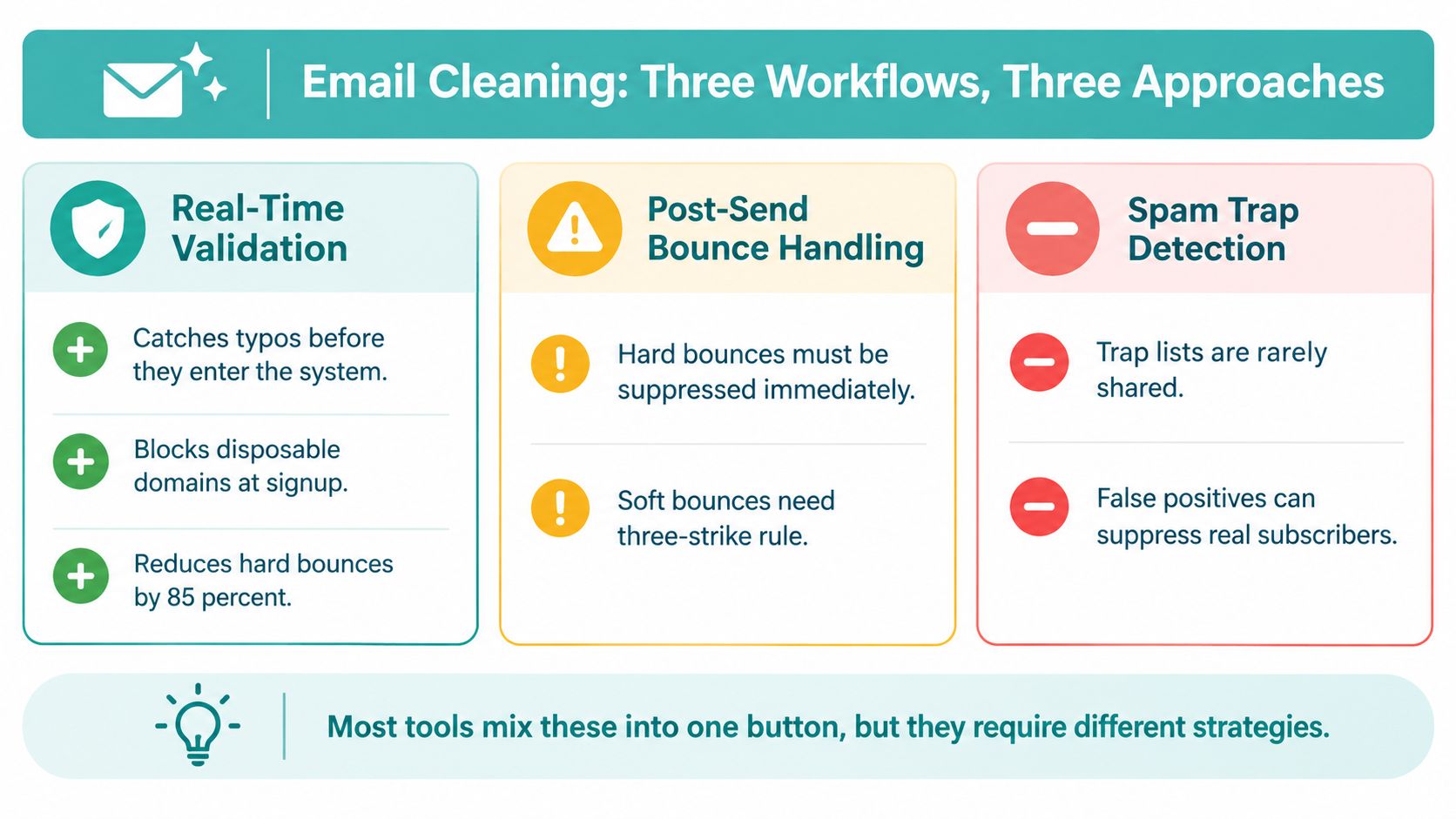
“Clean the list” hides three different jobs. Real-time validation prevents bad data from entering. Bounce handling reacts to what happened after delivery. Spam-trap removal addresses a high-risk category that shouldn’t receive a re-engagement attempt.
Choose the control that fits the moment
| Workflow | Strength | Limitation |
|---|---|---|
| API at signup | Catches typos and disposable domains before storage | Adds implementation work and may add signup friction |
| Batch pre-send check | Reviews an existing audience before an important campaign | Can become a recurring cost and won’t fix the acquisition process |
| ESP-native checks | Uses events already generated by your sending platform | May offer less detail than a dedicated validation service |
At signup, validate syntax, flag disposable domains, and offer a correction when the address looks mistyped. For higher-risk forms, use a confirmation step. A soft-fail approach can preserve conversion by accepting the form while placing the contact in a restricted segment until confirmation.
After delivery, classify the event before taking action. Hard bounces should be suppressed immediately. Soft bounces need observation because a full inbox or temporary server issue can resolve. If an address keeps soft-bouncing across campaigns, suppress it rather than allowing repeated retries to distort your metrics.
Spam traps require a harder line. Pristine traps were never legitimate subscribers, recycled traps may belong to abandoned addresses, and typo traps can result from common misspellings. If your validation or reputation data identifies an address as a trap, remove it from promotional sending without a win-back sequence.
Don’t make one button do three jobs. Validation prevents contamination, bounce processing limits repeated failure, and trap detection protects against a different class of reputation risk.
A small-business marketing stack benefits from real-time validation because local campaigns often depend on concentrated sends to a finite audience. Adwave can sit alongside your email and CRM tools as part of a broader local advertising workflow, while your signup and sending systems enforce the contact-level controls. For authentication fundamentals, use this SPF, DKIM, and DMARC guide.
Re-Engagement Flows and Suppression Decisions
Deleting every inactive subscriber can discard a legitimate customer who buys infrequently while flattering a short-term engagement ratio. A real estate prospect, automotive buyer, legal client, healthcare patient, or home-services customer may go quiet for months without losing future value. Treat re-engagement as an operating decision tied to expected revenue, sending cost, and suppression risk, not just open or bounce counts.
Segment subscribers before sending. Review recency, historical value, purchase cycle, and permission source. A recent lead with no open history needs a different decision from a former customer who engaged heavily before going inactive. Set rules by segment so the same inactivity window does not govern every contact.
Use a four-step re-engagement sequence
- Win-back offer: Give the subscriber a specific reason to return. “Still looking for help with your next project?” is more useful than “We miss you.”
- Value reminder: Explain what they will receive and offer a preference or frequency choice. Make the benefit concrete.
- Last chance: State that promotional messages will stop unless they confirm continued interest.
- Goodbye: Give a final, simple option to stay subscribed, update preferences, or unsubscribe.
Set a cutoff date before the sequence begins. Extending it indefinitely spends delivery capacity on contacts unlikely to respond and can increase fatigue. Unsubscribe rates rose from 0.08% in 2024 to 0.22% in 2025 across 3.6 million campaigns, according to Prospeo’s unsubscribe guidance. Re-engagement should be targeted, not relentless.
Contacts that remain inactive after the sequence should move to a suppression list. Keep them in your records so you retain consent history, acquisition source, and the reason for suppression. Deletion removes useful context and can make it harder to prove that an opt-out was honored.
Under U.S. CAN-SPAM rules, businesses must provide a clear opt-out method, honor requests within 10 business days, and keep that mechanism able to process requests for at least 30 days after sending, according to the Federal Trade Commission’s CAN-SPAM guidance. Maintain one suppression record across every team and sending system.
For implementation ideas, use Adwave’s resource on re-engagement campaigns for inactive subscribers.
Automating Hygiene on a Repeatable Cadence
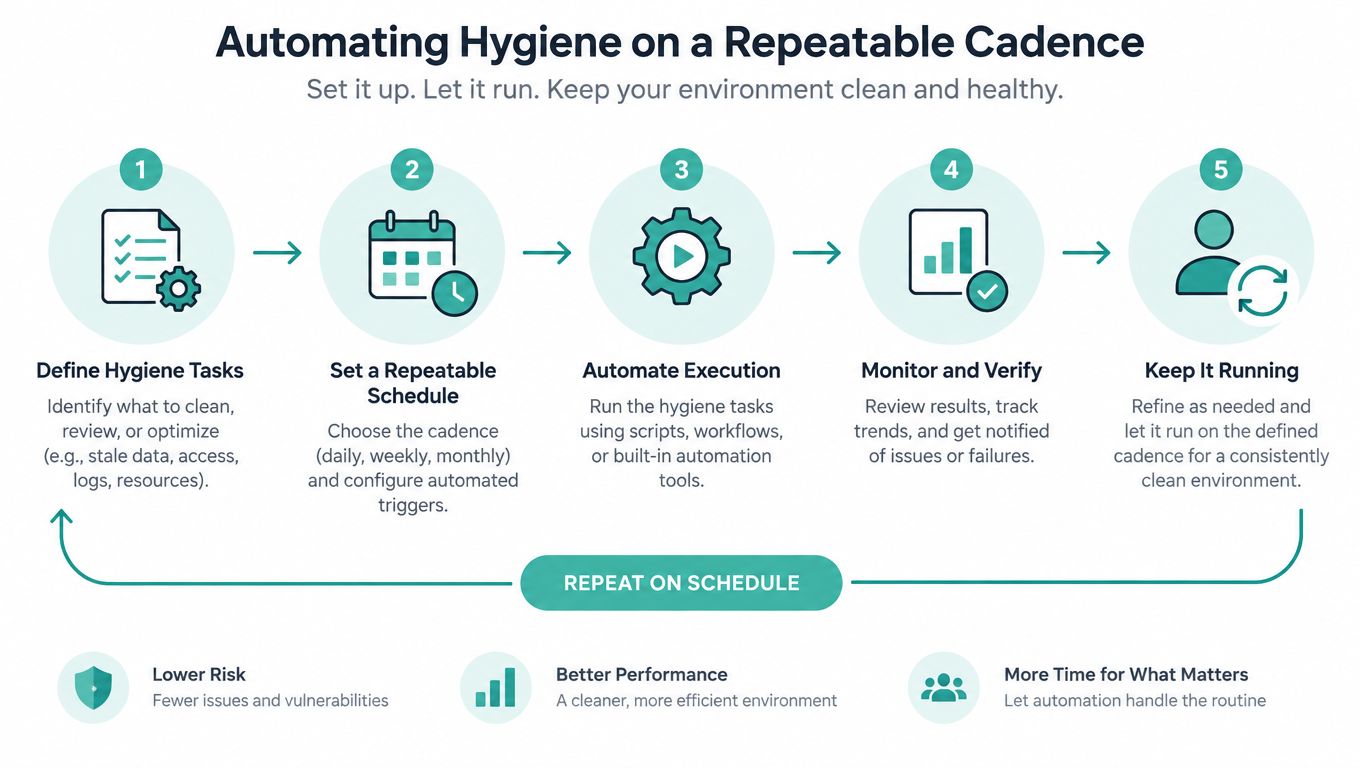
The fix for “I cleaned my list six months ago, what changed?” is automation. Build controls into the points where data enters, moves through, and leaves your marketing system.
Start with the signup form. On submission, send the address through a validation API. If the result is uncertain, accept the lead into a review or confirmation path rather than immediately adding it to every promotional segment. Apply double opt-in when the acquisition source or offer carries meaningful risk.
Then automate the recurring work:
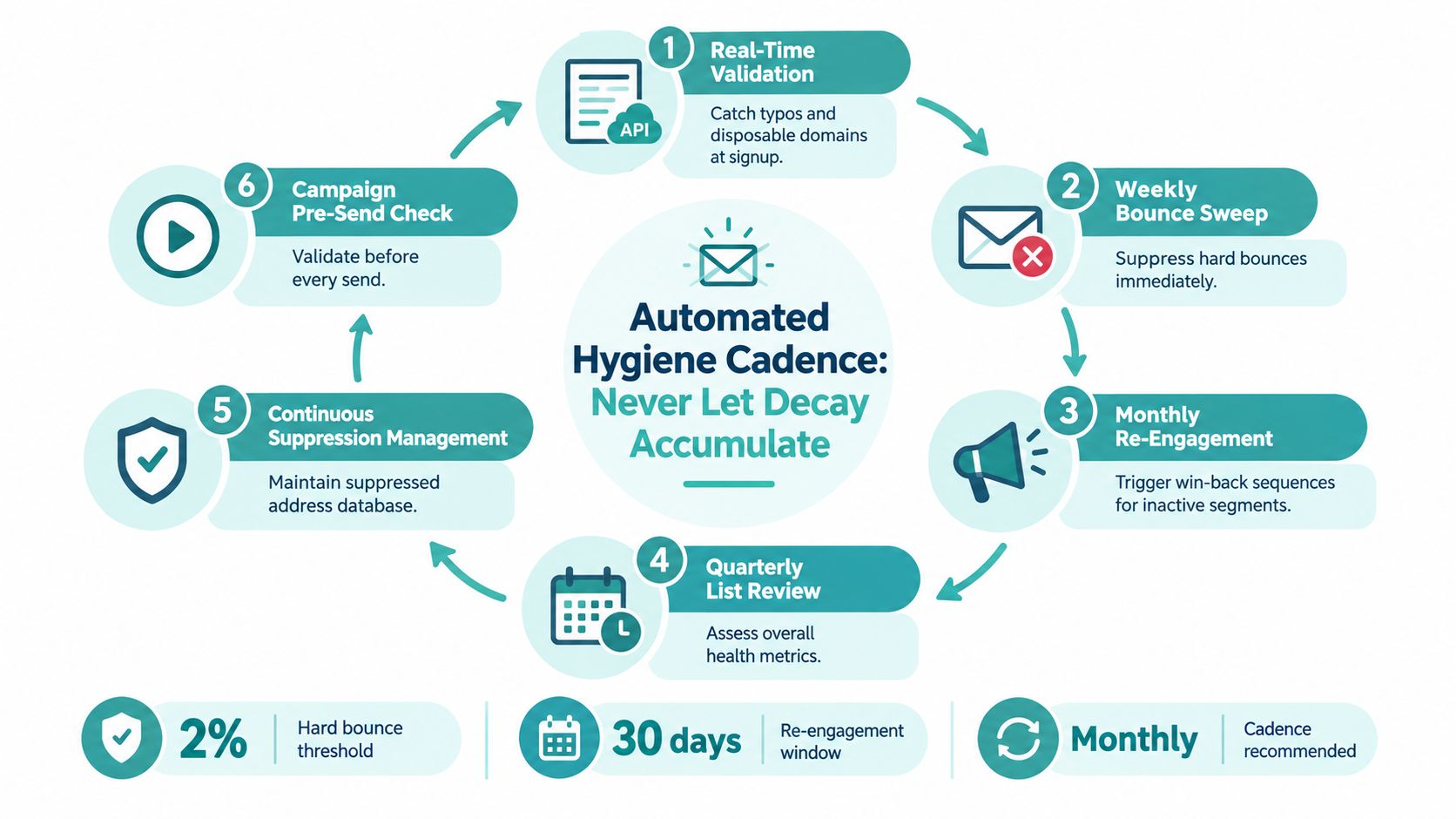
- Weekly bounce sweep: Suppress hard bounces and classify soft bounces.
- Monthly suppression job: Process complaints, repeated delivery failures, and contacts that have crossed your inactivity rule.
- Triggered re-engagement: Move subscribers into a win-back sequence when they become inactive according to their segment.
- Campaign pre-send check: Validate newly imported or recently edited contacts before every significant send.
- Quarterly review: Examine acquisition sources, list growth quality, authentication, and domain reputation.
Keep the suppression list in a central table that your ESP, CRM, and broadcast tools all reference. A suppression request that reaches one system but not another isn’t a successful unsubscribe process.
Use a short monthly operating routine
Reserve 30 minutes each month for a focused review. Check new hard bounces, complaints, soft-bounce patterns, inactive segments, suppression synchronization, and unusual changes by acquisition source. Record what you changed and why.
Local businesses often send promotions in short bursts. That makes silent decay more dangerous because an old audience may remain untouched until a high-priority launch. A platform such as Adwave can support the broader local advertising push, but your email systems still need this repeatable control layer. See this guide to email automation for small businesses for campaign workflow ideas.
Matching Hygiene Controls to the Way You Acquired Each Subscriber
One list can contain several different risk profiles. Treating every contact identically is how a small business either adds too much friction to good signups or sends too freely to questionable ones.
Consider a local business with four acquisition paths. Paid-search leads arrive through a form, in-store visitors join a newsletter, a partner runs a co-branded giveaway, and staff scan leads at an event.
| Acquisition source | Recommended control | Reason |
|---|---|---|
| Paid search | Real-time validation, with double opt-in for high-value offers | The lead is valuable, but form errors and low intent need testing |
| In-store signup | Confirm or verify at the next visit | The business has an opportunity to match the record to a real customer |
| Partner giveaway | Sunset re-engagement sequence | Permission and intent may be less specific than the partner suggests |
| Event scan | Same-week welcome flow | Quick context reduces confusion about why the business is emailing |
The rule is simple: the higher the source risk or offer value, the stronger the verification gate. A trusted first-party signup can use a lower-friction path. A partner import or high-value consultation request deserves clearer confirmation and tighter segmentation.
Don’t blur email permission with SMS permission. If your campaign also collects mobile numbers, document the separate consent language and review resources such as SMS consent terms before adding that channel.
Ask three questions for every source:
- Did the person clearly request this type of message?
- Can the business explain why the contact is receiving the next send?
- What is the cost of allowing a bad address or unwanted recipient through?
Your answers should determine the control, not a universal cleaning calendar. Track source-level bounces, complaints, and re-engagement results so acquisition teams can fix the upstream problem rather than repeatedly scrubbing the downstream list.
KPIs Worth Tracking and Warning Signs to Act On
Track a small set of metrics and act before a quarterly review. The four hygiene KPIs that matter most are hard-bounce rate, spam-complaint rate, inbox-placement rate, and re-engagement win rate. Review them continuously, with alerts tied to suppression decisions rather than treating list cleaning as a one-time task.
For bounce performance, high-performing sectors in Mailgun’s 2025 benchmark data generally kept bounce rates below 0.5% across data from more than 400 billion emails. Mailgun also reported an example of a tightly managed program with a 0.01% bounce rate and 99.25% delivery rate. Use 0.5% as a practical ceiling, then investigate any increase after an import, form change, or new acquisition channel.
Google’s sender guidelines set the clearest complaint threshold. Keep user-reported spam below 0.1%, or fewer than 1 complaint per 1,000 messages, and prevent the rate from reaching 0.3% or higher, according to Google’s sender guidelines. Gmail calculates spam rates daily. Configure alerts and pause questionable segments instead of waiting for a scheduled review.
| Metric | Target | Warning | Action |
|---|---|---|---|
| Hard-bounce rate | Below 0.5%, based on Mailgun’s benchmark examples | Rising after an import or signup change | Audit the source, validate new records, and suppress permanent failures |
| Spam-complaint rate | Below 0.1%, Google’s stated benchmark | Approaching 0.1% or moving sharply upward | Review consent, frequency, content, and suppression synchronization |
| Inbox-placement rate | Improve over time | Falling while delivery remains technically successful | Check authentication, engagement, complaints, and sending patterns |
| Re-engagement win rate | Positive and sustained after the sequence | No meaningful response from an inactive segment | Tighten the inactivity rule and suppress contacts that failed the test |
Inbox placement differs from delivery. The cited benchmark reported 87.2% global inbox placement in 2025, up from 83.5% in 2024. Use that figure as context, not as a promise. A message can be accepted technically and still miss the primary inbox, so connect placement data to engagement and suppression economics.
Pick two KPIs today, assign an owner, and set a monthly review date. Adwave helps small businesses create, launch, and measure broadcast-ready advertising across premium channels. Disciplined email hygiene keeps owned-audience data usable for follow-up and conversion.
Use Adwave to plan and measure accessible local TV advertising alongside a stronger email operating process. Visit Adwave before your next campaign to connect audience growth, advertising reach, and repeatable performance tracking without letting an aging contact list undermine your marketing.