TV advertising has always had one frustrating limitation: viewers can't click the screen. They see your ad, maybe they remember it, but there's no direct path from the TV to your website, your store, or your checkout page. QR codes change that.
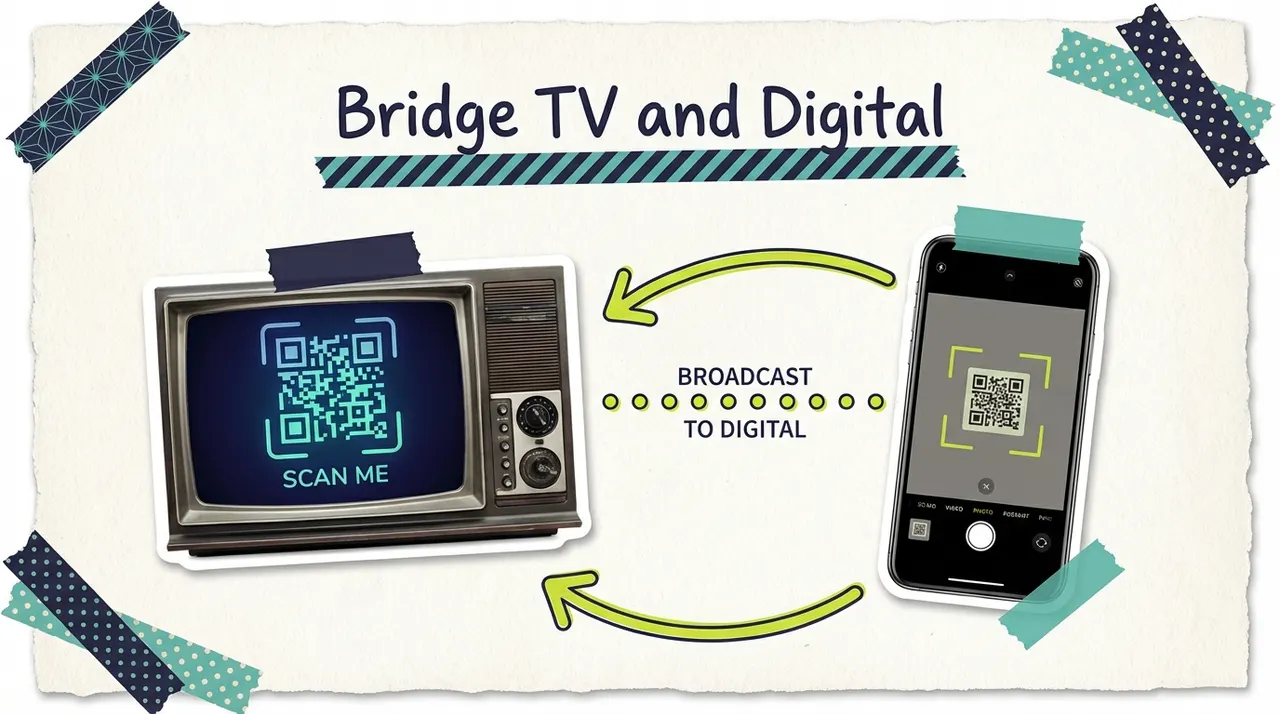
By placing a scannable QR code in your TV commercial, you create an instant bridge between the big screen and the viewer's phone. They see your ad, scan the code, and land directly on your website, booking page, or special offer. It's the closest thing to a "click" that TV has ever had.
This guide explains how QR codes work in TV advertising, when they make sense, and how to use them effectively without sabotaging your creative.
Why QR codes on TV gained traction
QR codes have been around since 1994, but their use in TV advertising really took off after two converging trends:
COVID-era adoption. Between 2020 and 2022, QR codes became mainstream consumer behavior. Restaurant menus, event check-ins, vaccine records, and payment systems all trained consumers to pull out their phone and scan. According to Statista, QR code scans in the U.S. increased by over 400% between 2020 and 2024.
CTV's living room environment. Connected TV ads play on the big screen while viewers have their phones nearby. Unlike traditional TV watching from across the room, CTV viewers are often sitting close enough to scan a code easily. The multi-screen behavior (watching TV while using a phone) that used to be a distraction became an opportunity.
Coinbase's Super Bowl moment. The 2022 Coinbase Super Bowl ad that featured nothing but a bouncing QR code generated over 20 million scans in 60 seconds. That single ad proved to the entire advertising industry that TV viewers would scan QR codes if given the right prompt.
How QR codes work in TV commercials
The mechanics are straightforward:
Step 1: Generate a dynamic QR code. Use a QR code generator that creates dynamic codes (codes that can redirect to different URLs after creation). This is critical because it lets you update the destination without changing the ad creative.
Step 2: Add the QR code to your commercial. Place the code on screen during the portion of the ad where you want viewers to take action (typically the last 5 to 10 seconds). The code should be large enough to scan from a comfortable viewing distance.
Step 3: Viewer scans with their phone. The viewer opens their phone camera, points it at the TV screen, and the code automatically opens the destination URL in their browser.
Step 4: Track the scan. Dynamic QR code platforms track every scan with data including time, location, device type, and whether it's a new or repeat scanner.
Best practices for QR codes in TV ads
Sizing and placement
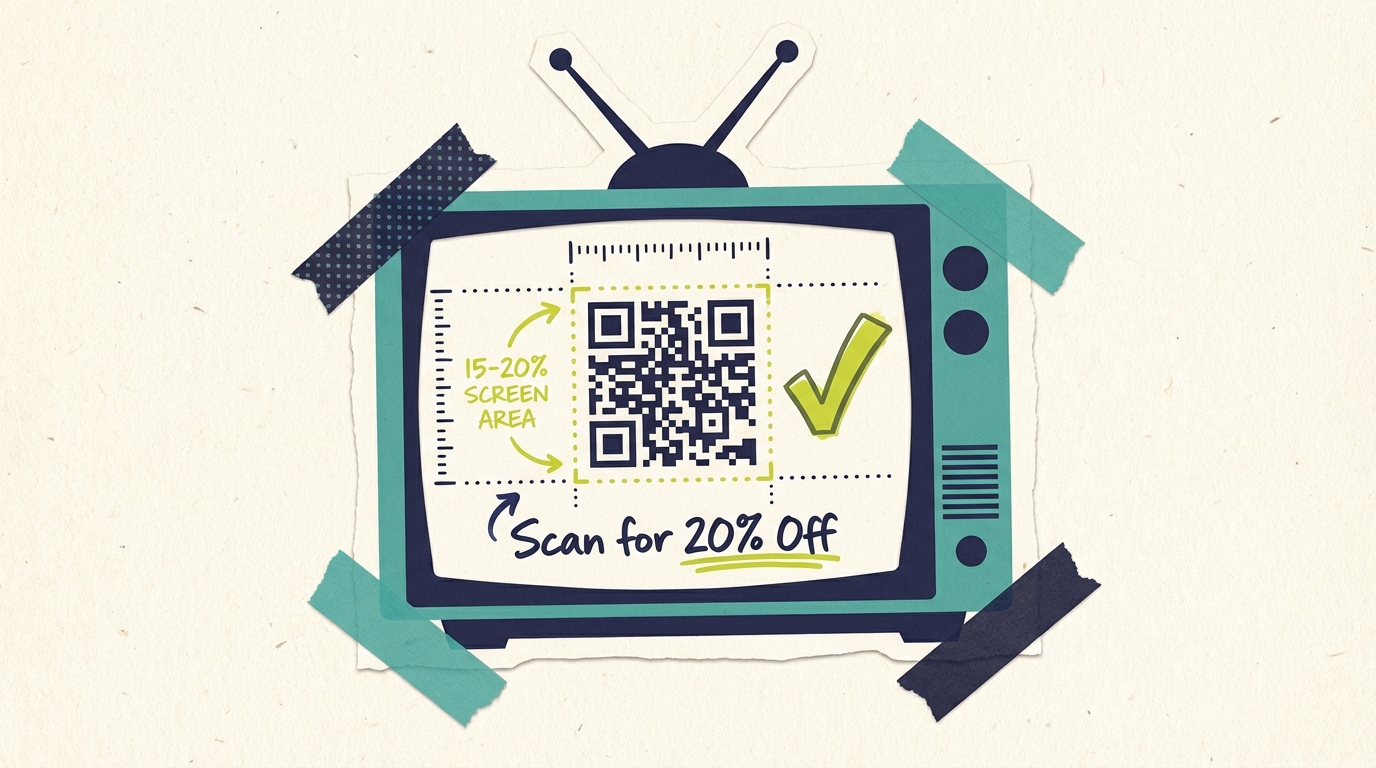
Make it big enough. The QR code should occupy at least 15 to 20% of the screen area. A tiny code in the corner won't scan reliably from 6 to 10 feet away (typical viewing distance). Test your ad on an actual TV at typical viewing distance before running.
Place it on the right side or center. Eye-tracking research shows that viewers' attention flows left to right on screen. A QR code on the right side of the screen catches attention after they've read the main message. Center placement works well for end cards.
Use a solid, contrasting background. QR codes need high contrast to scan. Place the code on a solid white or light background. Avoid placing it over busy video footage, gradients, or moving backgrounds.
Keep it on screen long enough. Give viewers at least 5 seconds with the QR code visible. Ideally, show it for the final 7 to 10 seconds of a 30-second spot. Viewers need time to notice the code, grab their phone, and scan. A 2-second flash isn't enough.
Creative integration
Don't let the QR code take over. The Coinbase approach (QR code as the entire ad) worked once because of the novelty factor. For most businesses, the QR code should enhance your creative, not replace it. Tell your story first, then present the code as the call to action.
Include a clear prompt. Don't assume viewers know what to do. Add text like "Scan for 20% off," "Scan to book now," or "Scan for a free quote." The prompt should communicate both the action (scan) and the incentive (what they get).
Brand the QR code. Many QR code generators let you add your logo to the center of the code or customize colors. A branded QR code looks intentional rather than slapped on. Just make sure customization doesn't reduce scannability (test thoroughly).
Match the destination to the promise. If your ad says "Scan for a free estimate," the landing page should immediately present a free estimate form, not your homepage. The fewer clicks between scan and conversion, the better.
Technical considerations
Use dynamic QR codes. Static QR codes permanently link to one URL. Dynamic codes let you change the destination URL after the ad is already running. This means you can update your landing page, fix broken links, or redirect to seasonal offers without re-editing the commercial.
Test across devices. Scan your QR code on multiple phone models (iPhone and Android), at multiple distances, and on multiple TV sizes. What works on a 65-inch TV at 5 feet might fail on a 42-inch TV at 10 feet.
Ensure your landing page is mobile-optimized. Every QR code scan comes from a phone. If your landing page isn't fast, mobile-friendly, and easy to convert on a phone screen, you'll waste the scan. Page load time under 3 seconds is the target.
Set up proper tracking. Use UTM parameters on your QR code destination URL so you can track QR code traffic separately in Google Analytics. This lets you measure exactly how many website visits, form fills, or purchases came from TV ad scans.
When QR codes make sense in TV advertising
QR codes work best in specific scenarios. They're not right for every TV ad.
Strong use cases
Direct response offers. If you're running a promotion (20% off, free consultation, limited-time offer), a QR code gives viewers an immediate way to claim it. The scan becomes the conversion mechanism.
Event promotion. Promoting a grand opening, seasonal event, or community gathering? A QR code linking to the RSVP or ticket page makes it easy for viewers to commit in the moment.
Lead generation. For businesses that depend on inquiries (home services, professional services, healthcare), a QR code linking to a contact form or booking page shortens the path from ad exposure to lead.
App downloads. If you're promoting a mobile app, a QR code that links directly to the App Store or Google Play is far more effective than telling viewers to search for your app name.
Multi-location businesses. A QR code linking to a "find a location" page helps viewers find their nearest location without having to remember your website URL.
Weak use cases
Brand awareness campaigns. If the goal is simply building name recognition and trust, a QR code adds complexity without clear benefit. Not every ad needs a direct response mechanism.
Short-form ads (15 seconds or less). Fifteen seconds isn't enough time to tell a story and give viewers time to scan. The QR code will feel rushed and won't generate meaningful scan volume.
Audiences 65+. While QR code adoption has increased across all ages, older demographics scan at significantly lower rates. If your primary audience is 65+, focus on phone numbers or URLs instead.
Measuring QR code performance in TV ads
Key metrics
Scan volume. Total number of times the QR code was scanned during the campaign. This is your top-of-funnel metric for QR code engagement.
Unique scanners. How many individual devices scanned the code. This distinguishes between one person scanning five times and five people scanning once each.
Scan-to-conversion rate. What percentage of people who scanned the code completed the desired action (filled out a form, made a purchase, booked an appointment). This is the most important ROI metric.
Time-of-day patterns. When are viewers scanning? This data tells you which dayparts and programming drive the most engagement with your ad.
Geographic distribution. Where are scans coming from? This helps validate that your geographic targeting is working and identifies markets where your message resonates most.
Setting realistic expectations
QR code scan rates on TV ads typically range from 0.5% to 2% of total ad impressions. That might sound low, but consider the context:
A CTV campaign delivering 100,000 impressions with a 1% scan rate generates 1,000 website visits
If 10% of those visitors convert, that's 100 new leads or customers
For a local business, 100 attributable conversions from a single campaign is significant
The real value of QR codes isn't replacing other conversion paths. It's giving you one more measurable touchpoint. Many viewers who see your ad will search for your business later rather than scan immediately. The QR code captures the subset of viewers who want to act right now, and it gives you concrete attribution data for your TV advertising ROI.
QR codes and CTV vs. traditional TV
QR codes perform significantly better on CTV than on traditional broadcast or cable TV, for several reasons:
Viewing distance. CTV viewers typically sit 5 to 8 feet from the screen (living room couch). Traditional TV viewers in some setups sit further away, making scanning harder.
Multi-screen behavior. CTV viewers are more likely to have a phone in hand while watching. The phone-as-companion behavior is strongest with streaming content.
Targeting alignment. CTV platforms let you target specific demographics and geographies, meaning your QR code ad reaches viewers most likely to be interested in your offer. Traditional TV's broad reach means more wasted QR code impressions on uninterested viewers.
Younger audiences. CTV skews younger than traditional TV, and younger viewers scan QR codes at higher rates. According to Statista, adults 18 to 44 account for over 70% of QR code scans.
Non-skippable format. CTV ads are typically non-skippable with 90%+ completion rates. This means the QR code gets full screen time. On traditional TV, viewers may change channels during commercial breaks.
Building a QR code strategy for your TV campaigns
Step 1: Define the conversion goal
Before creating a QR code, know exactly what you want the scanner to do:
Book an appointment
Get a quote
Claim a discount
Download your app
Sign up for a newsletter
Visit a specific product page
One clear goal per QR code. Don't link to your homepage and hope they figure it out.
Step 2: Create a dedicated landing page
Build a mobile-optimized landing page specifically for QR code traffic. This page should:
Load in under 3 seconds
Match the offer promised in the ad
Have a single, prominent call to action
Collect minimal information (fewer form fields = higher conversion)
Include your business name and branding for recognition
Step 3: Generate and test the QR code
Use a dynamic QR code generator with analytics built in. Test the code at realistic viewing distances on multiple devices. If it doesn't scan reliably at 8 feet on a 50-inch screen, resize it.
Step 4: Integrate into your ad creative
Work the QR code into the final 7 to 10 seconds of your 30-second spot. Include a text prompt explaining what the viewer gets by scanning. Make sure the code has a clean, high-contrast background.
Step 5: Launch and monitor
Run your CTV campaign and monitor QR code analytics alongside your standard campaign metrics. Look for patterns: which days, times, and programming drive the most scans? Use this data to optimize future campaigns.
Industry examples: QR codes in action
Restaurants. A 30-second CTV ad showing a restaurant's spring menu with a QR code linking to an online reservation page. The prompt: "Scan to reserve your table tonight." Restaurants that use QR codes in TV ads often see 2 to 3 times more online reservations during campaign periods compared to ads without a scan option.
Home services. An HVAC company running a spring tune-up promotion uses a QR code linking to a scheduling form. The prompt: "Scan to book your $49 spring tune-up." The QR code gives them exact attribution: they know exactly which new customers came from the TV ad versus other channels.
Healthcare. A dental practice uses a QR code linking to their new patient intake form. The prompt: "Scan to schedule your first visit, no insurance needed." For healthcare providers, the QR code reduces the friction between seeing the ad and taking the first step, which is often the hardest conversion to drive.
Retail. A local boutique uses a QR code linking to their e-commerce site with a "TV viewer exclusive" discount automatically applied. The prompt: "Scan for 15% off, online or in-store." The auto-applied discount rewards the scan and eliminates one more step in the conversion process.
Professional services. A financial advisor uses a QR code linking to a calendar booking page for free consultations. The prompt: "Scan to book your free retirement review." The QR code converts a passive viewer into an active prospect in under 10 seconds.
Common questions answered
Do people scan QR codes on TV? Yes. QR code scanning has become mainstream consumer behavior. TV ad QR codes typically generate scan rates of 0.5% to 2% of impressions, which translates to hundreds or thousands of direct website visits for a local CTV campaign. Scan rates are highest on CTV (vs. traditional TV) and with viewers under 45.
What should the QR code link to? Link to a mobile-optimized landing page that matches the specific offer in your ad. If your ad promotes "20% off your first visit," the landing page should present that offer with a simple way to claim it. Never link to your homepage or a page that requires scrolling to find the relevant offer.
How big should the QR code be on screen? The QR code should occupy at least 15 to 20% of the screen area and appear on a solid, high-contrast background. Test at typical viewing distances (6 to 10 feet) on actual TVs before running the campaign. A code that works fine on your laptop screen may not scan from across the room.
Can I add a QR code to an existing TV ad? Yes, though it's better to design the QR code into the creative from the start. Adding a code to an existing ad as an overlay can work, but it may feel tacked on and the placement might not be optimal for scanning. If you're running CTV through Adwave, you can create a new ad version with a QR code built in.
How do I track whether QR code scans are converting to customers? Use UTM parameters on your QR code destination URL and track the traffic in Google Analytics. Set up conversion tracking on the landing page (form submissions, purchases, bookings) and attribute those conversions to QR code traffic. Your QR code platform will also provide scan analytics including volume, timing, and location.
Are QR codes better than showing a website URL on TV? For most viewers, yes. Scanning a QR code takes 2 to 3 seconds. Typing a URL from memory takes 30 seconds or more, and most viewers won't bother. QR codes also give you exact scan tracking that URL visits from memory can't provide. That said, including both a QR code and a simple URL covers viewers who prefer either method.