
A campaign hits, your phone starts buzzing, and the first wave of comments looks great. Then the DMs pile up. Someone wants pricing. Someone asks if you service their ZIP code. Someone else says they saw your ad and wants to book today. A frustrated customer jumps into the comments because they can’t get through another channel. At that point, social media stops being “content” and becomes frontline customer service.
That moment decides whether your marketing spend turns into revenue or missed intent.
Fast response isn’t about looking busy. It’s about catching demand while attention is still high. 73% of social media users will switch to a competitor if a brand fails to respond to inquiries on social platforms, according to Sprout Social’s social media customer service statistics. For a small business, that’s the difference between a successful promotion and a leaky funnel.
The brands that handle this well don’t wing it. They build a simple operating system for DMs, comments, and mentions before the next campaign goes live. They know who owns replies, which messages need a public answer, which ones should move to private, and how to keep response time tight without sounding robotic.
Plan customer-service coverage before a promotion launches. Assign responsibility for messages and public comments.
Your Introduction to Instant Gratification Culture
Customers don’t separate marketing from service. They see your Instagram post, your Facebook ad, your Google listing, your Story, and your DM button as one brand experience. If they message you after seeing an offer, they expect continuity. They don’t care that the ad came from one team and the replies come from another.
That’s why speed is now part of the offer.
A delayed answer on social feels worse than a delayed answer by email. Social is where people ask pre-purchase questions when they’re close to acting. If they have to wait too long for basic clarification, many won’t come back later. They’ll move on to the next business that answers first and makes buying easier.
What fast means in practice
Speed doesn’t mean every reply needs a complete resolution in seconds. It means the customer gets acknowledged quickly, routed correctly, and kept moving.
A workable standard looks like this:
Acknowledge first Send a real first reply quickly, even if you need more time to solve the issue.
Clarify second Ask only the next necessary question. Don’t turn one DM into a long intake form.
Move private when needed If the issue involves an order, quote, appointment, or account detail, take it out of the comments.
Close the loop Once resolved, confirm the outcome so the customer knows they’re not waiting in limbo.
Practical rule: On social, silence feels like neglect faster than on almost any other channel.
Where small teams get stuck
Most SMBs don’t fail because they don’t care. They fail because the inbox gets fragmented. Instagram DMs live in one app. Facebook comments live in another. TikTok notifications get checked by whoever notices them. Google messages may be on one person’s phone. Leads sit next to complaints, and nobody’s sure what gets answered first.
That’s manageable at low volume. It breaks the minute a campaign lands and attention spikes.
The shift is simple. Stop treating replies as random interruptions. Treat them like inbound demand with service rules attached. Once you do that, fast response becomes repeatable instead of heroic.
Building Your Social Media Command Center
The first fix is visibility. If your team can’t see every incoming message in one workflow, you can’t respond quickly on purpose. You can only react when someone happens to catch something.
A basic command center doesn’t need enterprise software. It needs one place to review incoming activity, clear categories, and simple rules. Plenty of SMBs run this with native inboxes plus one scheduling or monitoring tool. If you’re comparing options, this roundup of social media scheduling tools for small businesses is a practical place to start.
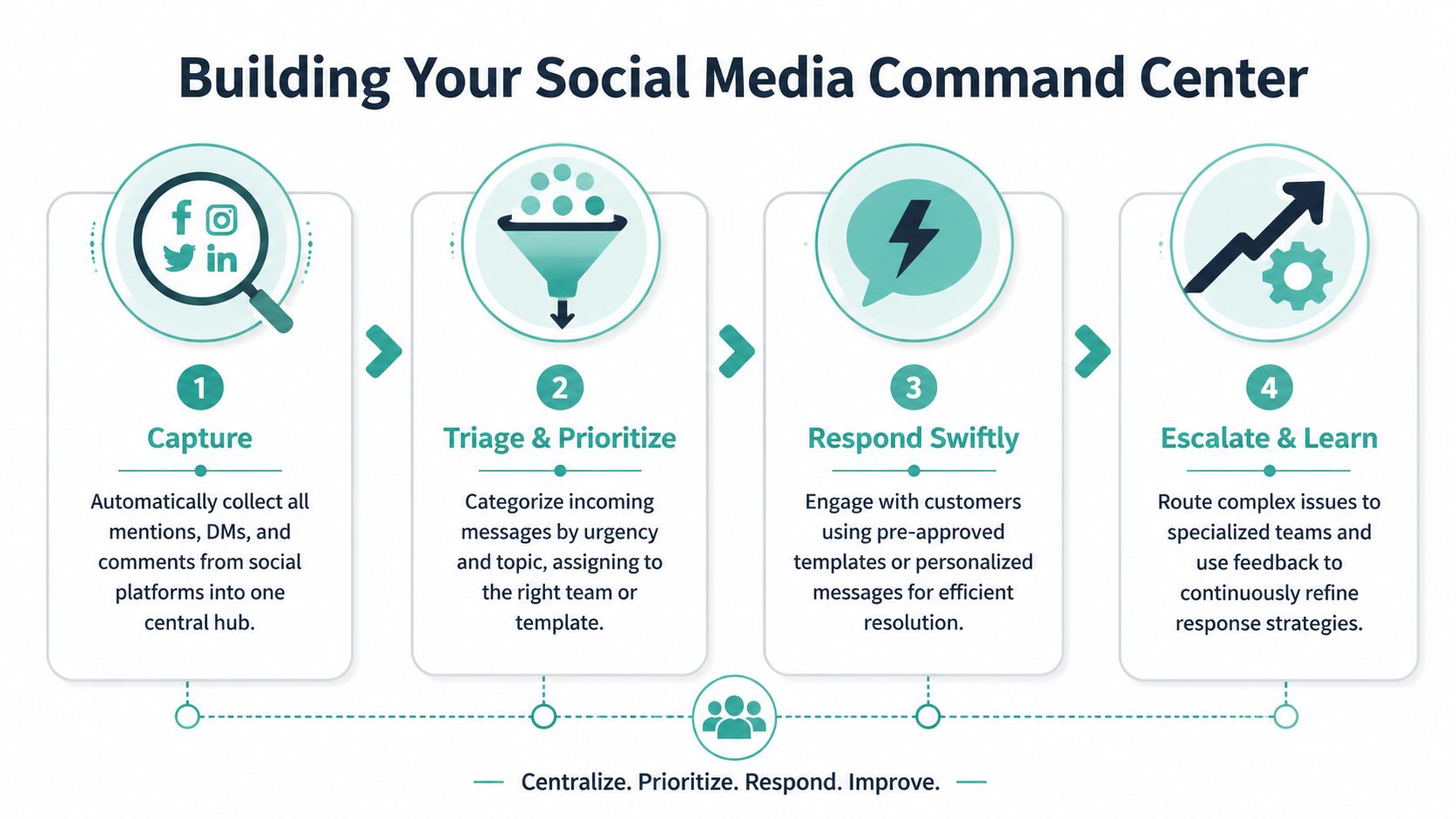
Use the four-part workflow
I’ve seen the cleanest teams run some version of this every day.
Urgency changes by channel. Live chat demands responses in under 48 seconds, Twitter in 30 minutes, and Facebook in 6 hours. Only 32% of complainers are satisfied with business response speeds, based on HubSpot’s review of social media response time benchmarks. You don’t need identical targets everywhere, but you do need channel-specific expectations.
Categorize messages by business value
Not every message should get the same handling. A simple triage model works better than an overbuilt taxonomy.
Use these buckets:
Hot lead “Do you have this in stock?” “Can I book today?” “What’s the price?” These should jump the line.
Active customer issue Delivery problems, service complaints, billing confusion, appointment changes. These need a calm and fast first response.
Routine question Hours, location, returns, financing, availability, coverage area. Most can use saved replies.
Positive engagement Compliments, tags, testimonials, happy photos. These matter more than teams think because they’re public trust signals.
Noise or spam Irrelevant tags, bot comments, bad-fit messages. Don’t let them clutter the queue.
Copy-ready triage templates
When volume jumps, your team shouldn’t be writing every response from scratch.
For a lead in comments
Thanks for reaching out. We can help with that. I’m sending you a DM now so we can get the right details and next steps over to you.
For a support issue in comments
Sorry you’re dealing with that. We want to fix it. Please check your DMs so we can get your order or appointment details and sort this out quickly.
For a routine FAQ in DMs
Thanks for messaging us. Yes, we do offer that. If you send your location and what you need, we’ll point you to the best next step.
For praise
We appreciate you saying that. Thanks for supporting us.
Set ownership before you need it
The biggest mistake isn’t slow typing. It’s fuzzy ownership. If nobody knows who handles what, the queue stalls.
A small team can solve this with three decisions:
Who watches the inbox One named person per shift.
Who handles sales questions Usually marketing, front desk, or sales.
Who handles service problems Usually customer support, operations, or the owner for edge cases.
Write those rules down. Put them where the team can see them. If it isn’t documented, it isn’t a system.
The Rapid Response Playbook
Once the command center is set, the next job is consistency. Fast replies help, but sloppy replies create new problems. The best playbook balances three things at once: speed, accuracy, and tone.
That’s where templates earn their keep. Not canned replies pasted blindly. Structured responses that give your team a strong first draft and room to personalize.

There’s also a reach benefit. Replying to comments boosts engagement by 5-42% on major platforms, and Facebook posts with replied-to comments saw a 9% increase in reactions, according to Buffer’s analysis of nearly 2 million posts. Done well, customer service work helps distribution too.
The core response patterns
Most inbound messages fit a handful of scenarios. Build your library around those first.
Public complaint response
Use this when someone is upset in the comments and you need to show attentiveness without starting a public back-and-forth.
Sorry about this. That’s not the experience we want for you. I’m sending you a DM now so we can get the details and help.
Why it works: it acknowledges the issue, shows accountability, and moves the conversation where you can solve it.
Pre-sale question response
For pricing, availability, service area, scheduling, or product fit:
Thanks for reaching out. Yes, we can help with that. Send us your location and what you’re looking for, and we’ll reply with the best option.
Why it works: it reduces friction and asks only for the next useful detail.
After-hours DM response
Automation helps without sounding cold:
Thanks for your message. We’ve got it and will reply as soon as our team is back online. If this is about booking, availability, or pricing, send those details now so we can respond faster.
Why it works: it sets expectations and moves the customer toward a complete request.
Positive comment response
Thanks so much. We appreciate the support.
Short is fine here. Don’t overwork a simple thank-you.
Where automation helps and where it hurts
A lot of teams either avoid automation completely or overdo it. Neither works.
Use automation for:
Acknowledgment Confirm receipt fast.
Routing Send account issues one way and sales questions another.
Drafting Use AI tools to create first drafts your team edits.
Saved replies Answer repeat questions with a consistent base response.
Don’t use automation for:
Escalated complaints Customers notice when a bot answers a sensitive issue.
Refund or billing conflicts These need precision and judgment.
Public threads that are gaining attention A robotic answer in a visible thread can make the brand feel absent.
Fast is useful. Accurate and human is what keeps the conversation moving toward resolution.
A simple editing standard for every reply
Before a response goes out, check four things:
Is it clear No jargon, no long blocks of text.
Is it specific Tell the customer what happens next.
Is it safe Don’t ask for personal details in public comments.
Is it on-brand Friendly if your brand is friendly. Direct if your brand is direct. Not stiff unless the situation calls for it.
If more than one person is replying, create a mini style guide. Decide whether you use first names, whether you sign replies, how formal you sound, and which issues always move to DM. That keeps your brand from sounding like five different businesses in the same afternoon.
Scaling Speed with Automation and AI Tools
Small teams can’t stay fast with manual effort alone, especially when a campaign drives a sudden flood of attention. The answer isn’t to automate everything. It’s to automate the parts that don’t require judgment.
The right setup buys time for the conversations that need a person.
Start with the low-risk automations
These are the first ones I’d put in place for any SMB:
Instant acknowledgment in DMs Let people know their message was received and when they can expect a reply.
Saved replies for repeat questions Hours, location, financing, appointment links, returns, service areas, and inventory basics.
Keyword routing Terms like “price,” “book,” “quote,” “appointment,” “refund,” or “broken” can trigger different handling paths.
Internal alerts If a post starts pulling lots of comments or a complaint appears on a high-visibility post, someone should know right away.
These tools don’t replace service. They remove dead time.
Use AI as a draft assistant, not a final decision-maker
AI can help a lean team move faster by generating first drafts for replies, summarizing long conversations, and turning rough notes into clear responses. That’s useful when you’re handling the same core questions repeatedly after a promotion.
The mistake is letting AI send answers unreviewed on anything nuanced.
Use it for:
A human should still approve anything tied to money, scheduling, service recovery, or reputation risk.
Plan before volume arrives
This matters most when you’re running bigger awareness campaigns. If you expect a spike from TV, radio, or local promotion, set up the social service layer before launch day. That includes autoresponses, campaign-specific saved replies, and escalation rules.
If your business is already building systems around campaign execution, it makes sense to line that up with broader marketing automation for small businesses. The same mindset applies here. Remove repetitive work first, then protect the human moments.
The best automation doesn’t hide your team. It gives your team room to respond well.
A local retailer might set an after-hours DM reply that captures product name, size, and preferred store. A home services company might ask for ZIP code, service need, and timing. A real estate team might route “schedule a showing” messages differently from “is this still available?” comments.
That’s how you stay responsive without being online every minute yourself.
Managing Spikes from TV and Ad Campaigns
Your TV spot airs at 7:14 p.m. By 7:16, Instagram comments ask about price, Facebook DMs ask whether the offer is still live, and someone tags a friend with “do they service my area?” That traffic feels like momentum. It also exposes every weak point in your response process.
For SMBs, campaign ROI is either protected or wasted at this point. If paid media drives attention and social replies lag for hours, the business pays to create demand that nobody catches.
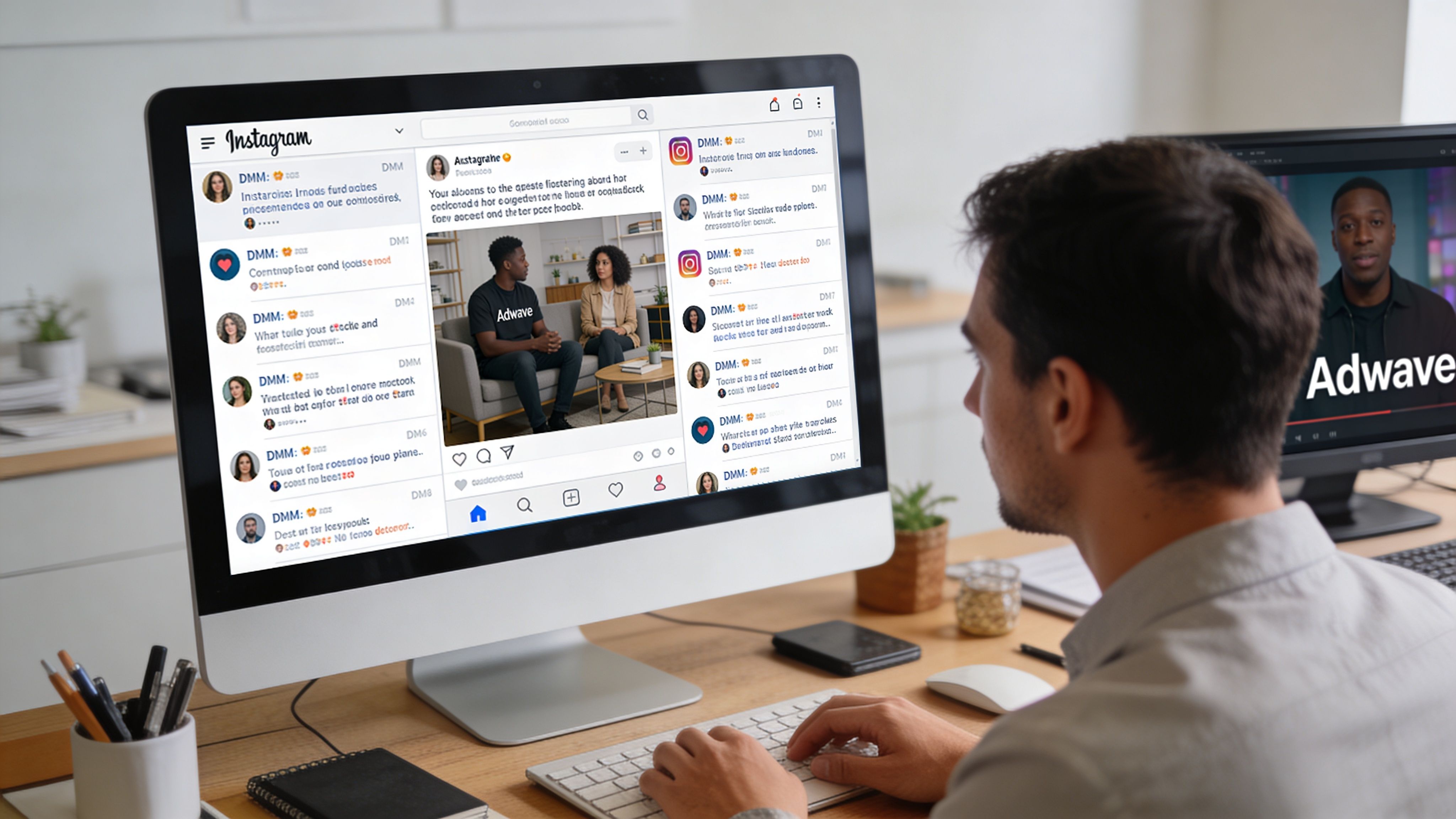
Use a response pod during launch windows
A campaign spike is not the time for shared inbox chaos. Temporary role clarity beats good intentions every time.
For the first 24 to 72 hours after launch, assign a small response pod with specific jobs:
Monitor Watches comments, DMs, mentions, and ad replies during the hours traffic is expected to peak.
Responder Handles first replies, answers routine questions, and moves people toward the next step.
Closer Takes qualified conversations into booking, quote requests, store visits, or sales follow-up.
Escalation owner Reviews complaints, policy questions, and any thread that could create public friction.
This structure fixes a common SMB failure point. Marketing assumes sales saw the message. Sales assumes support has it. The customer waits, then leaves. During a campaign, that gap costs more because every missed reply came from traffic you paid to generate.
Judge speed by what customers experience
Average response time can hide a bad night. Five fast replies from noon do not help the customer who messaged right after the ad aired and heard nothing until morning.
Use median first response time as the operating view during campaign periods. It gives a cleaner picture of the typical experience because a few extreme outliers do not distort it the way they do with an average. Track it by platform, by hour, and by campaign tag so you can see whether the issue was staffing, routing, or message mix.
If you want a clearer reporting setup, build campaign tags into the same social reporting process you use for social media analytics metrics that matter.
Build for the surge you expect, not the week you had
The hours after a TV, radio, or paid local campaign launch usually produce the most preventable misses. Teams staff for normal volume, then get buried by repetitive questions that could have been answered in seconds with the right prep.
Before launch, prepare the operational layer around the campaign:
Campaign-specific saved replies Write approved responses for offer details, service areas, eligibility, location questions, and booking steps.
Peak-hour coverage Staff the first response window around the airtime or launch time, including evenings and weekends if that is when the ad runs.
Escalation rules Decide who can answer discount disputes, stock questions, appointment problems, or negative public comments.
Campaign tags Label inbound messages tied to the promotion so the team can separate normal inbox traffic from ad-driven demand.
One current reference doc Keep promo terms, landing pages, hours, links, and CTA language in one place so replies stay consistent.
The trade-off is simple. More preparation before launch means less improvisation when volume hits.
What holds up under pressure
Teams do not need a complicated system. They need one that survives a spike.
When a campaign lands, social customer service becomes part of fulfillment. Fast replies do more than protect brand perception. They help convert the attention your media spend already bought.
Measuring Performance to Get Even Faster
A campaign spike exposes every weak point in your response system. Measuring the right few numbers shows whether your team is keeping up with the attention your marketing created, or letting high-intent conversations sit too long.

Track speed and outcome
Start with First Response Time, or FRT. Use the median, not the average. One fast reply from a quiet hour can make a weekly average look healthy while launch-night DMs are still waiting. For SMBs running paid campaigns, the useful benchmark is simple: replies should happen fast enough that a customer who just saw the ad still feels momentum.
Then track resolution or satisfaction in a lightweight way. A full survey program is usually overkill for this channel. A short follow-up message is enough to spot whether fast replies are helping customers finish a purchase, solve a problem, or move forward.
Try a DM follow-up like:
Thanks again for reaching out. Did we help you get what you needed today?
Or:
Was this resolved for you?
Diagnose the slowdown before you add headcount
If FRT slips after a campaign launch, the answer usually is not “work harder.” The better move is to isolate where the queue gets stuck.
Review the inbox by:
Hour and day Check whether response times break down outside your planned coverage window or right after ad spots air.
Platform Instagram and Facebook often behave differently during the same promotion. One can stay manageable while the other backs up.
Question type Product availability, promo-code issues, location questions, and complaints each move at different speeds.
Owner Look for queues that pile up with one rep, one shift, or one approval bottleneck.
That review matters most after a push like a TV campaign, because slow replies do not just hurt service. They waste demand you already paid to generate.
A dashboard should support decisions, not decorate a report. If you are refining what belongs there, this guide on social media analytics metrics that matter is a useful filter.
Review these numbers every week
Median FRT by platform and campaign window This shows whether your team responds quickly when attention is highest, not just during quieter hours.
Unanswered message count A plain indicator of missed revenue and unresolved issues.
Top repeated question Repetition points to a weak landing page, unclear offer terms, or a saved reply that needs work.
Escalation volume High escalation rates usually signal a policy gap, a training issue, or a promo that created more confusion than expected.
The goal is not perfect reporting. The goal is faster correction. Teams that review these patterns weekly get sharper with every campaign, especially when a successful ad sends more comments and DMs than the business is used to handling.
From Overwhelmed to In Control
Fast social customer service isn’t a side task anymore. It’s part of sales, retention, and brand trust. When DMs and comments start coming in after a strong campaign, that isn’t a nuisance. It’s proof that attention is landing.
The teams that win aren’t always the biggest. They’re the ones with a visible inbox, a clear triage system, practical reply templates, selective automation, and assigned ownership when volume spikes. They respond fast without rushing into bad answers. They move sensitive conversations private. They measure response time in a way that reflects the actual customer experience.
That’s how a crowded inbox stops feeling chaotic. It starts feeling like qualified demand.
If you're ready to create more demand and want a TV advertising platform built for small businesses, Adwave is a strong option. It helps local brands launch broadcast-ready ads quickly, reach targeted audiences on premium channels, and track campaign performance without the usual production overhead. When your marketing creates attention, a disciplined social response system helps you capture it. Adwave gives SMBs a practical way to generate that attention in the first place.


