
You're probably dealing with this right now. The phone rings with the same question your receptionist answered an hour ago. A customer DMs you asking about pricing, returns, delivery zones, or how to get started. Someone fills out your contact form because they couldn't find a simple answer that should have been obvious on your site.
For most small businesses, that isn't a staffing problem first. It's an information delivery problem.
A useful FAQ answers questions customers ask repeatedly and helps them decide whether to buy, contact you, or find support.
Your FAQ Page Is a Silent Salesperson
A weak FAQ page reads like legal filler. A strong one works like a front-desk employee who never sleeps.
Think about a local service business. Prospects want to know if you serve their area, how fast you can book, whether estimates are free, what happens after they submit a form, and whether financing or payment plans are available. Existing customers ask different questions. They want appointment changes, billing details, order status, or support steps. If those answers aren't easy to find, people contact you directly.
That creates drag in two places. Your team spends time answering routine questions, and your customers experience delay before they can take the next step.
What the page is doing
A useful FAQ page does more than reduce inbox clutter. It also:
Handles objections early: Questions about cost, timing, guarantees, and process often sit between curiosity and conversion.
Builds trust: Clear answers signal that your business is organized and transparent.
Improves handoff between marketing and support: The same page can help before and after the sale.
Makes your site easier to use: Customers don't want to hunt through service pages, policies, and blog posts for one answer.
That's why businesses should treat FAQs as a practical automation layer, not a content chore. The same logic shows up across modern growth tools. Good systems remove repetitive manual work and turn common decisions into guided paths. You see that principle in support operations, and you also see it in products like Adwave, which simplifies TV ad creation, launch, and measurement for small businesses so owners don't have to manage every moving part themselves.
Practical rule: If your team answers a question often enough to recognize it instantly, that question belongs somewhere customers can find it without contacting you.
The hidden trust effect
Customers judge competence by how quickly they can orient themselves. A clean FAQ page tells them what to expect before they commit. That matters on service pages, pricing pages, and contact pages.
If you're tightening the trust layer across your website, Adwave's guide on how to create an about page that builds trust is a useful companion read. The same principle applies. Answer what people are already wondering, in plain language, before they need to ask.
The businesses that get this right usually don't have the fanciest help centers. They just respect the customer's time.
Find the Right Questions Before You Write
Most FAQ pages fail before the writing starts. The owner guesses what people want to know, writes from memory, and publishes a list that reflects internal assumptions instead of customer demand.
That's backwards.
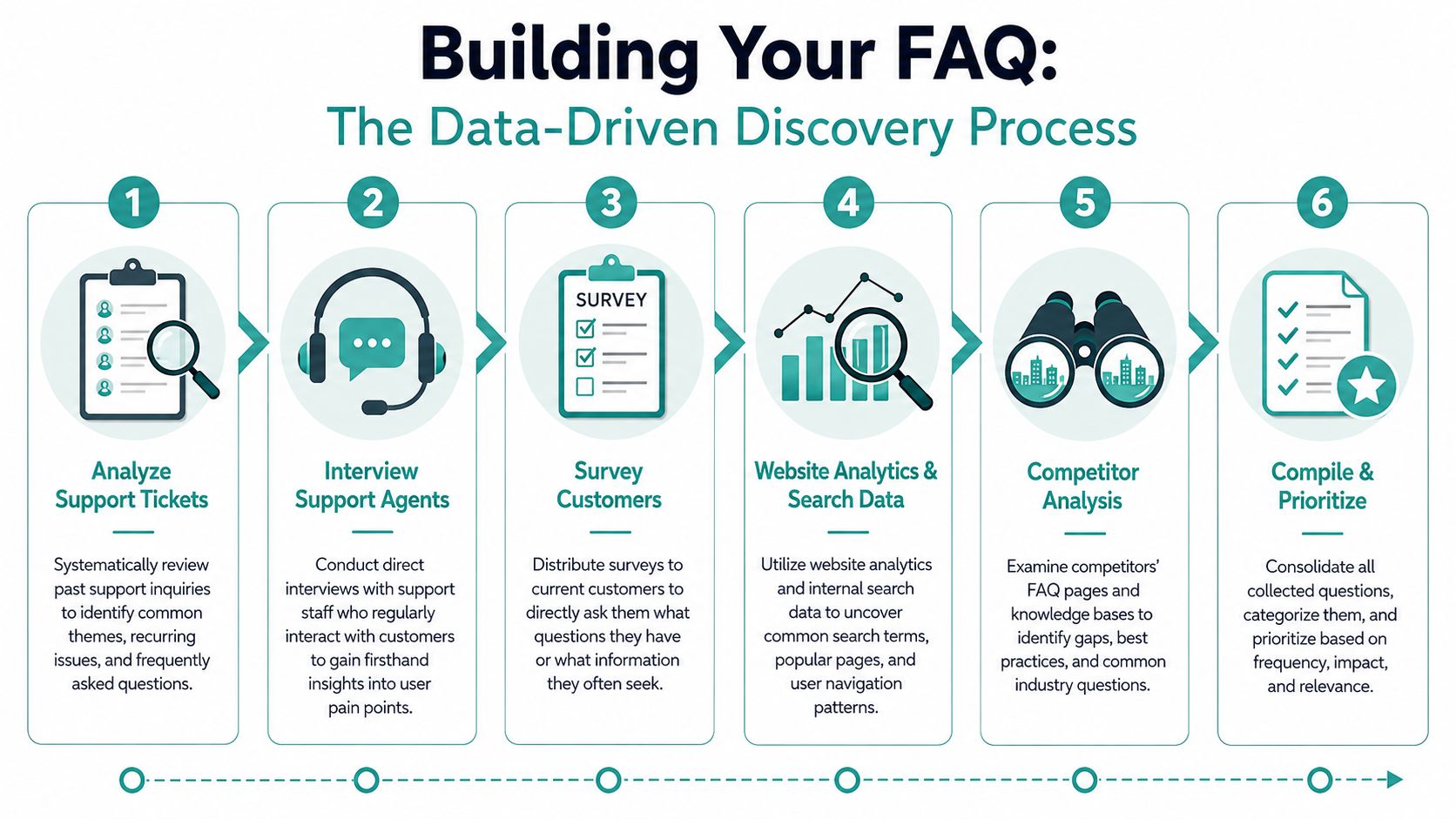
Industry guidance is consistent on this point. A strong FAQ page should be built from real customer questions, pulled from support tickets, live-chat logs, search queries, and call transcripts so the page matches actual demand rather than guessed topics. It also recommends starting with the top 10 frequent questions from support data, then grouping and maintaining them over time as customer behavior changes, as explained in this FAQ restructuring guidance.
Start with the channels that already contain demand
Your support inbox is the obvious place, but don't stop there. The best question sources usually sit in messy, scattered places.
Support tickets and email threads Export a recent sample and tag each question by theme. Don't rewrite the wording yet. Keep the customer's phrasing.
Live chat and social DMs These channels often expose short, high-intent questions people ask when they're close to buying but still uncertain.
Call notes and front-desk logs If your team answers phones, they already know which questions interrupt the day most often.
Internal site search This is one of the best signals on your site. It shows what visitors expected to find but couldn't locate immediately.
Sales and service staff memory Ask them one simple question: “What do people ask right before they book, buy, or drop off?”
Build a list you can prioritize
Once you gather the raw questions, avoid the temptation to clean them up too early. First, sort them into patterns.
Here's a practical way to do it:
Frequency: Which questions keep recurring?
Friction: Which ones block purchases or create support calls?
Risk: Which topics create confusion, refunds, complaints, or missed expectations?
Intent: Which questions come from buyers close to action, not just casual browsers?
A local HVAC company, for example, might see lots of broad questions about services. But the higher-value FAQ entries may be specific ones like whether emergency appointments are available, what areas are covered, what happens after a booking request, and how maintenance plans work.
The best FAQ questions usually sound a little plain. That's a good sign. Customers rarely ask polished marketing questions.
Look beyond your own inbox
If you're still light on data, use nearby signals.
Survey current customers: Ask what they wished had been easier to find.
Review competitor FAQ pages to identify topics customers in your market may expect.
Check form abandonment points: If people stop at quote or checkout pages, missing answers may be the problem.
Listen to in-person staff: Retail associates, coordinators, and receptionists hear confusion before it becomes a ticket.
A lot of small businesses overcomplicate this part. You don't need a big knowledge base project. You need a list of recurring questions tied to operational pain.
A simple filter for deciding what makes the page
Not every question belongs in the FAQ. Some belong on service pages, pricing pages, product pages, or onboarding emails.
Use this test:
If you do this step well, you won't be brainstorming. You'll be documenting demand.
Write and Structure Answers That Help
Once you have the right questions, the writing gets easier. However, a common mistake persists. It involves answering from the company's perspective instead of the customer's.
Customers don't want a speech. They want orientation.
Best-practice guidance recommends that FAQ answers start with a short, direct response of about 40 to 60 words, followed by deeper detail below if needed, alongside tools like search, accordions, and schema so users and search engines can find answers quickly. That recommendation is outlined in this guide to building an SEO-driven FAQ section.
Lead with the answer, not the explanation
A good FAQ answer starts with the clearest possible resolution. Then it adds context.
We aim to provide a smooth and customer-friendly booking experience across our service areas. Depending on appointment availability and staffing conditions, your request may be processed in our standard business timeline.
Strong version: We usually confirm booking requests by email or phone after submission. If you need urgent help, call our team directly so we can check availability faster.
The second version gives the customer an action and a next step. That's what reduces contact friction.
Write the way people ask
Use the wording customers use in tickets, chats, and calls. If customers ask “Do you install on weekends?” don't turn that into “What are your extended scheduling capabilities?”
Plain language wins.
If your product or service is technical, translate it for a first-time buyer. When I review FAQ drafts, the most common issue isn't lack of information. It's unnecessary abstraction. Teams write as if they're explaining the business to themselves.
A customer scanning your FAQ is trying to decide one thing at a time. Can I trust this answer enough to move forward?
For teams working on sharper conversion language overall, Adwave's resource on how to write website copy that converts visitors into customers is a useful reference because FAQ writing and conversion writing rely on the same discipline. Clarity first.
Group questions by decision path
Categories still matter, but simple topic buckets aren't always enough. “Billing,” “Shipping,” and “Returns” are fine. But many businesses reduce more support when they organize part of the FAQ around what the customer is trying to do.
Examples:
Before booking
After placing an order
For first-time customers
For existing clients
For location-specific questions
That structure feels natural because it matches user intent.
Here's a practical comparison.
Use layered answers instead of walls of text
A useful FAQ page gives the quick answer first, then offers more detail only when needed.
That's why expandable accordions work well. So do mini follow-ups inside the answer:
Short answer first
What to expect next
When to contact support
Link to a deeper guide if needed
If you need to explain something more complex, think like a teacher. The same approach used in technical education helps here. A resource on exploring molecular mechanisms is a good reminder that difficult subjects become usable when they're broken into smaller, logical explanations. FAQ writing works the same way.
Keep tone calm and operational
Good FAQ tone is helpful, not cheerful for the sake of it. Don't sound robotic, and don't overbrand every answer.
Use this checklist before publishing:
Can the customer understand the first sentence without context?
Does the answer tell them what happens next?
Would a support agent say it this way on the phone?
Is there a clear path if the answer doesn't solve the issue?
If the answer passes those tests, it's probably ready.
Optimize Your Page for Users and Search Engines
A strong FAQ page still fails if customers can't find it. Visibility is part of support design.
That starts on your own website. If users have to scroll through a long page or click through three menus just to locate a basic answer, the FAQ is creating work instead of removing it.
Add search before you add more content
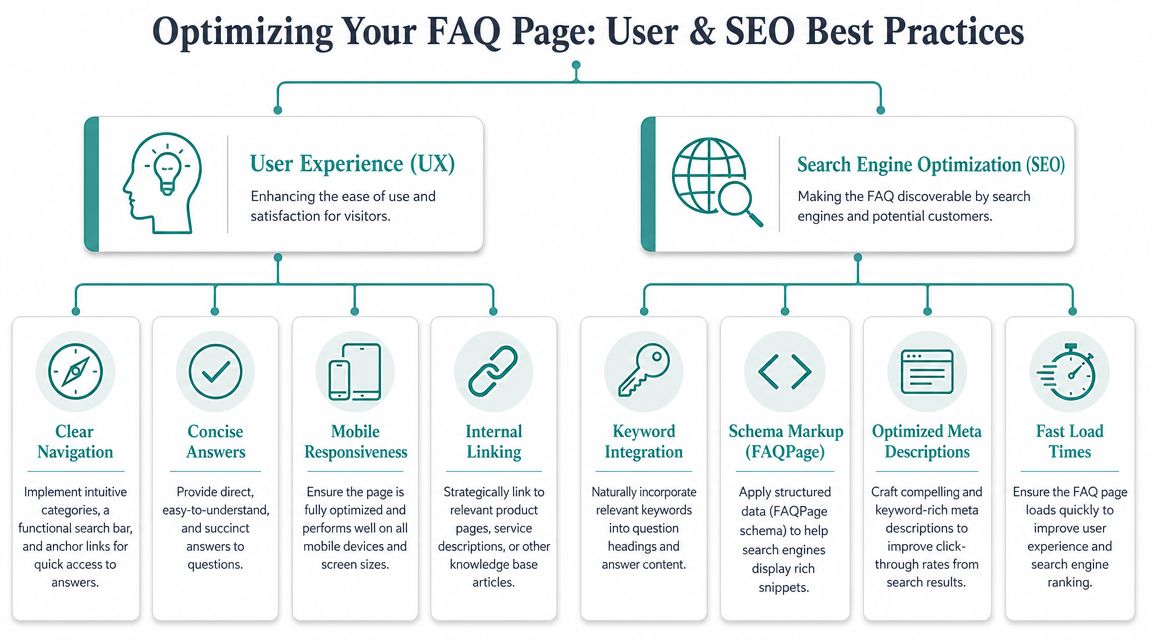
The single highest-impact usability feature on most FAQ pages is an on-page search bar.
Not every visitor wants to browse categories. Many already know the question they have. They just want to type “refund,” “appointment,” “pricing,” or “delivery area” and get the answer immediately.
A few practical rules help here:
Place search at the top of the page
Use customer wording in questions
Show matching results quickly
Don't bury obvious topics under clever category names
If your business has multiple audiences, such as buyers and existing customers, give them clear paths from the start. That reduces scanning fatigue.
Use FAQ schema so search engines read the page correctly
FAQ schema sounds technical, but the idea is simple. It's structured code that tells search engines, “This page contains questions and answers.”
That helps search engines interpret your content more accurately. It can also improve how your page appears in search results when someone asks a question related to your business.
For local businesses, schema matters beyond the FAQ itself because it supports how search engines understand your site overall. Adwave's article on local schema markup helping Google understand your business is a practical starting point if you want the plain-English version.
Keep the page light, mobile-friendly, and easy to navigate
Many FAQ visits happen on phones. That changes what “usable” means.
A mobile-friendly FAQ page should have:
Accordion sections that don't create giant text blocks
Tap-friendly spacing
Readable font size
Fast load speed
Simple navigation back to service, product, or contact pages
If a customer lands on your FAQ from a phone search, they should be able to get the answer with one hand and very little patience.
Link the FAQ from the right places
Don't isolate the page in your footer and call it done. Link to relevant FAQ entries from places where doubt appears.
Common examples:
Product and service pages
Pricing pages
Checkout or booking forms
Contact page
Confirmation emails
Order or account area
This is what turns the FAQ into a working support tool. The customer sees the answer at the point of friction, not after they've already decided to call.
Measure What Matters Ticket Deflection and ROI
Measuring FAQ performance often falls short. It commonly involves tracking page views, perhaps time on page, and nothing more.
Those numbers can be useful, but they don't answer the question that matters: Did the FAQ change support behavior?
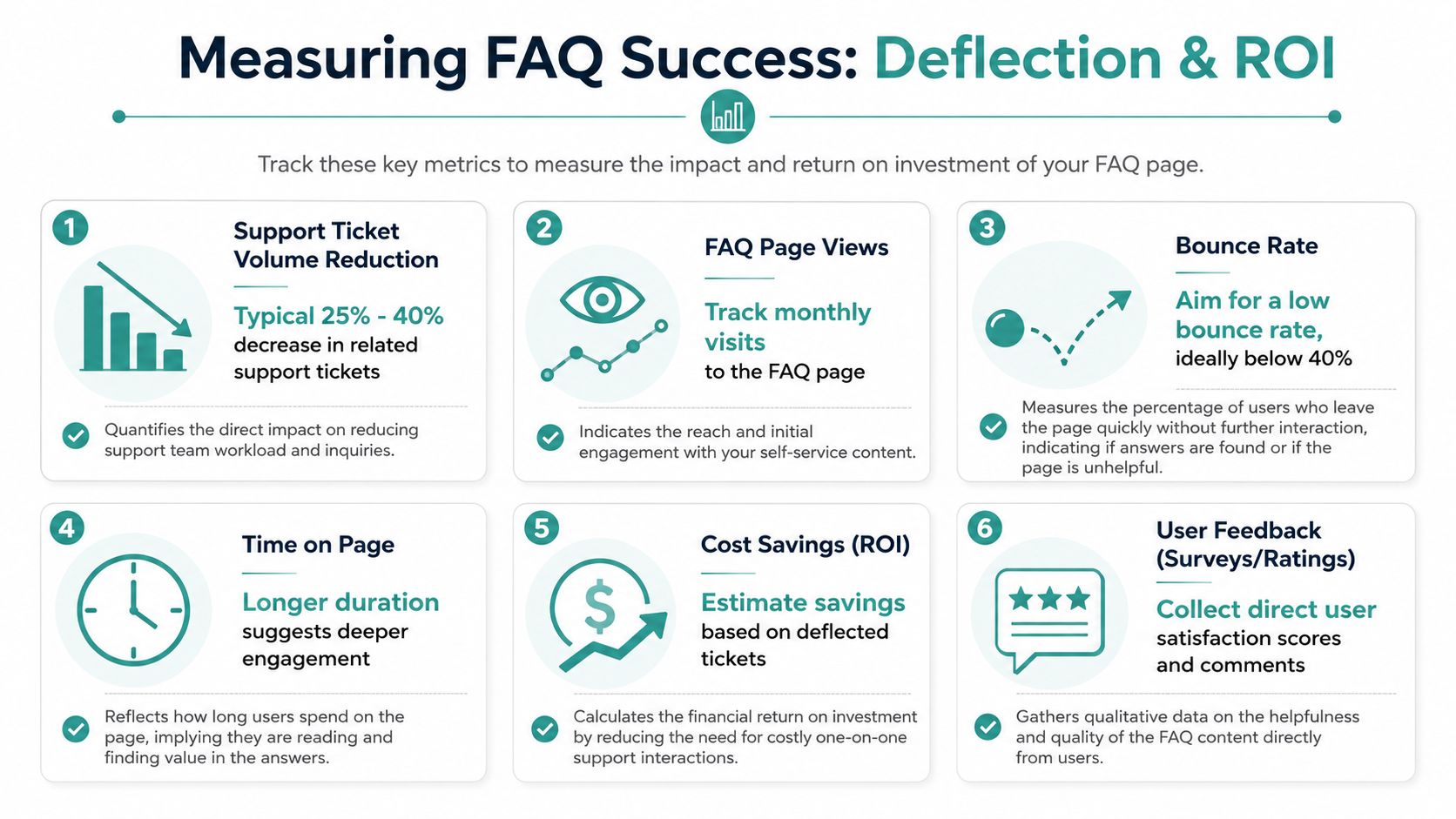
That's the operational test. More advanced FAQ measurement should track entry-to-exit behavior, search refinements, and post-FAQ contact rates so teams can see which questions effectively deflect calls and which ones merely redirect people to another support channel, as noted in Uscreen's guidance on creating an effective FAQ or contact page.
What to track first
For a small business, you don't need a huge analytics stack. You need a simple view of whether people found an answer and avoided contacting you.
Start with these measures:
FAQ entry pages: Which pages send people into the FAQ?
Top searched terms: What are users typing once they arrive?
Search refinements: Do they keep changing the query because the first result failed?
Exit path: Do they leave satisfied, continue browsing, or click into contact options?
Post-FAQ contact rate: How often does a visit to the FAQ lead straight to a call, form submission, or support email?
Those signals tell you much more than raw traffic.
Good metrics and misleading metrics
A busy FAQ page isn't always a successful FAQ page.
If lots of visitors hit one FAQ entry and then contact support anyway, that answer probably isn't doing its job. It may be vague, incomplete, too broad, or missing a next step.
Build a small reporting habit
A monthly review is enough for many SMBs.
Look at:
The most viewed questions
The most searched terms
Questions that lead to contact clicks
New questions support staff had to answer manually
Pages where customers seem to stall before reaching out
That creates a maintenance loop. Your support data feeds the FAQ. Then your FAQ data feeds support improvement.
Measurement lens: A FAQ page is working when common questions stop consuming staff time, not when the page simply attracts visits.
This is also why a dashboard mindset matters. Teams already understand this in marketing. They don't judge ad performance by impressions alone. They look at outcomes. The same discipline applies here. If you want a clean framework for thinking about business impact, Adwave's guide on how to measure marketing ROI maps well to FAQ analysis because both require connecting activity to operational results.
Turn support savings into a business case
Even if you don't calculate a precise dollar figure, you can still make the case internally.
Ask:
Are staff answering fewer repetitive questions?
Are customers getting to booking or checkout with less hand-holding?
Are fewer calls coming in about the same policy or process?
Are support agents spending more time on exceptions instead of routine explanations?
When the answer is yes, your FAQ page isn't just content. It's an efficiency asset.
Experiment and Evolve Your FAQ for Local Growth
The best FAQ pages are never finished. They're maintained like a sales script or a service workflow.
That matters even more for local businesses because customer questions shift with seasonality, promotions, service changes, and local expectations. A roofing company gets different questions after storms than during a quiet month. A real estate team gets different questions from first-time buyers than from sellers preparing to list.
Guidance on FAQ design increasingly points toward a more nuanced model: tailor answers by user role or journey stage instead of relying on one generic hub. Surfacing different answers for first-time buyers versus returning customers at the point of friction is a stronger support-deflection strategy, as discussed in Kayako's FAQ page design guidance.
Run small experiments, not redesigns
You don't need a massive rebuild to improve performance. Test one thing at a time.
Examples:
Change the question wording: Use the exact phrase customers use on the phone.
Rewrite the first sentence: Make the answer more direct.
Move a high-friction question higher on the page
Add a next step: “Call us if this is urgent” or “Log in to update your order”
Split one broad answer into two persona-specific answers
A local gym might separate “How do I join?” from “How do I pause my membership?” A dental practice might separate “new patient” questions from “insurance and billing” questions. A brokerage might create distinct FAQs for buyers, sellers, and landlords.
Put answers where hesitation happens
The highest-performing FAQ content often doesn't live only on the main FAQ page. It shows up where doubt appears.
That can include:
Booking pages
Service detail pages
Checkout flow
Listing pages
Contact forms
Confirmation emails
If a customer has to leave the page they're on to go search for reassurance, you've already added friction.
Keep the system alive. Review recurring questions monthly. Add new ones quickly. Retire outdated answers. Tighten weak entries when users still call after reading them.
That's how to build a FAQ page that reduces support calls over time, not just at launch.
If you want to simplify more of the customer journey beyond support, Adwave gives small businesses a practical way to create, launch, and track TV advertising from one platform. It fits the same operating model as a strong FAQ page: reduce manual work, make execution easier, and measure performance with less overhead.


