You’re probably in one of two places right now. You’ve got a product, offer, or new service package ready to launch, and you know a plain text announcement won’t do it justice. Or you’ve seen other brands use launch video well, but every example seems built for teams with agency budgets, a studio, and weeks of production time.
That gap is real. Most advice on video for product launch assumes a polished production environment. Small businesses need something more practical: a way to clarify the message, produce the asset without waste, and distribute it where buyers will see it.
Video earns that effort. According to recent consumer research, 85% of consumers report that watching a video has convinced them to buy a product or service, and videos placed on landing pages can boost conversion rates by up to 86% ( Vidico). For a launch, that changes the job of video. It’s not decoration. It’s sales infrastructure.
Define Your Launch Video Goals and Audience
Most launch videos underperform for a simple reason. The team starts with visuals instead of decisions.
Before you choose a shot list or write a script, pin down what the video must do for the business. A product launch video can introduce a new offer, drive pre-orders, lift landing page conversion, support a local awareness push, or help sales reps explain the product faster. Those are very different jobs. One video can support several outcomes, but it should be built around one primary objective.

Pick one business outcome first
A vague goal produces a vague video. “Build buzz” sounds exciting, but it doesn’t tell you what the viewer should do next.
Use a sharper frame:
Lead generation: The viewer should click, book, or request more information.
Direct response: The viewer should buy now, claim an offer, or start a trial.
Education: The viewer should understand what changed and why it matters.
Local awareness: The viewer should remember your brand when they’re ready to act.
If you need help organizing the launch around those decisions, a structured product launch preparation checklist helps keep the video tied to timing, assets, approvals, and post-launch follow-through.
Practical rule: If your team can’t finish the sentence “This video succeeds if viewers do X,” you’re not ready to script.
Build the audience around buying context
Audience definition isn’t just age, location, and job title. It’s the moment that makes someone care.
For a strong video for product launch, identify:
The problem they already feel
The trigger that makes them look for a solution
The objection that slows the purchase
The outcome they want soon
That’s where segmentation becomes useful. A first-time buyer needs reassurance. A returning customer needs clarity on what’s new. A local homeowner reacts differently than a regional distributor. If you need a practical framework, this guide to audience segmentation is useful for turning broad markets into message-ready groups.
Write a short audience brief
Keep it lean. One page is enough.
Include these points:
Who they are: the buyer segment that matters most for this launch
What they’re dealing with: the pain point in plain language
What they care about: speed, savings, convenience, trust, status, simplicity
What stops them: confusion, skepticism, timing, price sensitivity
What they should do next: buy, book, sign up, visit, call
This work seems basic, but it prevents the most expensive mistake in launch video: making something polished that says nothing specific. When the target is clear, every production choice gets easier. You know what to lead with, what to cut, and what the call to action should ask for.
Scripting and Storyboarding Your Message
A launch video works when the message lands fast. That matters even more on mobile. Consumer video consumption has shifted decisively to mobile, with 79% of users aged 18 to 34 watching on smartphones. The optimal video duration is 1 to 3 minutes, and the first 10 seconds are critical for communicating one core message before significant viewer drop-off ( simpleshow).
That single fact should shape your script more than any camera decision.
Open with the problem, not the product tour
The fastest way to lose a viewer is to start with a feature list they haven’t earned yet. Buyers don’t care about the mechanics first. They care whether you understand the problem they’re trying to solve.
A simple script structure works well:
Problem
Consequence
Solution
Proof through demonstration
Call to action
That sounds basic because it is. It also works.
Here’s a practical version:
Hook: Name the issue in plain language.
Tension: Show what happens when the issue continues.
Reveal: Introduce the product as the answer.
Show: Demonstrate the key result, not every feature.
Close: Ask for one action.
If you want examples of how creators tighten language for watchability, this guide on crafting captivating YouTube scripts is useful, especially for simplifying voiceover and tightening openings.
Start the script where the customer feels the pain, not where your team feels proud of the feature set.
Use one core message
Launch teams often try to cram in every differentiator. That’s usually fear talking. If the audience remembers one strong claim, the video did its job. If they remember six half-explained claims, it didn’t.
Ask this question: what is the one thing this product should be known for in this launch window?
Examples:
It cuts a frustrating task down to one step.
It helps local buyers get a premium result without premium complexity.
It makes a high-cost channel accessible to smaller brands.
That message should appear in the opening, stay visible in the middle, and return in the close.
For teams that need help shaping ad language rather than long-form content, this resource on how to write a commercial script is a good model for concise, buyer-focused copy.
Storyboard the flow before you film
Storyboarding doesn’t need design software. A simple grid on paper or slides is enough. You’re mapping the sequence so production day doesn’t become a guessing game.
A basic storyboard should answer:
What does the viewer see first
What line or on-screen text appears with it
What proof is shown
What action closes the video
For small businesses, the storyboard often reveals unnecessary scenes. If a line can be shown through product use, cut the extra narration. If a scene looks nice but doesn’t support the sales message, drop it.
Keep pacing honest
For a video for product launch, pacing should match buyer intent.
A short teaser can move fast. A landing page video should slow down enough for comprehension. A local streaming ad needs a clear, immediate setup. If you’re writing for phone-first viewing, use short sentences, readable text, and visuals that still make sense with the sound low or off.
A good script doesn’t just sound good on paper. It survives real attention spans.
Producing Your Launch Video on Any Budget
Production used to be the part that pushed small businesses out of the game. That’s changed. You now have three realistic paths: do it yourself, hire a small crew, or use AI-assisted production.
Each path can work. The right choice depends on the complexity of the product, the quality bar of the channel, and how fast you need to launch.

DIY works when clarity matters more than polish
If you’re launching a physical product, a service package, or a straightforward local offer, a smartphone setup can be enough.
DIY is a good fit when:
You can show the product clearly: demos, hands-on use, before-and-after, packaging, interface walkthroughs
You control the setting: office, shop floor, home, treatment room, showroom
You can keep the script short: one pain point, one result, one CTA
To improve DIY output quickly:
Use window light or one consistent light source
Stabilize the shot with a tripod
Record clean audio before worrying about fancy visuals
Film extra cutaway footage so edits feel smoother
If you sell online, these product video tips for e-commerce are a practical reference for framing, demonstration, and showing the product in use.
Hiring a freelancer makes sense when demonstration is harder
Some launches need more craft. Maybe the product requires controlled lighting, motion graphics, or a more refined edit. In those cases, a freelancer or boutique production partner can save time and avoid rework.
This route is worth it when:
The product needs stronger visual explanation
The brand already has clear guidelines
The launch window is important enough to justify outside help
The trade-off is coordination. You’ll need tighter approvals, a clear brief, and quick feedback cycles. Small business teams often underestimate that overhead.
AI-assisted production changes the economics
This is the most important shift for SMBs. While most content on product launch videos focuses on high-end production, a significant gap exists for small businesses. AI-powered tools like Adwave address this by enabling broadcast-ready spots from a URL, offering a data-driven, affordable alternative starting at $15 to $35 CPM on channels like NBC and Hulu ( Outlier Kit).
That changes what “production” means. Instead of organizing a crew, scouting locations, and building everything manually, a small business can start with its website, offer details, and targeting plan.
If you want a broader walkthrough of formats and workflows, this guide on how to make marketing videos is a useful reference point.
The smartest production choice isn’t the one with the most gear. It’s the one that gets a clear, usable video into market before the launch window cools off.
A quick decision filter
Here’s the practical version:
A launch video doesn’t need Hollywood treatment. It needs message discipline, decent execution, and a format that matches the channels where it will run.
Optimizing Video Specs for TV and Digital
A strong message can still fail if the file doesn’t meet platform requirements, often causing many first launch campaigns to lose momentum. The creative is done, but the export settings, aspect ratio, or runtime don’t match the channel.
For small businesses running across streaming, social, site pages, and other digital placements, technical discipline matters more than people expect.
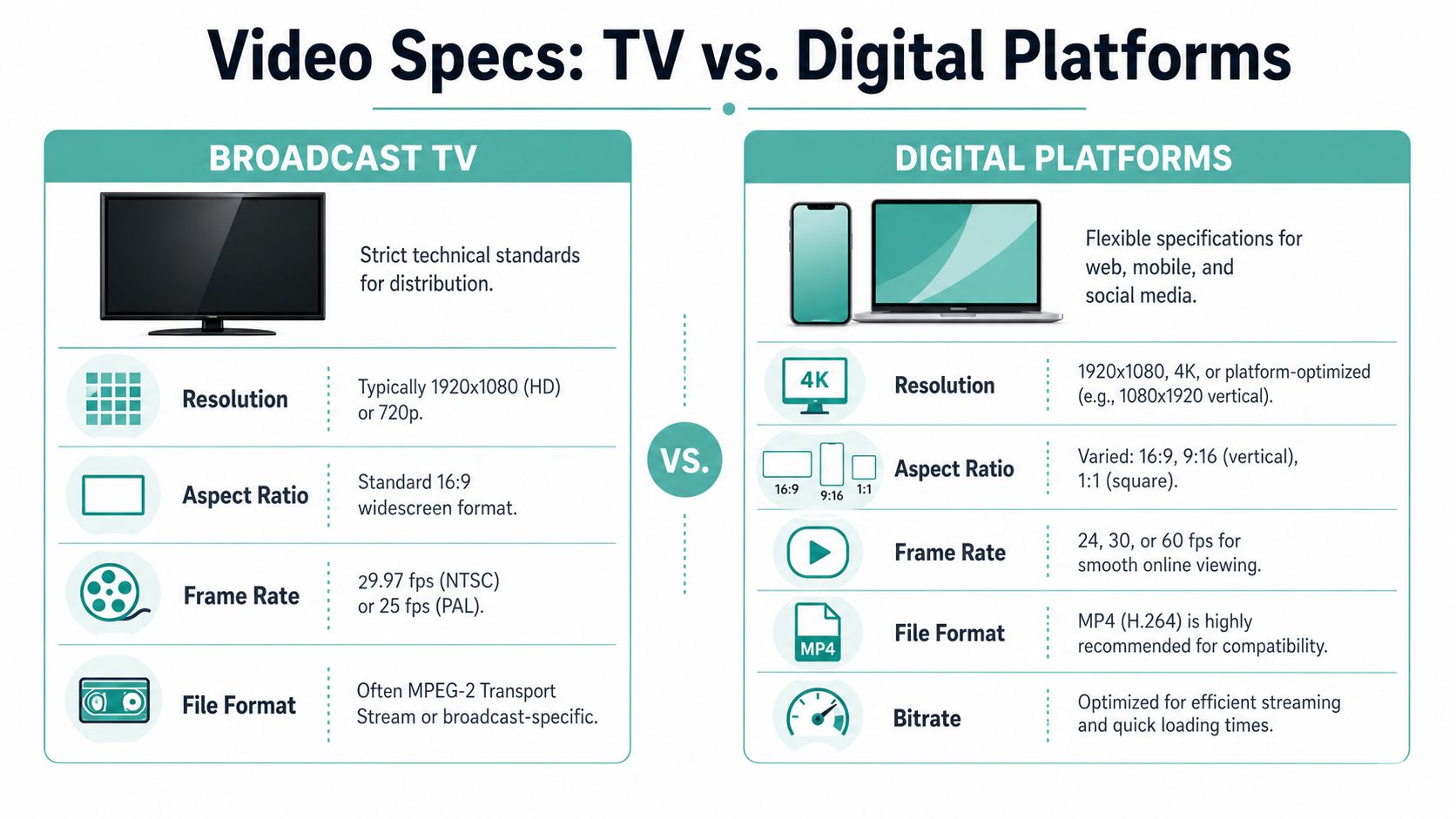
For SMB product launches, video assets must meet broadcast standards including H.264 codec, 8 to 12 Mbps bitrate, and AAC audio. Optimizing for these specs, especially for platforms like Hulu and ESPN, is essential, and video-integrated strategies hit their targets 65% more often than those without ( PW Skills).
What matters most in practice
You don’t need to memorize every codec detail. You do need to understand what changes by platform.
Aspect ratio: TV and YouTube usually favor widescreen. Social placements may need vertical or square versions.
Resolution: HD is the practical baseline for most launch work.
Audio: Clean stereo audio matters more than fancy effects.
Length: The right runtime depends on where the video appears.
If the same asset is going to live on a landing page, run on social, and appear in streaming placements, produce master creative with adaptation in mind. Don’t treat one export as universal.
Optimal Video Specs by Platform
Common formatting mistakes
Most technical failures are predictable:
Wrong crop: Text gets cut off when a widescreen video is reused vertically.
Unreadable overlays: Small text vanishes on phones and connected TV screens.
Overstuffed runtime: The message arrives too late.
One-file thinking: Teams export one version and hope it works everywhere.
Field note: Build for adaptation from the start. It’s easier to trim and reformat a clean master than rescue a single overloaded edit after launch week starts.
If your video for product launch may appear on both TV and digital, get specs settled before final edit. That prevents the expensive version of “quick fixes,” where a nearly finished asset has to be rebuilt to pass placement requirements.
Launch and Distribute Your Video for Maximum Impact
A finished video sitting in a folder isn’t a launch asset. Distribution is where most of the return gets created.
This is also where small businesses often undershoot. They post once on social, send one email, and assume the market has seen it. That’s not a launch plan. That’s a status update.
A structured launch methodology matters because 70 to 80% of launches fail to meet goals due to vague value propositions or poor planning. Leveraging AI tools for production and distribution across 100+ channels, with a focus on problem-solution narratives in 15 to 30 second formats, can increase retention by 2 to 5x ( Product Leadership).
Start with owned channels
Owned distribution is the first layer because it gives you clean feedback.
Use the video in places where interested buyers already interact with your business:
Website landing page: Put the video near the conversion point, not buried below the fold.
Email: Use the video to support launch day emails, early access messages, and follow-up reminders.
Organic social: Cut shorter versions for each platform instead of posting the same file everywhere.
Sales enablement: Give your team a version they can send in one-to-one outreach.
This stage tells you whether the hook, message, and CTA are doing their job before you widen spend.
Add paid distribution with intent
Paid social can work well for quick testing. Streaming and TV placements can extend reach in a way that digital-only campaigns often can’t, especially for local businesses that need regional visibility and repeated exposure.
The mistake is going broad too early. Launch in layers. Start where you can observe response clearly. Then expand.
Use paid distribution to answer practical questions:
Which audience responds fastest?
Which opening line holds attention?
Which offer framing drives action?
Which geography deserves more budget?
Treat TV as accessible, not exotic
Many SMB owners still think TV is out of reach. It isn’t. The channel has changed, and so has access.
For a local product launch, streaming and connected TV can work well when you need awareness beyond your existing audience. That’s especially useful for categories like real estate, home services, automotive, health and wellness, and retail, where local memory matters.
The key shift is operational. You no longer need a traditional TV buying process to test launch creative in premium environments. You need a clear asset, a specific audience, and a controlled budget.
Launch distribution works best when each channel has a job. Your site converts. Email warms. Social tests. TV expands reach and recall.
The strongest campaigns don’t ask one placement to do everything. They let each channel play to its strength, then measure which combination moves buyers forward.
Measuring Success and Planning Your Next Move
A launch video should produce more than views. It should produce evidence.
That means tying performance back to the goal you set at the start. If the job was lead generation, track lead quality and conversion behavior. If the job was awareness, look for lifts in branded search, direct traffic patterns, and inbound inquiry quality. If the job was product education, watch how prospects behave after they’ve seen the video.

Measure in layers
Don’t rely on one metric. A useful launch readout usually includes three layers.
Attention metrics: views, watch behavior, click-through activity
Intent metrics: page visits, form starts, calls, demo requests, add-to-cart behavior
Outcome metrics: purchases, booked revenue, qualified pipeline, repeat actions
This layered view matters because a launch often creates early signals before revenue shows up cleanly. If people watch, click, and engage with the next step, the message is probably working even before all sales data settles.
Look for friction, not just wins
A good review process asks where the video lost people.
Did viewers stop before the product was shown? Did the landing page fail to match the promise in the video? Did one audience respond while another ignored it? Did the short version outperform the longer cut?
Those questions help you improve the next round faster than staring at total view counts.
If you need a practical framework for reading ad performance beyond surface metrics, this resource on how to measure advertising effectiveness is a useful way to connect channel data back to business outcomes.
Turn one launch into a system
The most valuable launch video usually isn’t the first edit. It’s the second and third version built from real response.
Reuse what you learn:
Keep the opening if it holds attention.
Replace scenes that don’t earn their time.
Tighten the CTA if viewers hesitate.
Split the asset into shorter cuts for follow-up distribution.
Build future launch creative around proven audience language.
That’s how video for product launch becomes easier over time. You stop guessing. You build a feedback loop.
If you want a faster path from idea to launch-ready creative, Adwave gives small businesses a practical way to create, launch, and measure broadcast-ready video ads from a website URL. It’s a useful option when you need to move quickly, reach local audiences across premium streaming channels, and keep the process manageable without a full production crew.