

You're probably here because you need an infographic, not a design education.
A client wants a one-pager. Your founder wants a “quick visual” for LinkedIn. Sales needs something cleaner than a dense PDF. You open Canva or Piktochart, stare at a blank template, and realize the hard part isn't dragging shapes around. It's deciding what belongs in the graphic, what gets cut, and how to make the final piece look credible enough to publish.
That is the primary challenge in creating infographics without a graphic designer. The software is easier than ever. The judgment still matters.
The good news is that non-designers are no longer improvising on the fringe. They're operating in the mainstream. With the right workflow, a marketer, founder, or coordinator can produce an infographic that looks polished, reads clearly, and supports actual business goals instead of becoming decorative clutter.
Why You No Longer Need a Designer for Great Infographics
A founder asks for a one-page visual before Friday. Sales wants a cleaner version for outreach. Paid media wants something they can test as a static ad. In that situation, waiting on a full design handoff is often the slowest and most expensive part of the process.
That is why many marketing teams now build infographics in-house. Not because design stopped mattering, but because the bottleneck moved. The hard part is usually deciding what the graphic needs to say, which data you can support, and how the asset will be used after it is published.
A dedicated designer still makes sense for large brand campaigns, custom illustration, and strict visual systems. For a process explainer, comparison chart, research summary, or sales enablement asset, a marketer with a sound workflow can produce work that is clear, credible, and ready to ship.
What changed
Three shifts made that possible.
Tools became easier to use. Canva, Venngage, and Piktochart removed a lot of the technical setup that used to slow non-designers down.
Templates improved. A good template handles baseline structure, spacing, and alignment well enough that the creator can focus on message and proof instead of rebuilding a layout from scratch.
AI sped up early production. It can help turn notes into sections, suggest chart formats, and tighten rough copy. It cannot verify claims, choose the right story angle, or protect you from using licensed material incorrectly. That part still sits with the marketer.
Practical rule: Useful infographics come from strong content decisions. Software helps. Judgment does the real work.
Where non-designers have an advantage
Marketers, founders, and content leads are often closer to the business goal than a freelance designer coming in cold. They know which objection the sales team needs to answer. They know which proof point legal will approve. They know whether the asset needs to generate backlinks, support outbound, feed a landing page, or become a cut-down script for paid social and even TV creative later.
That proximity matters because good infographics are not isolated design pieces. They are working assets. The same source material might support a blog post, lead magnet, sales one-sheet, email sequence, and a short ad concept if it is built with reuse in mind from the start.
There is a trade-off. In-house creators usually move faster, but they also tend to overfill the canvas because they know too much. The fix is process. Tight scope, documented sources, approved claims, and a clear distribution plan beat raw enthusiasm every time.
Teams that handle this work with junior marketers, contractors, or hybrid content roles often run into the same coordination issues they see in social production. Adwave's guide on how to hire and manage a social media intern or freelancer is useful if infographic creation sits inside that broader content operation.
What “great” means now
A great infographic does not need custom illustration or agency polish. It needs to do a job well.
That job might be helping a prospect understand a process in 30 seconds. It might be giving your sales team a cleaner leave-behind. It might be turning original data into a visual that earns links. It might be serving as the backbone for a paid campaign, where the core chart becomes a static ad, the headline becomes the voiceover hook, and the proof points become a script for a 15-second TV spot.
If the asset is accurate, readable, on-brand enough to trust, and built so the content can be reused across channels, you no longer need a designer to get strong results. You need a disciplined workflow.
Build Your Foundation Before You Design
A junior marketer opens Canva with a folder full of notes, three stakeholder requests, and a deadline at 4 p.m. An hour later, the page looks polished but says too many things at once. That problem started before the first template.
Infographics usually break at the planning stage. The team keeps every fact, skips message hierarchy, and treats the headline, proof, and call to action as equal priorities. The result is a crowded asset that looks finished but does not guide the reader anywhere useful.
Strong infographics come from editorial decisions first. Design only makes those decisions visible.
Start with the planning checklist
Use this before you touch colors, icons, or charts.
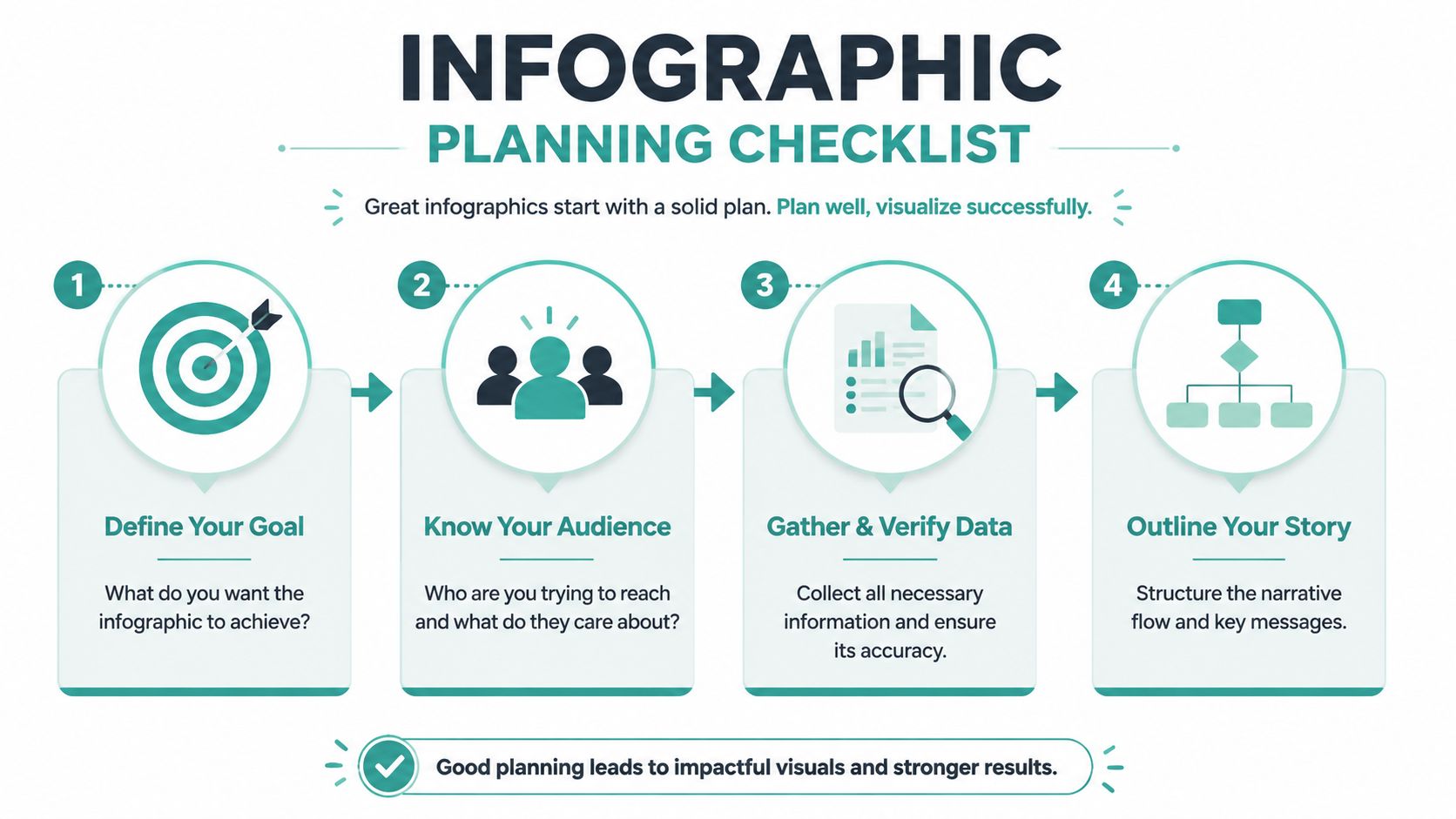
The workflow that actually works
Here's the process I'd give a junior marketer building a first infographic for a sales or content campaign:
Collect the raw material Gather source notes, approved statistics, customer quotes you have permission to use, process steps, screenshots, and product details. Add the source URL or file name beside every claim. If legal or compliance review matters in your industry, mark those items now instead of chasing approvals after design is done.
Cut the material down to message-level points Infographics are not research dumps. Reduce each point to one idea per line. If a sentence needs heavy context to make sense, it probably belongs in the blog post, landing page, or sales follow-up, not in the graphic.
Write a one-sentence theme This sentence keeps the project from drifting. It should answer one question clearly: what should the viewer understand or do after seeing this? If the sentence tries to cover education, brand story, product pitch, and thought leadership at the same time, narrow it.
Set the story order Decide what earns the top position, what supports it, and what closes the piece. A practical structure is headline, proof, explanation, CTA. That sequence also makes repurposing easier later, because the same hierarchy can become a social carousel, email hook, landing page section, or 15-second video script.
Sketch a wireframe Use boxes on paper or in a doc. Place the headline, main stat, supporting points, chart, and CTA. The wireframe reveals whether the piece has a real story or just a pile of facts. For teams building adjacent assets in-house, Adwave's guide to creating social media graphics without a designer using free tools follows the same discipline.
A wireframe also exposes trade-offs early. If the chart needs half the page, you cannot also fit six supporting statistics and a long explainer paragraph without hurting readability. Pick the one proof element that carries the argument.
If you cannot sketch the infographic in a minute or two, the idea is still too loose.
Build a source and rights check into the brief
This step gets skipped often, and it creates avoidable risk.
Before design starts, confirm that every statistic is current, every quote is approved, every image is licensed, and every logo or brand reference can be used in public materials. If you plan to reuse the infographic in paid distribution, sales collateral, or broadcast creative, the standard gets higher. A claim that is acceptable in a blog draft may need stronger substantiation in an ad. The same goes for AI-generated visuals. If that is part of your workflow, review the usage terms and production costs up front with a detailed Midjourney pricing breakdown.
What to cut before it becomes clutter
Clutter usually comes from weak editing, not from the design tool.
Cut these first:
Background explanation: If the reader needs a full paragraph before the point becomes clear, move that context to the article or landing page.
Duplicate proof points: Keep the strongest stat, quote, or example. Extra evidence often adds length without adding persuasion.
Nice-to-have sections: Decorative icons, filler dividers, and stock art should support comprehension. If they do not, remove them.
Multiple calls to action: One next step is enough for a single infographic.
One more rule matters here. Do not choose the template first. That habit pushes teams to shape the message around a layout they did not plan. Build the argument first, then fit the design to the job.
Choosing the Right Tools for the Job
Tool choice matters less than people think, but it still matters. The best platform is the one that matches the complexity of your content and the skill of the person building it.
The market has expanded for a reason. The global market for infographic creation software grew from $1.2 billion in 2019 to $3.8 billion in 2024, and by 2023, 89% of infographic templates were downloaded by non-designers. That isn't just a software trend. It reflects a change in how marketing teams want to work.

A practical comparison
How to choose without overthinking it
Pick based on the asset, not the platform's marketing page.
Use Canva when you need speed and your infographic is more editorial than analytical.
Use Piktochart when the charts carry the story.
Use Venngage when you want business-oriented structure with less blank-canvas pressure.
Use Photoshop only if someone on the team already knows it and needs tighter control.
If you're also experimenting with AI-generated visuals around your infographic workflow, it helps to understand tool costs before you commit. AccountShare's detailed Midjourney pricing breakdown is a practical reference for teams comparing design and image-generation budgets.
For broader day-to-day asset production, Adwave's guide to creating social media graphics without a designer using free tools pairs well with this process because most infographic teams also need resize-friendly promo graphics after the main asset is done.
Better tools reduce friction. They don't fix weak messaging, weak data, or weak editing.
Essential Design Rules for a Professional Look
A first infographic usually breaks in the same places. The headline competes with the body copy, the color palette keeps changing, and the final export looks crisp in the editor but soft on a phone. None of those problems require a designer. They require restraint.
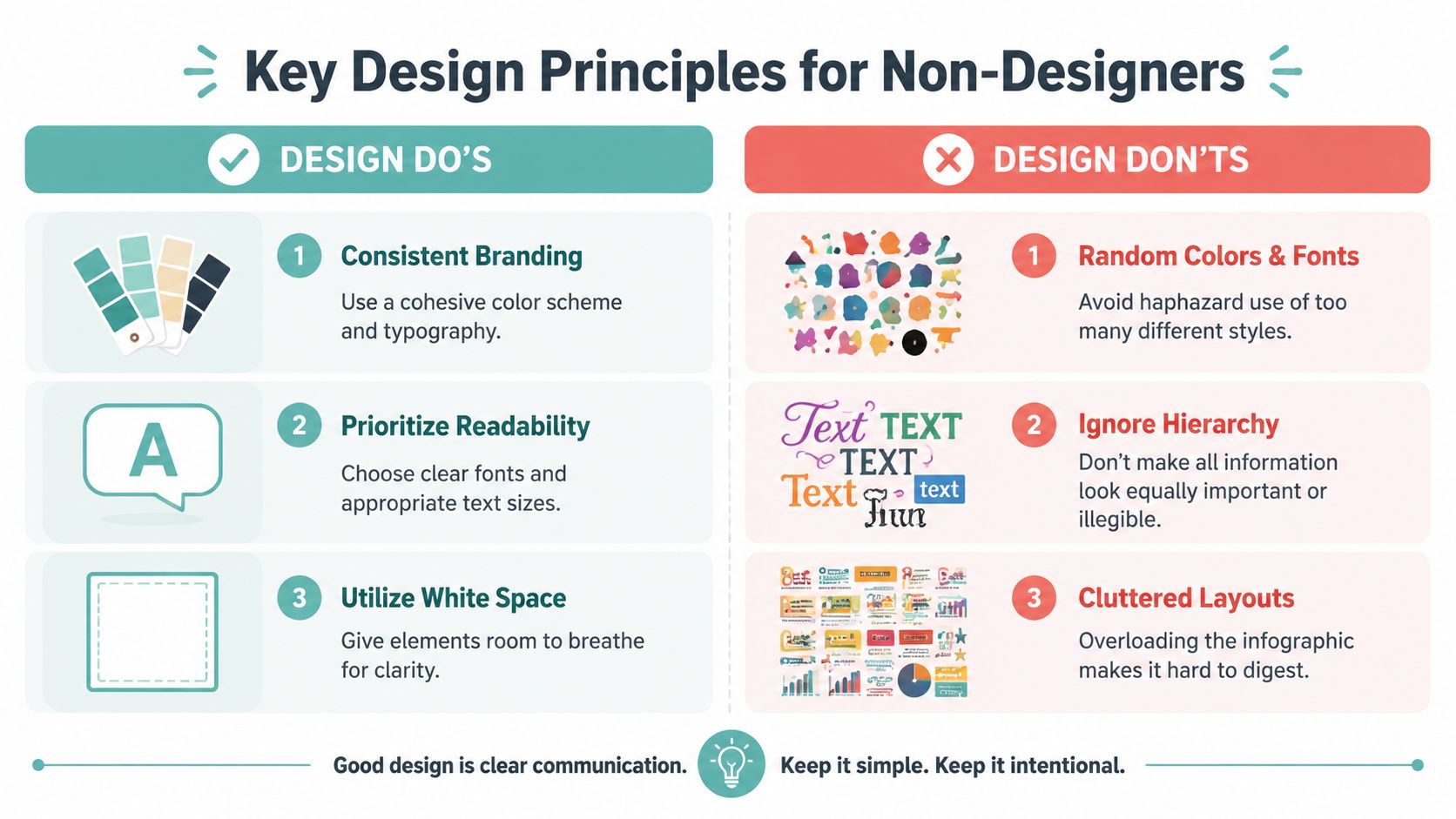
Treat the layout like a sales asset, not a collage. Every block should answer one question, prove one point, or move the viewer toward the next section. If a chart, icon, or callout does not support that job, cut it. Clean infographics usually come from harder editing, not better decoration.
Follow these visual rules first
Use two fonts at most: One for headings and one for body text is enough for a polished look.
Build clear hierarchy: The headline should win first, subheads should guide the scan, and supporting copy should stay quiet.
Keep one accent color: A tight palette makes the piece feel intentional and helps key data stand out.
Leave whitespace on purpose: Space between sections improves readability and keeps dense information from blending together.
One more rule matters in practice. Keep text blocks short. If a section needs a paragraph to explain itself, the idea probably belongs in the blog post, sales page, or script notes, not inside the graphic. Infographics earn attention by compressing information.
Size for the channel you will actually publish on
Use platform dimensions as working recommendations, not hard performance rules. Blog infographics are often built as a tall vertical image, while social platforms usually need wider crops or separate resized versions to stay legible in feed. If you publish one master file everywhere, the text often gets too small and your CTA loses value.
Here is a practical cheat sheet:
I usually build the full infographic for the blog first, then create channel-specific cutdowns for distribution. That takes longer than exporting one file, but it protects readability and gives you better assets for promotion, retargeting, and later ad creative.
Design choices that hold up in the real world
Use charts instead of screenshots of charts whenever possible. Native charts scale better, match the rest of the layout, and are easier to update if the numbers change or legal review asks for a correction.
Write labels as if someone will scan them in three seconds. Short chart titles, direct section headers, and plain-language captions beat clever phrasing almost every time.
Finish with a next step. If the infographic supports lead generation or sales enablement, the ending should point to a demo, landing page, download, or contact action. Adwave's guide to call-to-action buttons, words, and placement that get clicks is a useful reference for tightening that final conversion moment.
A professional look comes from consistency, clear choices, and export decisions that respect where the asset will live. That discipline also makes the infographic easier to repurpose later into email creative, sales collateral, and even storyboard-ready visuals for TV ad campaigns.
Finalizing and Publishing Your Infographic Legally
The infographic is approved, the landing page is ready, and someone wants it live before lunch. That last hour is where rushed teams create preventable legal and publishing problems.
A strong infographic needs a clean handoff from design file to public asset. That means choosing the right export, confirming usage rights, and storing enough documentation to defend the piece later if a client, platform, or legal reviewer asks questions. It also matters for revenue. The infographic only becomes a dependable asset when sales, paid media, and content teams can reuse it without guessing what is licensed, what is sourced, and what needs attribution.
Pick the right file type for the publishing job
Export decisions should match how the asset will be used, not just what the design tool suggests by default.
PNG: Best for blog graphics, landing pages, and stat-heavy visuals where text clarity matters.
JPG: Useful for social posts when smaller file sizes matter more than perfect edge sharpness.
PDF: Better for downloadable collateral, sales follow-up, printouts, or stakeholder review.
Check the file where it will appear. A long infographic that looks fine in Canva or Adobe Express can become unreadable once a CMS shrinks it inside a blog column or email module.
If the infographic supports lead generation, save one master version and one publication version. I do this on almost every project. The master stays editable, and the publication file is compressed, named clearly, and ready for the site, sales team, or paid campaign folder.
Treat citations and licensing as production work
Legal review should not start after export.
As guidance from university libraries like the University at Albany Libraries on infographic citation and licensing notes, creators need to understand Creative Commons terms and cite source material correctly. That matters even more when one infographic combines outside data, stock photos, icon sets, screenshots, and AI-generated visuals.
Keep a simple asset log while building the piece:
Data sources: The report, article, dataset, or internal analysis behind each claim
Icons and illustrations: The source library, creator terms, and whether commercial use is allowed
Photos: The license type and any restrictions on editing or redistribution
AI assets: The tool used and the platform terms for commercial publishing
This is basic risk control.
If you cannot trace where a chart, icon, or stat came from, pause publication and fix that gap before the asset goes live.
Use a pre-publish checklist that protects future reuse
Publishing is not the end of the workflow. It is the point where the asset enters your wider content system.
Before launch, confirm these points:
The attribution line is visible Long graphics can place citations in a footer, final panel, or page note, as long as readers can find them easily.
Commercial rights are documented Assets inside a design tool library may still have limits on paid promotion, resale, broadcast use, or client transfer.
The final package is archived Save the export, editable source file, source log, and approval notes in one folder.
Every destination works Test the CTA, URL, QR code, and landing page on desktop and mobile after export.
Repurposing rights are clear If the plan includes slicing the infographic into social posts, sales one-pagers, motion graphics, or broadcast creative, confirm those uses now instead of revisiting rights later.
That last point gets missed often. A visual licensed for a blog post may not be the right asset for a paid ad, a client presentation, or a TV spot. If the infographic is meant to support revenue across channels, legal clarity has to cover the full lifecycle, not just the first publish.
For teams building a larger content engine around one asset, this guide on turning one article into multiple repurposed content assets is a useful planning reference.
Administrative work is part of good content production. Handle it well, and the infographic becomes easier to update, safer to distribute, and far more useful across owned, paid, and sales channels.
Repurpose Your Infographic into a Winning Ad Campaign
A finished infographic shouldn't be treated like a single post with a short shelf life. That wastes the hardest part of the work, which is distilling the message.
The more useful question now isn't just how to make the infographic. It's whether the asset can earn attention across channels and justify the time spent creating it. Guidance on newer infographic workflows points in that direction. Tools are adding interactivity, but the bigger opportunity is repurposing the core message into formats that travel further ( guidance on infographic repurposing and attention).
Pull out the parts with campaign value
Most infographics contain reusable building blocks:
A headline claim that can become ad copy
One sharp proof point that works as an on-screen stat
A process graphic that can become a short slide or motion sequence
A final CTA that becomes the offer or next step
That means one infographic can feed multiple assets. Turn the top section into a LinkedIn image. Turn the chart into an email graphic. Turn the summary into a sales one-pager. Turn the strongest message into script language for video.
For a broader content system, Adwave's article on content repurposing and turning one article into 10 pieces of content is worth reading because the logic is the same. One strong core asset should produce multiple outputs.
Move from static asset to broadcast-ready creative
Many teams stop their efforts prematurely. They publish the infographic on social, maybe embed it in a blog, and then move on. But if the message is good enough to summarize visually, it's often strong enough to support video and TV creative too.
The key is translation, not duplication. Don't turn the whole infographic into a crowded slideshow. Pull the core promise, the one or two supporting facts, and the clearest audience benefit. That gives you the spine of an ad.
A static visual is good at compression. A TV ad is good at reach, recall, and repeated exposure. Used together, they create a stronger campaign than either asset does alone.
The infographic is not the finish line. It's the message lab where you find the lines, proof, and structure that deserve bigger distribution.
If you approach creating infographics without a graphic designer this way, the asset stops being “content for content's sake.” It becomes source material for revenue-facing marketing.
If you've already done the hard work of clarifying your message in an infographic, the next smart move is to turn that message into a broader campaign. Adwave is a strong choice for that step. It helps small businesses turn core marketing ideas into broadcast-ready TV ads without the usual production burden, making it easier to extend a single well-built content asset into premium-channel reach.


