You probably already have the raw material for better rankings sitting in your archive.
Older posts can lose traffic when information, screenshots, or search intent change. Review declining pages to decide what needs updating.
That's why learning how to update old blog posts to boost search rankings matters so much. It's one of the few SEO activities that can produce meaningful gains without requiring an entirely new editorial calendar. In Orbit Media's annual blogger survey, bloggers who update old articles were twice as likely to report “strong results” from content marketing, according to Orbit Media's analysis of updating old posts.
The key is treating updates as a strategic process, not a cleanup task. You're not changing a few dates and hitting publish. You're deciding which URLs deserve investment, which ones should be merged or removed, and how to relaunch the winners so they contribute to traffic, leads, and broader business growth.
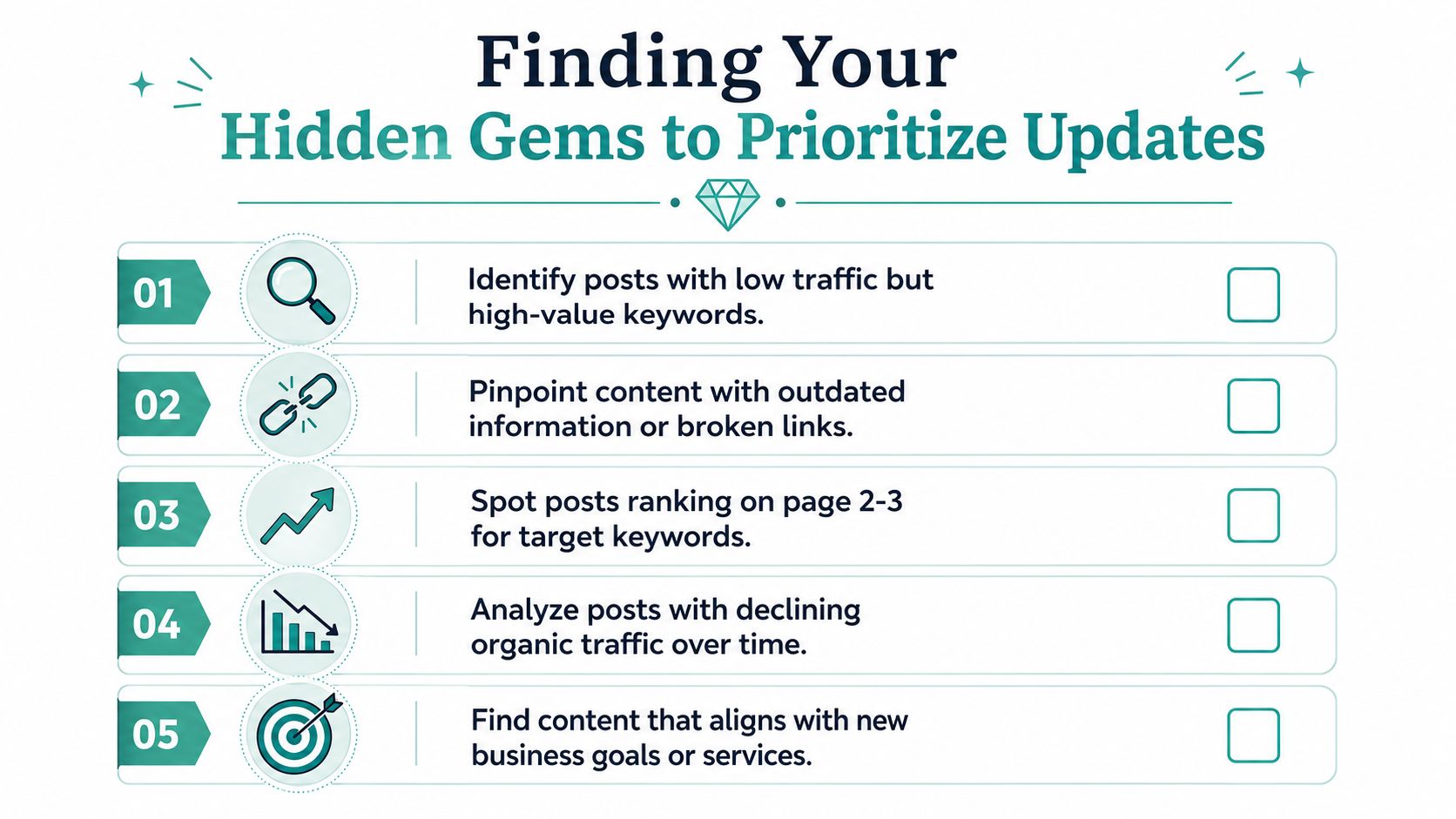
Finding Your Hidden Gems to Prioritize Updates
The biggest mistake is starting with the oldest post on the site.
Age alone doesn't tell you where the opportunity is. Some old posts are dead for good. Others are one strong refresh away from much better visibility. The job is to separate high-potential URLs from content that isn't worth another round of work.
Start with Search Console, not your CMS
Open Google Search Console and look for pages that already have search traction. Search Engine People highlights pages ranking in positions 11 to 30 as the best candidates for an update because they've already shown relevance but haven't broken onto page one, as noted in their guide to updating old blog posts for SEO.
That's the sweet spot I'd prioritize first.
A post in position 58 usually needs a bigger rethink. A post in position 14 may only need a better title, tighter structure, stronger internal links, and fresher examples. That's a much better use of time if you're managing a real marketing budget and a real content backlog.
What to pull into your shortlist
Use a simple triage system. I'd put candidate posts into three buckets:
Striking-distance posts. These rank on page two or three for terms that matter to the business.
High-impression, low-click posts. Searchers are seeing the page, but the headline and snippet aren't convincing them to choose it.
Traffic-decline posts. These once performed, but rankings have softened over time.
If your reporting setup is messy, clean that up first. Adwave's guide to setting up Google Analytics 4 for small businesses is useful for making sure you can compare page performance before and after a refresh.
Practical rule: If a page already earns impressions, Google has given you a starting point. Updating it is usually easier than teaching a brand-new URL to rank from zero.
Don't just refresh. Prune and consolidate
Not every weak page should survive.
Sometimes the best update is merging two thin posts into one stronger resource. Search Engine Land notes that refreshing old content can mean combining weaker pages or removing thin ones, especially when a once-strong page has slipped and can regain value through consolidation and stronger internal linking, as explained in their piece on refreshing content to drive traffic.
Consolidate posts that answer the same question. Keep useful details from each and redirect the retired page to the updated article.
A fast decision table helps:
Prioritize pages that support your business
A post about a broad informational keyword may attract attention, but a post tied closely to a service line or buyer question usually deserves the first round of work.
That's where update strategy becomes growth strategy. If the page supports a high-intent query, aligns with your current offers, and already shows signs of relevance, it belongs near the top of the list.
The Content Refresh Playbook From Stale to Stellar
Once you've picked the right URL, the rewrite itself needs discipline. Random edits won't move much. A useful refresh usually improves three things at once: intent match, substance, and structure.
Match the page to today's search intent
Search intent changes more often than many teams expect. A query that once rewarded a short explainer may now favor a detailed guide, comparison, checklist, or FAQ-driven page.
Start by searching the target keyword manually. Look at what's ranking now. Are the top results tactical or conceptual? Are they local, product-led, or educational? Are they using examples, templates, screenshots, or definitions near the top?
Then compare that to your page. If your post answers a different question than the results page does now, no amount of polishing will fix the mismatch.
A practical workflow recommended by SEO practitioners is to audit Google Analytics and Google Search Console, identify URLs already earning impressions, then use tools such as Ahrefs or Google Keyword Planner to spot new subtopics and long-tail queries before rewriting sections and refreshing visuals, as described in this guide to updating old blog posts to rank higher.
Upgrade the substance, not just the timestamp
Many refreshes fall flat. Teams update the year in the title, swap a sentence or two, and call it done. That rarely makes the page more useful.
Instead, rewrite the parts that influence quality:
Outdated facts and references. Remove stale claims, old tools, expired examples, and broken external links.
Missing angles. Add sections that reflect what searchers clearly want now.
Weak intros. If the opening takes too long to answer the query, tighten it.
Thin examples. Replace generic advice with concrete workflows, tool names, and decision criteria.
I like to ask one hard question during refreshes: if this page were published today, would it still deserve to rank? If the answer is no, the update needs more than cosmetic changes.
If the SERP now rewards depth and your article still reads like an outline, you don't need editing. You need a rebuild.
One more practical move pays off after the rewrite. Adwave's article on content repurposing from one article into multiple assets is a strong companion to this process because a refreshed post can also feed email, social, short-form video, and sales enablement content.
Rebuild the structure for scanability and clicks
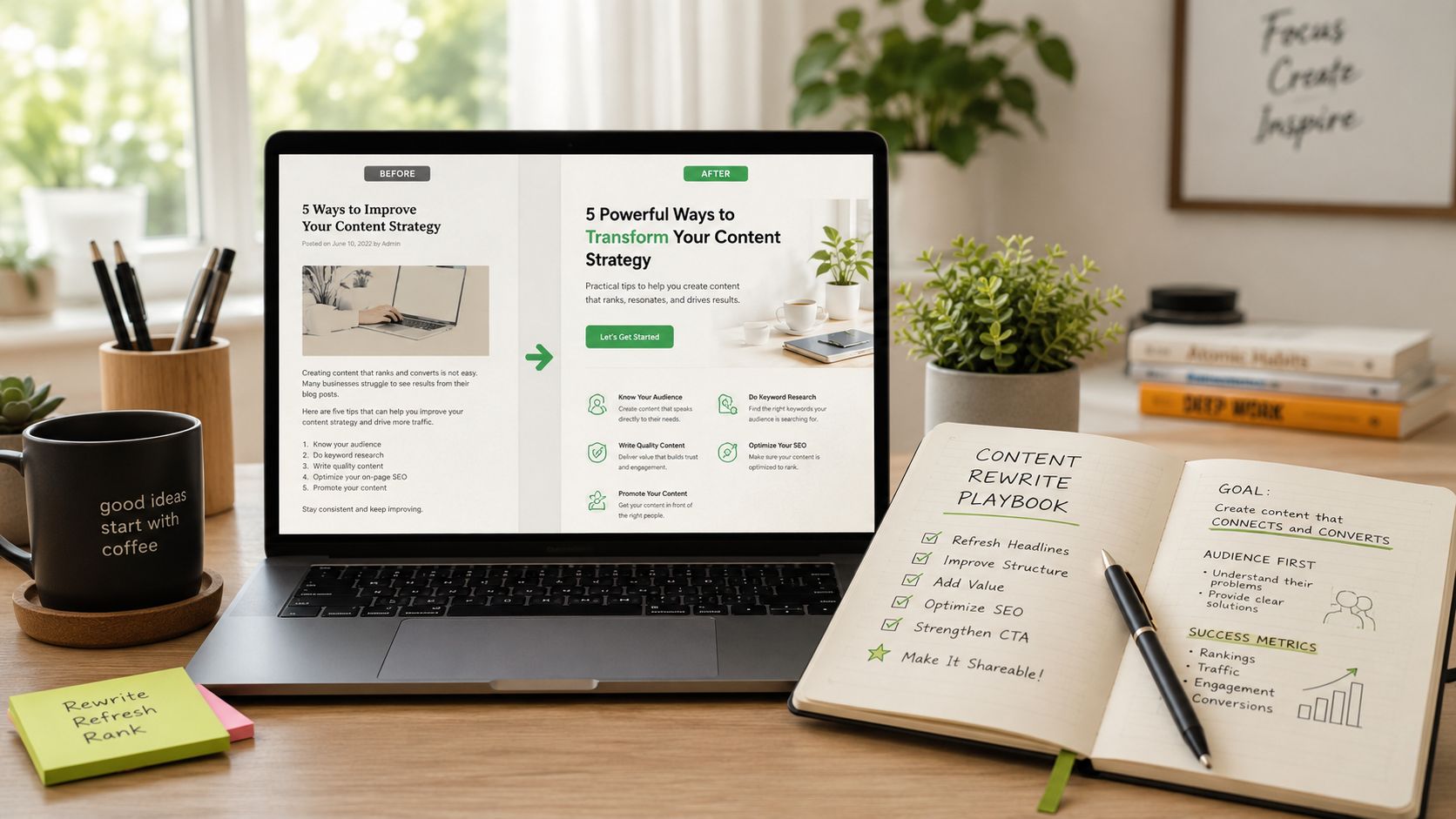
Structure affects both readers and search visibility. Guidance on updating old posts recommends replacing stale formatting with stronger H2s and H3s, bullet lists, updated metadata, and current references. It also recommends keeping title tags near 60 characters and meta descriptions around 140 to 160 characters to stay click-worthy in search results, according to Lotus Optimisation's refresh guidance.
That doesn't mean writing to a formula. It means making the result easier to understand and easier to choose.
A simple before-and-after example:
Good refreshes feel sharper because they are. They answer faster, cover more of the topic, and make the click more appealing before the user even lands on the page.
On-Page SEO and Technical Tune-Ups
A strong rewrite still needs support from the page itself. This is the under-the-hood work that helps search engines interpret the update correctly and helps users move through the site once they land.
Tighten internal linking and topical signals
Every refreshed post should gain and give internal links.
Start by linking from related pages into the updated URL using natural anchor text. Then scan the refreshed article for chances to point readers toward service pages, supporting guides, category pages, or case-study content. This helps distribute authority and makes the page more useful for people who want the next step.
On-page optimization also needs balance. Practitioner guidance suggests targeting 1,500 to 2,000 words to better match competitive SERP depth and keeping the main keyword in at least one-third of H2 headings, but no more than 60%, based on Faith Hanan's guidance on blog updates for old content. That's a useful guardrail because it encourages coverage without turning headings into repetitive SEO labels.
Handle the technical basics that often get skipped
A content update should trigger a quick technical checklist:
Images. Compress oversized files, update alt text, and replace visuals that make the post feel old.
Mobile layout. Check spacing, font sizing, and embedded elements on a phone, not just desktop.
Schema. Add FAQ or HowTo schema where it fits the page.
Broken links. Fix both internal and external destinations before republishing.
Speed belongs in this conversation too. Even a well-written page can lose people if it loads poorly. Adwave's resource on why website speed matters and how to improve it is a practical reference if your refreshed posts still feel sluggish after the rewrite.
Watch for this: Teams often update copy and ignore page experience. Searchers notice the lag, the awkward mobile formatting, and the bloated images even if the writing is better.
Keep the URL stable unless there's a real reason to change it
In most refreshes, the slug should stay the same.
Changing the URL creates extra work and adds risk. If the existing page has any authority, backlinks, or historical relevance, preserve that asset unless the slug is inaccurate or harmful. When teams casually rewrite URLs during refreshes, they often create redirect chains, orphan internal links, and reporting confusion.
The best technical tune-up is rarely flashy. It's clean execution. Better linking, cleaner markup, faster images, stronger headings, and a page that feels current from both a reader and crawler perspective.
Republishing and Relaunching Your Content
A strong refresh can still underperform if no one sees it.
I see this happen often. A team improves the post, hits publish, and assumes rankings will catch up on their own. Sometimes they do. More often, the page sits in limbo because the update was treated like cleanup instead of distribution. Republishing is the step that turns editorial work into traffic, leads, and pipeline.
Match the relaunch to the size of the update
Not every refresh deserves the same rollout.
If you rewrote the article, improved search intent coverage, added new examples, and tightened the conversion path, publish it like a current asset. In many cases, that means showing a recent date or adding a clear "last updated" note. Readers use those signals to judge relevance, especially on topics where tactics, tools, or SERP features change quickly.
If the changes were minor, a quiet update is usually the better call. Changing the visible date for a light edit can create expectation you did not earn. The trade-off is simple. Big update, bigger relaunch. Small fix, lighter touch.
Then give the page fresh distribution. Add it to the newsletter. Share it on social. Place new internal links from recent posts, comparison pages, and resource hubs that now have authority the original article never had.
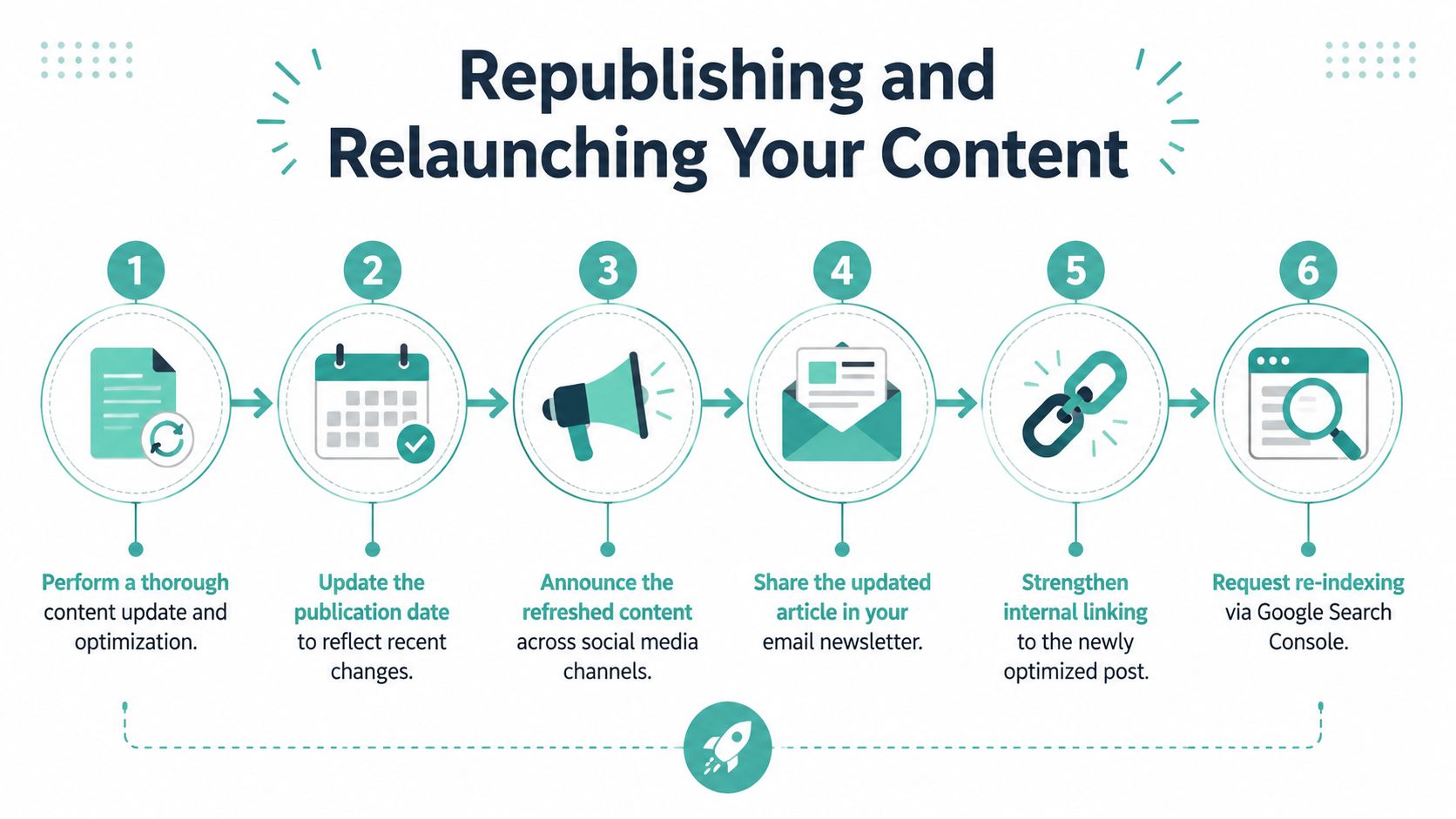
Request indexing as part of the publishing workflow
Once the revised page is live, submit the URL in Google Search Console.
That shortens the gap between the work you finished and the crawler seeing it. It also gives your team a clean timestamp for later analysis. If you want to connect refresh work to revenue, treat indexing requests and relaunch dates as part of the reporting process, not admin work. This is the same discipline used in teams that care about measuring marketing ROI across channels.
Run the relaunch like a focused campaign
The highest-ROI refreshes get channel support. That does not mean a bloated launch plan. It means using the few channels that can move the page quickly and reinforce business goals.
A practical sequence looks like this:
Publish the updated page with the right date treatment for the scale of the revision.
Request indexing in Search Console.
Feature it in owned channels such as email, social, and community posts.
Add internal links from pages that attract the audience you want next.
Give sales and customer teams a reason to use it if the content answers objections or supports buying decisions.
That last point gets missed. Some refreshed posts are top-of-funnel traffic assets. Others can shorten sales cycles, support onboarding, or improve product adoption. If a post has that kind of value, relaunching it only through marketing channels leaves return on the table.
A refreshed article can also feed multiple formats. Pull out one chart for social. Turn the key argument into a newsletter section. Hand the strongest FAQ-style answers to sales reps. The update should support the funnel, not just the blog archive.
Relaunches produce better results when the page is treated like a current growth asset with search, email, internal linking, and sales distribution working together.
Measuring the Impact of Your Content Refresh
A common scenario looks like this. The team updates ten old posts, two climb, three stay flat, and five barely move. Without page-level measurement, those results get lumped together and the next budget conversation turns into opinion instead of evidence.
The point of measurement is not to prove that content refreshes can work. That case was made earlier. The job here is to identify which updates create enough business value to repeat, scale, or stop.
Measure the page as an asset, not just a traffic source
Track each refreshed URL on its own in Google Search Console and Google Analytics. Sitewide organic growth is too blunt for this job because brand demand, seasonality, and unrelated page gains can hide whether the update itself performed.
Start with four signals:
Average position for the page's primary query cluster
Organic clicks and impressions to the updated URL
Click-through rate if the page had weak search snippets before the refresh
Conversions or assisted conversions from visitors who land on that page
Add one more layer many teams skip. Group refreshed pages by purpose, such as traffic growth, lead generation, sales enablement, or retention. That makes it easier to compare similar assets and see where refresh work produces the best return.
A simple date annotation matters too. Mark when the page was updated, when indexing was requested, and when any major internal links were added. Those details make before-and-after comparisons much cleaner.
Judge outcomes by pattern, then by ROI
Early movement can be noisy. A stronger headline may lift CTR within days. Ranking gains often take longer, especially in crowded search results or on sites that need more internal authority before Google recalculates the page's role.
The useful question is not “Did traffic go up?” It is “What changed, and what does that change suggest we should do next?”
If impressions rise first, the refresh likely expanded query coverage. If rankings improve but clicks do not, the title tag and meta description probably still need work. If clicks increase but conversions stay weak, the page may be attracting visitors with the wrong intent or handing them off poorly to the next step.
Refresh programs either become disciplined or stay reactive. The teams that get the best ROI build a simple review loop. They look at results 30, 60, and 90 days after publication, then decide whether to optimize again, promote harder, or leave the page alone.
Tie wins back to business value
A refreshed post that brings in more visits is useful. A refreshed post that increases demo requests, supports sales conversations, or reduces paid acquisition costs deserves more attention.
That is why I prefer a tiered scorecard over a single SEO dashboard. Track search visibility and on-page engagement, then connect those numbers to outcomes your leadership team already cares about. If you need a practical model for that handoff, use this guide on measuring marketing ROI across channels.
Over time, this measurement discipline improves prioritization. You learn which topics respond well to updates, which formats produce pipeline support, and which pages are not worth another round of effort. That turns content refreshing from maintenance work into a repeatable growth program.
Amplify Your Best Content With an awareness and conversion Strategy
A refreshed post that ranks well is more than an SEO win. It's a business asset.
Once a page reliably attracts the right searchers, you can use it as a destination for broader demand generation. That's the move many teams miss. They improve rankings, then stop at the traffic increase. The better play is to use that high-performing content as the middle of a larger funnel.
If your brand creates more top-of-funnel awareness, more people search for your name, your services, and the questions you answer well. When that happens, your refreshed content has a better chance to capture and convert that demand because it's already aligned to real search intent.

That combination is especially useful for local businesses and lean marketing teams. The SEO work captures active demand. Adwave helps create more of it.
If you want to pair stronger search visibility with broader local brand awareness, Adwave is a smart next step. It helps small businesses create and launch AI-powered TV ads quickly, giving your refreshed content more branded demand to capture and convert.