You're probably dealing with the same frustrating gap most online sellers hit early on. The product looks great in your hands, but once it's on your store, it suddenly looks flat, dark, or cheap. Shoppers can't touch it, compare materials, or feel weight and finish, so your photos have to do all of that work.
Strong product photography doesn't require a rented studio or a shelf full of expensive gear. For most sellers, the smartest move is to build a repeatable DIY setup, learn how to control light, and create images that look clean across every listing, social post, and ad.
Why Great Product Photos Are Your Best Sales Tool
Poor product photos create doubt fast. Buyers notice shadows, mixed colors, crooked angles, and cluttered backgrounds before they read your description. If the images feel inconsistent, the brand feels inconsistent too.
That matters even more for small stores. A large retailer can lean on brand recognition. An independent seller usually can't. Your images are often the first proof that your business is serious, careful, and worth trusting.
The cost problem is real
Hiring a pro can absolutely make sense, especially for flagship products or campaign creative. But the price adds up quickly. One industry guide says basic product shots typically run $25 to $100 per image, while styled shots rise to $100 to $300+ per image. For larger shoots, day rates can range from $500 to $3,000+ according to this product photography pricing guide.
For a seller with a growing catalog, that's the real decision point. If you have a few hero SKUs, outsourcing may be worth it. If you need clean, reliable photos across many products, DIY is often the only practical way to stay in control of cost and speed.
Practical rule: Spend money where the image has to sell the brand. Save money where the image only has to document the product clearly.
Good photos do more than fill a listing
A strong image set helps buyers answer silent questions:
What does it really look like
What's the texture or finish
How big or detailed is it
Will it look as expected when it arrives
That's why product photography on a budget isn't about cutting corners. It's about building a system that lets you publish dependable visuals every time. Consistency beats occasional brilliance.
If you're still shaping the rest of your store and promotion plan, Adwave's guide on how to market my online business is a useful companion because photos only pay off when they're part of a broader sales process.
What works
What works is simple. Clean backgrounds. Stable camera position. Soft light. Repeated angles. Light editing. The sellers who get this right don't always have the fanciest gear. They just remove variation.
What doesn't work is chasing a cinematic look for every SKU, mixing five different backgrounds across a collection, or trying to fix a bad photo with heavy editing later. Start simple, keep it repeatable, and your store will look better almost immediately.
Building Your DIY Photography Studio for Under $100
The easiest mistake is overbuying. You don't need a DSLR, a full lighting kit, or a permanent studio corner to start taking usable product photos. A budget guide from 2024 confirms that a smartphone with at least a 12-megapixel camera, a tripod, and free editing tools are often sufficient, and that a seller can create a workable setup for under $200 with the right choices, as noted in this ecommerce budget photography guide.
For many sellers, the actual cost is even lower because you already own the most expensive piece: the phone.
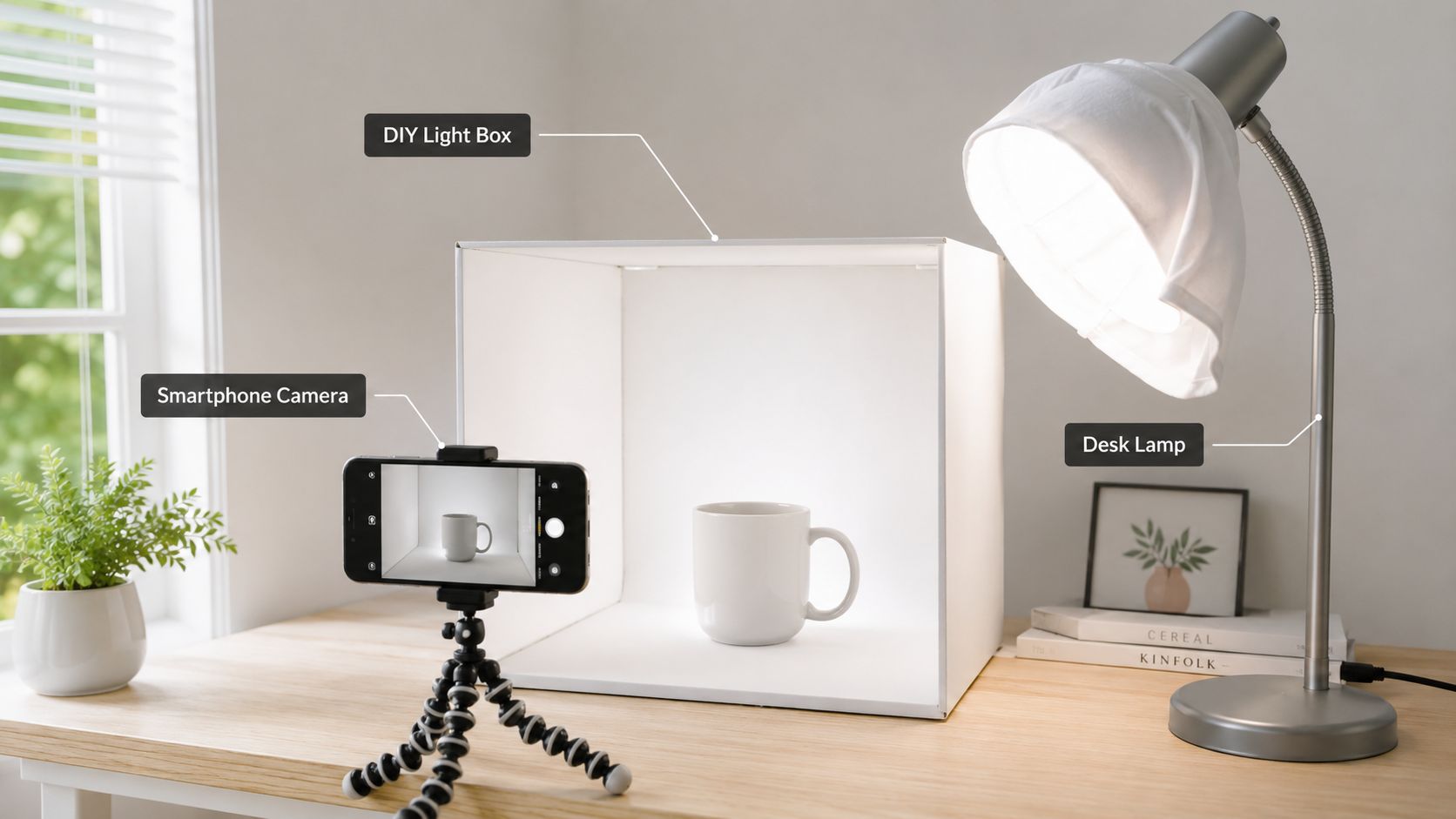
The core setup
A functional starter studio only needs a few parts:
Smartphone camera. If your current phone shoots clean, sharp images, use it.
Tripod. This is more important than commonly believed because it removes shake and keeps framing consistent.
White background. Poster board, craft paper, or a roll of continuous paper works.
Window light or simple continuous lights. A bright window is often enough.
Free editing app. GIMP or BeFunky can handle basic corrections.
If your current phone is outdated, buying used can be smarter than buying new. A practical place to compare best refurbished iPhones can help you find a capable camera phone without overspending.
Budget DIY Studio Shopping List
The point isn't the exact receipt total. The point is that a credible setup can come from common tools, household materials, and one smart purchase instead of a full gear haul.
What to spend on first
If you have almost no budget, buy in this order:
Tripod first This improves sharpness and consistency immediately.
Background second A clean white sweep removes a lot of amateur-looking clutter.
Reflector materials next Foam board is one of the cheapest upgrades with one of the biggest visual effects.
Lights only if your space lacks good daylight Don't buy lights just because tutorials say you should.
A stable phone and controlled light beat expensive gear used inconsistently.
If you're setting up a lean storefront at the same time, Adwave's article on building a business website on a $500 budget fits the same mindset. Keep the stack practical, not aspirational.
Mastering Light and Backgrounds on a Budget
Use consistent, even lighting for product photos. Harsh or changing light can make the same item look different from shot to shot.
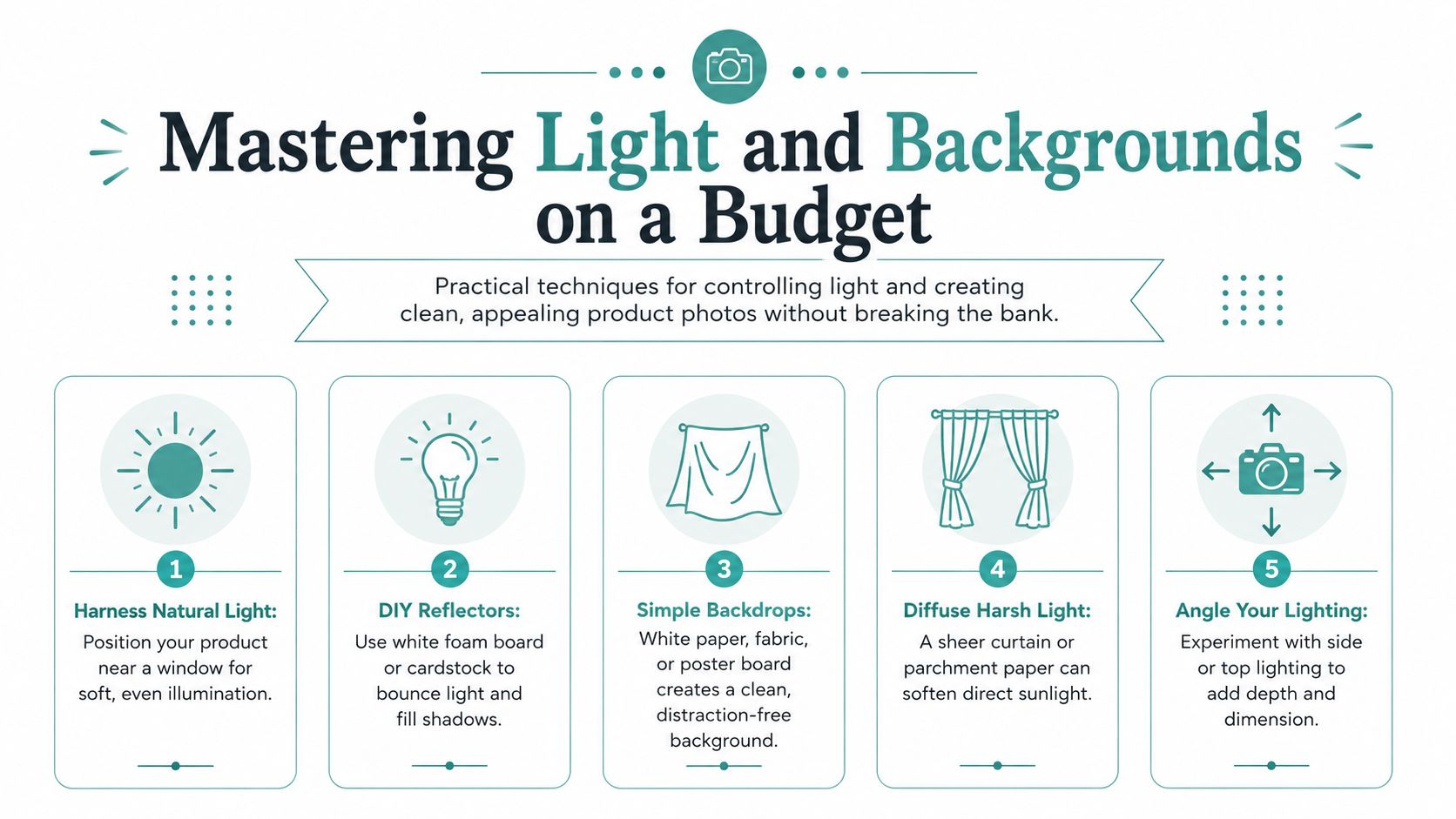
Natural light is usually the best place to start. Set your product near a window with indirect daylight, not in a beam of direct sun. That gives you a softer look, cleaner colors, and fewer ugly reflections.
Control the shadows
A cheap reflector does a lot of work. Place white foam board opposite the window to bounce light back into the dark side of the product. That simple move keeps shadows from looking muddy while still preserving shape.
If the light is too hard, diffuse it. A sheer curtain can soften direct daylight enough to make glass, metal, and glossy packaging easier to shoot.
Soft light sells surfaces better than hard light. Buyers want to see finish and detail, not dramatic contrast.
Keep backgrounds quiet
White works because it removes distraction. It's still the safest default for marketplaces, collection pages, and comparison shopping. But white isn't the only option.
Use simple textured surfaces or subtle lifestyle backgrounds when they support the product story. Linen can work for skincare. Wood can work for kitchen items. Stone can work for candles or home decor. The background should support the item, not compete with it.
A few useful rules help:
Match the surface to the category. Rustic wood won't help a sleek tech accessory.
Watch edges and corners. Background clutter often sneaks into the frame.
Stay consistent within a product line. Mixed styles make the store feel disjointed.
Think beyond the product page
This is where many sellers miss an opportunity. The same clean lighting discipline that helps a listing also makes your social content easier to design later. If you post product promos, launch graphics, or simple offer creatives, consistency in your raw photos saves time everywhere else.
For that reason, it's worth pairing your photography process with lightweight creative tools. Adwave's resource on creating social media graphics without a designer using free tools is useful when you want your photos to carry over cleanly into promos and posts.
A Simple Workflow for Consistent Product Shots
Random shooting creates random results. The stores that look polished usually follow the same shot order, the same camera position rules, and the same editing choices every time. That's how you make fifty products feel like they belong in one brand.
A major budget photography guide recommends technical settings such as aperture around f/11 to f/16, ISO 100, and shooting in RAW when possible for stronger post-processing flexibility, according to BigCommerce's budget product photography guide. On a phone, you won't always control those exact settings, but you can copy the principle. Aim for maximum sharpness, low noise, and the most editable file your device allows.
Use the same shot list every time
A simple listing needs structure. I'd use this order for almost any physical product:
Hero shot Straight-on, centered, clean background. This is the image that has to work in search results and category pages.
Angled view A slight turn adds depth and helps buyers understand shape.
Side or profile shot Useful for bags, bottles, shoes, packaged goods, and anything with thickness.
Back view or secondary face Important if there's design, ingredients, care instructions, or closure detail.
Close-up detail Show texture, stitching, finish, buttons, labels, grain, or material quality.
That workflow keeps you from forgetting key coverage. It also makes batch shooting much faster.
Translate camera settings into phone actions
You don't need to think like a studio photographer to improve your images. On a smartphone, the practical equivalents are simple:
Lock focus on the product so the phone doesn't hunt between shots.
Lower exposure slightly if whites are blowing out.
Don't use digital zoom. Move the camera physically instead.
Keep the phone on a tripod for every frame in a set.
Use the timer or remote trigger to avoid movement when tapping the screen.
Use one distance, one height, and one light setup for the full batch. That's what makes a catalog look intentional.
Build a repeatable batch routine
Try this for every product session:
Prep first. Clean dust, fingerprints, stickers, and packaging creases before the shoot.
Shoot all hero images together while the setup stays fixed.
Then capture angle variations for each item.
Review on a larger screen before packing everything away.
Rename and sort files immediately so you don't lose track later.
If you launch products regularly, tying your shoot days to a content schedule helps keep assets organized. Adwave's content calendar template to plan three months in 30 minutes is handy for lining up photo sessions with product drops and promotions.
Editing and Optimizing Photos for Sales and Ads
Editing should make the product look accurate, not “edited.” Most ecommerce photos only need a few corrections: exposure, white balance, contrast, crop, and minor cleanup. If you rely on heavy filters, strong saturation, or dramatic shadows, the listing usually starts to feel less trustworthy.
The best free workflows are boring on purpose. Open the image, straighten it, match the product color to real life, clean the background, and export a consistent file. That's enough for most stores.
Edit for accuracy first
Good editing usually follows this order:
White balance so whites look white and product colors look believable
Brightness and contrast to restore separation and shape
Crop and alignment so the product sits consistently across your catalog
Spot cleanup for dust, tiny scratches, and background marks
If your images will appear in sliders or storefront modules, sizing matters too. A practical reference for product slider image sizes can help you avoid awkward crops and soft-looking visuals on site.

Consistency matters even more in ads
This is the part most budget photography advice skips. Clean listing photos are useful, but consistent listing photos are what make your visual assets reusable for promotion.
Recent data shows that 68% of AI-generated TV ads underperform due to inconsistent product imagery, which highlights a real operational gap for sellers preparing assets for platforms like Adwave. If one product image is warm, another is cool, one is shot from above, another from eye level, and a third uses a completely different background, automated ad generation has less consistent material to work with.
That doesn't mean your photos need to look robotic. It means they should follow a system.
When you shoot with ads in mind, you stop thinking in single images and start building an asset library.
Shoot once, use everywhere
A budget-friendly photo set becomes much more valuable when it can serve multiple jobs:
That's one of the strongest reasons to take product photography on a budget seriously. You're not just creating pictures for a listing. You're creating reusable visual inputs for merchandising, social content, and advertising.
Quick Fixes for Common Photography Problems
Every seller hits the same few issues at first. Most of them have simple fixes, and none of them require expensive gear.
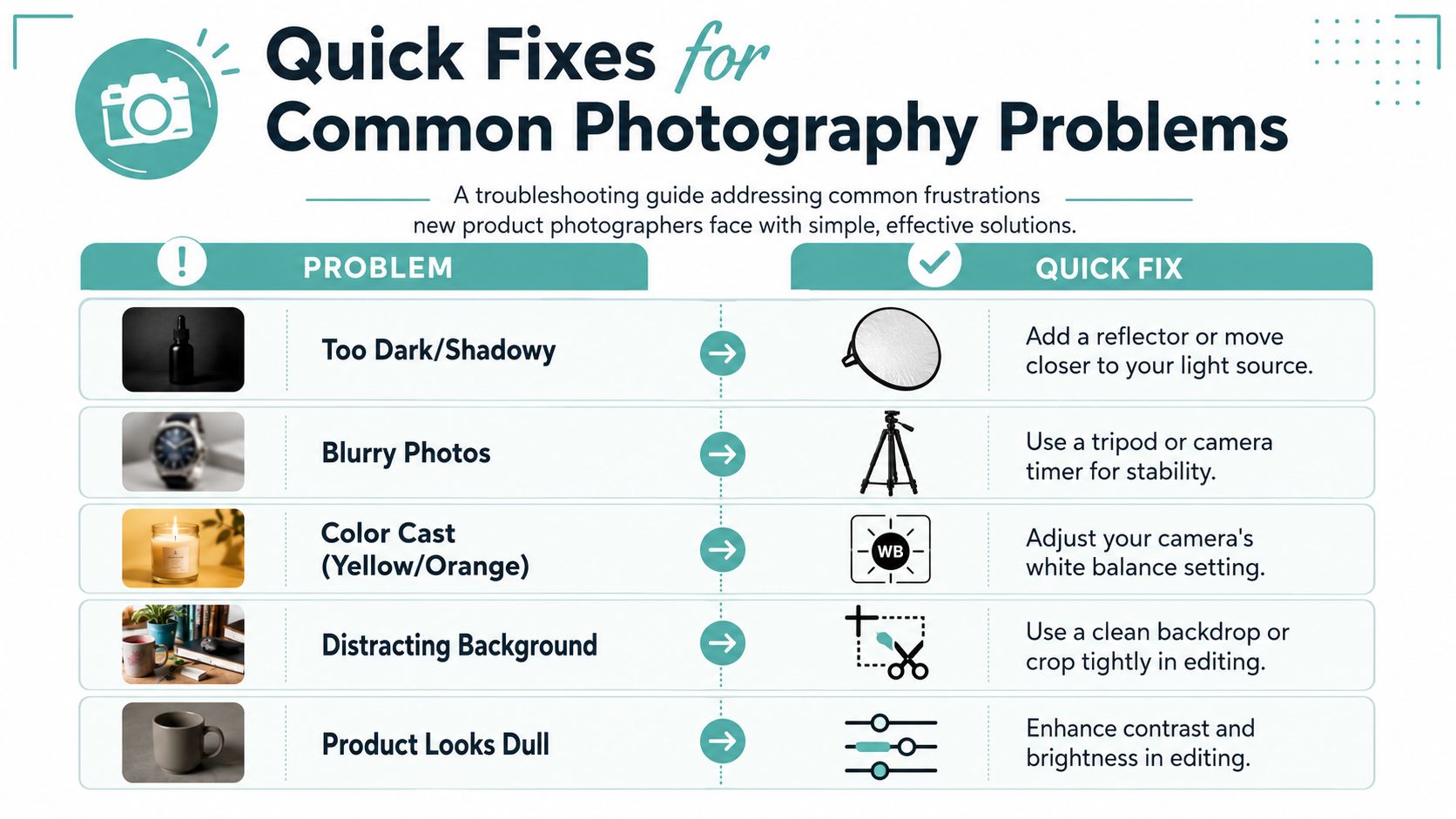
Fast troubleshooting list
Photos look blurry Put the phone on a tripod, tap to focus on the product, and use the timer so you're not shaking the camera when pressing the shutter.
Background looks gray instead of white Move the product closer to the light, brighten exposure slightly, and separate the item from the backdrop so shadows don't dirty the background.
Colors look yellow or orange Adjust white balance and avoid mixing daylight with warm indoor bulbs in the same shot.
Shadows are too harsh Add foam board on the opposite side of the light or diffuse the window with a sheer curtain.
Reflections ruin the shot Change the angle before changing the product. A small turn in the item or camera position often fixes shiny surfaces.
Small improvements stack up
Most product photography problems come from one of three things: unstable camera position, uncontrolled light, or inconsistent setup choices. Fix those first. Don't jump straight to editing.
A simple, repeatable setup will outperform a complicated one you can't recreate next week. That's the key to effective product photography on a budget for online sellers.
If you want those consistent product photos to do more than improve your listings, Adwave is a smart next step. It helps small businesses turn strong visual assets into polished TV ads without the usual production burden, which makes it a practical fit for ecommerce sellers who are already building a clean, repeatable photo system.